
Hey,
For quite a while now i've been using a pair of USB Speakers.
I had it set so my games came out my speakers and my Team speak Voice chat came through my headset.
I recently decided to swap back to my Creative speakers, but now i have an issue.
When i plug my speakers and headphones in the Realtek HD Audio Manager is only detecting one device. (Muting my speakers when my headphones are plugged in) I've managed to get them both working at the same time but due to the fact it's only detecting one of them i can't organize / change which programs use which.
I remember at one point in the past when using these that i selected ''Mute rear speakers when front pannel is in use'' but now i can't seem to find this option?
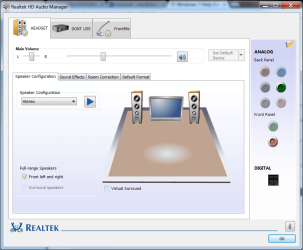
I've looked at a few forums that say ''Go into Device advanced settings'' and even seen a screen shot of someone pointing out that it's at the top right on the Realtek HD Audio Manager, but on mine that option is not there and nor can i find it!
Any and all help would be lovely! Thanks <3
Attached is a screen shot of what my Realtek HD Audio Manager looks like with BOTH Headphones and Speakers connected.
For quite a while now i've been using a pair of USB Speakers.
I had it set so my games came out my speakers and my Team speak Voice chat came through my headset.
I recently decided to swap back to my Creative speakers, but now i have an issue.
When i plug my speakers and headphones in the Realtek HD Audio Manager is only detecting one device. (Muting my speakers when my headphones are plugged in) I've managed to get them both working at the same time but due to the fact it's only detecting one of them i can't organize / change which programs use which.
I remember at one point in the past when using these that i selected ''Mute rear speakers when front pannel is in use'' but now i can't seem to find this option?
I've looked at a few forums that say ''Go into Device advanced settings'' and even seen a screen shot of someone pointing out that it's at the top right on the Realtek HD Audio Manager, but on mine that option is not there and nor can i find it!
Any and all help would be lovely! Thanks <3
Attached is a screen shot of what my Realtek HD Audio Manager looks like with BOTH Headphones and Speakers connected.
Attachments
My Computer
At a glance
Windows 7 64 bit
- Computer type
- PC/Desktop
- OS
- Windows 7 64 bit

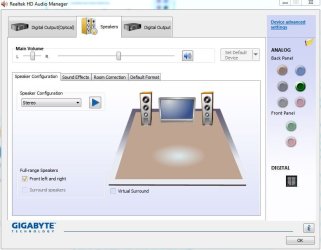
 and i have seen the advanced settings before, as i set it to mute the speakers when the headset was plugged in