RealTek hd audio manager subwoofer problem

Jelled Fro

New member
Local time
12:17 AM
Messages
5
Hi!
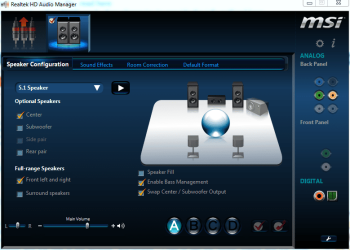
I'm new to the forum. I recently reinstalled my computer to start using my new ssd. Everything is working quite well except I can't get any programs to play audio through my subwoofer. It worked before the reinstall so I know its compatible. I use realtek hd audio manager and have two front speakers and a sub connected in the 5.1 configuration and the rest of the devices "unchecked". I had to use the center-output and the swap center-sub option to get any sound from the sub in the "auto test". There is a tone from the sub and from the front speakers, but there is no sub when I try to play music for example. And if i check the subwoofer in addition to the center the front speaker-sound becomes a little darker, so I don't know if the manager is confused about the outputs or if there is something else going on. I have a MSI Z77A-G45 and downloaded the latest audiodriver when I reinstalled.
 

My Computer

Computer type
PC/Desktop
Computer Manufacturer/Model Number
custom
OS
Windows 7 Home Premium x64
CPU
Intel Core i5 3570k 3
Motherboard
MSI Z77A-G45
Memory
corsair 8GB
Graphics Card(s)
MSI GeForce GTX 660Ti
Hard Drives
1 TB Seagate Barracuda
Kingston 120GB ssd
Antivirus
AVG
Browser
Chrome
Two speakers and a bass speaker (sub) is a 2.1 configuration. With a 2.1 configuration, one connection is made to the GREEN speaker jack on the PC and everything is distributed in the 2.1 speaker system bass speaker which has the amplifier.

Any other configuration of two speakers and bass may or may not work.
 

My Computer

Computer type
PC/Desktop
Computer Manufacturer/Model Number
My Own Build
OS
Windows 10 64 bit
CPU
Intel i7 6700K
Motherboard
ASUS ROG Maximus VIII Hero
Memory
16GB Corsair Dominator
Graphics Card(s)
Intel CPU Graphics
Sound Card
RealTek
Monitor(s) Displays
27" Dell S2719dgf
Screen Resolution
2560X1440
Hard Drives
1 TB Samsung 850 EVO SSD for Win 10 Pro
500GB Samsung 850 EVO SSD for Win 10 Insider
2 TB drive for backup
PSU
EVGA Supernova 750G2
Case
BeQuiet Silent Base 600
Cooling
Deepcool Captain 120EX
Keyboard
Microsoft Wireless 2000
Mouse
Microsoft wireless
Internet Speed
100 MB/sec (Cable)
Antivirus
Microsoft Defender and Malwarebytes
Browser
Edge/Firefox
Other Info
Cakewalk (Sonar) by BandLab and Studio One 4.1 Pro recording studio software. MOTU 896Mk3 Hybrid recording interface, Frontier Tranzport wireless control unit, Behringer X-Touch Control Surface.
Five USB connected optical drives for CD Audio production using Nero BurningROM
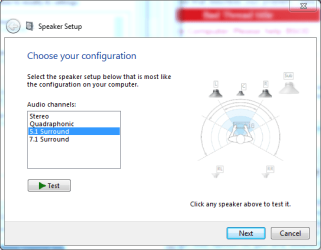
There isn't a 2.1 option in the audio manager that I can see. Only sterio, quadraphonic, 5.1 and 7.1. Before the reinstall I belive I set the 5.1 option and then "unchecked" the speakers I didn't have. I'll attach the screenshots that I forgot in the last post to make the layout clearer.
 

Attachments

  • Capture.PNG
    Capture.PNG
    49.9 KB · Views: 2
  • Capture2.PNG
    Capture2.PNG
    20.3 KB · Views: 27

My Computer

Computer type
PC/Desktop
Computer Manufacturer/Model Number
custom
OS
Windows 7 Home Premium x64
CPU
Intel Core i5 3570k 3
Motherboard
MSI Z77A-G45
Memory
corsair 8GB
Graphics Card(s)
MSI GeForce GTX 660Ti
Hard Drives
1 TB Seagate Barracuda
Kingston 120GB ssd
Antivirus
AVG
Browser
Chrome
Stereo is what is used for a 2.1 system.
 

My Computer

Computer type
PC/Desktop
Computer Manufacturer/Model Number
My Own Build
OS
Windows 10 64 bit
CPU
Intel i7 6700K
Motherboard
ASUS ROG Maximus VIII Hero
Memory
16GB Corsair Dominator
Graphics Card(s)
Intel CPU Graphics
Sound Card
RealTek
Monitor(s) Displays
27" Dell S2719dgf
Screen Resolution
2560X1440
Hard Drives
1 TB Samsung 850 EVO SSD for Win 10 Pro
500GB Samsung 850 EVO SSD for Win 10 Insider
2 TB drive for backup
PSU
EVGA Supernova 750G2
Case
BeQuiet Silent Base 600
Cooling
Deepcool Captain 120EX
Keyboard
Microsoft Wireless 2000
Mouse
Microsoft wireless
Internet Speed
100 MB/sec (Cable)
Antivirus
Microsoft Defender and Malwarebytes
Browser
Edge/Firefox
Other Info
Cakewalk (Sonar) by BandLab and Studio One 4.1 Pro recording studio software. MOTU 896Mk3 Hybrid recording interface, Frontier Tranzport wireless control unit, Behringer X-Touch Control Surface.
Five USB connected optical drives for CD Audio production using Nero BurningROM
But then the sub doesn't show up at all. Nor does it play any sound.
 

Attachments

  • Capture3.PNG
    Capture3.PNG
    40.3 KB · Views: 1

My Computer

Computer type
PC/Desktop
Computer Manufacturer/Model Number
custom
OS
Windows 7 Home Premium x64
CPU
Intel Core i5 3570k 3
Motherboard
MSI Z77A-G45
Memory
corsair 8GB
Graphics Card(s)
MSI GeForce GTX 660Ti
Hard Drives
1 TB Seagate Barracuda
Kingston 120GB ssd
Antivirus
AVG
Browser
Chrome
A regular 2.1 speaker system - two speakers and a sub - are connected with one cable ONLY from the Green speaker jack to the sub speaker. The sub speaker contains the amplifiers and distribution of the sound to the bass speaker and to the two speakers.

I don't think what you want to do will work correctly.
 

My Computer

Computer type
PC/Desktop
Computer Manufacturer/Model Number
My Own Build
OS
Windows 10 64 bit
CPU
Intel i7 6700K
Motherboard
ASUS ROG Maximus VIII Hero
Memory
16GB Corsair Dominator
Graphics Card(s)
Intel CPU Graphics
Sound Card
RealTek
Monitor(s) Displays
27" Dell S2719dgf
Screen Resolution
2560X1440
Hard Drives
1 TB Samsung 850 EVO SSD for Win 10 Pro
500GB Samsung 850 EVO SSD for Win 10 Insider
2 TB drive for backup
PSU
EVGA Supernova 750G2
Case
BeQuiet Silent Base 600
Cooling
Deepcool Captain 120EX
Keyboard
Microsoft Wireless 2000
Mouse
Microsoft wireless
Internet Speed
100 MB/sec (Cable)
Antivirus
Microsoft Defender and Malwarebytes
Browser
Edge/Firefox
Other Info
Cakewalk (Sonar) by BandLab and Studio One 4.1 Pro recording studio software. MOTU 896Mk3 Hybrid recording interface, Frontier Tranzport wireless control unit, Behringer X-Touch Control Surface.
Five USB connected optical drives for CD Audio production using Nero BurningROM
I have one cabel for the two front speakers and one for the sub. It worked before, I'm trying to figure out how to make it work again.
 

My Computer

Computer type
PC/Desktop
Computer Manufacturer/Model Number
custom
OS
Windows 7 Home Premium x64
CPU
Intel Core i5 3570k 3
Motherboard
MSI Z77A-G45
Memory
corsair 8GB
Graphics Card(s)
MSI GeForce GTX 660Ti
Hard Drives
1 TB Seagate Barracuda
Kingston 120GB ssd
Antivirus
AVG
Browser
Chrome
With the initial setup I can apparently get the sub to make sounds by checking the "rear pair" box. It seems too me if I could just get the maneger to recognize the sub as a sub, it should work like before.
 

My Computer

Computer type
PC/Desktop
Computer Manufacturer/Model Number
custom
OS
Windows 7 Home Premium x64
CPU
Intel Core i5 3570k 3
Motherboard
MSI Z77A-G45
Memory
corsair 8GB
Graphics Card(s)
MSI GeForce GTX 660Ti
Hard Drives
1 TB Seagate Barracuda
Kingston 120GB ssd
Antivirus
AVG
Browser
Chrome
On a 5.1 system, there are three connections, but they are all to the bass cabinet and internally in the bass cabinet the sound is routed to the correct speaker.

You can select 5.1 then connect the two speakers to the Green jack and then try the Orange or the Black and see if that works.

Realistically consider getting a 2.1 speaker system.
 

My Computer

Computer type
PC/Desktop
Computer Manufacturer/Model Number
My Own Build
OS
Windows 10 64 bit
CPU
Intel i7 6700K
Motherboard
ASUS ROG Maximus VIII Hero
Memory
16GB Corsair Dominator
Graphics Card(s)
Intel CPU Graphics
Sound Card
RealTek
Monitor(s) Displays
27" Dell S2719dgf
Screen Resolution
2560X1440
Hard Drives
1 TB Samsung 850 EVO SSD for Win 10 Pro
500GB Samsung 850 EVO SSD for Win 10 Insider
2 TB drive for backup
PSU
EVGA Supernova 750G2
Case
BeQuiet Silent Base 600
Cooling
Deepcool Captain 120EX
Keyboard
Microsoft Wireless 2000
Mouse
Microsoft wireless
Internet Speed
100 MB/sec (Cable)
Antivirus
Microsoft Defender and Malwarebytes
Browser
Edge/Firefox
Other Info
Cakewalk (Sonar) by BandLab and Studio One 4.1 Pro recording studio software. MOTU 896Mk3 Hybrid recording interface, Frontier Tranzport wireless control unit, Behringer X-Touch Control Surface.
Five USB connected optical drives for CD Audio production using Nero BurningROM
Another Possible

Just today I loaded a multimedia app and it bricked my sound drivers (Realtek). I had to go get the latest drivers and reload it Realtek. So you might try reloading your sound drivers. Firebirds advice is sound (no pun) advice. Be really careful where you download the drivers from there is a multitude of sights that is offering adware/malware with the drivers. The name of the file is 0001-64bit_Win7_Win8.1_R275.exe. The driver date is 8/17/2012 and the ver is 6.0.1.6699.
 

My Computer

Computer Manufacturer/Model Number
BGC (Bob's Garage Crew)
OS
win 7 X64 Ultimate SP1
CPU
I3770K
Motherboard
Asus P8Z77-V Deluxe
Memory
G Skill F3-14900CL9-4GBXL x 4
Graphics Card(s)
NVIDIA GeForce GTX670 + Intel 4000
Sound Card
Realtek HD 5.1 (MOB)
Monitor(s) Displays
Asus VW224T (1)
Screen Resolution
1920 x 1080
Hard Drives
SATA Corsair Force GT 2.5" 180GB (System) Sata 3
OCZ Vertex3 120GB
OCZ Vertex 2 120GB 2.5" SATA II
ST31000524AS 1000.2GB
WD15EARS (External)
PSU
CoolerMaster 1000 Watt
Case
CoolerMaster HAF X
Cooling
CPU -- CoolerMaster 520N
Keyboard
MS Wireless 3000 V2
Mouse
MS Wireless 3000 V2
Internet Speed
Cable
Antivirus
Norton Internet Security
Browser
IE9
Other Info
AMI Bios 1805
OC'd 3%
Jelled Fro,
You have determined the driver recognizes there is a Subwoofer channel with the test tone and everything is working as it should. The reason why this is not working for stereo music is because there is no information within that music file to tell the driver to send the low frequency information to the subwoofer channel. Stereo is only Left and Right channels. 2.1 is Left, Right and Low Frequency (otherwise knows a LFE). In order to have information sent to your subwoofer from a 2 channel stereo file, something needs to extract those lower frequencies and send it to the dedicated subwoofer channel. If the driver does not provide an option for this then you will need to look at a media player that provides this feature. Both JRiver and Foobar2000 media players have DSP modes that can be configured to take a 2 channel file, extract the lower frequencies and send it to the dedicated subwoofer channel. Perhaps you could share what media player you are using for music playback.

The single green connection that firebird is describing is not a true 2.1 configuration. It is a Stereo configuration where the full left and right frequency band is sent to the device via a single connection with crossovers built into the amplifiers that will separate the mids and highs from the low frequencies. Essentially it is 3 limited range speakers acting as 2 full range speakers (in simple terms). A true 2.1 relies on that .1 low frequency channel to be mixed separately from the left and right channels during mastering. TBH, there is not a lot of recorded material out there that caters to a true 2.1 configuration (5.1 and 7.1 is a different story). People rely on the DSP’s within their receivers to separate that .1 LFE channel from the left and right channels.
 

My Computer

Computer type
PC/Desktop
Computer Manufacturer/Model Number
Misfits Machine!
OS
Windows 7 Professional
CPU
Intel i7 4790K
Motherboard
ASUS Maximus VII Hero
Memory
32 GB G.SKILL TridentX F3-2400C10D-GTX
Graphics Card(s)
EVGA GeForce GTX 980 Superclocked X2 SLI
Sound Card
Teac UD-501 External USB DAC/Bryston BHA-1 Headphone Amp
Monitor(s) Displays
BenQ BL3200PT
Screen Resolution
2560x1440
Hard Drives
Samsung 850 Pro Series 256GB SSD
Western Digital Red 3TB
PSU
Corsair RM Series Gold 1000W
Case
Corsair Carbide Series Air 540
Cooling
Corsair Hydro Series H110
Keyboard
Corsair Vengeance K70 - Cherry MX Red/Razer Orbweaver Elite
Mouse
Razer DeathAdder Chroma
5.1 will only work with special media which sends a signal to the sub. What you want to do:

1. Open Realtek HD Audio Manager (if not already done)
2. Set it to Stereo (don't worry about the sub not showing up)
3. Right-click on the output in ANALAGO- Back Panel section > Connector Retasking... > Select "Front Spearkers Out" > OK

That's it. Listen to music and feel the bass. (True the whole signal will go to the sub and your sub should have a low-pass crossover or filter for only accepting and playing low frequency sounds IE BASS)
 

My Computer

Computer type
PC/Desktop
OS
ALL
Back
Top