Realtek HD Audio Manager Taskbar Icon Missing

werty12345

New member
Member
Local time
11:46 AM
Messages
46
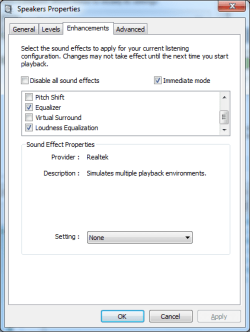
Everything was fine until I uninstalled Realtek audio driver and installed an updated version from the official website. After installation, the icon does not show in the taskbar and since I am unable to launch the program. I must admit that I installed a couple of other audio programs (FXsound, Equalizer APO, Room EQ Wizard) and then later uninstalled all of them. This must have made some changes to my system. I have tried to uninstall and re-install the Realtek drivers about 3 times to no success. However, I am able to hear the audio properly (as though Realtek was installed and working). Moreover, I also see the equalizer, bass boost, Normalize Volume, etc options in Windows Sound Properties (see screenshot). These same options used to be in Realtek.

I am running Windows 7 (32 bit). Please help.
 

Attachments
  • Audio.png
    Audio.png
    46.5 KB · Views: 32

My Computer

OS
Windows 7 Ultimate (32bit)
Hi werty12345,

Just a thought!

Have you tried uninstalling/deleting the entries/drivers out of Device Manager and then re-booting?
The drivers should then automatically get reinstalled from the system files.

I hope this helps!
 
Last edited:

My Computer

Computer type
Laptop
Computer Manufacturer/Model Number
Fujitsu LIFEBOOK
OS
Win 7 HP SP1 64-bit Vista HB SP2 32-bit Linux Mint 18.3
CPU
Intel(R) Pentium(R) CPU P6200 @ 2.13GHz
Motherboard
FUJITSU FJNBB06
Memory
4.00 GB
Graphics Card(s)
Intel(R) Graphics Media Accelerator HD
Sound Card
[1] Realtek High Definition Audio [2] Intel(R) Display Audio
Screen Resolution
1366 x 768 x 32 bits (4294967296 colors) @ 59 Hz
Hard Drives
TOSHIBA MK5076GSX
Antivirus
AVG FREE
Hi werty12345,

Just a thought!

Have you tried deleting the entries/drivers out of Device Manager and then re-booting?
The drivers should then automatically get reinstalled from the system files.

I hope this helps!

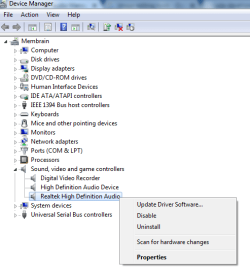
Hi, thank you for the quick response. I went to Device Manager and don't see any delete option. I suppose you mean uninstall. However, should I uninstall the driver under Realtek or High Definition Audio Device as seen in screenshot?
 

Attachments

  • Audio.png
    Audio.png
    48.3 KB · Views: 31

My Computer

OS
Windows 7 Ultimate (32bit)
Hi werty12345,

Should I uninstall the driver under Realtek or High Definition Audio Device?

I would uninstall both.
If the don't automatically get re-installed then go to the Realtek website and try re-installing the drivers again from there!

I must admit that I installed a couple of other audio programs (FXsound, Equalizer APO, Room EQ Wizard) and then later uninstalled all of them.

What did you use to uninstall them, because there might be leftover bits that are causing conflicts and problems!
It might be worth downloading Revo Uninstaller [FREE] and using that. When it gets to the Scan for leftover items make sure that you check the Advanced option.

I hope this helps!
 

My Computer

Computer type
Laptop
Computer Manufacturer/Model Number
Fujitsu LIFEBOOK
OS
Win 7 HP SP1 64-bit Vista HB SP2 32-bit Linux Mint 18.3
CPU
Intel(R) Pentium(R) CPU P6200 @ 2.13GHz
Motherboard
FUJITSU FJNBB06
Memory
4.00 GB
Graphics Card(s)
Intel(R) Graphics Media Accelerator HD
Sound Card
[1] Realtek High Definition Audio [2] Intel(R) Display Audio
Screen Resolution
1366 x 768 x 32 bits (4294967296 colors) @ 59 Hz
Hard Drives
TOSHIBA MK5076GSX
Antivirus
AVG FREE
werty12345, do NOT install the Realtek audio driver (R2.82) from the official Realtek web site! it is somewhat buggy AND the Realtek HD Audio Manager control panel does not work on some systems if the R2.82 driver was installed thru the HDXRT.INF file (for x64 Win7) or HDART.INF file (for x86 Win7). I did this on several systems using different Realtek audio chips and the Realtek HD Audio Manager program from the R2.82 package would not even run - so this was my experience.

Install the 6.0.1.8432 x86 driver from here (which is newer than the one from the Realtek web site); this one should have a working Realtek HD Audio Manager app. use 7zip to open the cab file, extract all the files inside onto a temporary folder and use Device Manager to install the Realtek audio driver.

Also, what kind of computer are you using?

Note: the Realtek HD Audio Manager app never works on Sony brand computers that have onboard Realtek HD audio chips due to a driver config problem for so many years, regardless of using old or new drivers.
 
Last edited:

My Computer

Computer type
PC/Desktop
Computer Manufacturer/Model Number
Dell Inspiron 620
OS
Windows 7 SP1 Home Premium 64bit [x64]
CPU
Intel(R) Core(TM) i5-2310 CPU @ 2.90GHz
Memory
6 GB
Graphics Card(s)
Intel HD Graphics 2000
Sound Card
Conexant CX20641 HD Audio
Hard Drives
Western Digital 1TB (1024GB) WD10EALX-759BA1
Internet Speed
Spectrum Cable Internet up to 100Mbps
Hi werty12345,
What did you use to uninstall them, because there might be leftover bits that are causing conflicts and problems!
It might be worth downloading Revo Uninstaller [FREE] and using that. When it gets to the Scan for leftover items make sure that you check the Advanced option.

I hope this helps!

Hi, sorry for the late reply. I have uninstalled these programs using the standard uninstall program that come with the software. I installed FX Sound Enhancer earlier using Revo and created a snapshot. After several months of using it, I decided to uninstall FX using Revo and since then whenever I installed the Realtek driver, it won't open. However, the audio is good (as though Realtek is properly installed and working).
 

My Computer

OS
Windows 7 Ultimate (32bit)
werty12345, do NOT install the Realtek audio driver (R2.82) from the official Realtek web site! it is somewhat buggy AND the Realtek HD Audio Manager control panel does not work on some systems if the R2.82 driver was installed thru the HDXRT.INF file (for x64 Win7) or HDART.INF file (for x86 Win7). I did this on several systems using different Realtek audio chips and the Realtek HD Audio Manager program from the R2.82 package would not even run - so this was my experience.

Install the 6.0.1.8432 x86 driver from here (which is newer than the one from the Realtek web site); this one should have a working Realtek HD Audio Manager app. use 7zip to open the cab file, extract all the files inside onto a temporary folder and use Device Manager to install the Realtek audio driver.

Also, what kind of computer are you using?

Note: the Realtek HD Audio Manager app never works on Sony brand computers that have onboard Realtek HD audio chips due to a driver config problem for so many years, regardless of using old or new drivers.

I have an assembled PC and not a branded one. I too checked on the internet and this version seems to be buggy. Will try the version that you have suggested. Thank you!
 

My Computer

OS
Windows 7 Ultimate (32bit)
no probs, werty12345.

on a friend's ASUS board, I get this version of Realtek HD Audio Manager app (with an ASUS logo on the top left hand corner)
 

Attachments

  • asus-realtek-audio-cpl(m5a78l-m-le-usb3)[2].png
    asus-realtek-audio-cpl(m5a78l-m-le-usb3)[2].png
    178.6 KB · Views: 16

My Computer

Computer type
PC/Desktop
Computer Manufacturer/Model Number
Dell Inspiron 620
OS
Windows 7 SP1 Home Premium 64bit [x64]
CPU
Intel(R) Core(TM) i5-2310 CPU @ 2.90GHz
Memory
6 GB
Graphics Card(s)
Intel HD Graphics 2000
Sound Card
Conexant CX20641 HD Audio
Hard Drives
Western Digital 1TB (1024GB) WD10EALX-759BA1
Internet Speed
Spectrum Cable Internet up to 100Mbps
Back
Top