Realtek HD Audio - Speakers "Not plugged in"

Nommiin

New member
Local time
2:20 AM
Messages
2
Hello, I'm new. So sorry if I do not post in the common format.

Recently, I had downgraded to Win 7 Ultimate from Windows 8, for various reason.
So I do my normal things, download all the drivers, and programs that I would need.

Sadly, I had lost my motherboard's drivers disc. So, having lost that, I had to download individual drivers from here. I installed drivers from the list below.

  • Realtek Function driver for Realtek Azalia audio chip (Including Microsoft UAA Driver in English edition)
  • Intel INF installation & Intel Management Engine Interface
  • Realtek Ethernet Diagnostic Utility
  • Realtek LAN Driver
  • Intel VGA Driver (for Ivy Bridge CPU)

All of the drivers above worked. Except for the audio drivers. I have pretty much no clue what I'm doing wrong, I've spent hours looking on the web for fixes, but none of them had worked. I'm running Windows 7 Ultimate. If you'd like my specs, please check my profile.

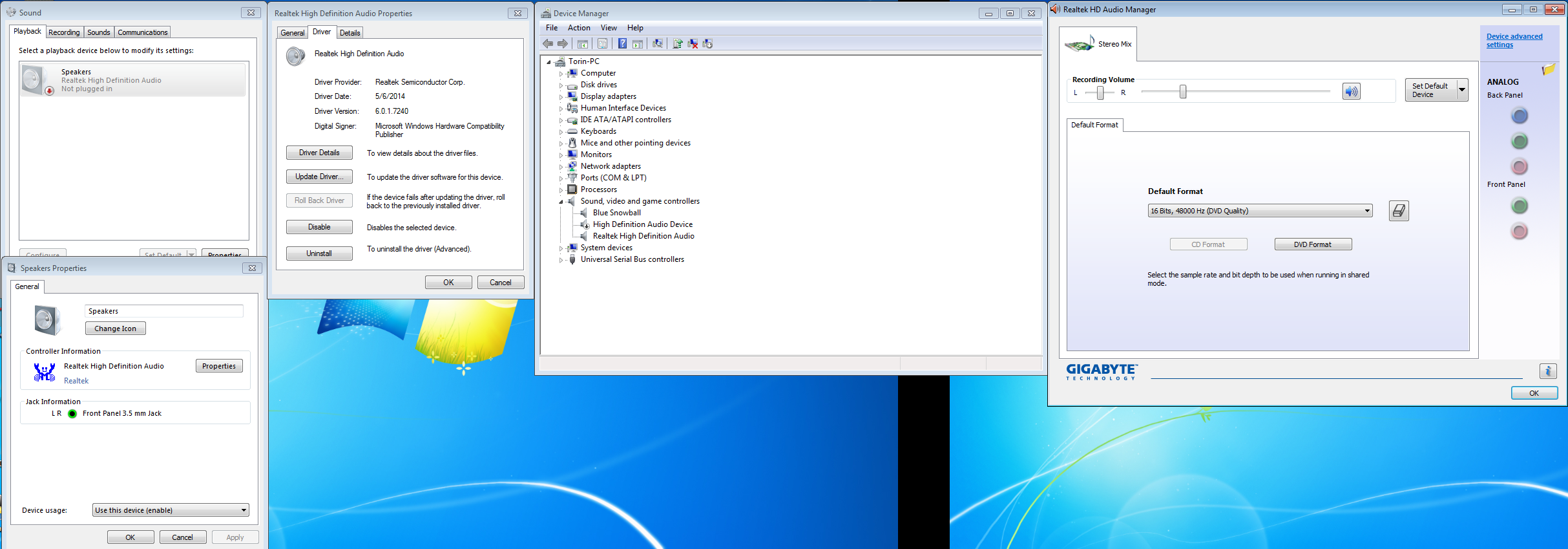
Here is a photo of the problem, with some windows open that might relate.
Sorry for the large image!
8dd8KTA.png


If anyone could help, it would be greatly apperciated!
 

My Computer My Computer

At a glance

Windows 7 Ultimate - 64 Biti3-3220 3.3GHz Dual-Core8 GB - Corsair XMS3 RamXFX Radeon HD 7770 (single)
Computer type
PC/Desktop
Computer Manufacturer/Model Number
Custom
OS
Windows 7 Ultimate - 64 Bit
CPU
i3-3220 3.3GHz Dual-Core
Motherboard
Gigabyte GA-H61M-DS2
Memory
8 GB - Corsair XMS3 Ram
Graphics Card(s)
XFX Radeon HD 7770 (single)
Hard Drives
2 TB Seagate Desktop SSHD
153 GB and 55 GB Slaves
Browser
Google Chrome
I have a Gigabyte board using Realtek sound and things work OK.

My settings differ a bit from yours.

Referring to your pictures:

In the playback tab of control panel, I show speakers, Realtek High Definition Audio Device, set as default with a green check mark, not “not plugged in”.

In Device Manager, under sound, video, and game controllers, I show 2 items:

1: Intel Display Audio
2: Realtek High Definition Audio, where I show a driver version 6.0.1.6235, from 2010.

I don’t have “Blue Snowball” or “High Definition Audio Device”.

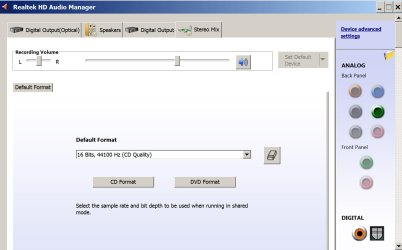
Attached is a picture of my Realtek HD Audio Manager, showing the Stereo Mix settings. Do you have those other tabs shown, such as “digital output”, “speakers”, etc??

I don’t expect you and I would use the same driver as we have different Gigabyte boards, but I’m wondering why you don’t have Intel Display Audio and why your Realtek High Definition Audio Device is shown as “not plugged in”, rather than default.

You have no sound whatsoever, not even Windows System sounds?
 

Attachments

  • realtek audio manager.jpg
    realtek audio manager.jpg
    76.6 KB · Views: 0

My Computer My Computer

At a glance

Windows 7 Home Premium SP1, 64-bitIntel Skylake i5-6600K, not overclocked8 GB HyperX DDR4-2666 (2 x 4 GB)none; graphics are integrated on CPU
Computer type
PC/Desktop
Computer Manufacturer/Model Number
Ignatz Special; 4 speed manual gearbox; factory air conditioning; one of one
OS
Windows 7 Home Premium SP1, 64-bit
CPU
Intel Skylake i5-6600K, not overclocked
Motherboard
AsRock Z170M Extreme 4, micro ATX
Memory
8 GB HyperX DDR4-2666 (2 x 4 GB)
Graphics Card(s)
none; graphics are integrated on CPU
Sound Card
onboard: Realtek ALC1150; external: USB Behringer UF0-202
Monitor(s) Displays
Dell S2340M 23 inch IPS
Screen Resolution
1600 x 900
Hard Drives
System: Crucial MX100 series SSD, 128 GB;
Data: Samsung Spinpoint 103SJ, 1 TB;
Backup: WD Caviar Green WD30EZRX-00D8PB0, 3 TB
PSU
Rosewill SilentNight 500 watt fanless, semi-modular
Case
Antec Solo II
Cooling
Noctua NH-U12S; Noctua F12 intake, Noctua S12A exhaust
Keyboard
Microsoft 200 6JH-00001 USB
Mouse
Dell or Microsoft optical wired; USB
Antivirus
Microsoft Security Essentials and Malwarebytes Premium
Browser
Pale Moon
Other Info
All fans PWM; speeds at idle: CPU circa 500 rpm; intake circa 600 rpm; exhaust circa 600 rpm; CPU temps 27 idle and 47 C load in a warm room (27 C/81 F) when running Intel Extreme Tuning Utility stress test.
Well, I get no sounds at all. All I have in the audio manager is Stereo Mix. If this helps, I have my headphones plugged into the front panel.
 

My Computer My Computer

At a glance

Windows 7 Ultimate - 64 Biti3-3220 3.3GHz Dual-Core8 GB - Corsair XMS3 RamXFX Radeon HD 7770 (single)
Computer type
PC/Desktop
Computer Manufacturer/Model Number
Custom
OS
Windows 7 Ultimate - 64 Bit
CPU
i3-3220 3.3GHz Dual-Core
Motherboard
Gigabyte GA-H61M-DS2
Memory
8 GB - Corsair XMS3 Ram
Graphics Card(s)
XFX Radeon HD 7770 (single)
Hard Drives
2 TB Seagate Desktop SSHD
153 GB and 55 GB Slaves
Browser
Google Chrome
Win 7 sound requires a lot of trial and error, fumbling around, and some voodoo can't hurt.

So, look for any and all settings that might possibly set Realtek as the default, rather than disconnected--regardless of whether you think it would make sense.

I assume you've tried headphones in other jacks on the rear?

And maybe connecting to something besides headphones---a stereo system, a $10 radio, anything that will accept a cable?

Was there any distinction made at the Gigabyte web site between 32 bit and 64 bit drivers?

Did you leave any drivers behind at Gigabyte?

Have you started from scratch---uninstalling all sound related drivers in Device Manager and rebooting and let Windows find what it thinks it needs--trying to even get system sounds.
 

My Computer My Computer

At a glance

Windows 7 Home Premium SP1, 64-bitIntel Skylake i5-6600K, not overclocked8 GB HyperX DDR4-2666 (2 x 4 GB)none; graphics are integrated on CPU
Computer type
PC/Desktop
Computer Manufacturer/Model Number
Ignatz Special; 4 speed manual gearbox; factory air conditioning; one of one
OS
Windows 7 Home Premium SP1, 64-bit
CPU
Intel Skylake i5-6600K, not overclocked
Motherboard
AsRock Z170M Extreme 4, micro ATX
Memory
8 GB HyperX DDR4-2666 (2 x 4 GB)
Graphics Card(s)
none; graphics are integrated on CPU
Sound Card
onboard: Realtek ALC1150; external: USB Behringer UF0-202
Monitor(s) Displays
Dell S2340M 23 inch IPS
Screen Resolution
1600 x 900
Hard Drives
System: Crucial MX100 series SSD, 128 GB;
Data: Samsung Spinpoint 103SJ, 1 TB;
Backup: WD Caviar Green WD30EZRX-00D8PB0, 3 TB
PSU
Rosewill SilentNight 500 watt fanless, semi-modular
Case
Antec Solo II
Cooling
Noctua NH-U12S; Noctua F12 intake, Noctua S12A exhaust
Keyboard
Microsoft 200 6JH-00001 USB
Mouse
Dell or Microsoft optical wired; USB
Antivirus
Microsoft Security Essentials and Malwarebytes Premium
Browser
Pale Moon
Other Info
All fans PWM; speeds at idle: CPU circa 500 rpm; intake circa 600 rpm; exhaust circa 600 rpm; CPU temps 27 idle and 47 C load in a warm room (27 C/81 F) when running Intel Extreme Tuning Utility stress test.
Back
Top