Realtek HD detecting rear speaker as side (5.1)

redtilldead

New member
Local time
4:14 AM
Messages
3
Hi,

Ive just recently switched from vista64 to windows 7 64.

The thing is that im using logitech X-540 5.1 speakers but realtek HD is detecting my "rear" speakers as "side" speakers when I select the 5.1 option. Same thing happened in vista too.

The only way round this to select the 7.1 option and disable the "side" speakers and hence I can use "rear". The sound from the "side" speakers then comes from the ones in the front in the testing.

Now the problem is that when I play games/movies in 5.1 it probably detects my system as a 7.1 and some sound will be missing.

So how can I use the 5.1 option and keep my surround speakers as "rear" and not "side".

Thanks in advance,

P.S. Buying a new soundcard isnt an option for me.
 

My Computer My Computer

At a glance

Windows 7Intel E85002x2GB TranscendGigabyte HD 4850 1GB
OS
Windows 7
CPU
Intel E8500
Motherboard
Gigabyte EP45-UD3P
Memory
2x2GB Transcend
Graphics Card(s)
Gigabyte HD 4850 1GB
Sound Card
Realtek HD
Monitor(s) Displays
Samsung 22"
Hard Drives
Seagate 7200.11 500GB
PSU
FSP Epsilon 600W
Case
Gigabyte Setto
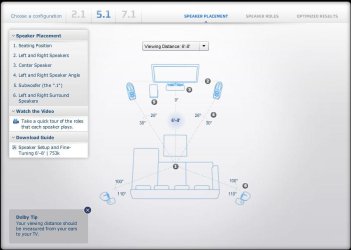
A true 5.1 speaker system consists of subwoofer, front right and left, and surround right and left (what you may be referring to as "side"). There are no "rear" speakers in a 5.1 system.

A 7.1 system adds rear right and left.

Your Realtek HD is configuring your 5.1 speaker system correctly.

See the Dolby Home Theater Speaker Guide for correct placement of your speakers.
 

Attachments

  • 5.1 setup.JPG
    5.1 setup.JPG
    49.3 KB · Views: 1,691

My Computer My Computer

At a glance

Windows 7 Ultimate 32 & 64 -(Boot Camped Snow...AMD Athlon A64 X2 6000+ 3.1GHz4GB Corsair XMS RAMGigabyte ATI Radeon HD4550/512MB/DDR3 passive...
Computer Manufacturer/Model Number
Self built
OS
Windows 7 Ultimate 32 & 64 -(Boot Camped Snow Leopard on a Mac Mini)
CPU
AMD Athlon A64 X2 6000+ 3.1GHz
Motherboard
DFI LanParty Jr 790GX M2RS
Memory
4GB Corsair XMS RAM
Graphics Card(s)
Gigabyte ATI Radeon HD4550/512MB/DDR3 passive cooled
Sound Card
latest RealTek HD/HDMI drivers
Monitor(s) Displays
Samsung LN40A550 (primary); Zalman 7" LCD (secondary)
Screen Resolution
1920x1080 ; 800x600
Hard Drives
WD Raptor for OS
Seagate 7211 640GB
Two Samsung EcoGreens for TV in RAID 0 = 3TB
Two WD MyBook 1TB externals for B/U and Movies
Optical Drive:
LG GGC-H20L Super Multi Blue BluRay/HD-DVD internal
PSU
Corsair HX520W
Case
Zalman HD160XT
Cooling
Zalman CNPS9500Cu on processor - Four Nexus case fans
Keyboard
Gyration wireless Media Center Keyboard
Mouse
Gyration Cordless Optical Air Mouse
Internet Speed
6344 kbps Down/1043 kbps Up (Comcast cable)
Other Info
HDMI audio/video out to Yamaha RX-V1065 receiver.
All controlled by a Harmony One universal remote.

Four other home built computers plus a Mac Mini, but this is my main Win7 testbed.
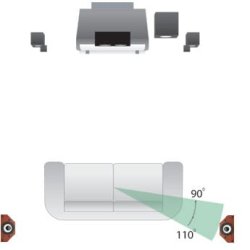
Hmm, come to think about it, Indeed my current speakers arrangement is quite similar to the one in the pic. But all this time I thought that those surround speakers are considered "rear" since they are behind the level of the listener's head (although not directly behind) and not directly on the side.

This pic shows my setup;
red=speakers
black=monitor
brown=seating postion

So, are the surround speakers in this case still "side"?


My Computer My Computer

At a glance

Windows 7Intel E85002x2GB TranscendGigabyte HD 4850 1GB
OS
Windows 7
CPU
Intel E8500
Motherboard
Gigabyte EP45-UD3P
Memory
2x2GB Transcend
Graphics Card(s)
Gigabyte HD 4850 1GB
Sound Card
Realtek HD
Monitor(s) Displays
Samsung 22"
Hard Drives
Seagate 7200.11 500GB
PSU
FSP Epsilon 600W
Case
Gigabyte Setto

Attachments

  • 166430.jpg
    166430.jpg
    5.5 KB · Views: 60
Last edited:

My Computer My Computer

At a glance

Windows 7 Ultimate 32 & 64 -(Boot Camped Snow...AMD Athlon A64 X2 6000+ 3.1GHz4GB Corsair XMS RAMGigabyte ATI Radeon HD4550/512MB/DDR3 passive...
Computer Manufacturer/Model Number
Self built
OS
Windows 7 Ultimate 32 & 64 -(Boot Camped Snow Leopard on a Mac Mini)
CPU
AMD Athlon A64 X2 6000+ 3.1GHz
Motherboard
DFI LanParty Jr 790GX M2RS
Memory
4GB Corsair XMS RAM
Graphics Card(s)
Gigabyte ATI Radeon HD4550/512MB/DDR3 passive cooled
Sound Card
latest RealTek HD/HDMI drivers
Monitor(s) Displays
Samsung LN40A550 (primary); Zalman 7" LCD (secondary)
Screen Resolution
1920x1080 ; 800x600
Hard Drives
WD Raptor for OS
Seagate 7211 640GB
Two Samsung EcoGreens for TV in RAID 0 = 3TB
Two WD MyBook 1TB externals for B/U and Movies
Optical Drive:
LG GGC-H20L Super Multi Blue BluRay/HD-DVD internal
PSU
Corsair HX520W
Case
Zalman HD160XT
Cooling
Zalman CNPS9500Cu on processor - Four Nexus case fans
Keyboard
Gyration wireless Media Center Keyboard
Mouse
Gyration Cordless Optical Air Mouse
Internet Speed
6344 kbps Down/1043 kbps Up (Comcast cable)
Other Info
HDMI audio/video out to Yamaha RX-V1065 receiver.
All controlled by a Harmony One universal remote.

Four other home built computers plus a Mac Mini, but this is my main Win7 testbed.
So I guess Realtek is doing the right thing in detecting my surround speakers as "side" and not "rear". If that is the case, then problem solved I think.

I cant move my positon around as its a computer setup, but I have indeed bumped up the volume on the "sides".
 

My Computer My Computer

At a glance

Windows 7Intel E85002x2GB TranscendGigabyte HD 4850 1GB
OS
Windows 7
CPU
Intel E8500
Motherboard
Gigabyte EP45-UD3P
Memory
2x2GB Transcend
Graphics Card(s)
Gigabyte HD 4850 1GB
Sound Card
Realtek HD
Monitor(s) Displays
Samsung 22"
Hard Drives
Seagate 7200.11 500GB
PSU
FSP Epsilon 600W
Case
Gigabyte Setto
Back
Top