Realtek HD & X-Fi MB

Erieg

New member
Local time
6:27 AM
Messages
2
I just purchased a Dell Studio XPS 435 which came with Vista Home Premium x64. As soon as I made sure that all was running correctly I promptly stripped Vista off and loaded Win 7 x64.

The computer came with a piece of software called "SoundBlaster X-Fi MB" which works with the on-board sound drivers to emulate a low end X-Fi card. This worked great under Vista and not so great under Win 7.

I have down loaded the Win 7 Realtek HD audio drives but when I go to install the SB software it tells me that the audio device is not present.

Has anyone ever had experience with this software? Yes, I know I should just buy a sound card but I just don't have the money and I can't really see any reason why this will not work under W7 x64 when it worked under Vista 64... but then again I can be dense at times :).
 

My Computer My Computer

At a glance

Win 7 RC 7100
OS
Win 7 RC 7100

My Computer My Computer

At a glance

Win 7 Ultimate x64FX-8350 @ 4.6 GHz so farADATA XPG V1 Series Black 8GB DDR3 1600Sapphire R9 270x Dual-X
Computer type
PC/Desktop
Computer Manufacturer/Model Number
Me
OS
Win 7 Ultimate x64
CPU
FX-8350 @ 4.6 GHz so far
Motherboard
Asus M5A97 EVO
Memory
ADATA XPG V1 Series Black 8GB DDR3 1600
Graphics Card(s)
Sapphire R9 270x Dual-X
Sound Card
Xonar DGX w/ Corsair Vengence 1300
Monitor(s) Displays
Acer S232HL Abid
Screen Resolution
1920x1080
Hard Drives
120 GB OCZ Vertex 3
500 GB Seagate 7200.12
PSU
Antec Earthwatts 650W Green
Case
Antec Three Hundred
Cooling
Cooler Master 212 EVO
Keyboard
Logitech G510
Mouse
Logitech G500s
Internet Speed
35000/3000
@Erieg...
I have a DELL Studio 1555 laptop that came with Creative X-FI MB CD and I can't seem to find any new drivers for Win 7. The drivers installed by Win 7 seem to work just fine.
I have th IDT audio codec.
 

My Computer My Computer

At a glance

Windows 7 Ultimate RC x64
OS
Windows 7 Ultimate RC x64
Yes, I own a 1555 and the Default win 7 drivers work for this device.. However I can notice that my music doesn't sound the same as it did on Vista with the Creative X-FI MB drivers. I didn't receive the disk.. interesting enough. I'm trying the downloads on these forums to see if anything gives me back that high quality sound again..
 

My Computer My Computer

At a glance

Windows 7
OS
Windows 7
@erieg , I ve upgraded my os from vista home 64bit to windows 7 64bit !! and i m facing the same problem now :(
Wt have u done to resove your problem ?? Pls do tell me, even i ve called customer care many times but they have also got no clue to this !!
"the audio device supported by this application cannot be detected. you need to close the application"
what to do ?
i m downloading the link given by stormy13.. hope it works !!


My Computer My Computer

At a glance

windows 72.1GHZ4gb512mb
Computer Manufacturer/Model Number
Dell studio 1555
OS
windows 7
CPU
2.1GHZ
Memory
4gb
Graphics Card(s)
512mb
Hi, I have download and installed the Sound Blaster X-Fi MB that stormy13 posted.
The program installed ok, but not able to launch because the program is unable to find a proper audio device, is this windows 7 fault or creative?
But when I install the included IDT audio drivers the "High Definition audio device" changed to "IDT High Definition audio CODEC", I was like... what's happening...??!!!
The creative software does work correctly under Windows Vista previously (It came with my laptop)

Btw, my laptop is Dell Studio 1555, I specifically ordered Sound Blaster X-Fi MB as my audio solution, is this not supported under Windows 7 yet?
Although I still able to get the sounds to work but without X-Fi software it sounds crap.
 

My Computer My Computer

At a glance

Windows 7 32-bitT65001GB + 2GB
Computer Manufacturer/Model Number
Dell Studio 1555
OS
Windows 7 32-bit
CPU
T6500
Memory
1GB + 2GB
To wildwestgoh:

Even though I haven't yet solved the problem, I do have the exact same laptop with the X-Fi soundcard. Interesting enough I can't find the words creative in any system settings.. Dxdiag, or Device manager. Any thoughts?

Some food for thought. There are two different driver sets I seemed to use. Windows 7 ones, and the IDT drivers from dells website. If you have the IDT drivers you'll notice you have some enhancements (even though they are not great) Control Panel -> IDT Audio Control Panel. -> premium Sound -> enabled. Also if you have Winamp installed, enabled the winamp equalizer helps alot. This is only way for now I can see to get around the complete crap sound. (at least for now)

Thanks everyone for responding. If anyone has any knowledge on the problem, please let me know. Thanks
 

My Computer My Computer

At a glance

Windows 7
OS
Windows 7
Problem solved :)

Just download the driver for "CREATIVE-LABS_SOUND-BLASTER-_A00_R213242" .and change its properties (compatibility).

ok, i ll tell step by step :

1) download the attached file, it is the above mentioned driver.

2) after downloading just right click on it , goto properties .
Then select "COMPATIBILITY". then check on "run this programm in compatibility mode for" and then select "windows vista service pack 2". apply it .

3) Run/install that driver and just follow the steps.

4) All done . it will work for sure :cool:

for more info check oout this link http://www.sevenforums.com/tutorials/316-compatibility-mode.html
 
Last edited:

My Computer My Computer

At a glance

windows 72.1GHZ4gb512mb
Computer Manufacturer/Model Number
Dell studio 1555
OS
windows 7
CPU
2.1GHZ
Memory
4gb
Graphics Card(s)
512mb
Tested, not working, nothing happen.

Dell Studio 1555
Windows 7 32-bit (clean install)
Is that just an upgrade application?

Update:
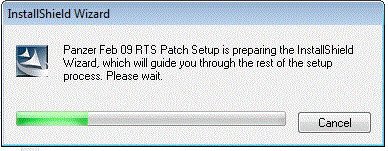
Attached is a screenshot of the installer window before it disappear.
It just disappear without any error.
I did adjust the compatibility to Windows Vista (Service pack 2).
Also ran the setup program using administrative rights.
 

Attachments

  • Untitled.gif
    Untitled.gif
    20.5 KB · Views: 64
Last edited:

My Computer My Computer

At a glance

Windows 7 32-bitT65001GB + 2GB
Computer Manufacturer/Model Number
Dell Studio 1555
OS
Windows 7 32-bit
CPU
T6500
Memory
1GB + 2GB
OK i ll look into the matter . will tell u in next reply.
btw, that attachement is the driver for sound blaster xfi mb
 
Last edited:

My Computer My Computer

At a glance

windows 72.1GHZ4gb512mb
Computer Manufacturer/Model Number
Dell studio 1555
OS
windows 7
CPU
2.1GHZ
Memory
4gb
Graphics Card(s)
512mb
@ wildwestgoh,

See, the problem occurs when u do a clean install !!
when i did a clean installation, then also i faced the same problem as i was facing before !!

So, i ve a long process, and it will work. I tried it on my studio 1555, and it did worked .
i had VISTA 64 before, i installed win 7 64 (clean install) since then i was facing problem with my sound blaster X-fi mb !!
so i installed VISTA 64 again, and installed required driivers and softwares INCLUDING SOUND BLASTER X-FI MB (which works absolutely fine in vista ).

Then i UPGRADED (not custom install) to WIN 7 64. and then i called up dell . They accessed my pc via remote access and they did the same thing which i ve written in my last reply ! and then it worked !

so its a long shot, as it took a looooooooooong time as u ve to install operating system twice , but it will work in the end.

pls ask if u ve any doubts .
 

My Computer My Computer

At a glance

windows 72.1GHZ4gb512mb
Computer Manufacturer/Model Number
Dell studio 1555
OS
windows 7
CPU
2.1GHZ
Memory
4gb
Graphics Card(s)
512mb
Dell Studio 1555 X-Fi MB is just software

Ok, after reading through many articles that I googled, found bad news and also good news as well.

First, Creative Sound Blaster X-Fi MB is just a software, I repeat, just a SOFTWARE.
YES! It's not hardware base, and the hardware is IDT Audio.

Second, after you installed the IDT, go ahead and install the Creative Sound Blaster X-Fi MB, yes, just like that and the software will pick up the hardware and you can start using the X-Fi "software" sound solution, LOL... sounded so cheap, no wonder the add-in was $0 :cry: feel like cheated :o

But after I installed the IDT sound driver, whenever I change volume or the IDT equalizer, the sound will appear distorted, I think I can still live with that.

And oh, for my case the stormy13's X-Fi MB software license does not match the license key that I have for my Dell Studio so... I use back the original software provided by Dell.
 

My Computer My Computer

At a glance

Windows 7 32-bitT65001GB + 2GB
Computer Manufacturer/Model Number
Dell Studio 1555
OS
Windows 7 32-bit
CPU
T6500
Memory
1GB + 2GB
And oh, for my case the stormy13's X-Fi MB software license does not match the license key that I have for my Dell Studio so... I use back the original software provided by Dell.

Which is exactly why I said this,

Till Dell gets the updated version from Creative (and no you can't/won't be able get it from Creative yourself), give this a try,

Daniel_K: SB X-Fi MB for Windows 7, Vista and XP and proper Realtek HD Audio driver

use the license key that came with the version you got with your laptop.
 

My Computer My Computer

At a glance

Win 7 Ultimate x64FX-8350 @ 4.6 GHz so farADATA XPG V1 Series Black 8GB DDR3 1600Sapphire R9 270x Dual-X
Computer type
PC/Desktop
Computer Manufacturer/Model Number
Me
OS
Win 7 Ultimate x64
CPU
FX-8350 @ 4.6 GHz so far
Motherboard
Asus M5A97 EVO
Memory
ADATA XPG V1 Series Black 8GB DDR3 1600
Graphics Card(s)
Sapphire R9 270x Dual-X
Sound Card
Xonar DGX w/ Corsair Vengence 1300
Monitor(s) Displays
Acer S232HL Abid
Screen Resolution
1920x1080
Hard Drives
120 GB OCZ Vertex 3
500 GB Seagate 7200.12
PSU
Antec Earthwatts 650W Green
Case
Antec Three Hundred
Cooling
Cooler Master 212 EVO
Keyboard
Logitech G510
Mouse
Logitech G500s
Internet Speed
35000/3000
stormy13, sorry if I'm confusing you, because I can't activate the software that you provided with the keys that I have for my X-Fi MB, weird but it says the product key is not intended for the software that I got from your link.
Right now I can use back the software that came with my laptop, but still a bit disappointed, LOL.. it is not a true X-Fi afterall.:(

Looking forward an update from IDT to solve the volume change distortion instead (from Dell of course).:)

Update:
Has anyone face this problem? Sound appear distorted (sort of lagging) when changing volume, IDT/X-Fi's equalizer.
Or should this be another topic to discuss? Let me know.
 
Last edited:

My Computer My Computer

At a glance

Windows 7 32-bitT65001GB + 2GB
Computer Manufacturer/Model Number
Dell Studio 1555
OS
Windows 7 32-bit
CPU
T6500
Memory
1GB + 2GB
Try the solutions here,

Sound Blaster X-Fi MB in Windows 7? - DELL COMMUNITY

and I also found this,

Free Upgrade to Integrated CREATIVE Sound Blaster X-Fi MB Audio Software Solution | Dell Australia

img.aspx

Offer ends 26/11/2009

It is from Dell Australia and no idea how to get it from Dell, but it does look like they have an updated version.
 

My Computer My Computer

At a glance

Win 7 Ultimate x64FX-8350 @ 4.6 GHz so farADATA XPG V1 Series Black 8GB DDR3 1600Sapphire R9 270x Dual-X
Computer type
PC/Desktop
Computer Manufacturer/Model Number
Me
OS
Win 7 Ultimate x64
CPU
FX-8350 @ 4.6 GHz so far
Motherboard
Asus M5A97 EVO
Memory
ADATA XPG V1 Series Black 8GB DDR3 1600
Graphics Card(s)
Sapphire R9 270x Dual-X
Sound Card
Xonar DGX w/ Corsair Vengence 1300
Monitor(s) Displays
Acer S232HL Abid
Screen Resolution
1920x1080
Hard Drives
120 GB OCZ Vertex 3
500 GB Seagate 7200.12
PSU
Antec Earthwatts 650W Green
Case
Antec Three Hundred
Cooling
Cooler Master 212 EVO
Keyboard
Logitech G510
Mouse
Logitech G500s
Internet Speed
35000/3000
Try the solutions here,

Sound Blaster X-Fi MB in Windows 7? - DELL COMMUNITY

and I also found this,

Free Upgrade to Integrated CREATIVE Sound Blaster X-Fi MB Audio Software Solution | Dell Australia

img.aspx

Offer ends 26/11/2009

It is from Dell Australia and no idea how to get it from Dell, but it does look like they have an updated version.

Oh I think I didn't mention that I already has the X-Fi MB that came with my laptop (previously Windows Vista) that run fine currently with my Windows 7, yeah you might had find it strange that the keys does not work on the software that you linked. Not same version??
 

My Computer My Computer

At a glance

Windows 7 32-bitT65001GB + 2GB
Computer Manufacturer/Model Number
Dell Studio 1555
OS
Windows 7 32-bit
CPU
T6500
Memory
1GB + 2GB
Back
Top