Realtek Sound crackling problem

jumpmouse

New member
Local time
1:31 PM
Messages
4
Hey everyone, i got this laptop:

2lcmyrl.jpg


r8kTJWf.jpg


And now.. the crackling problem, when i installed Win7, audio drivers installed automatically and crackling appears when i play a song in winamp and then scroll up and down in a folder full of pictures or scroll a site with pictures and gifs, when i play a video on youtube, when i stream a video from any other site etc.
Tried DPC Latency checker, it had green bars even when crackling appears, red bar appeared maybe once or twice after some time. Sound crackling also appears when i use headphones.
But when i install Realtek driver, it sounds way worse, like this:

https://www.youtube.com/watch?v=qd5CWVEvx0A

(Not my video)

Asus site does not have support for this laptop:
ASUS Notebook Pro55 Series Drivers Download for Windows 7, 8.1, 10 & XP

Task Manager shows this:

fehtdx.jpg


Aida64 Extreme shows this:

apa3ow.jpg


2epjbtf.jpg


Dxdiag shows this:

1eax6a.jpg


I noticed that Dxdiag shows that laptop model is F5SL (?) i checked the Asus site it also does not support Win7, it looks like my laptop only the camera part is not the same.

I tried to run a bootable Ubuntu from my usb, sound works perfect, today i gave up and installed Windows XP and i installed an audio driver from Asus site, for a laptop Asus Pro55SR, and it works perfectly.

Someone said to me that the problem is in power management of the Realtek sound chip, i tried to do it but i could not find the option in the Registry Editor.

Also, when i install the correct graphics driver, on Win7 showed that it was 256mb and worked perfect, but now on XP in desktop properties it shows 512mb and i have an option for a slightly bigger resolution, and i experience screen tearing when i play a video on Media Player Classic.

But leave the graphics issue, audio matters to me most, so please help, i will try to install Windows7 again if you can find me a solution.
 

My Computer

Computer type
PC/Desktop
OS
Windows 7 Ultimate 32bit
CPU
AMD Athlon 64 X2 Dual Core Processor 4600+ 2.40GHz
Memory
3.50GB
Graphics Card(s)
Nvidia GeForce 8600 GT
Antivirus
Kaspersky Internet Security 2013
Browser
Mozilla Firefox
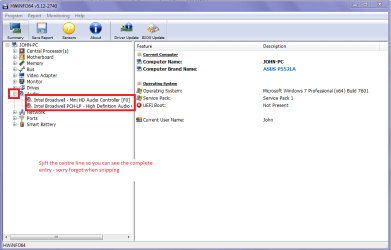
Jumpmouse mate try running this ditty of mine find the audio device and download the driver for it from the manufacturers site. Anyway just find it and we can see if we can work it out. See the pic of my machine (similar to my current work lappy) I am on right now.
Using HW Info
PART A:
You can test the volts on the PSU with HW Info HWiNFO, HWiNFO32/64 - Download < download the right bit version and close the right hand window select Sensors and scroll down to the power section where you will see what the volts are doing see my pic. In my pic the section (Nuvoton) with VBATT is a dead give away you are in the section for the rail voltages. There are other section titles and one that pops up often is ITE
Now the voltage on the different rails have to be within 5% =+/- of what is required or the machine will not work properly if at all.
See this for the rail voltage info
Power Supply 101: A Reference Of Specifications - Power Supplies (Section 2.)
The original right hand window shows the machine running and is handy for that but for looking at the components in some detail close it and use the main left hand side panel
FOR OTHER COMPONENTS
PART B:
Open each small square with + in it on the section the components are in and then click on the individual component/s (it will highlight in blue) - in the right hand side will appear all sorts of details including brands speeds and other essential info that particular device. See pic for example.

Use PART B:
 

Attachments

  • AUDIO.PNG
    AUDIO.PNG
    27.8 KB · Views: 1

My Computer

Computer type
PC/Desktop
Computer Manufacturer/Model Number
Own build (new) Desk1 / Asus ROG Win 7 / Desk2 1st build
OS
Desk1 7 Home Prem / Desk2 10 Pro / Main lap Asus ROG 10 Pro 2 laptop Toshiba 7 Pro Asus P2520 7 & 10
CPU
Desk1 i5 3750K / Laptop i7 GTX 860M / Desk2 i5 2500
Motherboard
Desk1 Asus P877-V / Desk2 Gigabyte H67 UD3H / Laptop ?
Memory
Desk1 8GB (1866) / Desk2 16GB (1333) / Laptop 8Gb DDR3
Graphics Card(s)
Desk 1& 2NVidia GTX 650 & Laptops on board Intel
Sound Card
Desk 1 & 2 -XONAR DG Realtek High Def audio Laptop
Monitor(s) Displays
Desk 1 Benq HD 2450 / Desk2 Philips 24" / Laptop 17.5"
Screen Resolution
1920x1080 D1 & D2 & Laptop 1
Hard Drives
Desk1 Samsung 120GB 830 SSD
Asus ROG 256GB 850 Pro SSD
Desk2 Samsung 840 256 SSD
Toshiba 120GB EVO
PSU
Desk 1 Corsair HX 1050/ Laptop ? / Desk 2 Corsair HX 650
Case
Desk 1 Cooler HAF XM ? Toshiba laptop / Desk2 Coolermaster
Cooling
Fans on all Desk1 -2 Desk2 - all Coolermasters 5 Laptop ?
Keyboard
Desk 1 MS Sidewinder X6 Desk 2 MS Sidewinder X 4
Mouse
Desk 1&2 - Gigabyte MS 900 gamer - laptop - Logitec wireless
Internet Speed
ADSL2+
Other Info
One other Desktop (tester) and spare Toshba laptop both with SSD's
Running Kaspersky 2016 ISS on all machines config'd identically
Logitec audio stereo systems on each machine (x3)
Canon MG5250MFC
Router/modem TP-Link running WPA2SK
JM mate in addition to my last post look around for your local Asus Service Centre and ask them directly because I cannot find that machine either not even close:(
 

My Computer

Computer type
PC/Desktop
Computer Manufacturer/Model Number
Own build (new) Desk1 / Asus ROG Win 7 / Desk2 1st build
OS
Desk1 7 Home Prem / Desk2 10 Pro / Main lap Asus ROG 10 Pro 2 laptop Toshiba 7 Pro Asus P2520 7 & 10
CPU
Desk1 i5 3750K / Laptop i7 GTX 860M / Desk2 i5 2500
Motherboard
Desk1 Asus P877-V / Desk2 Gigabyte H67 UD3H / Laptop ?
Memory
Desk1 8GB (1866) / Desk2 16GB (1333) / Laptop 8Gb DDR3
Graphics Card(s)
Desk 1& 2NVidia GTX 650 & Laptops on board Intel
Sound Card
Desk 1 & 2 -XONAR DG Realtek High Def audio Laptop
Monitor(s) Displays
Desk 1 Benq HD 2450 / Desk2 Philips 24" / Laptop 17.5"
Screen Resolution
1920x1080 D1 & D2 & Laptop 1
Hard Drives
Desk1 Samsung 120GB 830 SSD
Asus ROG 256GB 850 Pro SSD
Desk2 Samsung 840 256 SSD
Toshiba 120GB EVO
PSU
Desk 1 Corsair HX 1050/ Laptop ? / Desk 2 Corsair HX 650
Case
Desk 1 Cooler HAF XM ? Toshiba laptop / Desk2 Coolermaster
Cooling
Fans on all Desk1 -2 Desk2 - all Coolermasters 5 Laptop ?
Keyboard
Desk 1 MS Sidewinder X6 Desk 2 MS Sidewinder X 4
Mouse
Desk 1&2 - Gigabyte MS 900 gamer - laptop - Logitec wireless
Internet Speed
ADSL2+
Other Info
One other Desktop (tester) and spare Toshba laptop both with SSD's
Running Kaspersky 2016 ISS on all machines config'd identically
Logitec audio stereo systems on each machine (x3)
Canon MG5250MFC
Router/modem TP-Link running WPA2SK
I tried running that program in WinXP which i'm currently using on this laptop, it looks different, and shows the same info i already got from Aida64 Extreme, as you can see in the pictures in the previous posts.

Tried contacting Realtek, no response, tried contacting Asus, they asked for a serial number of the product, i sent them pictures with the stickers which i posted here, no response.
 

My Computer

Computer type
PC/Desktop
OS
Windows 7 Ultimate 32bit
CPU
AMD Athlon 64 X2 Dual Core Processor 4600+ 2.40GHz
Memory
3.50GB
Graphics Card(s)
Nvidia GeForce 8600 GT
Antivirus
Kaspersky Internet Security 2013
Browser
Mozilla Firefox
Yep typical of Asus support mate the local service centres are the best to deal with as I found when setting up a ROG laptop a while ago.

Look one thing you could try is this https://www.slimwareutilities.com/slimdrivers.php < just make sure you only download the drivers software as if you are not careful it will include utilities crap as well. I use it from time to time and it does use genuine sites ie Intel for example, and I always uninstall it afterwards because it is a nagger. You might get lucky with that audio driver hopefully.
 

My Computer

Computer type
PC/Desktop
Computer Manufacturer/Model Number
Own build (new) Desk1 / Asus ROG Win 7 / Desk2 1st build
OS
Desk1 7 Home Prem / Desk2 10 Pro / Main lap Asus ROG 10 Pro 2 laptop Toshiba 7 Pro Asus P2520 7 & 10
CPU
Desk1 i5 3750K / Laptop i7 GTX 860M / Desk2 i5 2500
Motherboard
Desk1 Asus P877-V / Desk2 Gigabyte H67 UD3H / Laptop ?
Memory
Desk1 8GB (1866) / Desk2 16GB (1333) / Laptop 8Gb DDR3
Graphics Card(s)
Desk 1& 2NVidia GTX 650 & Laptops on board Intel
Sound Card
Desk 1 & 2 -XONAR DG Realtek High Def audio Laptop
Monitor(s) Displays
Desk 1 Benq HD 2450 / Desk2 Philips 24" / Laptop 17.5"
Screen Resolution
1920x1080 D1 & D2 & Laptop 1
Hard Drives
Desk1 Samsung 120GB 830 SSD
Asus ROG 256GB 850 Pro SSD
Desk2 Samsung 840 256 SSD
Toshiba 120GB EVO
PSU
Desk 1 Corsair HX 1050/ Laptop ? / Desk 2 Corsair HX 650
Case
Desk 1 Cooler HAF XM ? Toshiba laptop / Desk2 Coolermaster
Cooling
Fans on all Desk1 -2 Desk2 - all Coolermasters 5 Laptop ?
Keyboard
Desk 1 MS Sidewinder X6 Desk 2 MS Sidewinder X 4
Mouse
Desk 1&2 - Gigabyte MS 900 gamer - laptop - Logitec wireless
Internet Speed
ADSL2+
Other Info
One other Desktop (tester) and spare Toshba laptop both with SSD's
Running Kaspersky 2016 ISS on all machines config'd identically
Logitec audio stereo systems on each machine (x3)
Canon MG5250MFC
Router/modem TP-Link running WPA2SK
Back
Top