Rearranging taskbar buttons inside a group ?

AncientRo

New member
Local time
12:30 PM
Messages
3
Hi,

I have a quick question regarding something that I have searched for for a long time and could not find an answer for at all.

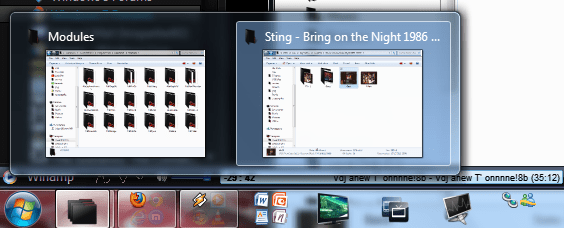
Is it possible to rearrange the taskbar buttons that are inside a group ?

By default, they are arranged in the order in which they were opened and I cannot find a way to rearrange them. If I try to click and drag, the whole group is moved. How can I rearrange the individual buttons from a group ?

Thank you.
 

My Computer

OS
Windows 7 Ultimate x32
im not sure i understand, any taskbar item i move goes where i want it.

could you explain what you mean by "group"

1/2011-12-17_1944.png

2/2011-12-17_1945.png
 

My Computer

Computer Manufacturer/Model Number
Hewlett packard/p6512uk
OS
Microsoft Windows 7 Home Premium 64-bit 7600
CPU
IIx4 amd athelon 635 processor
Motherboard
FOXCONN 2AA9
Memory
2x2gb
Graphics Card(s)
ati radeon HD 5450
Sound Card
(1) Realtek High Definition Audio (2) AMD High Definition
Monitor(s) Displays
samsung lcd tv 32"
Screen Resolution
1360x 768
Hard Drives
(1) WDC WD10 01FAES-60Z2A0 SATA Disk Device (2) Maxtor OneTouch USB Device (3) ST310003 33AS USB Device (4) WD My Book 1111 USB Device
PSU
?
Cooling
air!
Keyboard
wireless hp
Mouse
wireless Hp,optical
Internet Speed
1.10mb/s
Antivirus
MSE
Browser
Firefox
im not sure i understand, any taskbar item i move goes where i want it.

could you explain what you mean by "group"

1/View attachment 188724

2/View attachment 188725

Taskbar buttons can be made to be displayed in groups. So that if you have 3 folders opened, their buttons are displayed in the taskbar one after another, connected. If you have 3 notepad files opened, again, their buttons are displayed connected, in a group. If you open another folder, the button is added to the folders group, not displayed last, after the notepad group. And so on. If this is not happening for you, you might have this option turned off.

And my problem was with ordering the buttons when they are displayed in a group.
 

My Computer

OS
Windows 7 Ultimate x32
do you mean this feature, its called aero peek and the open folders ,notepads, browser instances etc all show " grouped"

2011-12-18_0214.png

if this is what you mean then no you cant rearrange the order of the view in the peek, however you could open the items in the order you want them to show.
not sure why though.
 

My Computer

Computer Manufacturer/Model Number
Hewlett packard/p6512uk
OS
Microsoft Windows 7 Home Premium 64-bit 7600
CPU
IIx4 amd athelon 635 processor
Motherboard
FOXCONN 2AA9
Memory
2x2gb
Graphics Card(s)
ati radeon HD 5450
Sound Card
(1) Realtek High Definition Audio (2) AMD High Definition
Monitor(s) Displays
samsung lcd tv 32"
Screen Resolution
1360x 768
Hard Drives
(1) WDC WD10 01FAES-60Z2A0 SATA Disk Device (2) Maxtor OneTouch USB Device (3) ST310003 33AS USB Device (4) WD My Book 1111 USB Device
PSU
?
Cooling
air!
Keyboard
wireless hp
Mouse
wireless Hp,optical
Internet Speed
1.10mb/s
Antivirus
MSE
Browser
Firefox
Back
Top