Reassigned Drive letters and System Reserve

Well it's Unallocated Space so it shouldn't show as Logical in your PW listings for 200mb.

I would boot back into PW CD, rightclick F again to Resize, then see if it will yield to let you include the 200mb into the F partition. If so, click Ok and Apply.

If not, try Resizing but move the 200mb to the right end of the HD as you seemed to think it would do, click OK, Apply.

Then try resizing into the Unalloc space at the right end of HD, OK, Apply.

If it won't do this, then restart Win7 and attempt to Extend the F partition into that space in Disk Management: http://www.sevenforums.com/tutorials/2670-partition-volume-extend.html
 
Hey gregrocker,
In PW on the bottom edge it showed boxes of different colors. The gray one was marked Unallocated. That is what the top edge of the System Area Partition changed to. I dunno.
Will try again and then I'm going to have to call a rain delay until tomorrow. Thanks kind Sir for your perserverence!
Will post whatever results I get when they are done. Take care
glennc
 

My Computer My Computer

At a glance

Windows 7 UltimateAMD Phenom-II X4 9658192 MB DDR2-SDRAMATI Radeon HD 4200
Computer type
PC/Desktop
Computer Manufacturer/Model Number
Self-Built
OS
Windows 7 Ultimate
CPU
AMD Phenom-II X4 965
Motherboard
Gigabyte GA-MA785GM-US2H
Memory
8192 MB DDR2-SDRAM
Graphics Card(s)
ATI Radeon HD 4200
Sound Card
ATI Radeon HD 4200 High Definition Audo
Monitor(s) Displays
LG Electronics W1943
Screen Resolution
1360 X 768
Hard Drives
C: 500 GB Caviar Black SATA
E: 500 GB Caviar Black SATA
PSU
Ultra LSP 750
Case
Ultra XBlaster
Cooling
2 Fans, CPU Fan, PS Fan
Keyboard
Acer
Mouse
Logitech
Internet Speed
6 MB
This would be highly unusual for it to convert itself to Logical when it was Primary, and "Unallocated Space" is created from deleting a Primary Partition while "Free Space" is created deleting a Logical Extended partition.

But to advise you correctly at this point, we need to see a screenshot of Partition Wizard's drive map and listings, with the Resize PopUp box that is giving you problems included in the screenshot in an area where it doesn't block view of the drives or listings.

To do this you'll need to install Partition Wizard to Win7 from here: Free Download Magic Partition Manager Software – Partition Wizard Online

I will be online Friday from 11-12 PST and then again from around 7-midnight PST.
 
Howdy,
I got my wind back and attempted to extend the volume. I'm not sure but under Disk Management the option was greyed out. I wasn't paying attention enough but I got to a display of the Drives and partitions. I clicked on the extend partition on the F drive space and the unallocated space was to it's left and the Wizard came up exactly as in the link and thread.
Partition or Volume - Extend


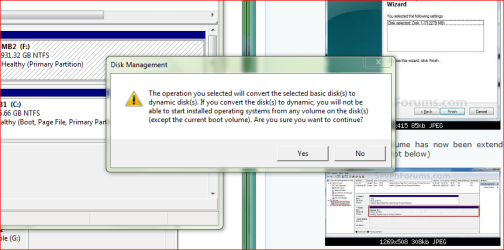
It was already showing Completing the Extend Volume Wizard and I hit next. At this time a prompt as shown below came up. It seems to state that the F will become unable to run programs from, if I understood it clearly so I hit no and it exited. I may be misinterpreting it, and if so is it o.k.? If not can you explain what this is and how to circumvent it?

Capture.PNG

Thanks for the help, I feel that a clarification will bring enough knowledge to choose yes. Does it mean that I won't be able to boot from an installed OS on the F drive.
If that is what it means it is ok because I only plan on installing OS's on the C drive.
Looking forward for your help and to put another issue to bed.
glennc
 

My Computer My Computer

At a glance

Windows 7 UltimateAMD Phenom-II X4 9658192 MB DDR2-SDRAMATI Radeon HD 4200
Computer type
PC/Desktop
Computer Manufacturer/Model Number
Self-Built
OS
Windows 7 Ultimate
CPU
AMD Phenom-II X4 965
Motherboard
Gigabyte GA-MA785GM-US2H
Memory
8192 MB DDR2-SDRAM
Graphics Card(s)
ATI Radeon HD 4200
Sound Card
ATI Radeon HD 4200 High Definition Audo
Monitor(s) Displays
LG Electronics W1943
Screen Resolution
1360 X 768
Hard Drives
C: 500 GB Caviar Black SATA
E: 500 GB Caviar Black SATA
PSU
Ultra LSP 750
Case
Ultra XBlaster
Cooling
2 Fans, CPU Fan, PS Fan
Keyboard
Acer
Mouse
Logitech
Internet Speed
6 MB
Hi again Glen -

Disk Management cannot Extend a partition to the left. To use Disk Mgmt you'd have to first move the Unallocated space over to the right end of the HD using Partition Wizard CD if it won't Resize F into it. I believe you thought it might do that when you tried.

I am not sure how you got the Wizard that converts the Basic Disk to a Dynamic Disk which could destroy your data. This does not extend the partition.

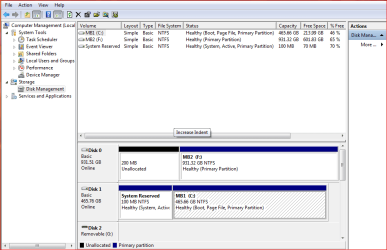
The problem is that, if you are reading it correctly in PW, your 200mb partition somehow got converted to Logical when it was deleted. Neither of your Disk Mgmt screenshots have showed any partition or the deleted space to be Logical.

We can clear up this mystery by installing Partition Wizard to Win7, then posting up a screenshot of the full PW drive map with listings, along with the popup box to Resize your F partition. Make sure that Resize Wizard isn't blocking the drive map or listings.

There is no rush to do this so take as much time as you need. 100mb out of a 1tb data drive isn't really that important, except as a learning experience which is what we do here also. ;)
 
Last edited:
Looking at your new screenshot, looks like you delete both System Reserved.

Capture33333.PNG
 

My Computer My Computer

At a glance

ME/XP/Vista/Win7
OS
ME/XP/Vista/Win7
theog I thought the same thing but then realized what we are seeing there is an open window screenshot from the Tutorial to Extend Volume which I linked him.

He must have run the Convert Basic to Dynamic wizard, tho, to have that warning message.

Waiting to see the Partition Wizard screenshot to see how the dead Primary SysReserved partition when deleted converted itself to Logical, but is still called "Unallocated" not "Free Space." Then we can get this done, or undone.

I believe he has gone to bed as he is on EST. He's had a full day, learned a lot today. There is no hurry on this now at all.
 
Last edited:
glennc, I get the impression that you are trying to jump a few steps ahead at times in order to get your problem solved more quickly. This is understandable, especially when you know that others (gregrocker & theog) are making quite an effort to help you out.

My advice would be to slow down, post frequent updates (one step at a time), and ask questions whenever you feel unsure about something. Everyone who knows a lot about this kind of stuff started out just like you. Just like you (trust me), they became proficient by muddling their way through a few things that were initially quite confusing and maybe at times a little scary.

Hang in there, Greg & theog have got you almost all the way home. :)
 
Last edited:

My Computer My Computer

At a glance

Main - Windows 7 Pro SP1 64-Bit; 2nd - Window...Main - Core i7 2600K; 2nd - Core i7 920Main - 16GB Corsair Vengeance; 2nd - 12GB Cor...Main - XFX Radeon 6870 1GB; 2nd - XFX Radeon ...
Computer Manufacturer/Model Number
Self
OS
Main - Windows 7 Pro SP1 64-Bit; 2nd - Windows Server 2008 R2
CPU
Main - Core i7 2600K; 2nd - Core i7 920
Motherboard
Main - Asus P8Z68-V Pro/Gen3; 2nd - Gigabyte GA-EX58-UDR3
Memory
Main - 16GB Corsair Vengeance; 2nd - 12GB Corsair Vengeance
Graphics Card(s)
Main - XFX Radeon 6870 1GB; 2nd - XFX Radeon 4870 1GB
Sound Card
Both: Onboard Realtek Azalia
Monitor(s) Displays
Main - Hann 25" + I-INC 25" + Acer 23"; 2nd - Upgrading Soon
Screen Resolution
Main - 1920x1080 (All Three Monitors); 2nd - Upgrading Soon
Hard Drives
Main - (1) Crucial M4 128GB (Boot)
Main - (1) Seagate 2TB 64MB Cache (Data)
Main - (1) Seagate 2TB 64MB Cache (Data Backup)
2nd - (1) Intel X25-M SSD 80GB (Boot)
2nd - (3) Seagate 1TB 32MB Cache (Data Backup)
2nd - (1) Seagate 320GB (Because)
PSU
Main - OCZ 600W Modular; 2nd - OCZ 600W
Case
Main - Thermaltake Element G; 2nd - NZXT something or other
Cooling
Main - Corsair H80; 2nd - Prolimatech Megahalems
Keyboard
Main - Razer Reclusa; 2nd - Old MS Keyboard
Mouse
Main - Logitech MX Revolution; 2nd - Old MS Mouse
Internet Speed
20Mbps Time-Warner Cable
Good Day Gentlemen!
profdlp, thanks for the advice, I will endeavor to adhere to it, within the boundaries of my personality :shock: !

gregrocker,
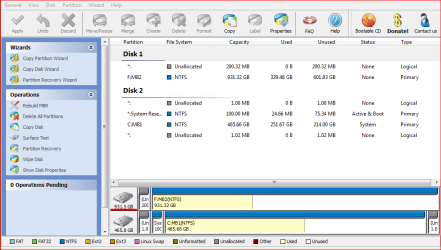
I installed PW this morning and am at a loss between the differences shown by it and PW CD. First the Drives were reassigned with PW. C:MBR1 became Disk 2 and F:MBR2 became Disk 1. It also shows 2 small unallocated spaces, one before and one after the C:MBR1 System Area/MBR1 partition, which were not there on PW CD or on Computer Management/Disk Management that I ran this morning, although it still shows the 200 MB unallocated space preceding the F:MBR2 partition. This begs several questions that can be answered after the main problem is fixed.
Following is the Display of PW Home Edition.
1. Why would the Display in PW be different than PW CD?
2. Why and how, if they exist, did the 2 unallocated spaces on C:MBR1 get created as they did not show up on PW and on Disk Management.
3. Can they be safely removed?
4. Why would a Hard drive cabled to SATA 0 connector be assigned Disk 1, while a separate Hard drive to SATA 1 is assigned as Disk 0?
5. Why would a 200 MB System Area Partition which was originally on C:MBR1 get transferred to F:MBR2 without my knowledge or permission?
6. Does F:MBR2 require any System Reserve Area Partition, it will only be used for storage of a lot of files and backups and clones?
7. In the guide thread Partition or Volume - Extend it show ways to extend into areas to the left or right of the Main Partion, if I read it correctly.
8. Why do the birds go on singing, why does this heart of mine cry, I digress.

Capture.PNG


For Grins, this is my Disk Management this morning.

Capture1.PNG

Thanks to all the extremely knowledgeable and generous people who are assisting me to knock one more issue down.
glennc
 

My Computer My Computer

At a glance

Windows 7 UltimateAMD Phenom-II X4 9658192 MB DDR2-SDRAMATI Radeon HD 4200
Computer type
PC/Desktop
Computer Manufacturer/Model Number
Self-Built
OS
Windows 7 Ultimate
CPU
AMD Phenom-II X4 965
Motherboard
Gigabyte GA-MA785GM-US2H
Memory
8192 MB DDR2-SDRAM
Graphics Card(s)
ATI Radeon HD 4200
Sound Card
ATI Radeon HD 4200 High Definition Audo
Monitor(s) Displays
LG Electronics W1943
Screen Resolution
1360 X 768
Hard Drives
C: 500 GB Caviar Black SATA
E: 500 GB Caviar Black SATA
PSU
Ultra LSP 750
Case
Ultra XBlaster
Cooling
2 Fans, CPU Fan, PS Fan
Keyboard
Acer
Mouse
Logitech
Internet Speed
6 MB
4. Why would a Hard drive cabled to SATA 0 connector be assigned Disk 1, while a separate Hard drive to SATA 1 is assigned as Disk 0?
Try changing the cables round, if PC will not boot, change back.
post back.

Gerg is the expert on PW.
 

My Computer My Computer

At a glance

ME/XP/Vista/Win7
OS
ME/XP/Vista/Win7
Howdy theog,
I contacted Gigabyte Technical Support with this issue. Will await their answer. I am currently a bit over-timid on switching cables and powering things up. As you can see from the list of questions there is a lot that has happened that has yet to be, if it can, logically explained. Maybe after I get the current problem resolved and do a complete backup... Thanks for all your help. Oh the manual gave nothing in the way of anything other than identifying the SATA2 3G connectors and location on the board!!!
Take care.
glennc
 

My Computer My Computer

At a glance

Windows 7 UltimateAMD Phenom-II X4 9658192 MB DDR2-SDRAMATI Radeon HD 4200
Computer type
PC/Desktop
Computer Manufacturer/Model Number
Self-Built
OS
Windows 7 Ultimate
CPU
AMD Phenom-II X4 965
Motherboard
Gigabyte GA-MA785GM-US2H
Memory
8192 MB DDR2-SDRAM
Graphics Card(s)
ATI Radeon HD 4200
Sound Card
ATI Radeon HD 4200 High Definition Audo
Monitor(s) Displays
LG Electronics W1943
Screen Resolution
1360 X 768
Hard Drives
C: 500 GB Caviar Black SATA
E: 500 GB Caviar Black SATA
PSU
Ultra LSP 750
Case
Ultra XBlaster
Cooling
2 Fans, CPU Fan, PS Fan
Keyboard
Acer
Mouse
Logitech
Internet Speed
6 MB
Hi Glen-

I think I have figured out your issue with PW slider not moving to the left when you try to resize your data partition into the deleted 200mb space.

Open PW from desktop, rightclick on F data partition, select Resize. Now you will notice that the 200mb is listed in the top box "Unallocate Space Before."

In replicating your problem here this morning, I was unable to get the slider to move to the left to take up that space until I first moved it to the right, then back all the way to the left.

I was also able to fill in 000 to the "Unallocate Space before" box and it took it and completed.

I believe this is because the 1 tb drive is so big that 200 mb is not enough to move the slider on its own - it needs to be goosed to the right first and then back again, or have 000 filled in the first box.

Try this to see if it works from Desktop then if it works, cancel out and boot into PW CD to do exactly this, since the CD version is more stable for Resizing operations.

PW seems to default all deleted partitions to Logical Unallocated Space now but that seems irrelevant to this problem.
 
Last edited:
Howdy gregrocker,
Thanks for getting back with me. With F:MB2 now showing as Disk 1 with the 200.32 MB unallocated logical partition, I right clicked on the F:MB2 NTFS partition and a drop down menu came up, I chose the 1st option to Move/Resize. A Move/Resize Partition Box popped up showint the partition. In the lower box marked Unallocate Space Before: with 200.29 MB showing. A icon with arrows up/down and right/left came up and I moved the left edge to the right slightly and back to the left and the box now showed 0 MB in unallocated space but the 931.51 IIRC MBR2 stayed the same. I hit ok and the main page came back up. Now the data partition is moved to the top above the unallocated 200.32 MB logical partition under Disk 1. To summarize it seems the unallocated logical partition moved from being listed above the F:MB2 partition to now being listed below it. To confirm I Move/Resized the F:MB2 partition and it now showed 0 in the Unallocate Space before and now shows 200.32 MB in the box Unallocate Space After.
I am purposely being as descriptive as possible so to better let you understand what I'm seeing.
So apparently I did something wrong, what can we do next?
I'm an possibly an idiot, I never hit apply!!!!! When I do a warning comes up that they strongly suggest I close ALL applications before applying pending changes.
glennc
 

My Computer My Computer

At a glance

Windows 7 UltimateAMD Phenom-II X4 9658192 MB DDR2-SDRAMATI Radeon HD 4200
Computer type
PC/Desktop
Computer Manufacturer/Model Number
Self-Built
OS
Windows 7 Ultimate
CPU
AMD Phenom-II X4 965
Motherboard
Gigabyte GA-MA785GM-US2H
Memory
8192 MB DDR2-SDRAM
Graphics Card(s)
ATI Radeon HD 4200
Sound Card
ATI Radeon HD 4200 High Definition Audo
Monitor(s) Displays
LG Electronics W1943
Screen Resolution
1360 X 768
Hard Drives
C: 500 GB Caviar Black SATA
E: 500 GB Caviar Black SATA
PSU
Ultra LSP 750
Case
Ultra XBlaster
Cooling
2 Fans, CPU Fan, PS Fan
Keyboard
Acer
Mouse
Logitech
Internet Speed
6 MB
The reason it is moving the 200mb to the right side of the drive is likely that you are leftclick dragging the partition itself and moving it to the left. This is the only way I can get it to replicate what you are experiencing.

Undo all steps, right click on F, Resize, now place your cursor exactly in the middle of the tiny thin grey box on the left side so it shows a two sided arrow, not the four sided arrow it shows when it is in the partition itself.

Once your cursor shows a two-sided arrow, hold your left click button down and drag it slightly to the right so that you see it expanding the 200mb space into the partition, then move it back all the way to the left - be sure to hold the left click until it completes.

Now it should show 000 Unallocated Space both before and after F, OK.

If you cannot get it to do this, then cue up the step you had where you moved the 200mb to the right side of the HD, OK. Next rightlick Resize and slide the right grey border over the 200mb up against the right border of partition, OK. Does it work now?


Once this works for you, then bail out of the desktop PW and boot the CD to do the exact same thing, OK, Apply.
 
Hello again,
Thanks for being real specific, it helps me. I undid the previous so the the 200.32 MB of unallocated logical space is now where it was originally. Above the F:MB2 NTFS 931.32 GB partition.
I right clicked on the F:MB2 partition on Disk 1 List view and chose again Move/Resize. The box came up as before with the unallocated space before the date partition, none after. With a left <--||--> shaped icon on the left gray bar of the map I left click and dragged it to the right. This time the partition moved leaving dark gray area to the left of the data partition. The Unallocate Space Before amount went up in size as the Partition Size went down in size. Seemingly making the unallocated space before the data partition larger while making the data partition smaller.
I was just reproducing the procedure as I was typing this reply. I had that same icon up on the left border with the unallocated space 200.32 MB. I must have left clicked it and held it and although I saw no change in the physical display, the Unallocated Space Before is now 0 MB and the Data Partition is the same size, while there is no Unallocated Space After.
It is sitting there staring at me at the point I just described. Pivotal points have changed the course of History!
What next boss?????
glennc
 

My Computer My Computer

At a glance

Windows 7 UltimateAMD Phenom-II X4 9658192 MB DDR2-SDRAMATI Radeon HD 4200
Computer type
PC/Desktop
Computer Manufacturer/Model Number
Self-Built
OS
Windows 7 Ultimate
CPU
AMD Phenom-II X4 965
Motherboard
Gigabyte GA-MA785GM-US2H
Memory
8192 MB DDR2-SDRAM
Graphics Card(s)
ATI Radeon HD 4200
Sound Card
ATI Radeon HD 4200 High Definition Audo
Monitor(s) Displays
LG Electronics W1943
Screen Resolution
1360 X 768
Hard Drives
C: 500 GB Caviar Black SATA
E: 500 GB Caviar Black SATA
PSU
Ultra LSP 750
Case
Ultra XBlaster
Cooling
2 Fans, CPU Fan, PS Fan
Keyboard
Acer
Mouse
Logitech
Internet Speed
6 MB
You can Apply this and it will restart the computer to move all the data on that partition over. Partition Wizard has data protection mode which should not allow your data to be lost. If it fails at the Resizing operation, it will restart and attempt to do it over until you interrupt it at the restart countdown by tapping the key given.

That said, we recommend using the PW CD as it is more stable and stays in boot mode the entire time instead of going from desktop to boot mode and back.

I will leave it up to you. If you feel you can re-do what you have done using the booted CD, then go ahead and try, then once you get it right, OK and Apply.

But if you want to go ahead now using the desktop version, just click Apply now.

You should back up any data you cannot afford to lose with any install or partitioning operation.
 
"The Road to Ruin, is paved with good intent"
quote: I don't know

Hey gregrocker,
I'd have no luck at all!!! Well first sorry for the long wait, I had a guy fixing my sliding glass doors.
Next I chose the PW CD route as better safe than sorry. Thank you for recommending that and the superior safety.
Now for the bad news. Everything was going along perfectly......BUT as the pop up window for the progress came up after hitting apply and the blue bars slowly moving from left to right indicating it was working, a second box opened stating something cryptic and important sounding followed by error 2 - Not enough memory!
I have 4 GB Dual Channel OCZ running so I tried again. I then shutdown and cold booted, then I tried PC Wizard in Safe Mode. All the results were the same.
I checked and it looks like it did not harm any of the partition or data on the disk and disk management showed the same as before.
I am ill at ease to do this with the Hard drive version, what should I do.
Please.........Help!
glennc
 

My Computer My Computer

At a glance

Windows 7 UltimateAMD Phenom-II X4 9658192 MB DDR2-SDRAMATI Radeon HD 4200
Computer type
PC/Desktop
Computer Manufacturer/Model Number
Self-Built
OS
Windows 7 Ultimate
CPU
AMD Phenom-II X4 965
Motherboard
Gigabyte GA-MA785GM-US2H
Memory
8192 MB DDR2-SDRAM
Graphics Card(s)
ATI Radeon HD 4200
Sound Card
ATI Radeon HD 4200 High Definition Audo
Monitor(s) Displays
LG Electronics W1943
Screen Resolution
1360 X 768
Hard Drives
C: 500 GB Caviar Black SATA
E: 500 GB Caviar Black SATA
PSU
Ultra LSP 750
Case
Ultra XBlaster
Cooling
2 Fans, CPU Fan, PS Fan
Keyboard
Acer
Mouse
Logitech
Internet Speed
6 MB
As it is only 200mb of 1000g, is worth it.

May be post a new screenshot.
 

My Computer My Computer

At a glance

ME/XP/Vista/Win7
OS
ME/XP/Vista/Win7
Hey theog,
You have a point. But I am highly displeased that it was done in the first place and there is no apparently easy way to undo it. This is at least unacceptable in principle.
So I will follow the people in the know until it is apparent that the possible lose will out weigh the gain.
Good point though
glennc
 

My Computer My Computer

At a glance

Windows 7 UltimateAMD Phenom-II X4 9658192 MB DDR2-SDRAMATI Radeon HD 4200
Computer type
PC/Desktop
Computer Manufacturer/Model Number
Self-Built
OS
Windows 7 Ultimate
CPU
AMD Phenom-II X4 965
Motherboard
Gigabyte GA-MA785GM-US2H
Memory
8192 MB DDR2-SDRAM
Graphics Card(s)
ATI Radeon HD 4200
Sound Card
ATI Radeon HD 4200 High Definition Audo
Monitor(s) Displays
LG Electronics W1943
Screen Resolution
1360 X 768
Hard Drives
C: 500 GB Caviar Black SATA
E: 500 GB Caviar Black SATA
PSU
Ultra LSP 750
Case
Ultra XBlaster
Cooling
2 Fans, CPU Fan, PS Fan
Keyboard
Acer
Mouse
Logitech
Internet Speed
6 MB
Hey theog,
You have a point. But I am highly displeased that it was done in the first place and there is no apparently easy way to undo it. This is at least unacceptable in principle.
So I will follow the people in the know until it is apparent that the possible lose will out weigh the gain.
Good point though
glennc

When reusing a HD, best to do a Full clean & format. to late now.
 

My Computer My Computer

At a glance

ME/XP/Vista/Win7
OS
ME/XP/Vista/Win7
Back
Top