
Solved Reassociate how to ?

darkhorse

New member
Power User
Local time
1:45 AM
Messages
514
Location
Denmark
Hi.

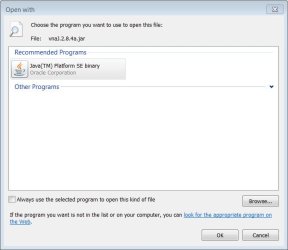
I have associated a jar file, and want to get back to where it was not associated.

How do I that trick.

Below is an overview of the file in focus.
 

Attachments

  • associate.jpg
    associate.jpg
    74.2 KB · Views: 3

My Computer

Computer type
PC/Desktop
Computer Manufacturer/Model Number
Homemade
OS
Windows 7 Ultimate
CPU
E7300
Motherboard
ASUS P5Q DeLuxe
Memory
4g
Graphics Card(s)
NVIDIA GeForce 7300 LE
Sound Card
N/A
Monitor(s) Displays
Acer
Screen Resolution
1600x1200
Hard Drives
Samsung HD503HI ATA Device
PSU
Seasonic
Case
ATX
Cooling
FAN
Keyboard
Logitech
Mouse
HP
Internet Speed
20/2
Antivirus
MSE
Browser
IE9, Chrome, Firefox
Hello darkhorse,

Here's how:-

1) Open an elevated command prompt (Start, type in cmd, right click, open as administrator)

2) In that elevated command prompt, type assoc .ext= " and press Enter. (there has to be a space after = sign and the " symbol)

(Note, ext stands for the file extension you wish to remove from the association list.)

So for example, you wish to disassociate .jar files, so the command would be assoc .jar= "

3) Reboot the computer

Hope that helps.
 

My Computer

Computer Manufacturer/Model Number
DELL SXPS 1640
OS
Windows 7 x64 Professional SP1
CPU
Intel C2D T9550 2.66 GHz @ 2.793 GHz (Thanks ThrottleStop!!)
Motherboard
Intel PM45
Memory
8 GB DDR3
Graphics Card(s)
ATI MOBILITY RADEON 4670
Sound Card
CREATIVE XFI AUDIO NOTEBOOK
Monitor(s) Displays
16.1 WLED
Screen Resolution
1920x1080
Hard Drives
Seagate ST9500420AS 500GB (465GiBi) 7200 RPM Drive

External Drives:-
2 TB WD Essentials x 3
1 TB WD Mybook Gen 1
1 TB WD Mybook Gen 2
1 TB Seagate
1 TB Seagate
320 GB WD Scorpio Black (enclosed)
PSU
90W Dell Power Brick
Case
Dell Chassis
Cooling
Coolermaster Cooling Pad
Keyboard
Built-in backlighted Keyboard
Mouse
Logitech Wireless Mini Mouse
Internet Speed
4/0.5
@solarmystic

That helped, many thanks :)
 

My Computer

Computer type
PC/Desktop
Computer Manufacturer/Model Number
Homemade
OS
Windows 7 Ultimate
CPU
E7300
Motherboard
ASUS P5Q DeLuxe
Memory
4g
Graphics Card(s)
NVIDIA GeForce 7300 LE
Sound Card
N/A
Monitor(s) Displays
Acer
Screen Resolution
1600x1200
Hard Drives
Samsung HD503HI ATA Device
PSU
Seasonic
Case
ATX
Cooling
FAN
Keyboard
Logitech
Mouse
HP
Internet Speed
20/2
Antivirus
MSE
Browser
IE9, Chrome, Firefox

My Computer

Computer Manufacturer/Model Number
DELL SXPS 1640
OS
Windows 7 x64 Professional SP1
CPU
Intel C2D T9550 2.66 GHz @ 2.793 GHz (Thanks ThrottleStop!!)
Motherboard
Intel PM45
Memory
8 GB DDR3
Graphics Card(s)
ATI MOBILITY RADEON 4670
Sound Card
CREATIVE XFI AUDIO NOTEBOOK
Monitor(s) Displays
16.1 WLED
Screen Resolution
1920x1080
Hard Drives
Seagate ST9500420AS 500GB (465GiBi) 7200 RPM Drive

External Drives:-
2 TB WD Essentials x 3
1 TB WD Mybook Gen 1
1 TB WD Mybook Gen 2
1 TB Seagate
1 TB Seagate
320 GB WD Scorpio Black (enclosed)
PSU
90W Dell Power Brick
Case
Dell Chassis
Cooling
Coolermaster Cooling Pad
Keyboard
Built-in backlighted Keyboard
Mouse
Logitech Wireless Mini Mouse
Internet Speed
4/0.5
Ok, and thanks again:geek:
 

My Computer

Computer type
PC/Desktop
Computer Manufacturer/Model Number
Homemade
OS
Windows 7 Ultimate
CPU
E7300
Motherboard
ASUS P5Q DeLuxe
Memory
4g
Graphics Card(s)
NVIDIA GeForce 7300 LE
Sound Card
N/A
Monitor(s) Displays
Acer
Screen Resolution
1600x1200
Hard Drives
Samsung HD503HI ATA Device
PSU
Seasonic
Case
ATX
Cooling
FAN
Keyboard
Logitech
Mouse
HP
Internet Speed
20/2
Antivirus
MSE
Browser
IE9, Chrome, Firefox
Hi sir! i want to try this solution on my friends pc,"exe" files but the problem is i cant even start an elevated command prompt.. it shows "C:\windows\system32\cmd.exe Application not found" .is there another way to launch a command prompt? I suspect it to be a virus, but cudn't install any anti virus because as i said "exe" files wouldn't run. I hope you can help me with my problem. thank you in advance.!!
 

My Computer

Computer Manufacturer/Model Number
hp pavilion dv7- 4285dx
OS
windows 7 Home Premium 64 bit
CPU
intel i5
Memory
8 gb
Graphics Card(s)
ati mobility radeon (512 mb)
Just write cmd in the start field.

As CMD comes up, then right click it and choose as administrator
 

My Computer

Computer type
PC/Desktop
Computer Manufacturer/Model Number
Homemade
OS
Windows 7 Ultimate
CPU
E7300
Motherboard
ASUS P5Q DeLuxe
Memory
4g
Graphics Card(s)
NVIDIA GeForce 7300 LE
Sound Card
N/A
Monitor(s) Displays
Acer
Screen Resolution
1600x1200
Hard Drives
Samsung HD503HI ATA Device
PSU
Seasonic
Case
ATX
Cooling
FAN
Keyboard
Logitech
Mouse
HP
Internet Speed
20/2
Antivirus
MSE
Browser
IE9, Chrome, Firefox
Hi sir! i want to try this solution on my friends pc,"exe" files but the problem is i cant even start an elevated command prompt.. it shows "C:\windows\system32\cmd.exe Application not found" .is there another way to launch a command prompt? I suspect it to be a virus, but cudn't install any anti virus because as i said "exe" files wouldn't run. I hope you can help me with my problem. thank you in advance.!!

WHAT ON EARTH YOU ARE DOING? Unassociating exe files means you can no longer run any programs!

Kari
 

My Computer

Computer type
Laptop
Computer Manufacturer/Model Number
HP ENVY 17-1150eg
OS
Windows 10 Pro x64 EN-GB
CPU
1.6 GHz Intel Core i7-720QM Processor
Memory
6 GB
Graphics Card(s)
ATI Mobility Radeon HD 5850 Graphics
Sound Card
Beats sound system with integrated subwoofer
Monitor(s) Displays
17" laptop display, 22" LED and 32" Full HD TV through HDMI
Screen Resolution
1600*900 (1), 1920*1080 (2&3)
Hard Drives
Internal: 2 x 500 GB SATA Hard Disk Drive 7200 rpm
External: 2TB for backups, 3TB USB3 network drive for media
Cooling
As Envy runs a bit warm, I have it on a Cooler Master pad
Keyboard
Logitech diNovo Media Desktop Laser (bluetooth)
Mouse
Logitech Performance Mouse MX
Internet Speed
50/10 Mbps VDSL
Antivirus
Windows Defender 4.3.9431.0
Browser
Maxthon 3.5.2., IE11
hi sir Kari, i want to clarify my post regarding reassociating "exe" files.my friend came to me for help about this. Here are what i can observe on it:

1. Almost all his desktop icons shows a windows media player shortcut.
2. When i try to open "exe" files it came out with the message "Application not found"

after hours of looking for solutions on the web I can safely say that it was cause by a malware altering the registry,since the pc doesn't have an updated anti-virus. The reason i was asking for 'other ways of launching a cmd' is i want to do "sfc /scannow" to see if something will come out of that.
then i came across a solution of merging a downloaded registry entry,which fixed the problem. Though now desktop icons are stuck showing windows media player icons...that is now the problem, hope someone here can help me get back the original icon for the .lnk files on the desktop.
 

Attachments

Last edited:

My Computer

Computer Manufacturer/Model Number
hp pavilion dv7- 4285dx
OS
windows 7 Home Premium 64 bit
CPU
intel i5
Memory
8 gb
Graphics Card(s)
ati mobility radeon (512 mb)

My Computer

Computer type
Laptop
Computer Manufacturer/Model Number
HP ENVY 17-1150eg
OS
Windows 10 Pro x64 EN-GB
CPU
1.6 GHz Intel Core i7-720QM Processor
Memory
6 GB
Graphics Card(s)
ATI Mobility Radeon HD 5850 Graphics
Sound Card
Beats sound system with integrated subwoofer
Monitor(s) Displays
17" laptop display, 22" LED and 32" Full HD TV through HDMI
Screen Resolution
1600*900 (1), 1920*1080 (2&3)
Hard Drives
Internal: 2 x 500 GB SATA Hard Disk Drive 7200 rpm
External: 2TB for backups, 3TB USB3 network drive for media
Cooling
As Envy runs a bit warm, I have it on a Cooler Master pad
Keyboard
Logitech diNovo Media Desktop Laser (bluetooth)
Mouse
Logitech Performance Mouse MX
Internet Speed
50/10 Mbps VDSL
Antivirus
Windows Defender 4.3.9431.0
Browser
Maxthon 3.5.2., IE11
Thank you sir Kari for the informative link on file reassociation.... but i manage to fix the icon issue by doing system restore. Hope it does help other members who are having similar problem.:D
 

My Computer

Computer Manufacturer/Model Number
hp pavilion dv7- 4285dx
OS
windows 7 Home Premium 64 bit
CPU
intel i5
Memory
8 gb
Graphics Card(s)
ati mobility radeon (512 mb)
Back
Top