Solved Reboot and Select proper Boot Device error- ASUS N55SF Laptop

Floody

New member
Local time
6:28 PM
Messages
8
I have had my laptop for about a year with minimal problems but it froze today and when I try to turn it on I get stuck at this screen saying, ' Reboot and select proper boot device or insert boot media in selected boot device and press a key'.

I can get to the BIOS screen but I am not great with computers so I would like some help trying to sort it. I do not have the Windows disks but luckily I saved the ISO versions saved on my D drive using ASUS AI Recovery a few days ago but obviously cannot access them at the moment.

Please help :(
 

My Computer My Computer

At a glance

Windows 7 64bit
Computer type
Laptop
Computer Manufacturer/Model Number
Asus
OS
Windows 7 64bit
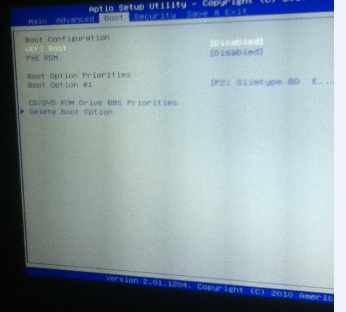
Can you go to the boot tab in the BIOS and please post a picture of it so we can see what boot order your devices are in?
 

My Computer My Computer

At a glance

Windows 7 Professional 32-bit/Windows 8 64-bi...Intel Core 2 Quad Q6600/Intel Core i7 4790/In...2GB/16GB/4GBIntel G33/G31 Express(Vostro)/NVIDIA GeForce ...
Computer type
PC/Desktop
Computer Manufacturer/Model Number
Dell Vostro 400/Dell XPS 8700(Slightly Customized for me by Dell)/Toshiba Satellite T135
OS
Windows 7 Professional 32-bit/Windows 8 64-bit/Win7 Pro64-bit
CPU
Intel Core 2 Quad Q6600/Intel Core i7 4790/Intel Pentium
Memory
2GB/16GB/4GB
Graphics Card(s)
Intel G33/G31 Express(Vostro)/NVIDIA GeForce GTX 745(XPS)
Monitor(s) Displays
HP 2009m(Vostro)/ViewSonic VX2250wm-LED(XPS)
Screen Resolution
1600x900(Vostro)/1920x1080(XPS)
Hard Drives
Seagate ST3160815AS(Vostro)/Western Digital Blue(Satellite)
External:
Western Digital My Passport 0748
Samsung HM121HC
Keyboard
Dell L100)(Vostro)/Dell KB2133p(XPS)
Mouse
Dell M-UAV-DEL8(XPS)
Internet Speed
100 Mbit/s(Only when IPTV is plugged out)
Antivirus
Avast, Malwarebytes PRO
Browser
Internet Explorer 11
Other Info
Note: Names with slashes between two different parts mean that the left is my old desktop and the right is my old laptop and the middle is my new desktop.(Unless specified)
Ping is horrible for servers overseas in US and Europe.
New laptop:LG Gram(Not available in US) Processor:Intel Core i3 4th Gen Ultra Low Power RAM:4GB Hard Drive:SK Hynix OEM MSATA or M.2 Graphics:Intel HD
Can you go to the boot tab in the BIOS and please post a picture of it so we can see what boot order your devices are in?

fd97164c98729b2d0a40e506c27ca5af.png

Only has the one device option unless I plug a USB in. I assume the option shown is my disk drive? :confused:

Sorry about the delay. Posting with an iPod is a nightmare
 

My Computer My Computer

At a glance

Windows 7 64bit
Computer type
Laptop
Computer Manufacturer/Model Number
Asus
OS
Windows 7 64bit
I can't see the picture very well but it seems that your Hard drive is not listed there, correct? You can determine any device listed there by googling it.

If your hard drive is not listed in BIOS setup then try reinstalling it. Most laptops have videos or tutorials showing how to access hard drive for your model via Google. If you can't get the hard drive to register in BIOS then you'll need to replace it and do a Clean Reinstall - Factory OEM Windows 7.

If your hard drive is detected and set first to boot, then boot the Win7 installation media for your licensed version from Steps 1 and 2 above to try running Startup Repair. If it fails everything that can be done to start Win7 is here in Troubleshooting Windows 7 Failure to Start. If you'll post back a picture you take of Partition Wizard drive map and listings we can help you better since it won't repair if the correct partition is not Partition Marked Active.

But if you want to skip that then you'll get a much better install than the one you have by doing the Clean Reinstall.

You also have UEFI boot disabled which means that the full features of that BIOS are not being used. This is fine but if that's not the way the reinstall was done or factory recovery was meant to be run then that may be stopping boot itself. However for reinstall I would leave UEFI boot disable since we see nothing but problems with it here.
 
I have found a video on this site:

Asus N55SF Disassembly | How To Save Money And Do It Yourself!

The problem is that I really don't know what I am looking for and this is the only video I have been able to find.

Is there any way to access my hard drive on another computer without removing it? If not do you think this is the sort of problem a computer store could fix?
 

My Computer My Computer

At a glance

Windows 7 64bit
Computer type
Laptop
Computer Manufacturer/Model Number
Asus
OS
Windows 7 64bit
I asked you if that was your HD listed there? Why did you not reply? Did you google the listing I cannot see?
 
I asked you if that was your HD listed there? Why did you not reply? Did you google the listing I cannot see?

No it isn't my hard drive listed it is Slimtype BD (the bluray drive) , sorry about that.

I googled the reinstalling the Hard drive bit but the only video I found wasn't great.
 

My Computer My Computer

At a glance

Windows 7 64bit
Computer type
Laptop
Computer Manufacturer/Model Number
Asus
OS
Windows 7 64bit
That's as good of a video as you'll likely find if that's your model. You can clearly see how he accesses the hard drive in bottom left corner and pulls it out. You'd want to reseat it against its contacts to see if you can get it to register in BIOS. Check under Storage or SATA drivers as well as boot order.

If not I would replace it with an SSD which is the best Upgrade you can do now for a PC like yours, with 10 second boots and lightning fast response. You can get one on Amazon, NewEgg or Tiger Direct for around $50 for 120gb or $100 for 240gb.
 
Last edited:
Ok. So it's the silver thing he removes early on into the video? If so then that shouldnt be to difficult. I will try that in the morning (late over here) and hopefully that works. If not I will check out that SSD.

Thanks for your help, I appreciate it
 

My Computer My Computer

At a glance

Windows 7 64bit
Computer type
Laptop
Computer Manufacturer/Model Number
Asus
OS
Windows 7 64bit
Bump. My new hard drive has finally arrived and it is being detected in the BIOS.

Now my problem is where to go from here. I still get the same error message after selecting it as a boot option. I have looked at that 'Clean Reinstall' page so is getting the Windows stuff on a USB or disk my first step?
 

My Computer My Computer

At a glance

Windows 7 64bit
Computer type
Laptop
Computer Manufacturer/Model Number
Asus
OS
Windows 7 64bit
Stuck on Expanding Windows Files- 0% for about 35 mins now. I'm guessing its not meant to take this long? :o.

EDIT: Ignore that. I just ejected the disk and put it back in and it started to fly through :)
 

My Computer My Computer

At a glance

Windows 7 64bit
Computer type
Laptop
Computer Manufacturer/Model Number
Asus
OS
Windows 7 64bit
Back
Top