
You are using an out of date browser. It may not display this or other websites correctly.
You should upgrade or use an alternative browser.
You should upgrade or use an alternative browser.
ReBoot Time [2]
- Thread starter paulpicks21
- Start date
- Local time
- 10:38 AM
- Messages
- 6,060
A reboot will take longer than a boot, so I will say 10 seconds is certainly possible.
Paul
Paul
My Computer
At a glance
Windows 7 Professional 64 bit
- OS
- Windows 7 Professional 64 bit

earled
New member
- Local time
- 5:38 AM
- Messages
- 15
really. Im surprised. Seems very fast. Must have some seriously nice Hardware to do that.
I have a samsung 840pro ssd in my laptop Samsung i7 and my reboot is 21 sec.
I have a samsung 840pro ssd in my laptop Samsung i7 and my reboot is 21 sec.
My Computer
At a glance
Win 7 Ultimate x64
- Computer type
- Laptop
- Computer Manufacturer/Model Number
- Samsung
- OS
- Win 7 Ultimate x64
- Hard Drives
- Samsung 840 256gb ssd
- Antivirus
- Avast
- Browser
- Firefox 21

Well on this machine I ma on now - a Toshiba laptop four years old I am trying out 8 as an upgrade and I have it starting up with a desktop view after login just like 7 (using Stardock8) it boots from cold in max 6 seconds and shuts down in max 1 second. Nothing fancy under the bonnet an i5 430M and 8GB 1333 RAM although it does have a SanDisk Extreme SSD. Even so before it used to boot in 30 seconds and close in around 20 seconds.someone posted on another forum that his PC boots in 10 sec. Is this possible? I LOL when I read that, thinking he exaggerated abit.
Summary
Power on > Metro tower screen > touch the spacebar > login page 6 seconds > 1 second > desktop.
I am very curious as to what is going to happen when I try this out on my Sandy bridge which has much better specs hardware wise. But at the moment to all intents and purpose I am just using it as per Windows 7

My Computer
At a glance
Desk1 7 Home Prem / Desk2 10 Pro / Main lap A...Desk1 i5 3750K / Laptop i7 GTX 860M / Desk2 i...Desk1 8GB (1866) / Desk2 16GB (1333) / Laptop...Desk 1& 2NVidia GTX 650 & Laptops on board Intel
- Computer type
- PC/Desktop
- Computer Manufacturer/Model Number
- Own build (new) Desk1 / Asus ROG Win 7 / Desk2 1st build
- OS
- Desk1 7 Home Prem / Desk2 10 Pro / Main lap Asus ROG 10 Pro 2 laptop Toshiba 7 Pro Asus P2520 7 & 10
- CPU
- Desk1 i5 3750K / Laptop i7 GTX 860M / Desk2 i5 2500
- Motherboard
- Desk1 Asus P877-V / Desk2 Gigabyte H67 UD3H / Laptop ?
- Memory
- Desk1 8GB (1866) / Desk2 16GB (1333) / Laptop 8Gb DDR3
- Graphics Card(s)
- Desk 1& 2NVidia GTX 650 & Laptops on board Intel
- Sound Card
- Desk 1 & 2 -XONAR DG Realtek High Def audio Laptop
- Monitor(s) Displays
- Desk 1 Benq HD 2450 / Desk2 Philips 24" / Laptop 17.5"
- Screen Resolution
- 1920x1080 D1 & D2 & Laptop 1
- Hard Drives
- Desk1 Samsung 120GB 830 SSD
Asus ROG 256GB 850 Pro SSD
Desk2 Samsung 840 256 SSD
Toshiba 120GB EVO
- PSU
- Desk 1 Corsair HX 1050/ Laptop ? / Desk 2 Corsair HX 650
- Case
- Desk 1 Cooler HAF XM ? Toshiba laptop / Desk2 Coolermaster
- Cooling
- Fans on all Desk1 -2 Desk2 - all Coolermasters 5 Laptop ?
- Keyboard
- Desk 1 MS Sidewinder X6 Desk 2 MS Sidewinder X 4
- Mouse
- Desk 1&2 - Gigabyte MS 900 gamer - laptop - Logitec wireless
- Internet Speed
- ADSL2+
- Other Info
- One other Desktop (tester) and spare Toshba laptop both with SSD's
Running Kaspersky 2016 ISS on all machines config'd identically
Logitec audio stereo systems on each machine (x3)
Canon MG5250MFC
Router/modem TP-Link running WPA2SK

really. Im surprised. Seems very fast. Must have some seriously nice Hardware to do that.
I have a samsung 840pro ssd in my laptop Samsung i7 and my reboot is 21 sec.
Maybe it was Windows 8?
A Guy
My Computer
At a glance
Windows 10 Home x64INTEL Core i5-750 Quad-Core 3.37GHzHyperX Fury Black Series 8GB (2 x 4GB) 1866MhzEVGA GeForce GTX 750 Superclocked 1GB 128-Bit...
- Computer type
- PC/Desktop
- OS
- Windows 10 Home x64
- CPU
- INTEL Core i5-750 Quad-Core 3.37GHz
- Motherboard
- ASUS P7P55D
- Memory
- HyperX Fury Black Series 8GB (2 x 4GB) 1866Mhz
- Graphics Card(s)
- EVGA GeForce GTX 750 Superclocked 1GB 128-Bit GDDR5
- Monitor(s) Displays
- LG 32MA68HY 32" IPS
- Screen Resolution
- 1920 x 1080
- Hard Drives
- Samsung 840 Evo 120GB, SEAGATE 500GB Barracuda® 7200.12, SATA 3 Gb/s, 7200 RPM, 16MB cache
- PSU
- ANTEC TruePower New TP-550, 80 PLUS, 550W
- Case
- ANTEC Three Hundred Illusion
- Cooling
- COOLER MASTER Hyper 212 Plus, 4 x 120mm 1 x 140mm Noctua's
- Internet Speed
- 85 + Mbps
- Antivirus
- Avast
- Browser
- Vivaldi
You may be right Bill I tried a reboot last night (that laptop with 8) with several open tabs and email plus a Speccy running and my reboot was 20 secs as opposed to the 5 sec start up the shut down though is still almost instantaneous.
My Computer
At a glance
Desk1 7 Home Prem / Desk2 10 Pro / Main lap A...Desk1 i5 3750K / Laptop i7 GTX 860M / Desk2 i...Desk1 8GB (1866) / Desk2 16GB (1333) / Laptop...Desk 1& 2NVidia GTX 650 & Laptops on board Intel
- Computer type
- PC/Desktop
- Computer Manufacturer/Model Number
- Own build (new) Desk1 / Asus ROG Win 7 / Desk2 1st build
- OS
- Desk1 7 Home Prem / Desk2 10 Pro / Main lap Asus ROG 10 Pro 2 laptop Toshiba 7 Pro Asus P2520 7 & 10
- CPU
- Desk1 i5 3750K / Laptop i7 GTX 860M / Desk2 i5 2500
- Motherboard
- Desk1 Asus P877-V / Desk2 Gigabyte H67 UD3H / Laptop ?
- Memory
- Desk1 8GB (1866) / Desk2 16GB (1333) / Laptop 8Gb DDR3
- Graphics Card(s)
- Desk 1& 2NVidia GTX 650 & Laptops on board Intel
- Sound Card
- Desk 1 & 2 -XONAR DG Realtek High Def audio Laptop
- Monitor(s) Displays
- Desk 1 Benq HD 2450 / Desk2 Philips 24" / Laptop 17.5"
- Screen Resolution
- 1920x1080 D1 & D2 & Laptop 1
- Hard Drives
- Desk1 Samsung 120GB 830 SSD
Asus ROG 256GB 850 Pro SSD
Desk2 Samsung 840 256 SSD
Toshiba 120GB EVO
- PSU
- Desk 1 Corsair HX 1050/ Laptop ? / Desk 2 Corsair HX 650
- Case
- Desk 1 Cooler HAF XM ? Toshiba laptop / Desk2 Coolermaster
- Cooling
- Fans on all Desk1 -2 Desk2 - all Coolermasters 5 Laptop ?
- Keyboard
- Desk 1 MS Sidewinder X6 Desk 2 MS Sidewinder X 4
- Mouse
- Desk 1&2 - Gigabyte MS 900 gamer - laptop - Logitec wireless
- Internet Speed
- ADSL2+
- Other Info
- One other Desktop (tester) and spare Toshba laptop both with SSD's
Running Kaspersky 2016 ISS on all machines config'd identically
Logitec audio stereo systems on each machine (x3)
Canon MG5250MFC
Router/modem TP-Link running WPA2SK

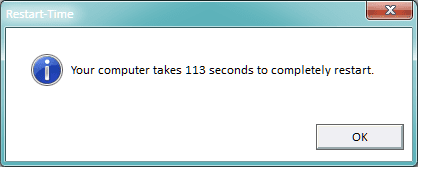
From Shawn's tutorial here: http://www.sevenforums.com/tutorials/720-restart-time.htmlGary what app are you using to get that readout please? Cos my Ivy takes forever in that POST bit too. But I only have the Z77-V board though.I think it's mostly due to the Z87 Deluxe board, it spend less time fricking around in POSTing. It also has a "Fast boot" option which I used too. I think I can do better by turning off some USB initializing too. Of course I'll post if I get a lower time.
This one will tell you how long you beast takes to reboot.
View attachment Restart Time.vbs
My Computer
At a glance
Windows 7 Ultimate X64 SP1Intel i5-2550K, Differing ~4.4-4.8GHz No buil...16GB G.Skill Sniper 1866MHz @ 2133MHz 2x8GBASUS GTX650TIB-DC2OC-2GD5, (650TI Boost)
- Computer type
- PC/Desktop
- Computer Manufacturer/Model Number
- Home Built Desktop By DataTech
- OS
- Windows 7 Ultimate X64 SP1
- CPU
- Intel i5-2550K, Differing ~4.4-4.8GHz No built in GPU
- Motherboard
- ASUS P8Z68-V PRO/GEN3
- Memory
- 16GB G.Skill Sniper 1866MHz @ 2133MHz 2x8GB
- Graphics Card(s)
- ASUS GTX650TIB-DC2OC-2GD5, (650TI Boost)
- Sound Card
- Onboard Realtek 5-1
- Monitor(s) Displays
- Samsung P2570HD
- Screen Resolution
- 1920x1080
- Hard Drives
- Samsung 840 Pro 256GB SSD for OS, 500GB Seagate Constellation (Enterprise drive) for Data
- PSU
- Corsair HX650W
- Case
- Inwin Dragon Rider
- Cooling
- Hyper 212 EVO w/two Noctua fans, push-pull, @1300 RPM
- Keyboard
- E-Z Eyes, bright yellow keys with large characters
- Mouse
- steelseries SENSEI Laser Pro Gaming
- Internet Speed
- 48-51Mbs Mbs down, 11 Mbs up Xfinity Cable
- Antivirus
- Norton Internet Security 2013
- Browser
- IE 10, Opera, Pale Moon if needed
- Other Info
- 4 case fans, LG BluRay-RE, ASUS DVD-RW, Mr. Fusion power supply, 1.21 gigawatts.
A cold start takes time doing things which a Reboot omits.
After a prolonged shut-down all the hardware is ready for hardware initialisation upon startup,
and amongst other things :-
my WDC HDD has a "spinup time" of 5.1 seconds, and becomes disk 0;
my Samsung HDD has a "spinup time" of 8.1 seconds, and becomes disk 1;
my OCZ SSD never spins and takes much longer doing whatever SSD's have to do before they are ready for Windows to enumerate and call this thing Disk 2.
A Reboot never extinguishes the "running lights" and there is no general hardware reset on all hardware that needs it.
With Windows 7 the result of a Reboot is that the SSD is "enumerated" a bit quicker and becomes either Disk 1 or Disk 0 and the HDD's make way for it, which confuses the totals and averages produced by HDS when monitoring total reads and writes.
Some years before Windows 95 I had a PC with a serial interface card,
and sometimes the card would crash a a Reboot never fixed it, it only recovered after a shutdown.
A prolonged delay between Power on and Windows 7 launching is something else,
with perhaps a 2% probability that flaky enumeration may introduce a race hazard,
and Windows confused my GPT style 600 GB WDC HDD with my MBR style 930 GB Samsung HDD,
and thought that they both had the same Disk ID (which is illegal),
so Windows stupidly knocked my MBR style HDD "offline" and then "fixed" my GPT style HDD as an MBR style and wrote a new MBR style Disk ID.
Essential partitions and folders on the Samsung HDD were "offline" and unusable.
Download and archive partitions and folders on the WDC HDD all became RAW DATA.
Windows 7 does not give me daily BSOD's like early versions of Windows,
but when it goes wrong it is more disastrous.
Sorry for the rant,
but Microsoft's KB acknowledging that SATA disk numbering is something they never got right and will never fix has really annoyed me.
After a prolonged shut-down all the hardware is ready for hardware initialisation upon startup,
and amongst other things :-
my WDC HDD has a "spinup time" of 5.1 seconds, and becomes disk 0;
my Samsung HDD has a "spinup time" of 8.1 seconds, and becomes disk 1;
my OCZ SSD never spins and takes much longer doing whatever SSD's have to do before they are ready for Windows to enumerate and call this thing Disk 2.
A Reboot never extinguishes the "running lights" and there is no general hardware reset on all hardware that needs it.
With Windows 7 the result of a Reboot is that the SSD is "enumerated" a bit quicker and becomes either Disk 1 or Disk 0 and the HDD's make way for it, which confuses the totals and averages produced by HDS when monitoring total reads and writes.
Some years before Windows 95 I had a PC with a serial interface card,
and sometimes the card would crash a a Reboot never fixed it, it only recovered after a shutdown.
A prolonged delay between Power on and Windows 7 launching is something else,
with perhaps a 2% probability that flaky enumeration may introduce a race hazard,
and Windows confused my GPT style 600 GB WDC HDD with my MBR style 930 GB Samsung HDD,
and thought that they both had the same Disk ID (which is illegal),
so Windows stupidly knocked my MBR style HDD "offline" and then "fixed" my GPT style HDD as an MBR style and wrote a new MBR style Disk ID.
Essential partitions and folders on the Samsung HDD were "offline" and unusable.
Download and archive partitions and folders on the WDC HDD all became RAW DATA.
Windows 7 does not give me daily BSOD's like early versions of Windows,
but when it goes wrong it is more disastrous.
Sorry for the rant,
but Microsoft's KB acknowledging that SATA disk numbering is something they never got right and will never fix has really annoyed me.
My Computer
At a glance
Windows 7 Ultimate 64 bit SP1 x64AMD Phenom X4 95008 GBATI Radeon HD 4600 Series
- Computer Manufacturer/Model Number
- ASUSTeK Computer INC. M3A32-MVP DELUXE (CPU 1)
- OS
- Windows 7 Ultimate 64 bit SP1 x64
- CPU
- AMD Phenom X4 9500
- Motherboard
- ASUSTeK M3A32-MVP Deluxe (CPU 1)
- Memory
- 8 GB
- Graphics Card(s)
- ATI Radeon HD 4600 Series
- Sound Card
- AMD High Definition Audio Device
- Monitor(s) Displays
- SyncMaster (1680x1050@60Hz)
- Hard Drives
- 59GB OCZ-VERTEX2 ATA Device
+
977GB SAMSUNG HD103SJ ATA Device
+
625GB WDC WD6401AALS-00L3B2 ATA Device
Alan mate send us a shot of the Disk Management so we can see what you have got.
My Computer
At a glance
Desk1 7 Home Prem / Desk2 10 Pro / Main lap A...Desk1 i5 3750K / Laptop i7 GTX 860M / Desk2 i...Desk1 8GB (1866) / Desk2 16GB (1333) / Laptop...Desk 1& 2NVidia GTX 650 & Laptops on board Intel
- Computer type
- PC/Desktop
- Computer Manufacturer/Model Number
- Own build (new) Desk1 / Asus ROG Win 7 / Desk2 1st build
- OS
- Desk1 7 Home Prem / Desk2 10 Pro / Main lap Asus ROG 10 Pro 2 laptop Toshiba 7 Pro Asus P2520 7 & 10
- CPU
- Desk1 i5 3750K / Laptop i7 GTX 860M / Desk2 i5 2500
- Motherboard
- Desk1 Asus P877-V / Desk2 Gigabyte H67 UD3H / Laptop ?
- Memory
- Desk1 8GB (1866) / Desk2 16GB (1333) / Laptop 8Gb DDR3
- Graphics Card(s)
- Desk 1& 2NVidia GTX 650 & Laptops on board Intel
- Sound Card
- Desk 1 & 2 -XONAR DG Realtek High Def audio Laptop
- Monitor(s) Displays
- Desk 1 Benq HD 2450 / Desk2 Philips 24" / Laptop 17.5"
- Screen Resolution
- 1920x1080 D1 & D2 & Laptop 1
- Hard Drives
- Desk1 Samsung 120GB 830 SSD
Asus ROG 256GB 850 Pro SSD
Desk2 Samsung 840 256 SSD
Toshiba 120GB EVO
- PSU
- Desk 1 Corsair HX 1050/ Laptop ? / Desk 2 Corsair HX 650
- Case
- Desk 1 Cooler HAF XM ? Toshiba laptop / Desk2 Coolermaster
- Cooling
- Fans on all Desk1 -2 Desk2 - all Coolermasters 5 Laptop ?
- Keyboard
- Desk 1 MS Sidewinder X6 Desk 2 MS Sidewinder X 4
- Mouse
- Desk 1&2 - Gigabyte MS 900 gamer - laptop - Logitec wireless
- Internet Speed
- ADSL2+
- Other Info
- One other Desktop (tester) and spare Toshba laptop both with SSD's
Running Kaspersky 2016 ISS on all machines config'd identically
Logitec audio stereo systems on each machine (x3)
Canon MG5250MFC
Router/modem TP-Link running WPA2SK
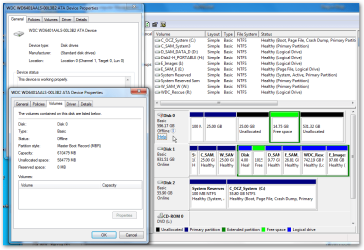
One shot attached.
Originally I looked for a way to change the disk ID from an MBR number to a GPT GUID,
but nothing that was safe worked for me,
and I fear that if I force a GPT format on the drive this would destroy all data.
As you can see, Disk 0 is now showing chunks of Free Space and Unallocated.
Disk Management originally showed chunks of RAW,
but this was before I changed the Disk 0 status from "online" to "offline" as a "write protect" measure.
Windows properties STUPIDLY declare :-
The Device is working Properly,
and
Partition Style Master Boot Record (MBR)
I "write protected" the disk before I unleashed "Data Recovery" utilities on the problem.
I determined that I would NOT allow any of them to modify the contents of the disk,
but did not trust them to obey my wishes.
Over 60% of 400+ GByte of data was Macrium Partition image backup files,
and all but the most recent one had been copied to an external backup,
and although I really do not need that particular backup,
it was a matter of personal honour that I recover it.
None of the freeware solutions could detect any files on the Disk
Then I tried a $69 professional solution which rescued this 400+ GB of data.
Unfortunately the "crucial" latest backup failed validation so I tried more freeware.
I estimate that this particular 6 GB file had been saved onto very second hand free space,
and as a result the 6 GB was probably in 200 fragments,
and obviously one or more fragments was assembled in the wrong order so that MD5 hash checksums rejected as invalid.
I looked at more freeware
I am happy to say that all my 400+ GB of data was rescued AND VALIDATED perfectly with the freeware
Lazesoft Recovery Suite Free, Free Windows System Recovery, Free Data Recovery, Free Windows Password Recovery, Free Disk Clone
I intend very soon to post my testimony for Lazesoft in
http://www.sevenforums.com/software/215829-free-great-programs-windows-7-2-a-9.html
Regards
Alan
Originally I looked for a way to change the disk ID from an MBR number to a GPT GUID,
but nothing that was safe worked for me,
and I fear that if I force a GPT format on the drive this would destroy all data.
As you can see, Disk 0 is now showing chunks of Free Space and Unallocated.
Disk Management originally showed chunks of RAW,
but this was before I changed the Disk 0 status from "online" to "offline" as a "write protect" measure.
Windows properties STUPIDLY declare :-
The Device is working Properly,
and
Partition Style Master Boot Record (MBR)
I "write protected" the disk before I unleashed "Data Recovery" utilities on the problem.
I determined that I would NOT allow any of them to modify the contents of the disk,
but did not trust them to obey my wishes.
Over 60% of 400+ GByte of data was Macrium Partition image backup files,
and all but the most recent one had been copied to an external backup,
and although I really do not need that particular backup,
it was a matter of personal honour that I recover it.
None of the freeware solutions could detect any files on the Disk
Then I tried a $69 professional solution which rescued this 400+ GB of data.
Unfortunately the "crucial" latest backup failed validation so I tried more freeware.
I estimate that this particular 6 GB file had been saved onto very second hand free space,
and as a result the 6 GB was probably in 200 fragments,
and obviously one or more fragments was assembled in the wrong order so that MD5 hash checksums rejected as invalid.
I looked at more freeware
I am happy to say that all my 400+ GB of data was rescued AND VALIDATED perfectly with the freeware
Lazesoft Recovery Suite Free, Free Windows System Recovery, Free Data Recovery, Free Windows Password Recovery, Free Disk Clone
I intend very soon to post my testimony for Lazesoft in
http://www.sevenforums.com/software/215829-free-great-programs-windows-7-2-a-9.html
Regards
Alan
Attachments
My Computer
At a glance
Windows 7 Ultimate 64 bit SP1 x64AMD Phenom X4 95008 GBATI Radeon HD 4600 Series
- Computer Manufacturer/Model Number
- ASUSTeK Computer INC. M3A32-MVP DELUXE (CPU 1)
- OS
- Windows 7 Ultimate 64 bit SP1 x64
- CPU
- AMD Phenom X4 9500
- Motherboard
- ASUSTeK M3A32-MVP Deluxe (CPU 1)
- Memory
- 8 GB
- Graphics Card(s)
- ATI Radeon HD 4600 Series
- Sound Card
- AMD High Definition Audio Device
- Monitor(s) Displays
- SyncMaster (1680x1050@60Hz)
- Hard Drives
- 59GB OCZ-VERTEX2 ATA Device
+
977GB SAMSUNG HD103SJ ATA Device
+
625GB WDC WD6401AALS-00L3B2 ATA Device
Hmm Alan as a matter of personal choice I never use the miracle fix programs mate they cause more problems than they are worth. It might be worth finding out from the others what their thoughts on that software.
Now the shot of your disk management looks beyond me mate how did all those partitions come about?? It doe s look like a right pickle, and just what is on the active partitions??
Now the shot of your disk management looks beyond me mate how did all those partitions come about?? It doe s look like a right pickle, and just what is on the active partitions??
My Computer
At a glance
Desk1 7 Home Prem / Desk2 10 Pro / Main lap A...Desk1 i5 3750K / Laptop i7 GTX 860M / Desk2 i...Desk1 8GB (1866) / Desk2 16GB (1333) / Laptop...Desk 1& 2NVidia GTX 650 & Laptops on board Intel
- Computer type
- PC/Desktop
- Computer Manufacturer/Model Number
- Own build (new) Desk1 / Asus ROG Win 7 / Desk2 1st build
- OS
- Desk1 7 Home Prem / Desk2 10 Pro / Main lap Asus ROG 10 Pro 2 laptop Toshiba 7 Pro Asus P2520 7 & 10
- CPU
- Desk1 i5 3750K / Laptop i7 GTX 860M / Desk2 i5 2500
- Motherboard
- Desk1 Asus P877-V / Desk2 Gigabyte H67 UD3H / Laptop ?
- Memory
- Desk1 8GB (1866) / Desk2 16GB (1333) / Laptop 8Gb DDR3
- Graphics Card(s)
- Desk 1& 2NVidia GTX 650 & Laptops on board Intel
- Sound Card
- Desk 1 & 2 -XONAR DG Realtek High Def audio Laptop
- Monitor(s) Displays
- Desk 1 Benq HD 2450 / Desk2 Philips 24" / Laptop 17.5"
- Screen Resolution
- 1920x1080 D1 & D2 & Laptop 1
- Hard Drives
- Desk1 Samsung 120GB 830 SSD
Asus ROG 256GB 850 Pro SSD
Desk2 Samsung 840 256 SSD
Toshiba 120GB EVO
- PSU
- Desk 1 Corsair HX 1050/ Laptop ? / Desk 2 Corsair HX 650
- Case
- Desk 1 Cooler HAF XM ? Toshiba laptop / Desk2 Coolermaster
- Cooling
- Fans on all Desk1 -2 Desk2 - all Coolermasters 5 Laptop ?
- Keyboard
- Desk 1 MS Sidewinder X6 Desk 2 MS Sidewinder X 4
- Mouse
- Desk 1&2 - Gigabyte MS 900 gamer - laptop - Logitec wireless
- Internet Speed
- ADSL2+
- Other Info
- One other Desktop (tester) and spare Toshba laptop both with SSD's
Running Kaspersky 2016 ISS on all machines config'd identically
Logitec audio stereo systems on each machine (x3)
Canon MG5250MFC
Router/modem TP-Link running WPA2SK
There is only one active partition, system Reserved, it is 100 MB at the start of Disk 2, the SSD, used for booting Win 7.
Disk 1 has System Reserved, NOT active, part of Windows 7 before I had an SSD.
My WDC HDD had one dozen partitions before Windows trashed its GPT status,
and only the first two chunks correspond to original reality when I first restored a Macrium image of Disc 1 Windows 7 onto Disc 0 to satisfy myself that my Boot Recovery CD had adequate drivers for writing to my hardware - I did not want to wipe out my Disc 1 working installation with a recovery process that I feared could be as unreliable as Acronis.
The other three chunks on Disk 0 are entirely Windows stupidity that it is using a MBR partition table and Extended partition table that never existed when the drive was good. Windows has created a work of fiction.
It is worthy of note that my 930 GB Disk 1 started with 2 partitions without drive letters that were my 25 GB install of Windows before I had an SSD,
and Partitions D:\ and H:\ which totalled 15 GB.
After Disk 0 was trashed I created many more partitions for recovery of data from what Lazesoft recognised as one dozen GPT partitions
I am fully with you
"that as a matter of personal choice I never use the miracle fix programs that cause more problems than they are worth".
UNFORTUNATELY most of the applications that I am familiar with will only run under the horrendous "miracle fix program" that is Windows.
There are many other people that prefer Linux.
So far as I am concerned the rot set in when IBM chose that the IBM PC would use DOS instead of the superior CPM.
If however you consider Lazesoft to be an untrustworthy "Miracle Fix Program" then,
with all due respect you could not be more wrong.
I do not use Lazesoft as my GOTO "Miracle Fix Program" for each and every disaster,
and as something to use in place of a reliable, dependable, backup procedure.
But I find it priceless when the backup procedure falters.
I use Macrium Reflect to create and validate image backup files on the secondary HDD (Disk 0),
and I subsequently connect to an external eSATA HDD and use Teracopy to copy those files from Disk 0,
and to perform hash checksum validation of copying to ensure integrity.
I once suffered 50% corrupted "duplicates" when using Windows Explorer copy to an USB2 external.
My external drive is ONLY connected when I need it,
so as to protect its integrity against a Power Surge that destroys the computer;
or yet another Windows disaster that ruins everything it can touch.
NB so far as the thoughts of other people are concerned, there are quite a few other people that are more than satisfied with Lazesoft,
and I only tried it because someone on the GAOTD site recommended this a superior alternative to the Data Recovery software that was on offer that day.
Regards
Alan
Disk 1 has System Reserved, NOT active, part of Windows 7 before I had an SSD.
My WDC HDD had one dozen partitions before Windows trashed its GPT status,
and only the first two chunks correspond to original reality when I first restored a Macrium image of Disc 1 Windows 7 onto Disc 0 to satisfy myself that my Boot Recovery CD had adequate drivers for writing to my hardware - I did not want to wipe out my Disc 1 working installation with a recovery process that I feared could be as unreliable as Acronis.
The other three chunks on Disk 0 are entirely Windows stupidity that it is using a MBR partition table and Extended partition table that never existed when the drive was good. Windows has created a work of fiction.
It is worthy of note that my 930 GB Disk 1 started with 2 partitions without drive letters that were my 25 GB install of Windows before I had an SSD,
and Partitions D:\ and H:\ which totalled 15 GB.
After Disk 0 was trashed I created many more partitions for recovery of data from what Lazesoft recognised as one dozen GPT partitions
I am fully with you
"that as a matter of personal choice I never use the miracle fix programs that cause more problems than they are worth".
UNFORTUNATELY most of the applications that I am familiar with will only run under the horrendous "miracle fix program" that is Windows.
There are many other people that prefer Linux.
So far as I am concerned the rot set in when IBM chose that the IBM PC would use DOS instead of the superior CPM.
If however you consider Lazesoft to be an untrustworthy "Miracle Fix Program" then,
with all due respect you could not be more wrong.
I do not use Lazesoft as my GOTO "Miracle Fix Program" for each and every disaster,
and as something to use in place of a reliable, dependable, backup procedure.
But I find it priceless when the backup procedure falters.
I use Macrium Reflect to create and validate image backup files on the secondary HDD (Disk 0),
and I subsequently connect to an external eSATA HDD and use Teracopy to copy those files from Disk 0,
and to perform hash checksum validation of copying to ensure integrity.
I once suffered 50% corrupted "duplicates" when using Windows Explorer copy to an USB2 external.
My external drive is ONLY connected when I need it,
so as to protect its integrity against a Power Surge that destroys the computer;
or yet another Windows disaster that ruins everything it can touch.
NB so far as the thoughts of other people are concerned, there are quite a few other people that are more than satisfied with Lazesoft,
and I only tried it because someone on the GAOTD site recommended this a superior alternative to the Data Recovery software that was on offer that day.
Regards
Alan
My Computer
At a glance
Windows 7 Ultimate 64 bit SP1 x64AMD Phenom X4 95008 GBATI Radeon HD 4600 Series
- Computer Manufacturer/Model Number
- ASUSTeK Computer INC. M3A32-MVP DELUXE (CPU 1)
- OS
- Windows 7 Ultimate 64 bit SP1 x64
- CPU
- AMD Phenom X4 9500
- Motherboard
- ASUSTeK M3A32-MVP Deluxe (CPU 1)
- Memory
- 8 GB
- Graphics Card(s)
- ATI Radeon HD 4600 Series
- Sound Card
- AMD High Definition Audio Device
- Monitor(s) Displays
- SyncMaster (1680x1050@60Hz)
- Hard Drives
- 59GB OCZ-VERTEX2 ATA Device
+
977GB SAMSUNG HD103SJ ATA Device
+
625GB WDC WD6401AALS-00L3B2 ATA Device

My Computer
At a glance
Windows 10 Home 64-BitIntel Core i3 380M @ 2.53GHz Arrandale 32nm T...Total RAM = 4.00 GB and Usable RAM = 3.80 GBGeneric PnP Monitor (1366x768@60Hz) Intel HD ...
- Computer type
- Laptop
- Computer Manufacturer/Model Number
- Dell Inspiron N4030
- OS
- Windows 10 Home 64-Bit
- CPU
- Intel Core i3 380M @ 2.53GHz Arrandale 32nm Technology
- Motherboard
- Dell Inc. 0K13WN (CPU 1)
- Memory
- Total RAM = 4.00 GB and Usable RAM = 3.80 GB
- Graphics Card(s)
- Generic PnP Monitor (1366x768@60Hz) Intel HD Graphics (Dell)
- Sound Card
- IDT High Definition Audio CODEC Bluetooth Hands-free Audio
- Monitor(s) Displays
- 1
- Screen Resolution
- 1366 x 768 x 32 bits (4294967296 colors) @ 59 Hz
- Hard Drives
- ATA WDC WD3200BEVT-7 SCSI Disk Device Size = 320.00 GB
- Internet Speed
- 6-14 Mbps Max and 153 Kbps Min
- Antivirus
- MBAM Pro, Windows Defender, SuperAntiSpyware, SpyBot S&D
- Browser
- Microsoft Edge, IE11, Google Chrome, Firefox
- Other Info
- Your dude.
Lol, you can find earlier W7 reboot times here.nope he said boots from being off. I call BS
Using UEFI (no CSM) BIOS can post in less than 2 seconds, add to that a MainPathBootTime of ~3.2 seconds and boot times can be fairly quick.
An example of BIOS initialization with W7 and UEFI using the Windows Assessment Console

My Computer
At a glance
Windows 7 Home Premium 64bit
- OS
- Windows 7 Home Premium 64bit
This thread is for bragging about fast restart times, not problem solving. 
My Computer
At a glance
Windows 7 Ultimate X64 SP1Intel i5-2550K, Differing ~4.4-4.8GHz No buil...16GB G.Skill Sniper 1866MHz @ 2133MHz 2x8GBASUS GTX650TIB-DC2OC-2GD5, (650TI Boost)
- Computer type
- PC/Desktop
- Computer Manufacturer/Model Number
- Home Built Desktop By DataTech
- OS
- Windows 7 Ultimate X64 SP1
- CPU
- Intel i5-2550K, Differing ~4.4-4.8GHz No built in GPU
- Motherboard
- ASUS P8Z68-V PRO/GEN3
- Memory
- 16GB G.Skill Sniper 1866MHz @ 2133MHz 2x8GB
- Graphics Card(s)
- ASUS GTX650TIB-DC2OC-2GD5, (650TI Boost)
- Sound Card
- Onboard Realtek 5-1
- Monitor(s) Displays
- Samsung P2570HD
- Screen Resolution
- 1920x1080
- Hard Drives
- Samsung 840 Pro 256GB SSD for OS, 500GB Seagate Constellation (Enterprise drive) for Data
- PSU
- Corsair HX650W
- Case
- Inwin Dragon Rider
- Cooling
- Hyper 212 EVO w/two Noctua fans, push-pull, @1300 RPM
- Keyboard
- E-Z Eyes, bright yellow keys with large characters
- Mouse
- steelseries SENSEI Laser Pro Gaming
- Internet Speed
- 48-51Mbs Mbs down, 11 Mbs up Xfinity Cable
- Antivirus
- Norton Internet Security 2013
- Browser
- IE 10, Opera, Pale Moon if needed
- Other Info
- 4 case fans, LG BluRay-RE, ASUS DVD-RW, Mr. Fusion power supply, 1.21 gigawatts.

Strontium, you hit the world record!
My Computer
At a glance
Windows 10 Home 64-BitIntel Core i3 380M @ 2.53GHz Arrandale 32nm T...Total RAM = 4.00 GB and Usable RAM = 3.80 GBGeneric PnP Monitor (1366x768@60Hz) Intel HD ...
- Computer type
- Laptop
- Computer Manufacturer/Model Number
- Dell Inspiron N4030
- OS
- Windows 10 Home 64-Bit
- CPU
- Intel Core i3 380M @ 2.53GHz Arrandale 32nm Technology
- Motherboard
- Dell Inc. 0K13WN (CPU 1)
- Memory
- Total RAM = 4.00 GB and Usable RAM = 3.80 GB
- Graphics Card(s)
- Generic PnP Monitor (1366x768@60Hz) Intel HD Graphics (Dell)
- Sound Card
- IDT High Definition Audio CODEC Bluetooth Hands-free Audio
- Monitor(s) Displays
- 1
- Screen Resolution
- 1366 x 768 x 32 bits (4294967296 colors) @ 59 Hz
- Hard Drives
- ATA WDC WD3200BEVT-7 SCSI Disk Device Size = 320.00 GB
- Internet Speed
- 6-14 Mbps Max and 153 Kbps Min
- Antivirus
- MBAM Pro, Windows Defender, SuperAntiSpyware, SpyBot S&D
- Browser
- Microsoft Edge, IE11, Google Chrome, Firefox
- Other Info
- Your dude.
No worries Alan I don't doubt Lazesoft is good I was sorta generalising really and not targetting Lazesoft. I was referring more to heaps of those reg cleaners and performance enhancing crapware that a lot of folk use and wreck the machine with they are usually free and the one you use I think you said you paid for which if right gives you some comeback.There is only one active partition, system Reserved, it is 100 MB at the start of Disk 2, the SSD, used for booting Win 7.
Disk 1 has System Reserved, NOT active, part of Windows 7 before I had an SSD.
My WDC HDD had one dozen partitions before Windows trashed its GPT status,
and only the first two chunks correspond to original reality when I first restored a Macrium image of Disc 1 Windows 7 onto Disc 0 to satisfy myself that my Boot Recovery CD had adequate drivers for writing to my hardware - I did not want to wipe out my Disc 1 working installation with a recovery process that I feared could be as unreliable as Acronis.
The other three chunks on Disk 0 are entirely Windows stupidity that it is using a MBR partition table and Extended partition table that never existed when the drive was good. Windows has created a work of fiction.
It is worthy of note that my 930 GB Disk 1 started with 2 partitions without drive letters that were my 25 GB install of Windows before I had an SSD,
and Partitions D:\ and H:\ which totalled 15 GB.
After Disk 0 was trashed I created many more partitions for recovery of data from what Lazesoft recognised as one dozen GPT partitions
I am fully with you
"that as a matter of personal choice I never use the miracle fix programs that cause more problems than they are worth".
UNFORTUNATELY most of the applications that I am familiar with will only run under the horrendous "miracle fix program" that is Windows.
There are many other people that prefer Linux.
So far as I am concerned the rot set in when IBM chose that the IBM PC would use DOS instead of the superior CPM.
If however you consider Lazesoft to be an untrustworthy "Miracle Fix Program" then,
with all due respect you could not be more wrong.
I do not use Lazesoft as my GOTO "Miracle Fix Program" for each and every disaster,
and as something to use in place of a reliable, dependable, backup procedure.
But I find it priceless when the backup procedure falters.
I use Macrium Reflect to create and validate image backup files on the secondary HDD (Disk 0),
and I subsequently connect to an external eSATA HDD and use Teracopy to copy those files from Disk 0,
and to perform hash checksum validation of copying to ensure integrity.
I once suffered 50% corrupted "duplicates" when using Windows Explorer copy to an USB2 external.
My external drive is ONLY connected when I need it,
so as to protect its integrity against a Power Surge that destroys the computer;
or yet another Windows disaster that ruins everything it can touch.
NB so far as the thoughts of other people are concerned, there are quite a few other people that are more than satisfied with Lazesoft,
and I only tried it because someone on the GAOTD site recommended this a superior alternative to the Data Recovery software that was on offer that day.
Regards
Alan
If you want a really good partitioning tool and I use it a lot for just that and testing drives etc etc is Partition Wizard free and is used a lot by others in here. Best Free Partition Manager Freeware and free partition magic for Windows 7, Windows 8, Windows Vista and Windows XP 32 bit & 64 bit. MiniTool Free Partition Manager Software Home Edition.
Sorry Gary I didn't mean to take over and should have referred Alan to make another thread

My Computer
At a glance
Desk1 7 Home Prem / Desk2 10 Pro / Main lap A...Desk1 i5 3750K / Laptop i7 GTX 860M / Desk2 i...Desk1 8GB (1866) / Desk2 16GB (1333) / Laptop...Desk 1& 2NVidia GTX 650 & Laptops on board Intel
- Computer type
- PC/Desktop
- Computer Manufacturer/Model Number
- Own build (new) Desk1 / Asus ROG Win 7 / Desk2 1st build
- OS
- Desk1 7 Home Prem / Desk2 10 Pro / Main lap Asus ROG 10 Pro 2 laptop Toshiba 7 Pro Asus P2520 7 & 10
- CPU
- Desk1 i5 3750K / Laptop i7 GTX 860M / Desk2 i5 2500
- Motherboard
- Desk1 Asus P877-V / Desk2 Gigabyte H67 UD3H / Laptop ?
- Memory
- Desk1 8GB (1866) / Desk2 16GB (1333) / Laptop 8Gb DDR3
- Graphics Card(s)
- Desk 1& 2NVidia GTX 650 & Laptops on board Intel
- Sound Card
- Desk 1 & 2 -XONAR DG Realtek High Def audio Laptop
- Monitor(s) Displays
- Desk 1 Benq HD 2450 / Desk2 Philips 24" / Laptop 17.5"
- Screen Resolution
- 1920x1080 D1 & D2 & Laptop 1
- Hard Drives
- Desk1 Samsung 120GB 830 SSD
Asus ROG 256GB 850 Pro SSD
Desk2 Samsung 840 256 SSD
Toshiba 120GB EVO
- PSU
- Desk 1 Corsair HX 1050/ Laptop ? / Desk 2 Corsair HX 650
- Case
- Desk 1 Cooler HAF XM ? Toshiba laptop / Desk2 Coolermaster
- Cooling
- Fans on all Desk1 -2 Desk2 - all Coolermasters 5 Laptop ?
- Keyboard
- Desk 1 MS Sidewinder X6 Desk 2 MS Sidewinder X 4
- Mouse
- Desk 1&2 - Gigabyte MS 900 gamer - laptop - Logitec wireless
- Internet Speed
- ADSL2+
- Other Info
- One other Desktop (tester) and spare Toshba laptop both with SSD's
Running Kaspersky 2016 ISS on all machines config'd identically
Logitec audio stereo systems on each machine (x3)
Canon MG5250MFC
Router/modem TP-Link running WPA2SK
Hmm a bit of a slouch is Ivy she takes 38 seconds to reboot
My Computer
At a glance
Desk1 7 Home Prem / Desk2 10 Pro / Main lap A...Desk1 i5 3750K / Laptop i7 GTX 860M / Desk2 i...Desk1 8GB (1866) / Desk2 16GB (1333) / Laptop...Desk 1& 2NVidia GTX 650 & Laptops on board Intel
- Computer type
- PC/Desktop
- Computer Manufacturer/Model Number
- Own build (new) Desk1 / Asus ROG Win 7 / Desk2 1st build
- OS
- Desk1 7 Home Prem / Desk2 10 Pro / Main lap Asus ROG 10 Pro 2 laptop Toshiba 7 Pro Asus P2520 7 & 10
- CPU
- Desk1 i5 3750K / Laptop i7 GTX 860M / Desk2 i5 2500
- Motherboard
- Desk1 Asus P877-V / Desk2 Gigabyte H67 UD3H / Laptop ?
- Memory
- Desk1 8GB (1866) / Desk2 16GB (1333) / Laptop 8Gb DDR3
- Graphics Card(s)
- Desk 1& 2NVidia GTX 650 & Laptops on board Intel
- Sound Card
- Desk 1 & 2 -XONAR DG Realtek High Def audio Laptop
- Monitor(s) Displays
- Desk 1 Benq HD 2450 / Desk2 Philips 24" / Laptop 17.5"
- Screen Resolution
- 1920x1080 D1 & D2 & Laptop 1
- Hard Drives
- Desk1 Samsung 120GB 830 SSD
Asus ROG 256GB 850 Pro SSD
Desk2 Samsung 840 256 SSD
Toshiba 120GB EVO
- PSU
- Desk 1 Corsair HX 1050/ Laptop ? / Desk 2 Corsair HX 650
- Case
- Desk 1 Cooler HAF XM ? Toshiba laptop / Desk2 Coolermaster
- Cooling
- Fans on all Desk1 -2 Desk2 - all Coolermasters 5 Laptop ?
- Keyboard
- Desk 1 MS Sidewinder X6 Desk 2 MS Sidewinder X 4
- Mouse
- Desk 1&2 - Gigabyte MS 900 gamer - laptop - Logitec wireless
- Internet Speed
- ADSL2+
- Other Info
- One other Desktop (tester) and spare Toshba laptop both with SSD's
Running Kaspersky 2016 ISS on all machines config'd identically
Logitec audio stereo systems on each machine (x3)
Canon MG5250MFC
Router/modem TP-Link running WPA2SK
- Local time
- 10:38 AM
- Messages
- 6,060
My Computer
At a glance
Windows 7 Professional 64 bit
- OS
- Windows 7 Professional 64 bit
Similar threads
- Replies
- 5
- Views
- 2K

- Replies
- 0
- Views
- 585
- Replies
- 0
- Views
- 2K

- Replies
- 37
- Views
- 17K
- Replies
- 12
- Views
- 4K