
Receiving Open File Security Warning on Admin '.msc' Console Files?!

KapaKai5O

New member
Member
Local time
9:29 AM
Messages
43
Aloha Forum!

This just started happening during a custom install of this HP EliteDesk 800G1 Twr.
Reached a point where no matter what I install it gives that warning on it's own admin mmc console files!
System is:
i7, 16GB ram, W7 Pro 32 bit, SSD 500GB, Toshiba 500GB... Otherwise solid as a brick.

I've seen your excellent posts on workarounds for common files and knew how to do that.
As such, I've been able to create a workaround using gpedit same as that but this shouldn't be happening. In addition, it's 'smelling' like something else is at work here that I've never come across in almost 30 years of IT and system building\maintaining\networking work.

Haven't regressive tested this but [so far] it appears that these are the only files doing this.
And they don't all experience it. For instance, I've setup right click options on 'my computer' and SOME of them just open like they're supposed to. But 'Manage' always gives the warning whether or not I use the right-click option on computer or simply goto admin tools and launch from there.

Even more strange, it seems that everything launched from the Admin tools gives that popup but event viewer, regedit and maybe others open up as normal using right-click option on computer.

Has anyone experienced this crazy weirdness? :banghead:
Possibly it's permissions, but I've checked that and it doesn't appear to be any different than other systems not exhibiting this.

A Wholehearted Mahalo (thank you very much) for any info or ideas on this.

P.S. System is clean - brand new install etc. Setup at least 7 other systems with no problems like this.
But this one has the most RAM I've dealt with so far (16GB). Prior to that the 8GB systems don't do this.
 

My Computer

Computer type
PC/Desktop
Computer Manufacturer/Model Number
ASUS - Home Built
OS
Win 7 Pro 32bit - XP & W2K3 Server - Linux
CPU
i7
Motherboard
Intel
Memory
16 GB
Graphics Card(s)
Radeon HD 7800 Series
Sound Card
Asus Xonar
Monitor(s) Displays
Asus
Hard Drives
SSD - Samsung EVO 1 TB + WD 2 TB x 4
PSU
EVGA G3 1000
Case
Thermaltake Level 10 GT
Cooling
Lots
Keyboard
Logitech
Mouse
MX Master 3
Internet Speed
1GB
Antivirus
Never
Browser
Pale Moon & Ungoogled Chromium, Brave etc.
Other Info
I thank you for this impressive forum
Aloha Forum!
P.S. System is clean - brand new install etc. Setup at least 7 other systems with no problems like this.
But this one has the most RAM I've dealt with so far (16GB). Prior to that the 8GB systems don't do this.
Can't help much with your main problem but I do see that you have installed Windows 7 32Bit on a machine with 16GB of RAM. A 32 bit system can only handle up to 3.5GB RAM!
This might help:
disable open file security warning, unknown publisher.
 

My Computer

Computer type
PC/Desktop
OS
Microsoft Windows 7 Home Premium 64-bit 7601 Multiprocessor Free Service Pack 1
CPU
Intel(R) Core(TM) i7-3770 CPU @ 3.40GHz
Motherboard
ASUSTeK COMPUTER INC. P8H77-M
Memory
8.00 GB
Graphics Card(s)
Intel(R) HD Graphics 4000
Sound Card
On Board
Monitor(s) Displays
Dell 24"
Screen Resolution
1920 x 1080
Hard Drives
(1) INTEL SSDSC2CT180A3 ATA Device (2) ST500DM002-1BD142 ATA Device (3) WDC WD3200AAKS-75L9A0 ATA Device (4) Generic- Compact Flash USB Device (5) Generic- MS/MS-Pro USB Device (6) Generic- SD/MMC USB Device (7) Generic- SM/xD-Picture USB
PSU
500w Corsair
Case
Cooler Master
Cooling
3 Fans
Keyboard
Logitech MK300
Mouse
Logitech WOM
Internet Speed
75Mb
Antivirus
Norton 360
Browser
Firefox, Opera, IE
No Warning When Directly Run from Run Window

Mitchell, thank you very much for your blazing fast reply!
Yes, I'm aware of the RAM implications. Yet this doesn't happen on an identical system w/ 8GB RAM.
I'll try removing 8GB to test whether or not the extra ram is doing this.

Another crazy detail:
When we input the path (from properties of Admin tools) directly into Run, they ALL run with no warning every single time.

As mentioned in first post, I was aware of being able to 'isolate' certain file types via gpo but what I'm concerned about is why the msc console files are being 'seen' as Internet files etc. and if there is something else messed up?

Don't want to finish these installs only to find out the worst. THANKS AGAIN

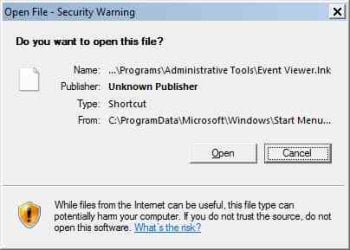
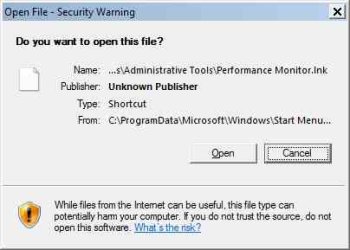
Here's screenshot of messages - No options at all for these errors.
 

Attachments

  • OpenFileSecurityWarning_EventViewer.jpg
    OpenFileSecurityWarning_EventViewer.jpg
    10.9 KB · Views: 15
  • OpenFileSecurityWarning_PerfMon.jpg
    OpenFileSecurityWarning_PerfMon.jpg
    10.9 KB · Views: 15
Last edited:

My Computer

Computer type
PC/Desktop
Computer Manufacturer/Model Number
ASUS - Home Built
OS
Win 7 Pro 32bit - XP & W2K3 Server - Linux
CPU
i7
Motherboard
Intel
Memory
16 GB
Graphics Card(s)
Radeon HD 7800 Series
Sound Card
Asus Xonar
Monitor(s) Displays
Asus
Hard Drives
SSD - Samsung EVO 1 TB + WD 2 TB x 4
PSU
EVGA G3 1000
Case
Thermaltake Level 10 GT
Cooling
Lots
Keyboard
Logitech
Mouse
MX Master 3
Internet Speed
1GB
Antivirus
Never
Browser
Pale Moon & Ungoogled Chromium, Brave etc.
Other Info
I thank you for this impressive forum
Even though I did manage to go further after removing 8GB ram,
this problem eventually reared it's ugly head again.
I don't have a clue what triggers this crazy behavior. :confused:
By no means did I solve this problem, but ended up throwing in the towel and 'isolated' .msc files
via gpo which I can only count as a workaround at this point.
I will proceed and see what else I can find that reminds me of Rod Serling's Twilight Zone.

If anyone has any ideas on this, please give me a holler!
 

My Computer

Computer type
PC/Desktop
Computer Manufacturer/Model Number
ASUS - Home Built
OS
Win 7 Pro 32bit - XP & W2K3 Server - Linux
CPU
i7
Motherboard
Intel
Memory
16 GB
Graphics Card(s)
Radeon HD 7800 Series
Sound Card
Asus Xonar
Monitor(s) Displays
Asus
Hard Drives
SSD - Samsung EVO 1 TB + WD 2 TB x 4
PSU
EVGA G3 1000
Case
Thermaltake Level 10 GT
Cooling
Lots
Keyboard
Logitech
Mouse
MX Master 3
Internet Speed
1GB
Antivirus
Never
Browser
Pale Moon & Ungoogled Chromium, Brave etc.
Other Info
I thank you for this impressive forum
To to get things right off the bat. Install no more than 4 gigs of ram with a Windows 7 32 bit system.

More ram than that does nothing but cause problems.
If you want to use more than 4 gigs of ram, install Windows 7 64 bit.
The same Windows 7 COA key will work on 32 and 64 bit systems.
You will have to do a clean install to get a 64 bit system installed.

Jack
 

My Computer

Computer type
PC/Desktop
Computer Manufacturer/Model Number
Home made Desktop
OS
Windows 10 Pro. 64/ version 1709 Windows 7 Pro/64
CPU
Intel i7-6800K @ 4.3
Motherboard
ASUS X-99 Deluxe II
Memory
Corsair Platinum 16 gig @2400
Graphics Card(s)
EVGA GTX 1070 OC
Monitor(s) Displays
Asus 27" LED LCD/VE278Q
Screen Resolution
1920-1080 or 1280-720 HDMI
Hard Drives
INTEL SSD 730-240 Gb Sata 3.0/
PSU
EVGA Platium 1200W
Case
Phanteks Luxe Tempered Glass 8 fans/ one radiator
Cooling
XSPC/ Water Cooled CPU
Keyboard
Das 4 Professional
Mouse
Logitech M705/MX Anywhere 2-S
Internet Speed
100 mbits
Antivirus
Microsoft Security Essentials/ Malwarebytes Premium 3.0/ SAS
Browser
I.E. 11 default/Firefox/ ISP Time Warner Cable/Spectrum
Other Info
LG BluRay Burner/
Sound system-KLipsch-THX/
Icy Dock ssd Hot Swap bays.
To to get things right off the bat. Install no more than 4 gigs of ram with a Windows 7 32 bit system.

More ram than that does nothing but cause problems.
If you want to use more than 4 gigs of ram, install Windows 7 64 bit.
The same Windows 7 COA key will work on 32 and 64 bit systems.
You will have to do a clean install to get a 64 bit system installed. Jack
Thank you very much for your input and taking time to respond.
Actually, I have several 32bit W7 systems with 8GBs that are solid as bricks and have lots of old & new software installed.
No problems whatsoever. Only this one gave me this specific and ridiculous problem.
So far, that's the only problem and it's one that many others are experiencing.

I dual boot Linux so that's why I prefer more ram.
Yes, it might have been foolish, but even with 16GB, it never gave me any problems but this one.
I'll be leaving 8GB because even that's plenty for my customized 'flavor' of Linux.
Also, I don't have any 4GB sticks. Dang, now where did that 'Thoroughly Embarrassed' smilie go?! :)
 

My Computer

Computer type
PC/Desktop
Computer Manufacturer/Model Number
ASUS - Home Built
OS
Win 7 Pro 32bit - XP & W2K3 Server - Linux
CPU
i7
Motherboard
Intel
Memory
16 GB
Graphics Card(s)
Radeon HD 7800 Series
Sound Card
Asus Xonar
Monitor(s) Displays
Asus
Hard Drives
SSD - Samsung EVO 1 TB + WD 2 TB x 4
PSU
EVGA G3 1000
Case
Thermaltake Level 10 GT
Cooling
Lots
Keyboard
Logitech
Mouse
MX Master 3
Internet Speed
1GB
Antivirus
Never
Browser
Pale Moon & Ungoogled Chromium, Brave etc.
Other Info
I thank you for this impressive forum
Back
Top