
You are using an out of date browser. It may not display this or other websites correctly.
You should upgrade or use an alternative browser.
You should upgrade or use an alternative browser.
Recent Documents
- Thread starter param
- Start date

- Local time
- 7:21 PM
- Messages
- 1,258
What happened to the recent documents? Idon't see it any more in start button.
Windows now maintains individual "Recent Documents" lists for each application listed. Do you see the arrow to the right of an application link? Click on that to see all the documents most recently opened by that application. Also, if when an icon for an application is either open or pinned to the taskbar, you can right-click it's icon to see a similar list of recently opened documents:
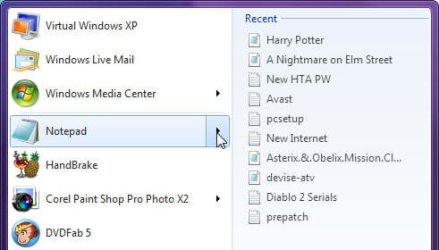
Start Orb Recent Documents List
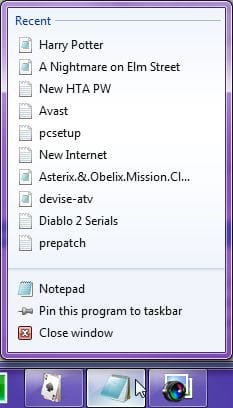
Taskbar Recent Documents (Right-click Taskbar Icon)
My Computer
- Computer type
- PC/Desktop
- Computer Manufacturer/Model Number
- Virtual Machine
- OS
- Windows 7 Professional 32-bit SP1
- CPU
- AMD A4/A6
- Motherboard
- Intel Corporation 440BX Desktop Reference Platform
- Memory
- 3.00GB EDO
- Graphics Card(s)
- VMware SVGA 3D
- Sound Card
- High Definition Audio Device
- Monitor(s) Displays
- Generic Non-PnP Monitor on VMware SVGA 3D
- Screen Resolution
- 1440x900
- Hard Drives
- 1 x 60GB VMware Virtual SATA Hard Drive ATA Device
- Antivirus
- Kaspersky Total Security
You can also right click on the start orb -> properties -> under the 'start menu' tab click customize -> then a little more than half way down it'll say recent items.
Check that box and you're good to go
Check that box and you're good to go
My Computer
- Computer Manufacturer/Model Number
- Dell Vostro 1000
- OS
- Windows 7 Ultimate x86
- CPU
- AMD Sempron 3600+
- Graphics Card(s)
- ATI Radeon Xpress 1150
- Monitor(s) Displays
- Generic PnP Monitor
- Screen Resolution
- 1200 x 800
- Hard Drives
- WD Scorpio Blue 500 GB (WD5000BEVT)
- Mouse
- Logitech V320 Cordless Optical Mouse

You can also right click on the start orb -> properties -> under the 'start menu' tab click customize -> then a little more than half way down it'll say recent items.
Check that box and you're good to go
Thanks redsox! I wish this forum had a "thanks" button!
Raargh
My Computer
- Computer Manufacturer/Model Number
- Dell T3400
- OS
- Windows 7 Pro x64 (dual-booting XPSP3 and Win7)
- CPU
- Intel Core-2 Quad
- Memory
- 4GB 800 Mhz PC2 unbuffered ECC
- Graphics Card(s)
- NVIDIA Quadro FX 570
- Sound Card
- Creative SB X-Fi model SB0770
- Monitor(s) Displays
- Dell 19" FP
- Screen Resolution
- 1680x1050
- Hard Drives
- SATA disk0 250GB disk1 500GB
- Internet Speed
- TW RR
- Other Info
- Just a baby compared to my work box!

You can also right click on the start orb -> properties -> under the 'start menu' tab click customize -> then a little more than half way down it'll say recent items.
Check that box and you're good to go
Thanks redsox! I wish this forum had a "thanks" button!
Raargh
It does....and I may get spanked for pointing it out, but, all the guys and gals who do a lot of the heavy lifting around here by taking the time to help so many people do so without expecting anything in return. So the "Virtual" way of providing a hearty hand shake, a pat on the back and a thank you is to click on their respective rep button and providing a note as to your appreciation
Attachments

My Computer
- Computer Manufacturer/Model Number
- PartsIsParts
- OS
- Windows 7 Ultimate 64bit
- CPU
- Intel Pentium D 3Ghz
- Motherboard
- ASRock G31M-S
- Memory
- 4 Gigs PC 6400
- Graphics Card(s)
- Nvidia GeForce 8500 GT
- Sound Card
- Realtek High Definition Audio Integrated
- Monitor(s) Displays
- AOC 19inch X2
- Screen Resolution
- 1024 X 768 (I'm Old)
- Hard Drives
- Segate ST3160815AS Serial ATAII
Western Digital WD1600AAJA-75PSA0 Serial ATAII
- PSU
- 500 watt..don't know mfg.
- Case
- Giant Black 4u rackmount I've had for years
- Cooling
- Stock CPU extra 120s in case
- Keyboard
- Generic Made in China
- Mouse
- Logitech USB Optical Scroll
- Internet Speed
- What ever comcast decides to give me usually 21Mbps up/5mbps
@pat - thanks for the tip for the "rep" button  . I just read the sticky - complex but interesting! Is it true that one has to be on-line for the "rep" button to be there? I wanted to thank redsoxm16 but his post has no "little scales rep" icon.
I'm not active on many forums. I spend most of my forum time on talk.maemo.org (for my Nokia N810). On that forum, there is a "thanks" button that is always active.
One thing I really like about sevenforums' software is the ease of attachments; best I've seen.
As an old guy, even though new to Win7, every time I'm on this forum I take a quick look at the new posts, just in case there is someone even more ignorunt than I (slim chance but WTH) and try to help. Perhaps in time I will transition from helpless to helpful!
Raargh
. I just read the sticky - complex but interesting! Is it true that one has to be on-line for the "rep" button to be there? I wanted to thank redsoxm16 but his post has no "little scales rep" icon.I'm not active on many forums. I spend most of my forum time on talk.maemo.org (for my Nokia N810). On that forum, there is a "thanks" button that is always active.
One thing I really like about sevenforums' software is the ease of attachments; best I've seen.
As an old guy, even though new to Win7, every time I'm on this forum I take a quick look at the new posts, just in case there is someone even more ignorunt than I (slim chance but WTH) and try to help. Perhaps in time I will transition from helpless to helpful!
Raargh
Last edited:
My Computer
- Computer Manufacturer/Model Number
- Dell T3400
- OS
- Windows 7 Pro x64 (dual-booting XPSP3 and Win7)
- CPU
- Intel Core-2 Quad
- Memory
- 4GB 800 Mhz PC2 unbuffered ECC
- Graphics Card(s)
- NVIDIA Quadro FX 570
- Sound Card
- Creative SB X-Fi model SB0770
- Monitor(s) Displays
- Dell 19" FP
- Screen Resolution
- 1680x1050
- Hard Drives
- SATA disk0 250GB disk1 500GB
- Internet Speed
- TW RR
- Other Info
- Just a baby compared to my work box!
brusselsclaire
New member
- Local time
- 12:21 PM
- Messages
- 1
Really helpful tips, but for some reason Word won't pin itself to the start bar thing, and therefore won't show me recent documents. And those are the only recent docs I actually care about!
Help?!
Help?!
My Computer
- OS
- 7

Here's a work around for you, until you figure out how to get Word attached to the Start Menu:
You can get your recent Word docs by going into Word, and clicking on the Word orb in the upper left-hand corner of the screen. All of your recent docs will be in the right-hand column, and you can pin whatever docs you wish to that list.
You can get your recent Word docs by going into Word, and clicking on the Word orb in the upper left-hand corner of the screen. All of your recent docs will be in the right-hand column, and you can pin whatever docs you wish to that list.
My Computer
- Computer Manufacturer/Model Number
- HP Pavillion dv5t (generation 1)
- OS
- Vista 64 bit and 32 bit (SP2)
- CPU
- Intel(R) Core(TM)2 Duo Processor T9400 (2.53 GHz
- Memory
- 4GB DDR2 System Memory (2 Dimm)
- Graphics Card(s)
- 512 MB NVIDIA GeForce 9600M GT
- Monitor(s) Displays
- 15.4" diagonal WSXGA+ High-Definition HP BrightView Widescre
- Screen Resolution
- 1680 x 1050
- Hard Drives
- 320GB 5400RPM SATA Hard Drive with HP ProtectSmart Hard Drive Protection
- Keyboard
- Built-in HP
- Mouse
- Built in - Synaptics TouchPad V6.5 on PS/2 Port
- Internet Speed
- Max
- Other Info
- ~ Intel Next-Gen Wireless-N Mini-card w/Bluetooth ~ Blu-Ray ROM DVD+/-R/RW ~ Integ. HDTV Hybrid Tuner ~ 12 Cell Battery ~ MS Office (Home Premium) 2007 ~
Thanks so much MXOSDER16 for the help in getting Recent Doc's back up on the Start Menu. That's a feature I used all the time on my old Windows set-up and with Windows 7 I just couldn't find that setting anywhere! Don't you hate it when some function you use ALL the time just disappears into the ether??You can also right click on the start orb -> properties -> under the 'start menu' tab click customize -> then a little more than half way down it'll say recent items.
Check that box and you're good to go
My Computer
- OS
- Windows 7 Enterprise 32 bit
Similar threads


- Replies
- 9
- Views
- 3K
- Replies
- 5
- Views
- 67K
- Replies
- 1
- Views
- 7K

