Recent Items List - Clear

How to Clear Recent Items List in Windows 7

   Information
Recent Items is a list of your recently opened files.

This will show you how to clear recent items list to be empty afterwards in the Windows 7 Start Menu.

   Note
The hidden system folder Recent Items is located at:

C:\Users\(User Name)\AppData\Roaming\Microsoft\Windows\Recent Items

If you go to the Recent Items folder location above and you have a yellow folder named Recent instead of one named Recent Items with a icon, then right click on the Recent folder and click Delete. Type shell:recent in the white line (Start Search) area of the Start Menu and press Enter. Logoff and logon, or restart the computer, to rebuild the folder back to the default Recent Items. Recent Items will not function correctly if is not set as the default Recent Items folder.

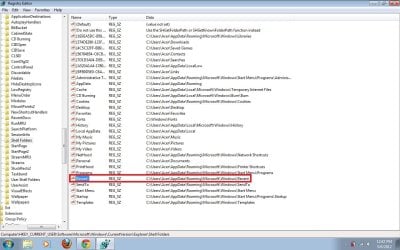
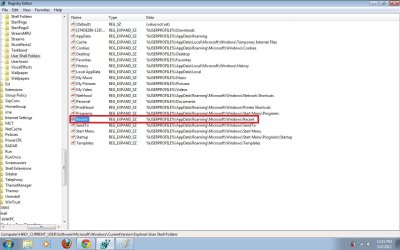
If this did not fix the Recent Items folder, then see the post at this link to make sure that the registry locations at the link have the correct locations entered for them.

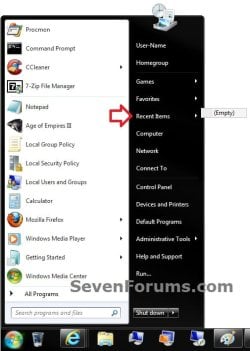
EXAMPLE: Recent Items Cleared in Start Menu
Empty.jpg


OPTION ONE

To Clear Recent Items List Automatically on Exit


NOTE: This option will also clear the Recent items in Jump Lists as well, and not just in the Start Menu.
1. For how, see: How to Clear Recent Items and Documents on Exit of Windows 7


OPTION TWO

To Clear Recent Items from Start Menu


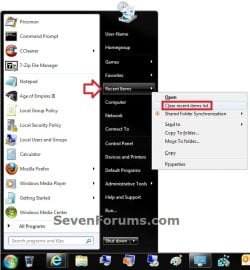
1. Open the Start Menu.

2. Right click on the Recent Items button, and click on Clear recent items list. (see screenshot below)
Start_Menu.jpg


OPTION THREE

To Clear Recent Items using Start Menu Properties


NOTE: This option will also clear the Recent items in Jump Lists as well, and not just in the Start Menu.
1. Right click on the Start button, and click on Properties.

2. Uncheck the Store and display recently opened items in the Start menu and the taskbar box, and click on Apply. (see screenshot below step 4)
NOTE: Turning off recent items will clear it.

3. If you would like to turn recent items back on, then check the Store and display recently opened items in the Start menu and the taskbar box. (see screenshot below step 4)

4. Click on OK. (see screenshot below)
Properties.jpg


OPTION FOUR

To Clear Recent Items using Windows Explorer


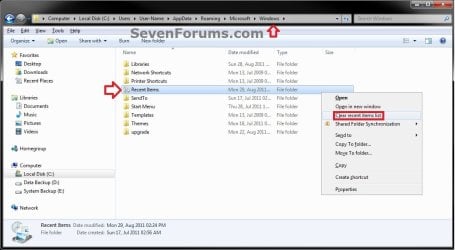
1. Open Windows Explorer, and do either step 2, 3, or 4 below.

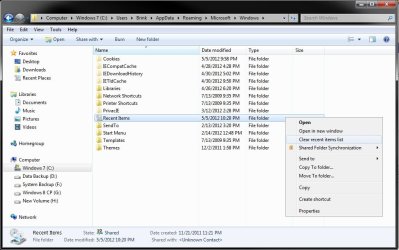
2. Navigate to the hidden system folder Windows folder below, right click on Recent Items, and click on Clear recent items list. (see screenshot below)
C:\Users\(User Name)\AppData\Roaming\Microsoft\Windows
Explorer-1.jpg
OR

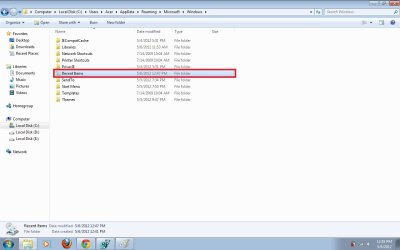
2. Navigate to the hidden system folder Recent Items folder below, right click on a empty space in the Recent Items folder, and click on Clear recent items list. (see screenshot below)
C:\Users\(User Name)\AppData\Roaming\Microsoft\Windows\Recent Items
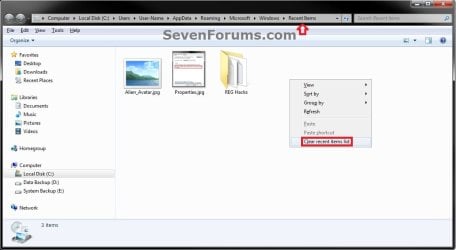

Explorer-2.jpg
3. Navigate to the hidden system folder Recent Items folder below, and delete any file in the Recent Items folder that you want cleared from the recent items list. (see screenshot below step 2)
WARNING: DO NOT DELETE the Recent Items folder itself.
C:\Users\(User Name)\AppData\Roaming\Microsoft\Windows\Recent Items


OPTION FIVE

To Reset and Clear "Recent Items" using a REG File


1. Click on the Download button below to download the file below.
Reset_and_Clear_Recent_Items.reg


Download


2. Click on Save, and save the .reg file to the Desktop.

3. Right click on the downloaded .reg file and click on Merge.

4. Click on Run, Yes, Yes, and OK when prompted.

5. When done, you can delete the downloaded .reg file if you like.

That's it,
Shawn


Attachments

Last edited:
Tutorial updated to add OPTION FIVE to be able to do this with a REG file. :)
 

My Computer

Computer type
PC/Desktop
Computer Manufacturer/Model Number
Self built custom
OS
64-bit Windows 11 Pro for Workstations
CPU
Intel i7-8700K OC'd to 5 GHz
Motherboard
ASUS ROG Maximus XI Formula Z390
Memory
64 GB (4x16GB) G.SKILL TridentZ RGB DDR4 3600 MHz
Graphics Card(s)
ASUS ROG-STRIX-GTX1080TI-O11G-GAMING
Sound Card
Integrated
Monitor(s) Displays
2 x Samsung Odyssey G7 27"
Screen Resolution
2560x1440
Hard Drives
1TB Samsung 990 PRO M.2,
4TB Samsung 990 PRO PRO M.2,
TerraMaster F8 SSD Plus NAS
PSU
Seasonic Prime Titanium 850W
Case
Thermaltake Core P3
Cooling
Corsair Hydro H115i
Keyboard
Logitech wireless K800
Mouse
Logitech MX Master 4
Internet Speed
2 Gb/s Download and 100 Mb/s Upload
Antivirus
Malwarebyte Anti-Malware Premium
Browser
Google Chrome
Other Info
Logitech Z625 speaker system,
Logitech BRIO 4K Pro webcam,
HP Color LaserJet Pro MFP M477fdn,
APC SMART-UPS RT 1000 XL - SURT1000XLI,
Galaxy S23 Plus phone
Is there an answer anywhere to get 'recent items' to list documents in the order they are opened rather than the useless list that is alphabetical? Have searched and searched and it appears to be an old problem that has suddenly started on my Windows 7 Pro 64 bit PC! As a work around (why do I hate that - because we shouldn't have to that's why) I've put a shortcut into the start menu but the recent items folder lists everything not just documents and is just not so convenient.
 

My Computer

Computer type
PC/Desktop
Computer Manufacturer/Model Number
Dell Studio XPS 8100
OS
Windows 7 Pro x64
CPU
Intel Core i5 650 @3.2Ghz
Memory
4Gb RAM
Hello.. I have a problem now. Delete recent item option didn't appear. Can you help with this?
 

Attachments

  • Untitled.jpg
    Untitled.jpg
    78.6 KB · Views: 1,812

My Computer

Computer Manufacturer/Model Number
Acer 4530
OS
Windows 7 Ultimate 32bit
Motherboard
AMD Turion (tm) X2 Dual-Core Mobile RM-70
Memory
3.00Mb RAM
Graphics Card(s)
NVIDIA GeForce 9100M G
Sound Card
Realtek High Definition Audio
Screen Resolution
1280x800
Hello Azwan, and welcome to Seven Forums.

Double check to see if the blue NOTE box at the top of the tutorial may apply to you for this, and see if you see the same as below.
recent.jpg
In the mean time, you should be able to use any of the other options in the tutorial to clear Recent Items as well. :)

Hope this helps,
Shawn
 

My Computer

Computer type
PC/Desktop
Computer Manufacturer/Model Number
Self built custom
OS
64-bit Windows 11 Pro for Workstations
CPU
Intel i7-8700K OC'd to 5 GHz
Motherboard
ASUS ROG Maximus XI Formula Z390
Memory
64 GB (4x16GB) G.SKILL TridentZ RGB DDR4 3600 MHz
Graphics Card(s)
ASUS ROG-STRIX-GTX1080TI-O11G-GAMING
Sound Card
Integrated
Monitor(s) Displays
2 x Samsung Odyssey G7 27"
Screen Resolution
2560x1440
Hard Drives
1TB Samsung 990 PRO M.2,
4TB Samsung 990 PRO PRO M.2,
TerraMaster F8 SSD Plus NAS
PSU
Seasonic Prime Titanium 850W
Case
Thermaltake Core P3
Cooling
Corsair Hydro H115i
Keyboard
Logitech wireless K800
Mouse
Logitech MX Master 4
Internet Speed
2 Gb/s Download and 100 Mb/s Upload
Antivirus
Malwarebyte Anti-Malware Premium
Browser
Google Chrome
Other Info
Logitech Z625 speaker system,
Logitech BRIO 4K Pro webcam,
HP Color LaserJet Pro MFP M477fdn,
APC SMART-UPS RT 1000 XL - SURT1000XLI,
Galaxy S23 Plus phone
Brink, after delete Recent folder, then I type shell:recent on search box (Start Menu). After that I restarted my laptop. Nothing happen. No Recent Items folder there. :cry:
 

My Computer

Computer Manufacturer/Model Number
Acer 4530
OS
Windows 7 Ultimate 32bit
Motherboard
AMD Turion (tm) X2 Dual-Core Mobile RM-70
Memory
3.00Mb RAM
Graphics Card(s)
NVIDIA GeForce 9100M G
Sound Card
Realtek High Definition Audio
Screen Resolution
1280x800
.....then see the post at this link to make sure that the registry locations at the link have the correct locations entered for them.
 

My Computer

Computer type
PC/Desktop
Computer Manufacturer/Model Number
Self built custom
OS
64-bit Windows 11 Pro for Workstations
CPU
Intel i7-8700K OC'd to 5 GHz
Motherboard
ASUS ROG Maximus XI Formula Z390
Memory
64 GB (4x16GB) G.SKILL TridentZ RGB DDR4 3600 MHz
Graphics Card(s)
ASUS ROG-STRIX-GTX1080TI-O11G-GAMING
Sound Card
Integrated
Monitor(s) Displays
2 x Samsung Odyssey G7 27"
Screen Resolution
2560x1440
Hard Drives
1TB Samsung 990 PRO M.2,
4TB Samsung 990 PRO PRO M.2,
TerraMaster F8 SSD Plus NAS
PSU
Seasonic Prime Titanium 850W
Case
Thermaltake Core P3
Cooling
Corsair Hydro H115i
Keyboard
Logitech wireless K800
Mouse
Logitech MX Master 4
Internet Speed
2 Gb/s Download and 100 Mb/s Upload
Antivirus
Malwarebyte Anti-Malware Premium
Browser
Google Chrome
Other Info
Logitech Z625 speaker system,
Logitech BRIO 4K Pro webcam,
HP Color LaserJet Pro MFP M477fdn,
APC SMART-UPS RT 1000 XL - SURT1000XLI,
Galaxy S23 Plus phone
I followed the steps. Then the problem won't go away. Should I delete the Recent folder then follow the steps regarding the link that you mention?
 

Attachments

  • Recent01.jpg
    Recent01.jpg
    139.2 KB · Views: 2,089
  • Recent02.jpg
    Recent02.jpg
    117.9 KB · Views: 2,191

My Computer

Computer Manufacturer/Model Number
Acer 4530
OS
Windows 7 Ultimate 32bit
Motherboard
AMD Turion (tm) X2 Dual-Core Mobile RM-70
Memory
3.00Mb RAM
Graphics Card(s)
NVIDIA GeForce 9100M G
Sound Card
Realtek High Definition Audio
Screen Resolution
1280x800
Dear Brink, it's working!!!. I don't know what happen. The Recent Items appear suddenly. LOL. Thank a lot Brink!! Now I can sleep :sleepy:..
 

Attachments

  • Recent03.jpg
    Recent03.jpg
    61.2 KB · Views: 1,748

My Computer

Computer Manufacturer/Model Number
Acer 4530
OS
Windows 7 Ultimate 32bit
Motherboard
AMD Turion (tm) X2 Dual-Core Mobile RM-70
Memory
3.00Mb RAM
Graphics Card(s)
NVIDIA GeForce 9100M G
Sound Card
Realtek High Definition Audio
Screen Resolution
1280x800
That's great news Azwan. Have a good nights sleep. :)
 

My Computer

Computer type
PC/Desktop
Computer Manufacturer/Model Number
Self built custom
OS
64-bit Windows 11 Pro for Workstations
CPU
Intel i7-8700K OC'd to 5 GHz
Motherboard
ASUS ROG Maximus XI Formula Z390
Memory
64 GB (4x16GB) G.SKILL TridentZ RGB DDR4 3600 MHz
Graphics Card(s)
ASUS ROG-STRIX-GTX1080TI-O11G-GAMING
Sound Card
Integrated
Monitor(s) Displays
2 x Samsung Odyssey G7 27"
Screen Resolution
2560x1440
Hard Drives
1TB Samsung 990 PRO M.2,
4TB Samsung 990 PRO PRO M.2,
TerraMaster F8 SSD Plus NAS
PSU
Seasonic Prime Titanium 850W
Case
Thermaltake Core P3
Cooling
Corsair Hydro H115i
Keyboard
Logitech wireless K800
Mouse
Logitech MX Master 4
Internet Speed
2 Gb/s Download and 100 Mb/s Upload
Antivirus
Malwarebyte Anti-Malware Premium
Browser
Google Chrome
Other Info
Logitech Z625 speaker system,
Logitech BRIO 4K Pro webcam,
HP Color LaserJet Pro MFP M477fdn,
APC SMART-UPS RT 1000 XL - SURT1000XLI,
Galaxy S23 Plus phone
Is there a way (in registry-settings or so) to have the shortcut files (.lnk) in

C:\Users\MyName\AppData\Roaming\Microsoft\Office\Recent
C:\Users\MyName\AppData\Roaming\Microsoft\Windows\Recent

automatically deleted at shutdown or startup of Windows 7 (x64)

Thanks!
=
 

My Computer

OS
Windows 7 Ultimate x64

My Computer

Computer type
PC/Desktop
Computer Manufacturer/Model Number
Self built custom
OS
64-bit Windows 11 Pro for Workstations
CPU
Intel i7-8700K OC'd to 5 GHz
Motherboard
ASUS ROG Maximus XI Formula Z390
Memory
64 GB (4x16GB) G.SKILL TridentZ RGB DDR4 3600 MHz
Graphics Card(s)
ASUS ROG-STRIX-GTX1080TI-O11G-GAMING
Sound Card
Integrated
Monitor(s) Displays
2 x Samsung Odyssey G7 27"
Screen Resolution
2560x1440
Hard Drives
1TB Samsung 990 PRO M.2,
4TB Samsung 990 PRO PRO M.2,
TerraMaster F8 SSD Plus NAS
PSU
Seasonic Prime Titanium 850W
Case
Thermaltake Core P3
Cooling
Corsair Hydro H115i
Keyboard
Logitech wireless K800
Mouse
Logitech MX Master 4
Internet Speed
2 Gb/s Download and 100 Mb/s Upload
Antivirus
Malwarebyte Anti-Malware Premium
Browser
Google Chrome
Other Info
Logitech Z625 speaker system,
Logitech BRIO 4K Pro webcam,
HP Color LaserJet Pro MFP M477fdn,
APC SMART-UPS RT 1000 XL - SURT1000XLI,
Galaxy S23 Plus phone
@brink

Many thanks indeed!

I have updated that setting accordingly. Will check the effect after next pc launch.

One thing does make me a little unsure: hopefully this setting will nót remove the 'pinned' files/folders within Office...?

[Offtopic]
Within Office one can pin frequently used files and folders. After a fresh install (luckely this does not happen too often..) one may wish to pin frequently used files and folders. This is a bit of a workload: one needs to open and pin the files one by one. Folders are even more 'complicated': to pin a folder that holds subfolders only, i.e. no files, is impossible. My workaround is to add a dummy excelsheet in that rootfolder, open that one, so the rootfolder can be pinned.
Sadly since Office 2003 there is no settings backup anymore.

Anyway, thanks for your guidance!
=
 

My Computer

OS
Windows 7 Ultimate x64
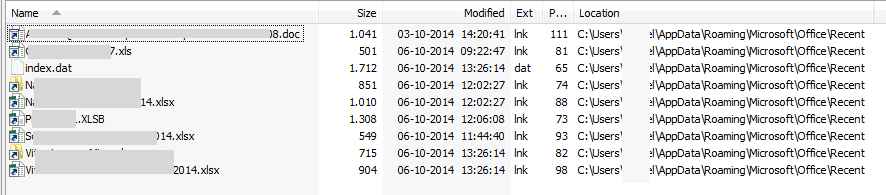
Just wonder, rebooted after the change, twice as a matter of fact, the links to \Office\Recent
they should be cleared, or not??

In my case recent Office documents are not cleared.

Like this

Any suggestions?

TIA
 

Attachments

  • Clear Recent Items and Documents on Exit using gpedit-msc-06102014 160337.png
    Clear Recent Items and Documents on Exit using gpedit-msc-06102014 160337.png
    7.8 KB · Views: 385

My Computer

OS
Windows 7 Ultimate x64

My Computer

Computer type
PC/Desktop
Computer Manufacturer/Model Number
Self built custom
OS
64-bit Windows 11 Pro for Workstations
CPU
Intel i7-8700K OC'd to 5 GHz
Motherboard
ASUS ROG Maximus XI Formula Z390
Memory
64 GB (4x16GB) G.SKILL TridentZ RGB DDR4 3600 MHz
Graphics Card(s)
ASUS ROG-STRIX-GTX1080TI-O11G-GAMING
Sound Card
Integrated
Monitor(s) Displays
2 x Samsung Odyssey G7 27"
Screen Resolution
2560x1440
Hard Drives
1TB Samsung 990 PRO M.2,
4TB Samsung 990 PRO PRO M.2,
TerraMaster F8 SSD Plus NAS
PSU
Seasonic Prime Titanium 850W
Case
Thermaltake Core P3
Cooling
Corsair Hydro H115i
Keyboard
Logitech wireless K800
Mouse
Logitech MX Master 4
Internet Speed
2 Gb/s Download and 100 Mb/s Upload
Antivirus
Malwarebyte Anti-Malware Premium
Browser
Google Chrome
Other Info
Logitech Z625 speaker system,
Logitech BRIO 4K Pro webcam,
HP Color LaserJet Pro MFP M477fdn,
APC SMART-UPS RT 1000 XL - SURT1000XLI,
Galaxy S23 Plus phone
Or maybe add a batch file to the startup folder?

Something like:

rem 14-10-2014 DeleteRecentFileLinks.bat
rem delete recent files links (.lnk) on C:\
rem delete in folder: C:\Users\UserName\AppData\Roaming\Microsoft\Office\Recent
rem delete in folder: C:\Users\UserName\AppData\Roaming\Microsoft\Windows\Recent
rem do not delete index.dat - they store pin files and folders

del C:\Users\UserName\AppData\Roaming\Microsoft\Windows\Recent\*.lnk
del C:\Users\UserName\AppData\Roaming\Microsoft\Office\Recent\*.lnk

Just an idea...
 

My Computer

OS
Windows 7 Ultimate x64
Back
Top