Recent Items - Turn On or Off

How to Turn Recent Items On or Off in Windows 7


   Information
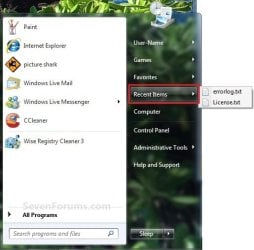
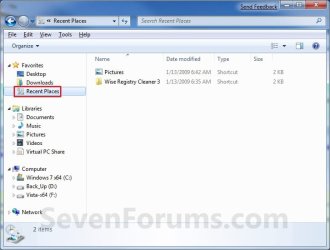
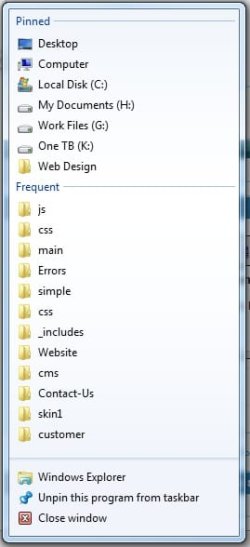
Recent Items is a list of your recently used files on the right side of the Start Menu, Taskbar Windows Explorer icon link, in the Navigaton Pane Recent Places, and in Jump Lists. This will show you how to turn Recent Items on or off in Windows 7.
   Note
The hidden system folder Recent Items is located at:

C:\Users\(User Name)\AppData\Roaming\Microsoft\Windows\Recent Items

OR

%AppData%\Microsoft\Windows\Recent Items

If you go to the Recent Items folder location above and you have a yellow folder named Recent instead of one named Recent Items with an icon, then right click on the Recent folder and click Delete. Type shell:recent in the white line (Start Search) area of the Start Menu, and press Enter. Logoff and logon, or restart the computer, to rebuild the folder back to the default Recent Items. Recent Items will not function correctly if is not set as the default Recent Items folder.

If this did not fix the Recent Items folder, then see the post at this link to make sure that the registry locations at the link have the correct locations entered for them.


EXAMPLE: Recent Items
NOTE: If Recent Items is turned on, the these are the locations (Taskbar, Start Menu, Navigation Pane) that you will see your recent items listed.
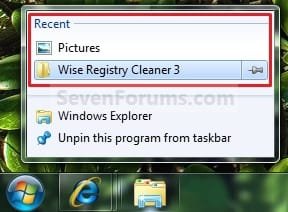
Taskbar.jpg

Start_Menu.jpg

Recent_Places.jpg


OPTION ONE

To Turn Recent Items On or Off in Start Menu Properties

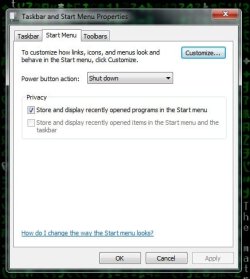
1. Right click on the Start button, and click on Properties.

2. To Turn Recent Items On A) Check the Store and display recently opened items in the Start menu and the taskbar box. (see screenshot below step 4)
NOTE: If you just turned on Recent Items, then it may take a bit after opening the recents items a few times before they actually show up.

B) Go to step 4.
3. To Turn Recent Items Off A) Uncheck the Store and display recently opened items in the Start menu and the taskbar box. (see screenshot below step 4)
4. Click on OK. (see screenshot below) Properties.jpg
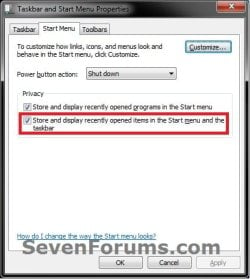
5. If you turned on recent items, then be sure to also set how many recent items you want displayed.

   Tip
If you turned on recent items, and would like to have Frequent (recent items) display in the Internet Explorer taskbar jump list, then you will need to be sure to add (check) "Internet Explorer History" to the Indexed Location.
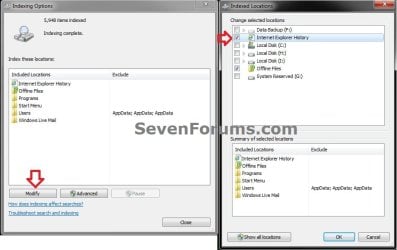
IE.jpg


OPTION TWO

To Turn Recent Items On or Off using a REG File Download

1. To Turn Recent Items On
NOTE: This is the default setting. A) Click on the Download button below to download the file below. Turn_On_Recent_Items_in_Start_Menu.reg

Download


B) Go to step 3.
2. To Turn Recent Items Off A) Click on the Download button below to download the file below. Turn_Off_Recent_Items_in_Start_Menu.reg

Download


3. Save the .reg file to the desktop.

4. Right click on the downloaded .reg file, and click on Merge.

5. Click on Run, Yes (UAC), Yes, and OK when prompted.

6. When done, you can delete the downloaded .reg file if you like.


OPTION THREE

To Add or Remove "Recent Items" Button from the Start Menu


NOTE: This will allow you to add or remove the Recent Items button from the right dark side of the Start Menu. If you add it, then you will need to turn on Recent Items on OPTION ONE above to have them listed. 1. Open the Start Menu Customize window.

2. Scroll down a bit, and check the Recent Items box, and click on OK. (See screenshot below) Start_Menu_Customize.jpg
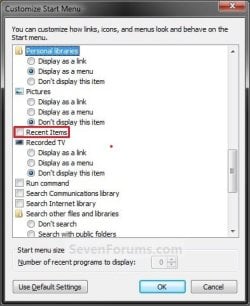
3. Click on OK. (See link in step 1)
That's it,
Shawn


Attachments

Last edited:
Sorry, had to make sure.

Are these programs still installed? If so, then see if pinning the Control Panel icon to the taskbar, then try to unpin the programs.

You might also see if you can use the program in this tutorial to remove them as well.
 
Last edited:

My Computer

Computer type
PC/Desktop
Computer Manufacturer/Model Number
Self built custom
OS
64-bit Windows 11 Pro for Workstations
CPU
Intel i7-8700K OC'd to 5 GHz
Motherboard
ASUS ROG Maximus XI Formula Z390
Memory
64 GB (4x16GB) G.SKILL TridentZ RGB DDR4 3600 MHz
Graphics Card(s)
ASUS ROG-STRIX-GTX1080TI-O11G-GAMING
Sound Card
Integrated
Monitor(s) Displays
2 x Samsung Odyssey G7 27"
Screen Resolution
2560x1440
Hard Drives
1TB Samsung 990 PRO M.2,
4TB Samsung 990 PRO PRO M.2,
TerraMaster F8 SSD Plus NAS
PSU
Seasonic Prime Titanium 850W
Case
Thermaltake Core P3
Cooling
Corsair Hydro H115i
Keyboard
Logitech wireless K800
Mouse
Logitech MX Master 4
Internet Speed
2 Gb/s Download and 100 Mb/s Upload
Antivirus
Malwarebyte Anti-Malware Premium
Browser
Google Chrome
Other Info
Logitech Z625 speaker system,
Logitech BRIO 4K Pro webcam,
HP Color LaserJet Pro MFP M477fdn,
APC SMART-UPS RT 1000 XL - SURT1000XLI,
Galaxy S23 Plus phone
Sorry, had to make sure.

Are these programs still installed? If so, then see if pinning the Control Panel icon to the taskbar, then try to unpin the programs.

You might also see if you cab use the program in this tutorial to remove them as well.

pinning Control Panel to icon and unpin doesn't work.

The program doesnt work as well.
 

My Computer

Computer Manufacturer/Model Number
Asus F83VF Noteook
OS
Windows 7 Home Premium x64
CPU
Intel Core 2 Duo P8800
Motherboard
Intel PM45 Chipset
Memory
4 GB DDR3
Graphics Card(s)
NVIDIA GeForce GT 220M, 1 GB GDDR3 SDRAM
Sound Card
Realtek
Screen Resolution
1366x768
Hard Drives
Seagate 500 GB
PSU
-
Case
-
Cooling
-
Keyboard
-
Mouse
Razer Lachesis
Internet Speed
10 Mb/s
A repair install should be able to reset this for you without losing anything.
 

My Computer

Computer type
PC/Desktop
Computer Manufacturer/Model Number
Self built custom
OS
64-bit Windows 11 Pro for Workstations
CPU
Intel i7-8700K OC'd to 5 GHz
Motherboard
ASUS ROG Maximus XI Formula Z390
Memory
64 GB (4x16GB) G.SKILL TridentZ RGB DDR4 3600 MHz
Graphics Card(s)
ASUS ROG-STRIX-GTX1080TI-O11G-GAMING
Sound Card
Integrated
Monitor(s) Displays
2 x Samsung Odyssey G7 27"
Screen Resolution
2560x1440
Hard Drives
1TB Samsung 990 PRO M.2,
4TB Samsung 990 PRO PRO M.2,
TerraMaster F8 SSD Plus NAS
PSU
Seasonic Prime Titanium 850W
Case
Thermaltake Core P3
Cooling
Corsair Hydro H115i
Keyboard
Logitech wireless K800
Mouse
Logitech MX Master 4
Internet Speed
2 Gb/s Download and 100 Mb/s Upload
Antivirus
Malwarebyte Anti-Malware Premium
Browser
Google Chrome
Other Info
Logitech Z625 speaker system,
Logitech BRIO 4K Pro webcam,
HP Color LaserJet Pro MFP M477fdn,
APC SMART-UPS RT 1000 XL - SURT1000XLI,
Galaxy S23 Plus phone
A repair install should be able to reset this for you without losing anything.


does upgrading my os has the same effect as repair install, becoz i did an upgrade once and it doesn't help
 

My Computer

Computer Manufacturer/Model Number
Asus F83VF Noteook
OS
Windows 7 Home Premium x64
CPU
Intel Core 2 Duo P8800
Motherboard
Intel PM45 Chipset
Memory
4 GB DDR3
Graphics Card(s)
NVIDIA GeForce GT 220M, 1 GB GDDR3 SDRAM
Sound Card
Realtek
Screen Resolution
1366x768
Hard Drives
Seagate 500 GB
PSU
-
Case
-
Cooling
-
Keyboard
-
Mouse
Razer Lachesis
Internet Speed
10 Mb/s
Sort of, but a repair install is doing a upgrade install with the same build that you currently have instead of a new build. This way it repairs the old OS instead of upgrading and replacing it.
 

My Computer

Computer type
PC/Desktop
Computer Manufacturer/Model Number
Self built custom
OS
64-bit Windows 11 Pro for Workstations
CPU
Intel i7-8700K OC'd to 5 GHz
Motherboard
ASUS ROG Maximus XI Formula Z390
Memory
64 GB (4x16GB) G.SKILL TridentZ RGB DDR4 3600 MHz
Graphics Card(s)
ASUS ROG-STRIX-GTX1080TI-O11G-GAMING
Sound Card
Integrated
Monitor(s) Displays
2 x Samsung Odyssey G7 27"
Screen Resolution
2560x1440
Hard Drives
1TB Samsung 990 PRO M.2,
4TB Samsung 990 PRO PRO M.2,
TerraMaster F8 SSD Plus NAS
PSU
Seasonic Prime Titanium 850W
Case
Thermaltake Core P3
Cooling
Corsair Hydro H115i
Keyboard
Logitech wireless K800
Mouse
Logitech MX Master 4
Internet Speed
2 Gb/s Download and 100 Mb/s Upload
Antivirus
Malwarebyte Anti-Malware Premium
Browser
Google Chrome
Other Info
Logitech Z625 speaker system,
Logitech BRIO 4K Pro webcam,
HP Color LaserJet Pro MFP M477fdn,
APC SMART-UPS RT 1000 XL - SURT1000XLI,
Galaxy S23 Plus phone
Is there any way for the 'recent items' in start menu to store only certain filetypes?

I want to see the recently opened office documents but not mp3s or videos..


Thanks in advance,
JaX
 

My Computer

Computer Manufacturer/Model Number
Dell XPS M1330
OS
Windows 7 Ultimate x86
CPU
Intel Core 2 Duo T7250 @2GHz
Memory
2 GB
Graphics Card(s)
nVidia 8400M GS
Screen Resolution
1280x800
Hard Drives
250GB SATA
Hello JaX, and welcome to Seven Forums.

Not that I am aware of. It seems to be a all or none deal. :(
 

My Computer

Computer type
PC/Desktop
Computer Manufacturer/Model Number
Self built custom
OS
64-bit Windows 11 Pro for Workstations
CPU
Intel i7-8700K OC'd to 5 GHz
Motherboard
ASUS ROG Maximus XI Formula Z390
Memory
64 GB (4x16GB) G.SKILL TridentZ RGB DDR4 3600 MHz
Graphics Card(s)
ASUS ROG-STRIX-GTX1080TI-O11G-GAMING
Sound Card
Integrated
Monitor(s) Displays
2 x Samsung Odyssey G7 27"
Screen Resolution
2560x1440
Hard Drives
1TB Samsung 990 PRO M.2,
4TB Samsung 990 PRO PRO M.2,
TerraMaster F8 SSD Plus NAS
PSU
Seasonic Prime Titanium 850W
Case
Thermaltake Core P3
Cooling
Corsair Hydro H115i
Keyboard
Logitech wireless K800
Mouse
Logitech MX Master 4
Internet Speed
2 Gb/s Download and 100 Mb/s Upload
Antivirus
Malwarebyte Anti-Malware Premium
Browser
Google Chrome
Other Info
Logitech Z625 speaker system,
Logitech BRIO 4K Pro webcam,
HP Color LaserJet Pro MFP M477fdn,
APC SMART-UPS RT 1000 XL - SURT1000XLI,
Galaxy S23 Plus phone
Too bad.. Thanks anyways.. You and this forum have been of great help.. :)
 

My Computer

Computer Manufacturer/Model Number
Dell XPS M1330
OS
Windows 7 Ultimate x86
CPU
Intel Core 2 Duo T7250 @2GHz
Memory
2 GB
Graphics Card(s)
nVidia 8400M GS
Screen Resolution
1280x800
Hard Drives
250GB SATA
You're welcome. :)
 

My Computer

Computer type
PC/Desktop
Computer Manufacturer/Model Number
Self built custom
OS
64-bit Windows 11 Pro for Workstations
CPU
Intel i7-8700K OC'd to 5 GHz
Motherboard
ASUS ROG Maximus XI Formula Z390
Memory
64 GB (4x16GB) G.SKILL TridentZ RGB DDR4 3600 MHz
Graphics Card(s)
ASUS ROG-STRIX-GTX1080TI-O11G-GAMING
Sound Card
Integrated
Monitor(s) Displays
2 x Samsung Odyssey G7 27"
Screen Resolution
2560x1440
Hard Drives
1TB Samsung 990 PRO M.2,
4TB Samsung 990 PRO PRO M.2,
TerraMaster F8 SSD Plus NAS
PSU
Seasonic Prime Titanium 850W
Case
Thermaltake Core P3
Cooling
Corsair Hydro H115i
Keyboard
Logitech wireless K800
Mouse
Logitech MX Master 4
Internet Speed
2 Gb/s Download and 100 Mb/s Upload
Antivirus
Malwarebyte Anti-Malware Premium
Browser
Google Chrome
Other Info
Logitech Z625 speaker system,
Logitech BRIO 4K Pro webcam,
HP Color LaserJet Pro MFP M477fdn,
APC SMART-UPS RT 1000 XL - SURT1000XLI,
Galaxy S23 Plus phone
I tried Option 1 and 2, but still I don't see files in taskbar, only in start menu now.
 

My Computer

Computer type
PC/Desktop
Computer Manufacturer/Model Number
Custom Built
OS
Windows 7 Ultimate x64 Service Pack 1
CPU
Intel Core i7-3770K Ivy Bridge Quad-Core 3.5GHz (4180.19MHz)
Motherboard
ASUS P8Z77-V LX
Memory
Corsair 32GB (4 x 8GB) Vengeance, DDR3 1600MHz, CL10, 1.5V
Graphics Card(s)
Asus GeForce DUAL-GTX1060-O6G
Sound Card
Asus XONAR DG, 90-YAA0K0-0UAN0BZ
Monitor(s) Displays
Iiyama 24" XB2483HSU, BenQ GW2470HL 24", UE32EH4005
Screen Resolution
1920x1080 60Hz, 1920x1080 60Hz, 1366x768 60Hz
Hard Drives
WDS500G1B0A-00H9H0, S3Z9NB0K316712Z, S3YVNB0KB15768W, ST2000DM001-1CH164, ST3000DM002-1BJ166, ST3000DM008-2DM166
PSU
Corsair PSU TX V2 750W 14CM ATX2.31 80+
Case
Fractal Design Define R6 - Black, ATX
Cooling
CORSAIR Hydro Series H100z Liquid Cooler
Keyboard
Logitech Gaming Keyboard G510
Mouse
SteelSeries RIVAL 500 GAMING MOUSE
Internet Speed
ADSL, 350/20Mbit/s FullRate
Antivirus
Malwarebytes Premium 3.7.1 + Windows Defender
Browser
Mozilla Firefox, Google Chrome
Other Info
TP-Link TG-3468 PCI-Express Gigabit Network Card
Hello AW,

What items/programs are these for on the taskbar?

Have you already been opening files and such that belong to these programs on the taskbar? For example, websites in Internet Explorer.
 

My Computer

Computer type
PC/Desktop
Computer Manufacturer/Model Number
Self built custom
OS
64-bit Windows 11 Pro for Workstations
CPU
Intel i7-8700K OC'd to 5 GHz
Motherboard
ASUS ROG Maximus XI Formula Z390
Memory
64 GB (4x16GB) G.SKILL TridentZ RGB DDR4 3600 MHz
Graphics Card(s)
ASUS ROG-STRIX-GTX1080TI-O11G-GAMING
Sound Card
Integrated
Monitor(s) Displays
2 x Samsung Odyssey G7 27"
Screen Resolution
2560x1440
Hard Drives
1TB Samsung 990 PRO M.2,
4TB Samsung 990 PRO PRO M.2,
TerraMaster F8 SSD Plus NAS
PSU
Seasonic Prime Titanium 850W
Case
Thermaltake Core P3
Cooling
Corsair Hydro H115i
Keyboard
Logitech wireless K800
Mouse
Logitech MX Master 4
Internet Speed
2 Gb/s Download and 100 Mb/s Upload
Antivirus
Malwarebyte Anti-Malware Premium
Browser
Google Chrome
Other Info
Logitech Z625 speaker system,
Logitech BRIO 4K Pro webcam,
HP Color LaserJet Pro MFP M477fdn,
APC SMART-UPS RT 1000 XL - SURT1000XLI,
Galaxy S23 Plus phone
well.. in taskbar is folder icon and when u press right click on it, here should be list of folder's what have been pinnged and recent files, but for me here isnt any of them. When I press right click on it. And I haven't changed any option's.
 

My Computer

Computer type
PC/Desktop
Computer Manufacturer/Model Number
Custom Built
OS
Windows 7 Ultimate x64 Service Pack 1
CPU
Intel Core i7-3770K Ivy Bridge Quad-Core 3.5GHz (4180.19MHz)
Motherboard
ASUS P8Z77-V LX
Memory
Corsair 32GB (4 x 8GB) Vengeance, DDR3 1600MHz, CL10, 1.5V
Graphics Card(s)
Asus GeForce DUAL-GTX1060-O6G
Sound Card
Asus XONAR DG, 90-YAA0K0-0UAN0BZ
Monitor(s) Displays
Iiyama 24" XB2483HSU, BenQ GW2470HL 24", UE32EH4005
Screen Resolution
1920x1080 60Hz, 1920x1080 60Hz, 1366x768 60Hz
Hard Drives
WDS500G1B0A-00H9H0, S3Z9NB0K316712Z, S3YVNB0KB15768W, ST2000DM001-1CH164, ST3000DM002-1BJ166, ST3000DM008-2DM166
PSU
Corsair PSU TX V2 750W 14CM ATX2.31 80+
Case
Fractal Design Define R6 - Black, ATX
Cooling
CORSAIR Hydro Series H100z Liquid Cooler
Keyboard
Logitech Gaming Keyboard G510
Mouse
SteelSeries RIVAL 500 GAMING MOUSE
Internet Speed
ADSL, 350/20Mbit/s FullRate
Antivirus
Malwarebytes Premium 3.7.1 + Windows Defender
Browser
Mozilla Firefox, Google Chrome
Other Info
TP-Link TG-3468 PCI-Express Gigabit Network Card
Ah, I see. Unfortunately only programs have jump lists and not pinned folders. :(
 

My Computer

Computer type
PC/Desktop
Computer Manufacturer/Model Number
Self built custom
OS
64-bit Windows 11 Pro for Workstations
CPU
Intel i7-8700K OC'd to 5 GHz
Motherboard
ASUS ROG Maximus XI Formula Z390
Memory
64 GB (4x16GB) G.SKILL TridentZ RGB DDR4 3600 MHz
Graphics Card(s)
ASUS ROG-STRIX-GTX1080TI-O11G-GAMING
Sound Card
Integrated
Monitor(s) Displays
2 x Samsung Odyssey G7 27"
Screen Resolution
2560x1440
Hard Drives
1TB Samsung 990 PRO M.2,
4TB Samsung 990 PRO PRO M.2,
TerraMaster F8 SSD Plus NAS
PSU
Seasonic Prime Titanium 850W
Case
Thermaltake Core P3
Cooling
Corsair Hydro H115i
Keyboard
Logitech wireless K800
Mouse
Logitech MX Master 4
Internet Speed
2 Gb/s Download and 100 Mb/s Upload
Antivirus
Malwarebyte Anti-Malware Premium
Browser
Google Chrome
Other Info
Logitech Z625 speaker system,
Logitech BRIO 4K Pro webcam,
HP Color LaserJet Pro MFP M477fdn,
APC SMART-UPS RT 1000 XL - SURT1000XLI,
Galaxy S23 Plus phone
Thanks again, Brink!
This one worked like a dream
 

My Computer

Computer Manufacturer/Model Number
ASUS 1001P
OS
W-7 Starter
CPU
Intel atom N450
Memory
2 GB
Graphics Card(s)
Intel Grapics media 3150
Sound Card
Realtek HD
Screen Resolution
1024x600
Hard Drives
Hitachi 160GB
You're most welcome Don. :)
 

My Computer

Computer type
PC/Desktop
Computer Manufacturer/Model Number
Self built custom
OS
64-bit Windows 11 Pro for Workstations
CPU
Intel i7-8700K OC'd to 5 GHz
Motherboard
ASUS ROG Maximus XI Formula Z390
Memory
64 GB (4x16GB) G.SKILL TridentZ RGB DDR4 3600 MHz
Graphics Card(s)
ASUS ROG-STRIX-GTX1080TI-O11G-GAMING
Sound Card
Integrated
Monitor(s) Displays
2 x Samsung Odyssey G7 27"
Screen Resolution
2560x1440
Hard Drives
1TB Samsung 990 PRO M.2,
4TB Samsung 990 PRO PRO M.2,
TerraMaster F8 SSD Plus NAS
PSU
Seasonic Prime Titanium 850W
Case
Thermaltake Core P3
Cooling
Corsair Hydro H115i
Keyboard
Logitech wireless K800
Mouse
Logitech MX Master 4
Internet Speed
2 Gb/s Download and 100 Mb/s Upload
Antivirus
Malwarebyte Anti-Malware Premium
Browser
Google Chrome
Other Info
Logitech Z625 speaker system,
Logitech BRIO 4K Pro webcam,
HP Color LaserJet Pro MFP M477fdn,
APC SMART-UPS RT 1000 XL - SURT1000XLI,
Galaxy S23 Plus phone
I'm having a problem with this. I've followed the tutorial and can confirm that "Store and display recently opened items in the Start menu and the taskbar" is checked off.

When I right-click on Windows Explorer that is pinned on my taskbar, I still do not see Recent Items as shown in this screenshot.

2726d1231908873-recent-items-turn-off-taskbar.jpg


See attached screenshot of what comes up when I right-click on Windows Explorer. I've also unpinned and repinned Windows Explorer.
 

Attachments

  • taskbar.jpg
    taskbar.jpg
    19.1 KB · Views: 1,022
Last edited by a moderator:

My Computer

OS
Windows 7

My Computer

Computer type
PC/Desktop
Computer Manufacturer/Model Number
Self built custom
OS
64-bit Windows 11 Pro for Workstations
CPU
Intel i7-8700K OC'd to 5 GHz
Motherboard
ASUS ROG Maximus XI Formula Z390
Memory
64 GB (4x16GB) G.SKILL TridentZ RGB DDR4 3600 MHz
Graphics Card(s)
ASUS ROG-STRIX-GTX1080TI-O11G-GAMING
Sound Card
Integrated
Monitor(s) Displays
2 x Samsung Odyssey G7 27"
Screen Resolution
2560x1440
Hard Drives
1TB Samsung 990 PRO M.2,
4TB Samsung 990 PRO PRO M.2,
TerraMaster F8 SSD Plus NAS
PSU
Seasonic Prime Titanium 850W
Case
Thermaltake Core P3
Cooling
Corsair Hydro H115i
Keyboard
Logitech wireless K800
Mouse
Logitech MX Master 4
Internet Speed
2 Gb/s Download and 100 Mb/s Upload
Antivirus
Malwarebyte Anti-Malware Premium
Browser
Google Chrome
Other Info
Logitech Z625 speaker system,
Logitech BRIO 4K Pro webcam,
HP Color LaserJet Pro MFP M477fdn,
APC SMART-UPS RT 1000 XL - SURT1000XLI,
Galaxy S23 Plus phone
I had to restart my computer, but that seemed to do the trick!

Anyone else with this problem, make sure you write down the list of your pinned items within Windows Explorer because this not only resets your recent items, but also your pinned items within Windows Explorer!

It's also explained in that link above, just thought I'd reiterate it!
 

My Computer

OS
Windows 7
That's great new Merlin. Thank you for posting back with your results.
smile.gif
 

My Computer

Computer type
PC/Desktop
Computer Manufacturer/Model Number
Self built custom
OS
64-bit Windows 11 Pro for Workstations
CPU
Intel i7-8700K OC'd to 5 GHz
Motherboard
ASUS ROG Maximus XI Formula Z390
Memory
64 GB (4x16GB) G.SKILL TridentZ RGB DDR4 3600 MHz
Graphics Card(s)
ASUS ROG-STRIX-GTX1080TI-O11G-GAMING
Sound Card
Integrated
Monitor(s) Displays
2 x Samsung Odyssey G7 27"
Screen Resolution
2560x1440
Hard Drives
1TB Samsung 990 PRO M.2,
4TB Samsung 990 PRO PRO M.2,
TerraMaster F8 SSD Plus NAS
PSU
Seasonic Prime Titanium 850W
Case
Thermaltake Core P3
Cooling
Corsair Hydro H115i
Keyboard
Logitech wireless K800
Mouse
Logitech MX Master 4
Internet Speed
2 Gb/s Download and 100 Mb/s Upload
Antivirus
Malwarebyte Anti-Malware Premium
Browser
Google Chrome
Other Info
Logitech Z625 speaker system,
Logitech BRIO 4K Pro webcam,
HP Color LaserJet Pro MFP M477fdn,
APC SMART-UPS RT 1000 XL - SURT1000XLI,
Galaxy S23 Plus phone
The highlighted option is grayed out.............any help?

Hi all,
The option that has been highlighted here, has grayed out in my properties window.
I've attached a screen shot herewith.
Please guide me how to enable this option.... via registry hack or whatever...
Thanks and regards,
NeoRitz
 

Attachments

  • Problem.jpg
    Problem.jpg
    29 KB · Views: 964

My Computer

Computer Manufacturer/Model Number
HCLK21
OS
Windows 7
CPU
Intel Penium Dual Core Inside
Memory
2GB
Graphics Card(s)
ATI RADEON Xpress 1100
Sound Card
Realtek Onboard
Hard Drives
120 GB
Back
Top