
Recent rebuild, but getting errors in Event viewer

Pitbull69

New member
Local time
6:26 AM
Messages
32
Recently rebuilt my computer, Installed a new SSD drive and new Motherboard,

sometimes when I boot the PC up I get a rgey square over my recycling bin, and it wont go away, unless I click on it, which then turns the screen 90 Degrees, not the end of the world but annoying,

Also when I boot up, once it gets to my home screen it seems to lag a little then flash, once it flashes it seems ok, again, not the end of the world but annoying, and dont want these issues to be something that become a bigger issue later,

I just checked my event log, and its full of errors, bnow forgive me as I have never used this before, so havent the foggiest what it means or if I should be worried,

I tried googling a few of the error codes but most draw a blank unless im copying the wrong part,

could anyone point me in the right direction with them, or tell me if I shouldnt be wrried about them
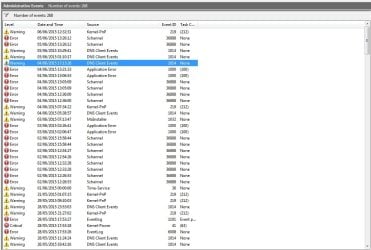
Event viewer.jpg
 

My Computer

Computer type
PC/Desktop
Computer Manufacturer/Model Number
Custom Build
OS
Windows 7
CPU
AMD Phenom II X6 1090T 3.2 GHz
Motherboard
GA-880GM-UD2H
Memory
16GB DDR3 PC3-10700
Graphics Card(s)
AMD Radeon R9200 Series
Sound Card
On Board
Monitor(s) Displays
BenQ XL2420Z
Screen Resolution
1080P
Hard Drives
C: Samsung SSD 60 GB
D: 1000 GB Hitachi
E: 1000 GB Western
Case
CM Storm
Internet Speed
40MB Down 10MB Up
Antivirus
BitDefender
Browser
Firefox
I get Schannel errors sometimes and they are related to HTTPS sites when using Internet Explorer. I try to use Firefox as much as possible.

You can double click a message to view the details. For the "Application error" that will be useful to find out what program crashed, while probably not so useful for the Schannel errors.
 

My Computer

Computer type
Laptop
Computer Manufacturer/Model Number
HP Elitebook 8540p
OS
Windows 7 Pro 32
CPU
Intel(R) Core(TM) i5 CPU M 540 @ 2.53GHz
Motherboard
Hewlett-Packard 1521
Memory
4,00 GB (Usable 2,98)
Graphics Card(s)
NVIDIA NVS 5100M
Sound Card
NVIDIA High Definition Audio
Screen Resolution
1600x900
Hard Drives
INTEL SSDSA2CW120G3
Antivirus
F-Secure Internet Security
Browser
IE, Firefox, Opera
Other Info
Sandboxie,
SRP (Software Restriction Policy),
EMET (Enhanced Mitigation Experience Toolkit),
WFC (Windows Firewall Control by BiniSoft),
Malwarebytes Premium
thanks application error was my driod cam, was more concerned about the Schannel errors, I do use firefox, but also use UC browser, but im guessing from the way you replied these errors/faults are nothing to worry about ?

was also these that worried me, the kernel-pnp when I click on it I get this message The driver \Driver\WUDFRd failed to load for the device USB\VID_0FCE&PID_01BA\CB5A249HUY.
 

My Computer

Computer type
PC/Desktop
Computer Manufacturer/Model Number
Custom Build
OS
Windows 7
CPU
AMD Phenom II X6 1090T 3.2 GHz
Motherboard
GA-880GM-UD2H
Memory
16GB DDR3 PC3-10700
Graphics Card(s)
AMD Radeon R9200 Series
Sound Card
On Board
Monitor(s) Displays
BenQ XL2420Z
Screen Resolution
1080P
Hard Drives
C: Samsung SSD 60 GB
D: 1000 GB Hitachi
E: 1000 GB Western
Case
CM Storm
Internet Speed
40MB Down 10MB Up
Antivirus
BitDefender
Browser
Firefox
About the Schannel errors I'd try and investigate why and where you get them. I've read they can relate to the use of Outlook and Skype for example, but in my case it was related to certain HTTPS sites when using Internet Explorer 11.

Schannel(secure channel) handles encrypted traffic over port 443(https). In my case some web sites I use don't fully work with TLS 1.2 in IE11 so they fallback on other perhaps less secure ciphers and that can trigger schannel errors. Info on IE11 and TLS 1.2: IE11 Automatically Makes Over 40% of the Web More Secure While Making Sure Sites Continue to Work - IEBlog - Site Home - MSDN Blogs

If you look at the details of a schannel error this can explain it more, if it's related to TLS/SSL and what version etc:
https://msdn.microsoft.com/en-us/library/windows/desktop/dd721886(v=vs.85).aspx

Unfortunately it's not easy tracking these errors to determine if they can be solved or ignored. I don't use IE11 that much anymore. That's my solution.

I get the Kernel-PnP too sometimes but they are only a warning compared to errors. Related to removal of USB devices and can be safely ignored I think.
 

My Computer

Computer type
Laptop
Computer Manufacturer/Model Number
HP Elitebook 8540p
OS
Windows 7 Pro 32
CPU
Intel(R) Core(TM) i5 CPU M 540 @ 2.53GHz
Motherboard
Hewlett-Packard 1521
Memory
4,00 GB (Usable 2,98)
Graphics Card(s)
NVIDIA NVS 5100M
Sound Card
NVIDIA High Definition Audio
Screen Resolution
1600x900
Hard Drives
INTEL SSDSA2CW120G3
Antivirus
F-Secure Internet Security
Browser
IE, Firefox, Opera
Other Info
Sandboxie,
SRP (Software Restriction Policy),
EMET (Enhanced Mitigation Experience Toolkit),
WFC (Windows Firewall Control by BiniSoft),
Malwarebytes Premium
Back
Top