recurring BSOD, errors: 0x00000024 and 0x00000003B

Appdata\Local\Temp is a protected operating system file under C: Users\Username ... hidden by default. So the OP is to first go to folder options,then unhide protected OS files (which is against system recommendations, may be heavy for noobs) and then delete it?

What I wanted to know is how you identified it as a problem?
 

My Computer My Computer

At a glance

Microsoft Windows 10 Pro Insider Preview 64-bitIntel(R) Core(TM) i3-4130 CPU @ 3.40GHzCorsair Vengence 4GB x2 (8.00GB Dual-Channel ...2047MB GeForce GTS 450 (ZOTAC International)
Computer type
PC/Desktop
Computer Manufacturer/Model Number
Self Assembled
OS
Microsoft Windows 10 Pro Insider Preview 64-bit
CPU
Intel(R) Core(TM) i3-4130 CPU @ 3.40GHz
Motherboard
Gigabyte Technology Co., Ltd. B85M-D3H
Memory
Corsair Vengence 4GB x2 (8.00GB Dual-Channel DDR3 @ 798MHz)
Graphics Card(s)
2047MB GeForce GTS 450 (ZOTAC International)
Sound Card
Onboard (Realtek High Definition Audio)
Monitor(s) Displays
LG Flatron E2040T
Screen Resolution
1600x900
Hard Drives
Western Digital 1 TB
Seagate 500 GB
PSU
Corsair VS550
Case
Cooler Master K380
Cooling
Cooler Master Seidon 120V Plus
Keyboard
Logitech MK260r
Mouse
Logitech MK260r
Internet Speed
PMPL Broadband
Antivirus
Windows Defender + MBAM
Browser
Firefox
Other Info
Dell Studio 15" Laptop
There shouldn't be any ?? in front of C:\ if there is a ? in front then there is an issue there.

But if he wants he could leave it there. Is dmp files point to

Code:
*******************************************************************************
*                                                                                                                                           *
*                        Bugcheck Analysis                                                                                           *
*                                                                                                                                           *
*******************************************************************************

IRQL_NOT_LESS_OR_EQUAL (a)
An attempt was made to access a pageable (or completely invalid) address at an
interrupt request level (IRQL) that is too high.  This is usually
caused by drivers using improper addresses.
If a kernel debugger is available get the stack backtrace.
Arguments:
Arg1: 0000000000000040, memory referenced
Arg2: 0000000000000002, IRQL
Arg3: 0000000000000001, bitfield :
	bit 0 : value 0 = read operation, 1 = write operation
	bit 3 : value 0 = not an execute operation, 1 = execute operation (only on chips which support this level of status)
Arg4: fffff80002ade0d8, address which referenced memory

Debugging Details:
------------------

TRIAGER: Could not open triage file : e:\dump_analysis\program\triage\modclass.ini, error 2

WRITE_ADDRESS: GetPointerFromAddress: unable to read from fffff80002d07100
GetUlongFromAddress: unable to read from fffff80002d071c0
 0000000000000040 Nonpaged pool

CURRENT_IRQL:  2

FAULTING_IP: 
nt!KiTryUnwaitThread+28
fffff800`02ade0d8 f0480fba6b4000  lock bts qword ptr [rbx+40h],0

DEFAULT_BUCKET_ID:  WIN7_DRIVER_FAULT

BUGCHECK_STR:  0xA

PROCESS_NAME:  svchost.exe

Code:
FOLLOWUP_IP: 
NETIO!NsiGetAllParametersEx+258
fffff880`019a2c08 8bf8            mov     edi,eax

SYMBOL_STACK_INDEX:  b

SYMBOL_NAME:  NETIO!NsiGetAllParametersEx+258

FOLLOWUP_NAME:  MachineOwner

MODULE_NAME: NETIO

IMAGE_NAME:  [COLOR="Red"]NETIO.SYS[/COLOR]

DEBUG_FLR_IMAGE_TIMESTAMP:  5034f6a0

FAILURE_BUCKET_ID:  X64_0xA_NETIO!NsiGetAllParametersEx+258

BUCKET_ID:  X64_0xA_NETIO!NsiGetAllParametersEx+258

Followup: MachineOwner

Code:
*******************************************************************************
*                                                                             *
*                        Bugcheck Analysis                                    *
*                                                                             *
*******************************************************************************

SYSTEM_SERVICE_EXCEPTION (3b)
An exception happened while executing a system service routine.
Arguments:
Arg1: 00000000c0000005, Exception code that caused the bugcheck
Arg2: fffff80002dd7074, Address of the instruction which caused the bugcheck
Arg3: fffff88007b4bdc0, Address of the context record for the exception that caused the bugcheck
Arg4: 0000000000000000, zero.

Debugging Details:
------------------

TRIAGER: Could not open triage file : e:\dump_analysis\program\triage\modclass.ini, error 2

EXCEPTION_CODE: (NTSTATUS) 0xc0000005 - The instruction at "0x%08lx" referenced memory at "0x%08lx". The memory could not be "%s".

FAULTING_IP: 
nt!ObpIncrementHandleCountEx+34
fffff800`02dd7074 0000            add     byte ptr [rax],al

CONTEXT:  fffff88007b4bdc0 -- (.cxr 0xfffff88007b4bdc0)
rax=0000000000000005 rbx=fffff88007b4c9c0 rcx=0000000000000001
rdx=fffff88007b4c8b0 rsi=0000000000000000 rdi=fffff8a00147d650
rip=fffff80002dd7074 rsp=fffff88007b4c7a0 rbp=0000000000000000
 r8=0000000000000000  r9=fffff8a00147d680 r10=0000000000000000
r11=0000000000000001 r12=0000000000000000 r13=0000000000000000
r14=0000000000000001 r15=fffffa800acd3060
iopl=0         nv up ei ng nz na po nc
cs=0010  ss=0018  ds=002b  es=002b  fs=0053  gs=002b             efl=00010286
nt!ObpIncrementHandleCountEx+0x34:
fffff800`02dd7074 0000            add     byte ptr [rax],al ds:002b:00000000`00000005=??
Resetting default scope

Code:
DEFAULT_BUCKET_ID:  WIN7_DRIVER_FAULT

BUGCHECK_STR:  0x3B

PROCESS_NAME:  spoolsv.exe

CURRENT_IRQL:  0

MISALIGNED_IP: 
nt!ObpIncrementHandleCountEx+34
fffff800`02dd7074 0000            add     byte ptr [rax],al

LAST_CONTROL_TRANSFER:  from fffff80002dd6abc to fffff80002dd7074

STACK_TEXT:  
fffff880`07b4c7a0 fffff800`02dd6abc : fffffa80`00000001 fffff880`07b4c8b0 fffffa80`0acd3060 fffff8a0`0147d680 : nt!ObpIncrementHandleCountEx+0x34
fffff880`07b4c860 fffff800`02dc87a9 : 00000000`00000001 fffff8a0`0147d680 00000000`00000000 fffff800`02deb800 : nt!ObpCreateHandle+0x19c
fffff880`07b4c970 fffff800`02db79d4 : fffff880`07b4cca0 00000000`00020002 fffff8a0`0147d680 00000000`00020002 : nt!ObOpenObjectByPointerWithTag+0x109
fffff880`07b4cb90 fffff800`02adae93 : fffffa80`0c297060 fffffa80`00020002 00000000`00000000 00000000`02ece7a8 : nt!NtOpenProcessTokenEx+0x114
fffff880`07b4cc20 00000000`772022da : 00000000`00000000 00000000`00000000 00000000`00000000 00000000`00000000 : nt!KiSystemServiceCopyEnd+0x13
00000000`02ece478 00000000`00000000 : 00000000`00000000 00000000`00000000 00000000`00000000 00000000`00000000 : 0x772022da


FOLLOWUP_IP: 
nt!ObpIncrementHandleCountEx+34
fffff800`02dd7074 0000            add     byte ptr [rax],al

SYMBOL_STACK_INDEX:  0

SYMBOL_NAME:  nt!ObpIncrementHandleCountEx+34

FOLLOWUP_NAME:  MachineOwner

IMAGE_NAME:  hardware

DEBUG_FLR_IMAGE_TIMESTAMP:  0

STACK_COMMAND:  .cxr 0xfffff88007b4bdc0 ; kb

MODULE_NAME: hardware

FAILURE_BUCKET_ID:  X64_IP_MISALIGNED

BUCKET_ID:  X64_IP_MISALIGNED

Followup: MachineOwner
 

My Computer My Computer

At a glance

Windows 7 Ultimate 32-Bit & Windows 7 Ultimat...Intel Core i7 CPU 950 @ 3.07GHzOCZ 6GB (3 x 2GB) 240-Pin DDR3 SDRAM DDR3 160...ATI Radeon HD 5700 Series
Computer Manufacturer/Model Number
Custom Built
OS
Windows 7 Ultimate 32-Bit & Windows 7 Ultimate 64-Bit
CPU
Intel Core i7 CPU 950 @ 3.07GHz
Motherboard
ASUS P6T DELUXE V2
Memory
OCZ 6GB (3 x 2GB) 240-Pin DDR3 SDRAM DDR3 1600 OCZ3X1600R2
Graphics Card(s)
ATI Radeon HD 5700 Series
Sound Card
OnBoard
Hard Drives
WD6400AACS-00M3B0 (640GB SATA )
PSU
CORSAIR 850w
Case
NZXT LEXA
Cooling
Intel Stock Heatsink Fan
Keyboard
Microsoft Wireless Laser Keyboard 7000
Mouse
Microsoft Wireless Laser Mouse 7000
Please read it.
Note File I/O functions in the Windows API convert "/" to "\" as part of converting the name to an NT-style name, except when using the "\\?\" prefix as detailed in the following sections.
The Windows API has many functions that also have Unicode versions to permit an extended-length path for a maximum total path length of 32,767 characters. This type of path is composed of components separated by backslashes, each up to the value returned in the lpMaximumComponentLength parameter of the GetVolumeInformation function (this value is commonly 255 characters). To specify an extended-length path, use the "\\?\" prefix. For example, "\\?\D:\very long path".
Note The maximum path of 32,767 characters is approximate, because the "\\?\" prefix may be expanded to a longer string by the system at run time, and this expansion applies to the total length.
The "\\?\" prefix can also be used with paths constructed according to the universal naming convention (UNC). To specify such a path using UNC, use the "\\?\UNC\" prefix. For example, "\\?\UNC\server\share", where "server" is the name of the computer and "share" is the name of the shared folder. These prefixes are not used as part of the path itself. They indicate that the path should be passed to the system with minimal modification, which means that you cannot use forward slashes to represent path separators, or a period to represent the current directory, or double dots to represent the parent directory. Because you cannot use the "\\?\" prefix with a relative path, relative paths are always limited to a total of MAX_PATH characters.
There is no need to perform any Unicode normalization on path and file name strings for use by the Windows file I/O API functions because the file system treats path and file names as an opaque sequence of WCHARs. Any normalization that your application requires should be performed with this in mind, external of any calls to related Windows file I/O API functions.
When using an API to create a directory, the specified path cannot be so long that you cannot append an 8.3 file name (that is, the directory name cannot exceed MAX_PATH minus 12).
The shell and the file system have different requirements. It is possible to create a path with the Windows API that the shell user interface is not able to interpret properly.
Namespaces

There are two main categories of namespace conventions used in the Windows APIs, commonly referred to as NT namespaces and the Win32 namespaces. The NT namespace was designed to be the lowest level namespace on which other subsystems and namespaces could exist, including the Win32 subsystem and, by extension, the Win32 namespaces. POSIX is another example of a subsystem in Windows that is built on top of the NT namespace. Early versions of Windows also defined several predefined, or reserved, names for certain special devices such as communications (serial and parallel) ports and the default display console as part of what is now called the NT device namespace, and are still supported in current versions of Windows for backward compatibility.
Win32 File Namespaces

The Win32 namespace prefixing and conventions are summarized in this section and the following section, with descriptions of how they are used. Note that these examples are intended for use with the Windows API functions and do not all necessarily work with Windows shell applications such as Windows Explorer. For this reason there is a wider range of possible paths than is usually available from Windows shell applications, and Windows applications that take advantage of this can be developed using these namespace conventions.
For file I/O, the "\\?\" prefix to a path string tells the Windows APIs to disable all string parsing and to send the string that follows it straight to the file system. For example, if the file system supports large paths and file names, you can exceed the MAX_PATH limits that are otherwise enforced by the Windows APIs. For more information about the normal maximum path limitation, see the previous section Maximum Path Length Limitation.
Because it turns off automatic expansion of the path string, the "\\?\" prefix also allows the use of ".." and "." in the path names, which can be useful if you are attempting to perform operations on a file with these otherwise reserved relative path specifiers as part of the fully qualified path.
Many but not all file I/O APIs support "\\?\"; you should look at the reference topic for each API to be sure.

Source: Naming Files, Paths, and Namespaces
It appears to be not an issue, but a long path.
 

My Computer My Computer

At a glance

Microsoft Windows 10 Pro Insider Preview 64-bitIntel(R) Core(TM) i3-4130 CPU @ 3.40GHzCorsair Vengence 4GB x2 (8.00GB Dual-Channel ...2047MB GeForce GTS 450 (ZOTAC International)
Computer type
PC/Desktop
Computer Manufacturer/Model Number
Self Assembled
OS
Microsoft Windows 10 Pro Insider Preview 64-bit
CPU
Intel(R) Core(TM) i3-4130 CPU @ 3.40GHz
Motherboard
Gigabyte Technology Co., Ltd. B85M-D3H
Memory
Corsair Vengence 4GB x2 (8.00GB Dual-Channel DDR3 @ 798MHz)
Graphics Card(s)
2047MB GeForce GTS 450 (ZOTAC International)
Sound Card
Onboard (Realtek High Definition Audio)
Monitor(s) Displays
LG Flatron E2040T
Screen Resolution
1600x900
Hard Drives
Western Digital 1 TB
Seagate 500 GB
PSU
Corsair VS550
Case
Cooler Master K380
Cooling
Cooler Master Seidon 120V Plus
Keyboard
Logitech MK260r
Mouse
Logitech MK260r
Internet Speed
PMPL Broadband
Antivirus
Windows Defender + MBAM
Browser
Firefox
Other Info
Dell Studio 15" Laptop
finally regained access after a series of BSOD's... I'll try to uninstall (delete?) the files as indicated by VistaKing.

yes, i tried several memory tests, as indicated on first page... maybe file still from them?

anyways, i'll post my progress as I try your indications. guys, you are really patient thanks a million!
 

My Computer My Computer

At a glance

Windows 7 Professional 64bitIntel Core i7 M620 @ 2.67 GHz8 GBIntel HD Graphics
Computer Manufacturer/Model Number
Lenovo X201
OS
Windows 7 Professional 64bit
CPU
Intel Core i7 M620 @ 2.67 GHz
Memory
8 GB
Graphics Card(s)
Intel HD Graphics
Sound Card
Conexant 20585 SmartAudio HD
Monitor(s) Displays
Lenovo TFT
Hard Drives
Intel 160 GB SSD
AVG is a known cause of BSODs with Windows 7, please remove the program with the official AVG Removal Tool and then install these free and proven alternatives which work with Windows 7:

Install and perform full scans with:
   Information
Remember to install the free version of Malwarebytes not the free trail; untick the free trial box during installation. MSE is the most lightweight and compatible with the Windows 7 operating system

You can also view this thread for a complete free and lightweight security protection combination:
Sorry saw that I already suggested to install MSE in my first post, I'm not sure if you have done it yet or not.

Code:
3: kd> [COLOR="SeaGreen"]lmvm SynTP[/COLOR]
start             end                 module name
fffff880`05c01000 fffff880`05c77000   SynTP    T (no symbols)           
    Loaded symbol image file: SynTP.sys
    Image path: SynTP.sys
    Image name: SynTP.sys
    Timestamp:        [COLOR="Red"]Thu Oct 18 05:56:11 2012[/COLOR] (507F8BEB)
    CheckSum:         00072CBB
    ImageSize:        00076000
    Translations:     0000.04b0 0000.04e4 0409.04b0 0409.04e4

Your Synaptic Touch Pad Driver may be causing a few problems, please update it from here:
Code:
3: kd> [COLOR="SeaGreen"]lmvm igdkmd64 [/COLOR]
start             end                 module name
fffff880`04c04000 fffff880`057c1d60   igdkmd64 T (no symbols)           
    Loaded symbol image file: igdkmd64.sys
    Image path: igdkmd64.sys
    Image name: igdkmd64.sys
    Timestamp:        [COLOR="Red"]Tue Jan 10 22:28:09 2012[/COLOR] (4F0CBB79)
    CheckSum:         00BC541D
    ImageSize:        00BBDD60
    Translations:     0000.04b0 0000.04e4 0409.04b0 0409.04e4

Your onboard Intel Graphics driver may also be contributing, please update the driver from here:
 

My Computer My Computer

Computer type
Laptop
Hi guys,

sorry, couldn't get to it earlier... so, now I have:
- updated intel graphics driver
- updated touchpad driver
- installed microsoft security essentials & malwarebytes
- removed AVG (hopefully no traces of it left)
- scanned the SSD with the intel SSD toolbox, no errors found

here is a few screen captures and the SF diagnostics... now let's see if the machine behaves stable for more than short stints. i'll report back.

thanks for your help !

jo
 

My Computer My Computer

At a glance

Windows 7 Professional 64bitIntel Core i7 M620 @ 2.67 GHz8 GBIntel HD Graphics
Computer Manufacturer/Model Number
Lenovo X201
OS
Windows 7 Professional 64bit
CPU
Intel Core i7 M620 @ 2.67 GHz
Memory
8 GB
Graphics Card(s)
Intel HD Graphics
Sound Card
Conexant 20585 SmartAudio HD
Monitor(s) Displays
Lenovo TFT
Hard Drives
Intel 160 GB SSD
Welcome, and thanks for the update, leave this thread open for a few days.
 

My Computer My Computer

Computer type
Laptop
so, I was optimistic... the ungrateful box promptly threw a 0x000001e at us

here are the SF diagnostics, if you still feel it's worth trying

thanks!
 

My Computer My Computer

At a glance

Windows 7 Professional 64bitIntel Core i7 M620 @ 2.67 GHz8 GBIntel HD Graphics
Computer Manufacturer/Model Number
Lenovo X201
OS
Windows 7 Professional 64bit
CPU
Intel Core i7 M620 @ 2.67 GHz
Memory
8 GB
Graphics Card(s)
Intel HD Graphics
Sound Card
Conexant 20585 SmartAudio HD
Monitor(s) Displays
Lenovo TFT
Hard Drives
Intel 160 GB SSD
Your Intel Rapid Storage driver seems to be causing some issues, there is one known stable driver which works with Windows 7, and this is dated as 6/11/2012, with the version number of 11.2.0.1006 - RAID: Intel® Rapid Storage Technology Driver for Intel Desktop Boards

Code:
3: kd> [COLOR="SeaGreen"]lmvm iaStor[/COLOR]
start             end                 module name
fffff880`01235000 fffff880`015d9000   iaStor   T (no symbols)           
    Loaded symbol image file: iaStor.sys
    Image path: iaStor.sys
    Image name: iaStor.sys
    Timestamp:        [COLOR="Red"]Wed May 30 21:40:40 2012[/COLOR] (4FC685C8)
    CheckSum:         00091790
    ImageSize:        003A4000
    Translations:     0000.04b0 0000.04e4 0409.04b0 0409.04e4
 

My Computer My Computer

Computer type
Laptop
Hi,

I updated this driver and the process ran fine to the end. However, once i go to device manager to see the version of driver installed I get the same 11.2.0.1006 dated 5/30/2012 (not 6/11/2012). This although the driver I downloaded from the intel page and installed is apparently dated as you say (june).


As far as I know the version number is the relevant piece of info, the date could be different. Correct?


Cheers,


Jo
 

My Computer My Computer

At a glance

Windows 7 Professional 64bitIntel Core i7 M620 @ 2.67 GHz8 GBIntel HD Graphics
Computer Manufacturer/Model Number
Lenovo X201
OS
Windows 7 Professional 64bit
CPU
Intel Core i7 M620 @ 2.67 GHz
Memory
8 GB
Graphics Card(s)
Intel HD Graphics
Sound Card
Conexant 20585 SmartAudio HD
Monitor(s) Displays
Lenovo TFT
Hard Drives
Intel 160 GB SSD
The release date of the driver and the timestrap is always different. Timestrap lags by a few days, sometimes by a month too (for the immediate earlier ATI display driver). So it is not a problem. The driver version is the main thing to check.
 

My Computer My Computer

At a glance

Microsoft Windows 10 Pro Insider Preview 64-bitIntel(R) Core(TM) i3-4130 CPU @ 3.40GHzCorsair Vengence 4GB x2 (8.00GB Dual-Channel ...2047MB GeForce GTS 450 (ZOTAC International)
Computer type
PC/Desktop
Computer Manufacturer/Model Number
Self Assembled
OS
Microsoft Windows 10 Pro Insider Preview 64-bit
CPU
Intel(R) Core(TM) i3-4130 CPU @ 3.40GHz
Motherboard
Gigabyte Technology Co., Ltd. B85M-D3H
Memory
Corsair Vengence 4GB x2 (8.00GB Dual-Channel DDR3 @ 798MHz)
Graphics Card(s)
2047MB GeForce GTS 450 (ZOTAC International)
Sound Card
Onboard (Realtek High Definition Audio)
Monitor(s) Displays
LG Flatron E2040T
Screen Resolution
1600x900
Hard Drives
Western Digital 1 TB
Seagate 500 GB
PSU
Corsair VS550
Case
Cooler Master K380
Cooling
Cooler Master Seidon 120V Plus
Keyboard
Logitech MK260r
Mouse
Logitech MK260r
Internet Speed
PMPL Broadband
Antivirus
Windows Defender + MBAM
Browser
Firefox
Other Info
Dell Studio 15" Laptop

My Computer My Computer

At a glance

Windows 7 Ultimate 32-Bit & Windows 7 Ultimat...Intel Core i7 CPU 950 @ 3.07GHzOCZ 6GB (3 x 2GB) 240-Pin DDR3 SDRAM DDR3 160...ATI Radeon HD 5700 Series
Computer Manufacturer/Model Number
Custom Built
OS
Windows 7 Ultimate 32-Bit & Windows 7 Ultimate 64-Bit
CPU
Intel Core i7 CPU 950 @ 3.07GHz
Motherboard
ASUS P6T DELUXE V2
Memory
OCZ 6GB (3 x 2GB) 240-Pin DDR3 SDRAM DDR3 1600 OCZ3X1600R2
Graphics Card(s)
ATI Radeon HD 5700 Series
Sound Card
OnBoard
Hard Drives
WD6400AACS-00M3B0 (640GB SATA )
PSU
CORSAIR 850w
Case
NZXT LEXA
Cooling
Intel Stock Heatsink Fan
Keyboard
Microsoft Wireless Laser Keyboard 7000
Mouse
Microsoft Wireless Laser Mouse 7000
VistaKing, xBluerobot hasnt suggested the latest version, there must be some reason.

Some of the latest versions of the RST drivers suffer from stability issue. I hope that version that XBlueRobot suggested is a good one, and we should continue to suggest that version or similar versions, not the very latest ones .... unless and untill people like Dave76 or NoelDP suggest for another stable version to us.

joX201, stay with the RST version that xBluerobot suggested.
 

My Computer My Computer

At a glance

Microsoft Windows 10 Pro Insider Preview 64-bitIntel(R) Core(TM) i3-4130 CPU @ 3.40GHzCorsair Vengence 4GB x2 (8.00GB Dual-Channel ...2047MB GeForce GTS 450 (ZOTAC International)
Computer type
PC/Desktop
Computer Manufacturer/Model Number
Self Assembled
OS
Microsoft Windows 10 Pro Insider Preview 64-bit
CPU
Intel(R) Core(TM) i3-4130 CPU @ 3.40GHz
Motherboard
Gigabyte Technology Co., Ltd. B85M-D3H
Memory
Corsair Vengence 4GB x2 (8.00GB Dual-Channel DDR3 @ 798MHz)
Graphics Card(s)
2047MB GeForce GTS 450 (ZOTAC International)
Sound Card
Onboard (Realtek High Definition Audio)
Monitor(s) Displays
LG Flatron E2040T
Screen Resolution
1600x900
Hard Drives
Western Digital 1 TB
Seagate 500 GB
PSU
Corsair VS550
Case
Cooler Master K380
Cooling
Cooler Master Seidon 120V Plus
Keyboard
Logitech MK260r
Mouse
Logitech MK260r
Internet Speed
PMPL Broadband
Antivirus
Windows Defender + MBAM
Browser
Firefox
Other Info
Dell Studio 15" Laptop
Hi again,

More BSOD's... I don't have the machine with me now, but will post more diagnostics soon. It keeps throwing blue screens, apparently mostly with the same error messages in random order.
I just wanted to thank you guys for your support. You have put much more effort into this than the shameful Lenovo (which since the machine was new was only good to make me waste hours on the phone or writing emails that remain unanswered, and whose only attempt to fix it was to dump the blame on Microsoft because "Lenovo doesn't make software"... what a lame company, if i did this to my clients I'd be out of business in a whiz!).

Have a good weekend!
Cheers,

Jo
 

My Computer My Computer

At a glance

Windows 7 Professional 64bitIntel Core i7 M620 @ 2.67 GHz8 GBIntel HD Graphics
Computer Manufacturer/Model Number
Lenovo X201
OS
Windows 7 Professional 64bit
CPU
Intel Core i7 M620 @ 2.67 GHz
Memory
8 GB
Graphics Card(s)
Intel HD Graphics
Sound Card
Conexant 20585 SmartAudio HD
Monitor(s) Displays
Lenovo TFT
Hard Drives
Intel 160 GB SSD
Very welcome, always happy to help, and will look forward for the diagnostics folder.
 

My Computer My Computer

Computer type
Laptop
whose only attempt to fix it was to dump the blame on Microsoft because "Lenovo doesn't make software"...
Yes, its true that Lenovo does not make software. But they do something. They bloat up the installations with some really unnecessary things. Suppost the AHCI controller. The system native controller never fails, whereas the intel RST elements are really crash prone. That intel'd driver that crashed your system for the last time we checked does not supplied by microsoft but bloated by (it may cause another debate, but it is always nothing but a bloatware to me) Lenovo.

If you want to get rid of the factory installation by Lenovo, that will be the best option for you. Follow the guide: http://www.sevenforums.com/tutorials/219487-clean-reinstall-factory-oem-windows-7-a.html

It will give you the perfect windows installation which will maximize windows efficiency only. And as your hardware are good, all the issues are for drivers and software, there is a fair chance that it will reduce the possibility of another BSOD.
 

My Computer My Computer

At a glance

Microsoft Windows 10 Pro Insider Preview 64-bitIntel(R) Core(TM) i3-4130 CPU @ 3.40GHzCorsair Vengence 4GB x2 (8.00GB Dual-Channel ...2047MB GeForce GTS 450 (ZOTAC International)
Computer type
PC/Desktop
Computer Manufacturer/Model Number
Self Assembled
OS
Microsoft Windows 10 Pro Insider Preview 64-bit
CPU
Intel(R) Core(TM) i3-4130 CPU @ 3.40GHz
Motherboard
Gigabyte Technology Co., Ltd. B85M-D3H
Memory
Corsair Vengence 4GB x2 (8.00GB Dual-Channel DDR3 @ 798MHz)
Graphics Card(s)
2047MB GeForce GTS 450 (ZOTAC International)
Sound Card
Onboard (Realtek High Definition Audio)
Monitor(s) Displays
LG Flatron E2040T
Screen Resolution
1600x900
Hard Drives
Western Digital 1 TB
Seagate 500 GB
PSU
Corsair VS550
Case
Cooler Master K380
Cooling
Cooler Master Seidon 120V Plus
Keyboard
Logitech MK260r
Mouse
Logitech MK260r
Internet Speed
PMPL Broadband
Antivirus
Windows Defender + MBAM
Browser
Firefox
Other Info
Dell Studio 15" Laptop
Hi guys,
finally I get around to investing some more time on this machine...
Here are the newest diagnostic logs. Today it even crashed while the SF tool was making them.
BTW, I seem to understand the tool writes info on all the last crashes, not just the last one. Is this correct? In any case, I also added a screen capture of the blue screen tool.

I am considering going down the road of a clean install (again). I did this before contacting the forum, so possibly with small differences compared to its suggestions.
Any concerns with the approach? Anything to get out of the system before I go ahead?

Thanks,

Jo
 

My Computer My Computer

At a glance

Windows 7 Professional 64bitIntel Core i7 M620 @ 2.67 GHz8 GBIntel HD Graphics
Computer Manufacturer/Model Number
Lenovo X201
OS
Windows 7 Professional 64bit
CPU
Intel Core i7 M620 @ 2.67 GHz
Memory
8 GB
Graphics Card(s)
Intel HD Graphics
Sound Card
Conexant 20585 SmartAudio HD
Monitor(s) Displays
Lenovo TFT
Hard Drives
Intel 160 GB SSD
Code:
[COLOR="SeaGreen"]Event[15301]:[/COLOR]
  Log Name: System
  Source: Service Control Manager
  Date: [COLOR="Blue"]2013-05-10[/COLOR] T08:50:35.238
  Event ID: 7026
  Task: N/A
  Level: [COLOR="Red"]Error[/COLOR]
  Opcode: N/A
  Keyword: Classic
  User: N/A
  User Name: N/A
  Computer: jostraso-X201
  Description: 
The following boot-start or system-start driver(s) failed to load: 
[COLOR="red"]cdrom[/COLOR]

cdrom.sys is a key Windows driver for the SCSI CD-ROM.

Code:
[COLOR="SeaGreen"]Event[15314]:[/COLOR]
  Log Name: System
  Source: Microsoft Antimalware
  Date: [COLOR="Blue"]2013-05-10[/COLOR] T08:50:38.000
  Event ID: 2001
  Task: N/A
  Level: [COLOR="red"]Error[/COLOR]
  Opcode: Info
  Keyword: Classic
  User: N/A
  User Name: N/A
  Computer: jostraso-X201
  Description: 
Microsoft Antimalware has encountered an error trying to update signatures

A few key Windows services were stopped, or failed to load, the Windows Anti-Malware service failed to update the signatures multiple times, eventually resulting in the Stop 0x3B BSOD. I also noticed that a few Lenovo services started before the Anti-Malware service began to crash, this may just be a coincidence.

The driver for the service has be seen within the call stack too:

Code:
fffff880`088405c8  fffff800`02ccad04 [COLOR="red"]nt!KeBugCheckEx+0x104[/COLOR]
fffff880`088405d0  0000007f`fffffff8
fffff880`088405d8  fffff800`02fe6000 nt! ?? ::NNGAKEGL::`string'+0x8a39
fffff880`088405e8  fffff880`01552000 [COLOR="Red"]MpFilter+0xb000[/COLOR]
fffff880`088405f0  00000000`00000000
fffff880`088405f8  00000000`00000000
fffff880`08840600  00000000`00000282
fffff880`08840608  fffff800`02cca1a9 nt!KiBugCheckDispatch+0x69

Before performing a clean installation which may be the best option at the moment, have you checked and installed all the available Windows Updates?

Scan for any malware:
 

My Computer My Computer

Computer type
Laptop
Hi x BlueRobot,

thanks again for your tips. If a clean install is my best chance to sort it out, perhaps I should jump into it and get it over with. I've got no data on this pc anyways. Do you agree?
A clean install would kill also any low-level virus, rootkits, or other mischievous stuff that may be at the origin of the crashes, correct?

@Arc: you also agree?
 

My Computer My Computer

At a glance

Windows 7 Professional 64bitIntel Core i7 M620 @ 2.67 GHz8 GBIntel HD Graphics
Computer Manufacturer/Model Number
Lenovo X201
OS
Windows 7 Professional 64bit
CPU
Intel Core i7 M620 @ 2.67 GHz
Memory
8 GB
Graphics Card(s)
Intel HD Graphics
Sound Card
Conexant 20585 SmartAudio HD
Monitor(s) Displays
Lenovo TFT
Hard Drives
Intel 160 GB SSD
Yes, I agree. I also think that what is that making cdrom.sys fail at startup.

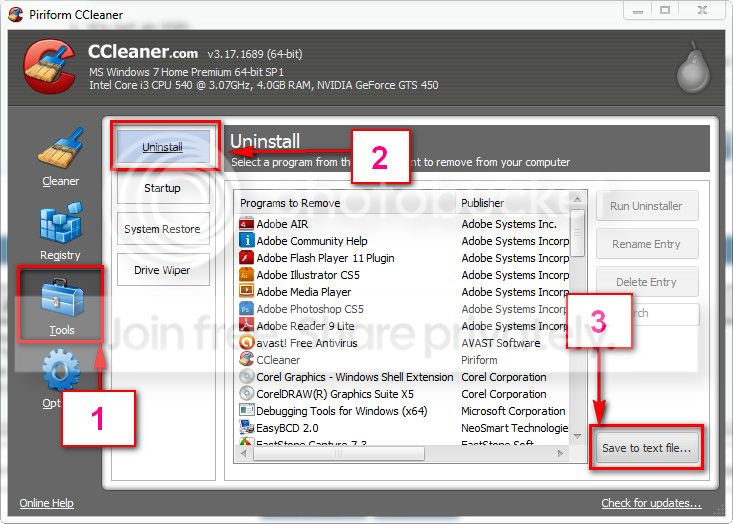
Download and install CCleaner. Then run it.
Go to "Tools" .... by default it will open the "uninstall" tab.
Click on save as text file. Save it on your desktop.
Upload the text file for us.
2012-11-02_224417.jpg


But if you opt for a clean reinstall, it will not be needed right now.
 

My Computer My Computer

At a glance

Microsoft Windows 10 Pro Insider Preview 64-bitIntel(R) Core(TM) i3-4130 CPU @ 3.40GHzCorsair Vengence 4GB x2 (8.00GB Dual-Channel ...2047MB GeForce GTS 450 (ZOTAC International)
Computer type
PC/Desktop
Computer Manufacturer/Model Number
Self Assembled
OS
Microsoft Windows 10 Pro Insider Preview 64-bit
CPU
Intel(R) Core(TM) i3-4130 CPU @ 3.40GHz
Motherboard
Gigabyte Technology Co., Ltd. B85M-D3H
Memory
Corsair Vengence 4GB x2 (8.00GB Dual-Channel DDR3 @ 798MHz)
Graphics Card(s)
2047MB GeForce GTS 450 (ZOTAC International)
Sound Card
Onboard (Realtek High Definition Audio)
Monitor(s) Displays
LG Flatron E2040T
Screen Resolution
1600x900
Hard Drives
Western Digital 1 TB
Seagate 500 GB
PSU
Corsair VS550
Case
Cooler Master K380
Cooling
Cooler Master Seidon 120V Plus
Keyboard
Logitech MK260r
Mouse
Logitech MK260r
Internet Speed
PMPL Broadband
Antivirus
Windows Defender + MBAM
Browser
Firefox
Other Info
Dell Studio 15" Laptop
Back
Top