RECYCLE BIN & Firefox Problems

PUZZLED

New member
Local time
6:21 PM
Messages
4
Hope this is the right place for this query, apologies if not.

I have just got a new laptop which has windows 7 installed. I have not used 7 before - previous laptop had Vista which was great.

For some reason the Recycle bin automatically empties itself after a few minutes without any warning or prompting.

After a search I found a hint about increasing the Custom size and so that is now set on 8550MB, but to be honest that means nothing to me so could be a small amount!

It doesnt matter what size file is put in the Recycle Bin, even unwanted desktop icons disappear in minutes.

I am unable to properly install Firefox - toolbars, bookmarks etc wont import. Is that a Firefox glitch or something to do with Windows 7?

Techy details - Acer 5750 Laptop
Windows 7 (use 32bit option but can also use 64bit)
4GB Memory

Would appreciate any help but please use idiots-speak:confused:
 

My Computer My Computer

At a glance

Windows 7 Home Premium 32bit
OS
Windows 7 Home Premium 32bit
This probably isn't the case, but check the Recycle Bin Properties, and be sure there is no "dot" in front of the "Don't move files to the Recycle Bin. Remove files immediately when deleted." statement.

The problem with Firefox is likely unrelated. Are you attempting to upgrade your FF version, or is this a new install on this computer?
 

My Computer My Computer

At a glance

Windows 7 Home Premium SP1i36 GBATI Radeon
Computer Manufacturer/Model Number
Dell Inspiron 580s
OS
Windows 7 Home Premium SP1
CPU
i3
Memory
6 GB
Graphics Card(s)
ATI Radeon

My Computer My Computer

At a glance

Windows 7 Home Premium x64 SP1Core 2 Quad Q66008 GB OCZ PC2-6400 nVIDIA SLI-Ready Edition (4...AMP! GeForce GTX 260² 896MB 448-bit GDDR3 (65...
Computer Manufacturer/Model Number
Me :P
OS
Windows 7 Home Premium x64 SP1
CPU
Core 2 Quad Q6600
Motherboard
Abit IN9 32X MAX
Memory
8 GB OCZ PC2-6400 nVIDIA SLI-Ready Edition (4X2GB)
Graphics Card(s)
AMP! GeForce GTX 260² 896MB 448-bit GDDR3 (650MHz/2100MHz)
Sound Card
Realtek 7.1 CH HD Audio
Monitor(s) Displays
37" LG 1080p HD LCD TV
Screen Resolution
1280x1024 + 1360x768
Hard Drives
40GB Mushkin SSD
60GB Intel 520 SSD
150GB Raptor HDD
500GB Caviar HDD
PSU
Thermaltake W0133RB 1200W PSU
Case
Antec 900
Cooling
OCZ Vendetta 2 + Antec 900 case fans
Keyboard
Logitech G15 (full layout)
Mouse
R.A.T.9
Internet Speed
Not fast enough!
This probably isn't the case, but check the Recycle Bin Properties, and be sure there is no "dot" in front of the "Don't move files to the Recycle Bin. Remove files immediately when deleted." statement.

The problem with Firefox is likely unrelated. Are you attempting to upgrade your FF version, or is this a new install on this computer?

Thanks for the reply. There is no 'dot', the custom size option is selected.

With FF it is a new install, IE was already installed on the computer when I got it.
 

My Computer My Computer

At a glance

Windows 7 Home Premium 32bit
OS
Windows 7 Home Premium 32bit

Thanks for the reply and the links but those tutorials are for getting the bin to automatically delete stuff. It is already doing that, I just want to know how I can keep things in the recycle bin until I manually select an item for seletion.

I have the custom size option selected, which according to the second link you give is the default option, but just keep losing anything I put in the bin
 

My Computer My Computer

At a glance

Windows 7 Home Premium 32bit
OS
Windows 7 Home Premium 32bit
I am unable to properly install Firefox - toolbars, bookmarks etc wont import. Is that a Firefox glitch or something to do with Windows 7?

How are you trying to import the features you mention? Did you have FF installed on your Vista laptop? If that is what you mean and you can still use th old laptop, the easiest method to transfer your settings is to save your old FF profile and copy it to the new FF installation on the Win 7 computer. MozBackup makes this pretty easy.
 

My Computer My Computer

At a glance

Windows 7 Home Premium SP1i36 GBATI Radeon
Computer Manufacturer/Model Number
Dell Inspiron 580s
OS
Windows 7 Home Premium SP1
CPU
i3
Memory
6 GB
Graphics Card(s)
ATI Radeon
Sorry if I am not making myself clear. My previous laptop was damaged and the one I have now is a replacement. I used FF on my previous one without any problems, but on this new one is had IE installed already when it was delivered.

When I install FF on this, there is an option for importing bookmarks, toolbars etc and although I get a message saying it has been successfully done, when I open FF up the toolbars are missing - the usual options of 'file/edit/tools' etc doesn't show, and the small icons you usually get for going back to the homepage etc doesn't show.

I am wondering if it is linked to the problem I am having with the recycle bin, a glitch somehow with the windows 7 program?
 

My Computer My Computer

At a glance

Windows 7 Home Premium 32bit
OS
Windows 7 Home Premium 32bit
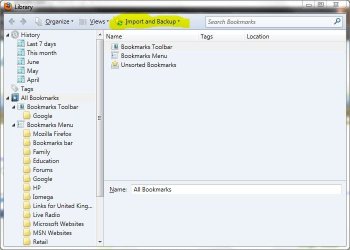
The option to import FF bookmarks probaly relates to importing them from the already installed IE9. If you saved your bookmarks from Vista then you should be able to import them into your new installation.

Bookmarks->Show All Bookmarks and press the Import and Backup button.

Capture.JPG
 

My Computer My Computer

At a glance

Microsoft Windows 7 Home Premium 64-bit Servi...Intel(R) Core(TM) i3 CPU M 330 @ 2.13GHz8 GB DDR3Intel(R) HD Graphics
Computer type
Laptop
Computer Manufacturer/Model Number
Hewlett-Packard/G62-107SA Notebook
OS
Microsoft Windows 7 Home Premium 64-bit Service Pack 1
CPU
Intel(R) Core(TM) i3 CPU M 330 @ 2.13GHz
Motherboard
Hewlett-Packard 1425
Memory
8 GB DDR3
Graphics Card(s)
Intel(R) HD Graphics
Sound Card
Realtek High Definition Audio
Monitor(s) Displays
Builtin
Screen Resolution
1366 x 768 x 32 bits (4294967296 colors) @ 60 Hz
Hard Drives
250 GB SATA Hard Disk Drive 7200 rpm
2TB Seagate GoFlex USB 2 Drive
1TB Iomega Prestige USB 2 Drive
1.5TB Iomega Prestige USB 2 Drive (Samsung)
2TB WD MyBook Live NAS.
Mouse
Logitech Anywhere MX
Internet Speed
152 Mbs download 10 Mbs upload
Antivirus
Norton 360
Browser
Chrome
I don't think there's a Windows problem involved in your Firefox concerns, nor is there a relation to the recycle bin situation. It's more likely you now have a newer version of the Firefox program than you used to, and it takes a bit of learning.

I believe the tool bar you are looking for is the Menu Toolbar. With Firefox open, hold down the Alt key and hit v This will show you the View options. Select Toolbars and then click on Menu Bar and whatever others you want. You can customize the toolbar to add exra familiar features by right-clicking on an empty space in the toolbar and selecting Customise.

Hope this helps!
 

My Computer My Computer

At a glance

Windows 7 Home Premium SP1i36 GBATI Radeon
Computer Manufacturer/Model Number
Dell Inspiron 580s
OS
Windows 7 Home Premium SP1
CPU
i3
Memory
6 GB
Graphics Card(s)
ATI Radeon
Good point, gini! FF5 introduced the new interface with menu toolbar hidden by default, among other changes.
 

My Computer My Computer

At a glance

Windows 7 Home Premium x64
OS
Windows 7 Home Premium x64
Back
Top