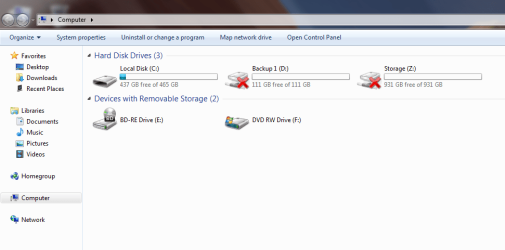
Red X over my HDD icon

Rookie

New member
Local time
5:04 PM
Messages
10
I just got done building my new system. Ive been messing with windows 7 for 2 days now. Today I was downloading somethings on the interweb trying to get my monitor to display a good picture through the HDMI cable (which is still an unresolved problem.) But anyway I went to My Computer to access my C: drive and I noticed that my other two drive (my storage and backup drive both do not have the OS on them) have a red X over the HDD icons. I did some google searches and they say I have a Trojan Virus. I did an AVG scan and it says I have no threats. So what happened? Do I really have a problem and how can fix it? Also how can I restore the icon to normal? I guess I could format and reinstall windows because I havnt put hardly anything on my drives yet. I would prefer not to I guess I could.
 

My Computer My Computer

Computer Manufacturer/Model Number
Custom
OS
Windows 7 Ultimate x64
CPU
Intel I7 860
Motherboard
MSI P55 GD80
Memory
8GB Corsair DDR3 1333
Graphics Card(s)
EVGA 9800 GX2
Hard Drives
WD 500GB
Seagate 1TB (storage)
WD 120GB (removable backup drive)
PSU
Mach 1 800W
Do you see red X if look at your drives in disk management?

You could go into safe mode with F8 at boot and rescan with both AVG and Malware Bytes (from malwarebytes.org).

Are both of the red X drives external and did they ever operate properly after you installed Windows 7?
 

My Computer My Computer

Computer type
PC/Desktop
Computer Manufacturer/Model Number
Ignatz Special; 4 speed manual gearbox; factory air conditioning; one of one
OS
Windows 7 Home Premium SP1, 64-bit
CPU
Intel Skylake i5-6600K, not overclocked
Motherboard
AsRock Z170M Extreme 4, micro ATX
Memory
8 GB HyperX DDR4-2666 (2 x 4 GB)
Graphics Card(s)
none; graphics are integrated on CPU
Sound Card
onboard: Realtek ALC1150; external: USB Behringer UF0-202
Monitor(s) Displays
Dell S2340M 23 inch IPS
Screen Resolution
1600 x 900
Hard Drives
System: Crucial MX100 series SSD, 128 GB;
Data: Samsung Spinpoint 103SJ, 1 TB;
Backup: WD Caviar Green WD30EZRX-00D8PB0, 3 TB
PSU
Rosewill SilentNight 500 watt fanless, semi-modular
Case
Antec Solo II
Cooling
Noctua NH-U12S; Noctua F12 intake, Noctua S12A exhaust
Keyboard
Microsoft 200 6JH-00001 USB
Mouse
Dell or Microsoft optical wired; USB
Antivirus
Microsoft Security Essentials and Malwarebytes Premium
Browser
Pale Moon
Other Info
All fans PWM; speeds at idle: CPU circa 500 rpm; intake circa 600 rpm; exhaust circa 600 rpm; CPU temps 27 idle and 47 C load in a warm room (27 C/81 F) when running Intel Extreme Tuning Utility stress test.
Can you actually access these drives? Since the OS is not on them, you can format them without a reinstall.
 

My Computer My Computer

Computer type
PC/Desktop
Computer Manufacturer/Model Number
Custom
OS
7 x64 Ultimate
CPU
AMD Ryzen 5
Motherboard
Gigabyte GA-AB350-Gaming
Memory
16GB DDR4
Graphics Card(s)
Radeon R7 360
Monitor(s) Displays
2 x Dell U2518D
Screen Resolution
2560x1440 2560x1440
Hard Drives
WD 500GB x2
Samsung SSD 128MB (OS)
XPG SX8200 Pro M.2 2280 1TB
PSU
Antec 500
Cooling
Hyper 212 EVO
Keyboard
Logitech cordless K800
Mouse
Logitech M510
Antivirus
Avira
Ok I checked the drives in Device Manager they all looked good there. I forgot to mention that that the C: drive does not have an X and both of the others are still working properly just with Xs. I ran malwarebytes and it too came up as a clean system. Im really only concerned that if I have a real problem, and I start loading lots of programs and files on it, and then it crashes that would not be a good day! I would like to nip this in the butt early before something bad might happen later! I have attached a screen shot to help people identify with what I'm talking about. Also I have tried formatting the 1TB drive it did say format successful and then I restarted and the X was still there.
 

Attachments

  • screen shot.png
    screen shot.png
    25.7 KB · Views: 166

My Computer My Computer

Computer Manufacturer/Model Number
Custom
OS
Windows 7 Ultimate x64
CPU
Intel I7 860
Motherboard
MSI P55 GD80
Memory
8GB Corsair DDR3 1333
Graphics Card(s)
EVGA 9800 GX2
Hard Drives
WD 500GB
Seagate 1TB (storage)
WD 120GB (removable backup drive)
PSU
Mach 1 800W
Since they are empty, why not try a quick format and see if that resolves the issue?
 

My Computer My Computer

Computer type
PC/Desktop
Computer Manufacturer/Model Number
Custom
OS
7 x64 Ultimate
CPU
AMD Ryzen 5
Motherboard
Gigabyte GA-AB350-Gaming
Memory
16GB DDR4
Graphics Card(s)
Radeon R7 360
Monitor(s) Displays
2 x Dell U2518D
Screen Resolution
2560x1440 2560x1440
Hard Drives
WD 500GB x2
Samsung SSD 128MB (OS)
XPG SX8200 Pro M.2 2280 1TB
PSU
Antec 500
Cooling
Hyper 212 EVO
Keyboard
Logitech cordless K800
Mouse
Logitech M510
Antivirus
Avira
Do you see red X if look at your drives in disk management?
 

My Computer My Computer

Computer type
PC/Desktop
Computer Manufacturer/Model Number
Ignatz Special; 4 speed manual gearbox; factory air conditioning; one of one
OS
Windows 7 Home Premium SP1, 64-bit
CPU
Intel Skylake i5-6600K, not overclocked
Motherboard
AsRock Z170M Extreme 4, micro ATX
Memory
8 GB HyperX DDR4-2666 (2 x 4 GB)
Graphics Card(s)
none; graphics are integrated on CPU
Sound Card
onboard: Realtek ALC1150; external: USB Behringer UF0-202
Monitor(s) Displays
Dell S2340M 23 inch IPS
Screen Resolution
1600 x 900
Hard Drives
System: Crucial MX100 series SSD, 128 GB;
Data: Samsung Spinpoint 103SJ, 1 TB;
Backup: WD Caviar Green WD30EZRX-00D8PB0, 3 TB
PSU
Rosewill SilentNight 500 watt fanless, semi-modular
Case
Antec Solo II
Cooling
Noctua NH-U12S; Noctua F12 intake, Noctua S12A exhaust
Keyboard
Microsoft 200 6JH-00001 USB
Mouse
Dell or Microsoft optical wired; USB
Antivirus
Microsoft Security Essentials and Malwarebytes Premium
Browser
Pale Moon
Other Info
All fans PWM; speeds at idle: CPU circa 500 rpm; intake circa 600 rpm; exhaust circa 600 rpm; CPU temps 27 idle and 47 C load in a warm room (27 C/81 F) when running Intel Extreme Tuning Utility stress test.
Do you see red X if look at your drives in disk management?

Sorry ignatzatsonic I miss read your first post and checked the wrong thing. In Disk Management all the drives say "Healthy" with no Xs
 

My Computer My Computer

Computer Manufacturer/Model Number
Custom
OS
Windows 7 Ultimate x64
CPU
Intel I7 860
Motherboard
MSI P55 GD80
Memory
8GB Corsair DDR3 1333
Graphics Card(s)
EVGA 9800 GX2
Hard Drives
WD 500GB
Seagate 1TB (storage)
WD 120GB (removable backup drive)
PSU
Mach 1 800W
I frankly don't know what the red X means, but if the drivers have nothing on them, I would do what RogerR suggested and reformat them. You can do that directly from Disk Management.


Have these drives ever worked properly, regardless of operating system?
 

My Computer My Computer

Computer type
PC/Desktop
Computer Manufacturer/Model Number
Ignatz Special; 4 speed manual gearbox; factory air conditioning; one of one
OS
Windows 7 Home Premium SP1, 64-bit
CPU
Intel Skylake i5-6600K, not overclocked
Motherboard
AsRock Z170M Extreme 4, micro ATX
Memory
8 GB HyperX DDR4-2666 (2 x 4 GB)
Graphics Card(s)
none; graphics are integrated on CPU
Sound Card
onboard: Realtek ALC1150; external: USB Behringer UF0-202
Monitor(s) Displays
Dell S2340M 23 inch IPS
Screen Resolution
1600 x 900
Hard Drives
System: Crucial MX100 series SSD, 128 GB;
Data: Samsung Spinpoint 103SJ, 1 TB;
Backup: WD Caviar Green WD30EZRX-00D8PB0, 3 TB
PSU
Rosewill SilentNight 500 watt fanless, semi-modular
Case
Antec Solo II
Cooling
Noctua NH-U12S; Noctua F12 intake, Noctua S12A exhaust
Keyboard
Microsoft 200 6JH-00001 USB
Mouse
Dell or Microsoft optical wired; USB
Antivirus
Microsoft Security Essentials and Malwarebytes Premium
Browser
Pale Moon
Other Info
All fans PWM; speeds at idle: CPU circa 500 rpm; intake circa 600 rpm; exhaust circa 600 rpm; CPU temps 27 idle and 47 C load in a warm room (27 C/81 F) when running Intel Extreme Tuning Utility stress test.
The 500GB and the 1TB drives are new. The 150GB drive is many years old and has always worked fine. As I said before I formatted the 1TB drive and the X did not go away...
 

My Computer My Computer

Computer Manufacturer/Model Number
Custom
OS
Windows 7 Ultimate x64
CPU
Intel I7 860
Motherboard
MSI P55 GD80
Memory
8GB Corsair DDR3 1333
Graphics Card(s)
EVGA 9800 GX2
Hard Drives
WD 500GB
Seagate 1TB (storage)
WD 120GB (removable backup drive)
PSU
Mach 1 800W
Last time I saw that had to "import foreign". When you say format, did you just format or delete partition and create new and then format?
 

My Computer My Computer

Computer Manufacturer/Model Number
Intel
OS
7 Pro64 Hopefully
CPU
Q8400
Motherboard
DP45SG
Memory
Kingston 4gb
Graphics Card(s)
Sapphire HD2600XT
Monitor(s) Displays
Dell 2007WFP
Hard Drives
WB Black 500gb and 1tb
PSU
Enermax Tomahawk 500w
Case
CoolerMaster Sileo
Actually I realized I had only done a Quick Format. Right now its working on a full format, about 12% done so far. I wasnt given an option to delete partition, I only saw delete volume and I did not do that.
 

My Computer My Computer

Computer Manufacturer/Model Number
Custom
OS
Windows 7 Ultimate x64
CPU
Intel I7 860
Motherboard
MSI P55 GD80
Memory
8GB Corsair DDR3 1333
Graphics Card(s)
EVGA 9800 GX2
Hard Drives
WD 500GB
Seagate 1TB (storage)
WD 120GB (removable backup drive)
PSU
Mach 1 800W
A volume is a near synonym for partition, so you might want to delete the volumes, create new ones, and then format them. I think technically a volume is partition without an assigned drive letter? But in this case you can think of the two words as synonyms.
 

My Computer My Computer

Computer type
PC/Desktop
Computer Manufacturer/Model Number
Ignatz Special; 4 speed manual gearbox; factory air conditioning; one of one
OS
Windows 7 Home Premium SP1, 64-bit
CPU
Intel Skylake i5-6600K, not overclocked
Motherboard
AsRock Z170M Extreme 4, micro ATX
Memory
8 GB HyperX DDR4-2666 (2 x 4 GB)
Graphics Card(s)
none; graphics are integrated on CPU
Sound Card
onboard: Realtek ALC1150; external: USB Behringer UF0-202
Monitor(s) Displays
Dell S2340M 23 inch IPS
Screen Resolution
1600 x 900
Hard Drives
System: Crucial MX100 series SSD, 128 GB;
Data: Samsung Spinpoint 103SJ, 1 TB;
Backup: WD Caviar Green WD30EZRX-00D8PB0, 3 TB
PSU
Rosewill SilentNight 500 watt fanless, semi-modular
Case
Antec Solo II
Cooling
Noctua NH-U12S; Noctua F12 intake, Noctua S12A exhaust
Keyboard
Microsoft 200 6JH-00001 USB
Mouse
Dell or Microsoft optical wired; USB
Antivirus
Microsoft Security Essentials and Malwarebytes Premium
Browser
Pale Moon
Other Info
All fans PWM; speeds at idle: CPU circa 500 rpm; intake circa 600 rpm; exhaust circa 600 rpm; CPU temps 27 idle and 47 C load in a warm room (27 C/81 F) when running Intel Extreme Tuning Utility stress test.
Ok when this gets done and it does not work I will try that. Thanks!
 

My Computer My Computer

Computer Manufacturer/Model Number
Custom
OS
Windows 7 Ultimate x64
CPU
Intel I7 860
Motherboard
MSI P55 GD80
Memory
8GB Corsair DDR3 1333
Graphics Card(s)
EVGA 9800 GX2
Hard Drives
WD 500GB
Seagate 1TB (storage)
WD 120GB (removable backup drive)
PSU
Mach 1 800W
Here is the update, I let this storage drive format though the night and then restarted and it was still branded with this X. So this morning I deleted the volume and then set up the new drive though the wizard. When it was all done it still had the X anymore thoughts of what could be going on?

Also was thinking about it, if I format my C: drive and reinstall my copy of windows will my product key still work since Ive already used it once?
 

My Computer My Computer

Computer Manufacturer/Model Number
Custom
OS
Windows 7 Ultimate x64
CPU
Intel I7 860
Motherboard
MSI P55 GD80
Memory
8GB Corsair DDR3 1333
Graphics Card(s)
EVGA 9800 GX2
Hard Drives
WD 500GB
Seagate 1TB (storage)
WD 120GB (removable backup drive)
PSU
Mach 1 800W
You sure you have your chipset drivers properly installed (these act as disk controllers you see)...as this could be fairly important...

Have you used compliant cables to connect these drives (eg; Sata-300 cables for Sata-II spec drives, and not older legacy cables...)

Are there any jumpers on the drives? Either to unlock/restrict a SATA unit from/to SATA-1 standards... or to set a device as Master/Slave on a ribbon cable?

I'd look at these possibilities before all else, given all the aforegoing... ;)
 

My Computer My Computer

Computer Manufacturer/Model Number
Custom built machine
OS
W7 x64
CPU
Intel Q9300 2.5Ghz Quad LGA775 (Would like Q9650)
Motherboard
Gigabyte GA-EP45T-UD3R (F6 Bios)
Memory
4Gb OCZ Gold 1,333Mhz
Graphics Card(s)
Palit HD4850 O/C Sonic 512Mb DDR3, Dual DViD's
Sound Card
Azalia to twin Samson 50w Studio Monitors
Monitor(s) Displays
Twin Dell (E-IPS) U2311H 23.6" Screens
Screen Resolution
1920 x 1080 @ 60Hz
Hard Drives
Crucial M4 SSD, archives on twin Western Digital Caviar Black WD2002FAEX, 2TB, 7200rpm HDD's, Samsung Ritemaster CD/DVD Burner...
PSU
OCZ 600w
Case
Lian-Li PC8 acoustifoamed' aluminium tower
Cooling
Scythe 140mm Zipang
Keyboard
Cherry PS/2 custom model
Mouse
Lenovo USB laser "Thinkpad" Mouse
Internet Speed
ADSL2+ @14Mbps downstream & Cat6 Gigabit Ethernet
Antivirus
NOD32
Browser
Opera
Other Info
Silicon Dust HD Homerun Dual FTA (Ethernet) TV Tuners, Dray Tek Vigor 2850Vn router and 8x HP Gigabit Switch. Lian-Li CR26 Card Reader, Canon MF4430 iSensys laser printer/scanner.
One more thing you might look at, go into bios and make sure the drives are turned on. Just a thought.

Smitty
 

My Computer My Computer

Computer Manufacturer/Model Number
Dell XPS 730
OS
Windows 7 Home Premium 64 bit
CPU
Intel Core 2 quad Extreme Q9770 @ 3.2 GHz
Memory
4x2 GB Muskin 1600 MHz ram
Graphics Card(s)
NVidia GTX 250
Sound Card
Soundblaster X-Fi Fatality Champion
Monitor(s) Displays
2 Dell 2007WFP Ultrascans
Screen Resolution
3360 x 1050
Hard Drives
WD Black 1TB sata, 2-WD Black 500 sata, 2-Seagate 500 Go external
PSU
1000 Watt
Cooling
air
Keyboard
MS Natrual Keyboard Pro
Mouse
Logitech Wireless Trackball
Internet Speed
DSL Elite
You sure you have your chipset drivers properly installed (these act as disk controllers you see)...as this could be fairly important...

Have you used compliant cables to connect these drives (eg; Sata-300 cables for Sata-II spec drives, and not older legacy cables...)

Are there any jumpers on the drives? Either to unlock/restrict a SATA unit from/to SATA-1 standards... or to set a device as Master/Slave on a ribbon cable?

I'd look at these possibilities before all else, given all the aforegoing... ;)

Ive checked the Chipset drivers and they are up to date. The drives still work so I know they are turned on in the bios. I used the cables that came stock with the MSI motherboard. The cables themselves say Serial ATA mold injected right into the connector. Both my C: drive and the storage Z: drives are SATA 3GB/s connected by these MSI cables. Dose that make them SATA II? Neither have jumper pins in the drives. The Backup drive D: is an older drive connected by an IDE 133 ribbon cable, Drive is set to master and DVD ROM is set to slave. Hope this helps.
 

My Computer My Computer

Computer Manufacturer/Model Number
Custom
OS
Windows 7 Ultimate x64
CPU
Intel I7 860
Motherboard
MSI P55 GD80
Memory
8GB Corsair DDR3 1333
Graphics Card(s)
EVGA 9800 GX2
Hard Drives
WD 500GB
Seagate 1TB (storage)
WD 120GB (removable backup drive)
PSU
Mach 1 800W
Hmm, judging from the image, and how it looks on my pc, windows thinks your Z:/ and D:/ drive are network drives. For example, if I'm at school and connected to the network, I have a three network drives on which I can store files. When I'm at home, those network drives are still visible in my computer but also have a red cross like in your picture. Also the icons have like this cilinder like shape beneath them, which means they are network drives. Normally your HDD should look like the icon you have on your C:/ drive, without the windows sign.

Now they look exactly the same as the three drives I have at school. (Apart from the fact that they are listed below my hard drives under the title (network drives).
I've just provided you with some information because I don't really know how to resolve this issue.
Because I'm not familiar with this issue, I think you should just try a few things and see what happens.

First of all, create a restore point, in case anything goes terribly wrong (start and type 'system restore'),

1. Go to start, type 'Computer Management' and open it up. Go to storage, and see if those drives are listed. My external hard drive (1TB) is listed there, yours should, if configured right) See what you can do by right clicking them. (There's an option, mark partition as active, which could work).

2.If above failed right click these drives in windows explorer and see if there's a 'disconnect' option and see what happens. Or right click my computer ' disconnect network drive ' .

3.What you can also do is (because windows things these drives are part of a network), right click my computer - 'properties'. On this page you see your windows edition and information about your system, a bit below that there should be a header ' Computer name, domain, and workgroup settings'. Now, I don't know whether or not you've set up a network, but if you haven't, and there is information about some sort of network, then this should be erased.

These are just a few thought, don't know if they'll be any good. But the possible solution at number 1 would be your best shot.

Good luck and let us know what happens
 

My Computer My Computer

Computer Manufacturer/Model Number
HP Compaq 8510w
OS
Windows 7
Monitor(s) Displays
Crimson1989
Your product key will work regardless of how many installs you make. You may have to reactivate, but you can use the same product key indefinitely.
 

My Computer My Computer

Computer type
PC/Desktop
Computer Manufacturer/Model Number
Ignatz Special; 4 speed manual gearbox; factory air conditioning; one of one
OS
Windows 7 Home Premium SP1, 64-bit
CPU
Intel Skylake i5-6600K, not overclocked
Motherboard
AsRock Z170M Extreme 4, micro ATX
Memory
8 GB HyperX DDR4-2666 (2 x 4 GB)
Graphics Card(s)
none; graphics are integrated on CPU
Sound Card
onboard: Realtek ALC1150; external: USB Behringer UF0-202
Monitor(s) Displays
Dell S2340M 23 inch IPS
Screen Resolution
1600 x 900
Hard Drives
System: Crucial MX100 series SSD, 128 GB;
Data: Samsung Spinpoint 103SJ, 1 TB;
Backup: WD Caviar Green WD30EZRX-00D8PB0, 3 TB
PSU
Rosewill SilentNight 500 watt fanless, semi-modular
Case
Antec Solo II
Cooling
Noctua NH-U12S; Noctua F12 intake, Noctua S12A exhaust
Keyboard
Microsoft 200 6JH-00001 USB
Mouse
Dell or Microsoft optical wired; USB
Antivirus
Microsoft Security Essentials and Malwarebytes Premium
Browser
Pale Moon
Other Info
All fans PWM; speeds at idle: CPU circa 500 rpm; intake circa 600 rpm; exhaust circa 600 rpm; CPU temps 27 idle and 47 C load in a warm room (27 C/81 F) when running Intel Extreme Tuning Utility stress test.
Hmm, judging from the image, and how it looks on my pc, windows thinks your Z:/ and D:/ drive are network drives. For example, if I'm at school and connected to the network, I have a three network drives on which I can store files. When I'm at home, those network drives are still visible in my computer but also have a red cross like in your picture. Also the icons have like this cilinder like shape beneath them, which means they are network drives. Normally your HDD should look like the icon you have on your C:/ drive, without the windows sign.

Now they look exactly the same as the three drives I have at school. (Apart from the fact that they are listed below my hard drives under the title (network drives).
I've just provided you with some information because I don't really know how to resolve this issue.
Because I'm not familiar with this issue, I think you should just try a few things and see what happens.

First of all, create a restore point, in case anything goes terribly wrong (start and type 'system restore'),

1. Go to start, type 'Computer Management' and open it up. Go to storage, and see if those drives are listed. My external hard drive (1TB) is listed there, yours should, if configured right) See what you can do by right clicking them. (There's an option, mark partition as active, which could work).

2.If above failed right click these drives in windows explorer and see if there's a 'disconnect' option and see what happens. Or right click my computer ' disconnect network drive ' .

3.What you can also do is (because windows things these drives are part of a network), right click my computer - 'properties'. On this page you see your windows edition and information about your system, a bit below that there should be a header ' Computer name, domain, and workgroup settings'. Now, I don't know whether or not you've set up a network, but if you haven't, and there is information about some sort of network, then this should be erased.

These are just a few thought, don't know if they'll be any good. But the possible solution at number 1 would be your best shot.

Good luck and let us know what happens

Crimson1989, thanks for the thoughts. All the drives are marked as "active." I went and checked to see if there is anything on "disconnect network drives" and it says there is nothing avalible to disconnect. Ive also checked to see if there is some sort of network that I didnt make under my computer properties, and there is not.

ignatzatsonic, Thanks for that info.
 

My Computer My Computer

Computer Manufacturer/Model Number
Custom
OS
Windows 7 Ultimate x64
CPU
Intel I7 860
Motherboard
MSI P55 GD80
Memory
8GB Corsair DDR3 1333
Graphics Card(s)
EVGA 9800 GX2
Hard Drives
WD 500GB
Seagate 1TB (storage)
WD 120GB (removable backup drive)
PSU
Mach 1 800W
Back
Top