
Solved Reformat gone bad - please help

It could be that I'm not familiar with the terminology when you say 'wireless switch' but whenever I go to Network and sharing center>Change Adapter Settings, I have the option of choosing LOCAL AREA CONNECTION or WIRELESS NETWORK CONNECTION 2. I have tried several times already connecting to the wireless connection 2 and it keeps failing to identify. One difference I've noticed is that before I formatted my drive and broke internet connection I wanna say I was connected to WIRELESS NETWORK CONNECTION 1. I'm not sure if that makes a difference. Also, we switched from a regular cable box to a Tivo cable box a few weeks ago and so it also works off of my router which is also provided by my cable company. I'm not sure if that could be causing a conflict.

I'm well aware of the troubleshooter and I have tried that several times. All I keep getting is this same message that I should investigate router or modem issues, unplug device, reset device, etc.

I read the clean install tutorial. Did I follow it? No, because I had already reformatted my pc and lost internet connection and was staring at a black screen of death so I wasn't even sure my pc would install Windows 7 again. I finally managed to get Windows 7 installed but now have no internet connection. I have since registered here and sought the advice of you fine people. I have asked you all more than once if I should start over and no one has answered. Unless fussing at me for not doing the clean install in the first place is your idea of asking me to start over. Yes, this is very annoying when I am accused of ignoring help and being irresponsible when I asked more than once if I should start over. I'm not sure why you have an attitude, but I'm willing to try whatever you suggest within reason.

If I am so irresponsible please tell me which steps I supposedly skipped and I will be happy to retrace my steps.
 

My Computer My Computer

Computer type
PC/Desktop
Computer Manufacturer/Model Number
Acer Aspire m3202
OS
Windows 7 Home Premium 64 bit
Antivirus
not at the moment - just reinstalled
I've just tried disconnecting my wifi connection on my mobile phone and reentering the passkey and it reconnected to the network with no problem whatsoever. That tells me the router is acting as it should. Also, on the site where I downloaded this version of Windows 7 there were a few people complaining that they had no internet connection. They seemed to think they were missing important internet drivers. I'm not sure if I am having a driver issue or not. Before I went to bed last night I restored my backup which was an image of drive c prior to reformatting it. I assumed that might download whatever drivers I am missing. I don't know what else to do except for maybe find a different version of Windows 7 to download and start over. Thoughts?
 

My Computer My Computer

Computer type
PC/Desktop
Computer Manufacturer/Model Number
Acer Aspire m3202
OS
Windows 7 Home Premium 64 bit
Antivirus
not at the moment - just reinstalled
I've just tried disconnecting my wifi connection on my mobile phone and reentering the passkey and it reconnected to the network with no problem whatsoever. That tells me the router is acting as it should. Also, on the site where I downloaded this version of Windows 7 there were a few people complaining that they had no internet connection. They seemed to think they were missing important internet drivers. I'm not sure if I am having a driver issue or not. Before I went to bed last night I restored my backup which was an image of drive c prior to reformatting it. I assumed that might download whatever drivers I am missing. I don't know what else to do except for maybe find a different version of Windows 7 to download and start over. Thoughts?

I would download a Genuine Microsoft Windows 7 x64/x32 ISO.
 

My Computer My Computer

OS
ME/XP/Vista/Win7
I've just tried disconnecting my wifi connection on my mobile phone and reentering the passkey and it reconnected to the network with no problem whatsoever. That tells me the router is acting as it should. Also, on the site where I downloaded this version of Windows 7 there were a few people complaining that they had no internet connection. They seemed to think they were missing important internet drivers. I'm not sure if I am having a driver issue or not. Before I went to bed last night I restored my backup which was an image of drive c prior to reformatting it. I assumed that might download whatever drivers I am missing. I don't know what else to do except for maybe find a different version of Windows 7 to download and start over. Thoughts?

I would download a Genuine Microsoft Windows 7 x64/x32 ISO.

Where would you download yours at, theog?
 

My Computer My Computer

Computer type
PC/Desktop
Computer Manufacturer/Model Number
Acer Aspire m3202
OS
Windows 7 Home Premium 64 bit
Antivirus
not at the moment - just reinstalled
I've just tried disconnecting my wifi connection on my mobile phone and reentering the passkey and it reconnected to the network with no problem whatsoever. That tells me the router is acting as it should. Also, on the site where I downloaded this version of Windows 7 there were a few people complaining that they had no internet connection. They seemed to think they were missing important internet drivers. I'm not sure if I am having a driver issue or not. Before I went to bed last night I restored my backup which was an image of drive c prior to reformatting it. I assumed that might download whatever drivers I am missing. I don't know what else to do except for maybe find a different version of Windows 7 to download and start over. Thoughts?

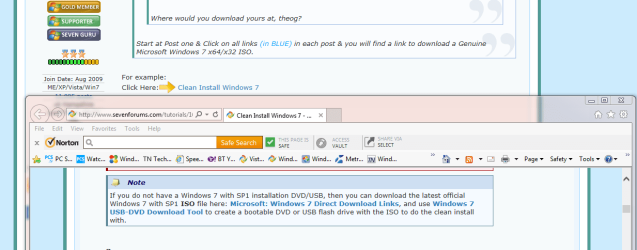
I would download a Genuine Microsoft Windows 7 x64/x32 ISO.

Where would you download yours at, theog?

Start at Post one & Click on all links (in BLUE) in each post & you will find a link to download a Genuine Microsoft Windows 7 x64/x32 ISO.
 

My Computer My Computer

OS
ME/XP/Vista/Win7
Hi arayfo1,

From a clean slate, here is a general outline of what you should do:

1) Leave Acer Aspire M3202 for a while and transfer to a PC with internet.

2) Prepare all prerequisites for the clean install using the other PC:
  • Download your appropriate ISO of Windows 7 here. (Ctrl+F USA)
  • Download all Windows 7 drivers for Acer Aspire M3202 from official website.
  • Buy several blank DVDs.
  • Burn Windows 7 ISO to a DVD (as image). Here are several freeware for the task. ImgBurn or InfraRecorder is recommended.
  • Burn drivers to another DVD (as data disc). A USB stick will do, but it is good to keep a copy of drivers on a disc.
3) Go back to Acer Aspire M3202.
  • Access your BIOS. For Acer, try spamming F2 or DEL during restart.
  • Set FIRST boot priority to your DVD drive. Search around your BIOS for this.
  • Mount your Windows 7 DVD on your DVD tray.
  • Save changes made to BIOS and exit.
  • Wait for the message Press any key to boot from CD or DVD...
  • Begin Windows 7 installation. If one can read, one can install.
  • Mount driver disc and install downloaded drivers.
USBs nowadays can do pretty much what DVDs can, but if it is causing you trouble, try another route. Also, clean installing from a CD/DVD has always worked with much success since the dawn of the ages. I had just clean installed using my Windows 7 Pro OEM DVD.

Now from what I understand, you originally had Vista and then got a Windows 7 upgrade disc? If so, make sure you clarify with our other friendly members about these 2 important points:
(a) Can an upgrade disc be used for a clean install?
(b) Can the upgrade key be used for the Windows 7 retail ISO downloaded?


I am personally quite doubtful with (a).

Anyway, the Windows 7 DVD you burned earlier is a full retail install disc. You have 30 days before M$ nags you to activate it.

Keep us posted.
 
Last edited:

My Computer My Computer

Computer type
Laptop
Computer Manufacturer/Model Number
ASUS N45SF
OS
Windows 7 Professional SP1 x64 (OEM)
CPU
Intel® Core™ i5 2430M/2410M Processor
Motherboard
Intel® HM65 Express Chipset
Memory
DDR3 1333 SODIMM (8GB)
Graphics Card(s)
NVIDIA® GeForce® GT 555M (2GB)
Sound Card
Realtek High Definition Audio
Monitor(s) Displays
14.0" LED Backlight
Screen Resolution
16:9 HD (1366x768)
Hard Drives
640GB Seagate (internal), 1TB Toshiba Canvio Portable, 2TB x 2 WD My Book Essential (external)
Antivirus
Malwarebytes Anti-Malware Home (Premium)
Browser
Waterfox
Other Info
Optical Drive: Slimtype DVD A DS8A5SH (Super-Multi DVD);
Audio: Bang & Olufsen ICEpower®, SonicMaster
Yes, you should start over

You should follow the tutorial step-by-step

You should fill the system specs on your forum profile - manually
This tutorial will show you waht members are looking to see, but since you don't have internet on that machine, you'll have to run the tool and type in the information: http://www.sevenforums.com/tutorials/180324-system-info-see-your-system-specs.html

You should take help offered, act on it and provide good feedback. I answered your inquiry regarding where to get Acer drivers here: http://www.sevenforums.com/drivers/317901-need-help-locating-acer-drivers.html#post2652085

It is also very annoying to volunteer help to someone and have that person complain after not following advice given.

I understand some things are more technical than some people can comprehend, but I've never seen members not take the time to explain.

Your last sentence in post 41 is what drives members bonkers:
If I am so irresponsible please tell me which steps I supposedly skipped and I will be happy to retrace my steps.

There is no way anyone but you can tell what steps you skipped.

So here's my advice.

Start over,
follow this tutorial step-by-step, http://www.sevenforums.com/tutorials/219487-clean-reinstall-factory-oem-windows-7-a.html#post1839164
ask about the step if you do not understand, provide screenshots so members can better understand what you're asking and how to proceed.
 

My Computer My Computer

Computer type
Laptop
Computer Manufacturer/Model Number
HP Pavilion dv6-6c10us
OS
x64 (6.3.9600) Win8.1 Pro & soon dual boot x64 (6.1.7601) Win7_SP1 HomePrem
CPU
AMD A6-3420M APU with Radeon(tm) HD Graphics
Motherboard
Hewlett-Packard 1805
Memory
6.00 GB
Graphics Card(s)
AMD Radeon(TM) HD 6520G
Sound Card
(1) AMD High Definition Audio Device (2) IDT High Definiti
Monitor(s) Displays
HP W2072a 20" LCD (1600 x 900) @ 60 Hz
Screen Resolution
1366 x 768 x 32 bits (4294967296 colors) @ 60 Hz
Hard Drives
ST640LM0 00 HM641JI SATA Disk Device
Keyboard
Logitech k520 wireless KB
Mouse
Logitech m320 wireless mouse (bundled with KB)
Internet Speed
15/5 | 54 MB Wireless 'n'
Antivirus
Realtime: Defender or Avast | On-demand: Malwarebytes, ESET
Browser
IE 11 on Win8, IE 10 on win 7
Other Info
Media: [Gimp, Audacity, VLC] || Comm: [WEmail 2012, Skype] || Productivity: [OpenOffice,| Textpad] || Utils: [Sysinternals, cCleaner, Speccy, Defraggler]
I've never seen the Network troubleshooter be wrong when it identifies the router as the cause of connection failures. This normally requires resetting the router. I would power off both modem and router for 1 minute, then turn back on the modem until it lights up normally, followed by the router. Try connecting again.

If this fails plug in the cable which should not have these problems, run the troubleshooter again.

I just registered to this forum last night so I didn't know about any specific steps prior to getting myself in this mess and I didn't report back to you about the system tray because that is common knowledge and thought it's maybe better to focus on what I don't know. Also, I'm not sure which tutorial it was but the one clean install tutorial didn't offer a download for my specific computer so naturally I had to look for a download by other means. And I really don't think I should have to apologize to anyone for being a noob, and it should be obvious I don't know what I'm doing.

The official MS downloads for every version is in Step 1 of Clean Reinstall - Factory OEM Windows 7. If you were unsure which download you only needed to ask back. I was online at the time and anyone else here would have been able to point you to it, too.

Which version did you use exactly? It should be this based on your meager specs posted: Win7 Home Premium x64 SP1 English Official ISO download. Burn it to disk or flash stick with the tool in Step 2 of Clean Reinstall - Factory OEM Windows 7 then work through those steps which are the same for retail. Those who work with us get the best installs in the world.
 
Last edited:

My Computer My Computer

Computer type
Laptop
Computer Manufacturer/Model Number
HP Pavilion dv6-6c10us
OS
x64 (6.3.9600) Win8.1 Pro & soon dual boot x64 (6.1.7601) Win7_SP1 HomePrem
CPU
AMD A6-3420M APU with Radeon(tm) HD Graphics
Motherboard
Hewlett-Packard 1805
Memory
6.00 GB
Graphics Card(s)
AMD Radeon(TM) HD 6520G
Sound Card
(1) AMD High Definition Audio Device (2) IDT High Definiti
Monitor(s) Displays
HP W2072a 20" LCD (1600 x 900) @ 60 Hz
Screen Resolution
1366 x 768 x 32 bits (4294967296 colors) @ 60 Hz
Hard Drives
ST640LM0 00 HM641JI SATA Disk Device
Keyboard
Logitech k520 wireless KB
Mouse
Logitech m320 wireless mouse (bundled with KB)
Internet Speed
15/5 | 54 MB Wireless 'n'
Antivirus
Realtime: Defender or Avast | On-demand: Malwarebytes, ESET
Browser
IE 11 on Win8, IE 10 on win 7
Other Info
Media: [Gimp, Audacity, VLC] || Comm: [WEmail 2012, Skype] || Productivity: [OpenOffice,| Textpad] || Utils: [Sysinternals, cCleaner, Speccy, Defraggler]

My Computer My Computer

OS
ME/XP/Vista/Win7
Well, Greg, you were right! I changed the security type from WPA2-Personal to WPA-Personal and reentered the pass key and voila! I have internet again! So thank you!!

Now let's see if I can get all my updates without having any problems. :)
 

My Computer My Computer

Computer type
PC/Desktop
Computer Manufacturer/Model Number
Acer Aspire m3202
OS
Windows 7 Home Premium 64 bit
Antivirus
not at the moment - just reinstalled
My only aversion to the clean install of Windows 7 tutorial you all keep referencing is that there didn't appear to be a single download available for Acer computers.
 

My Computer My Computer

Computer type
PC/Desktop
Computer Manufacturer/Model Number
Acer Aspire m3202
OS
Windows 7 Home Premium 64 bit
Antivirus
not at the moment - just reinstalled
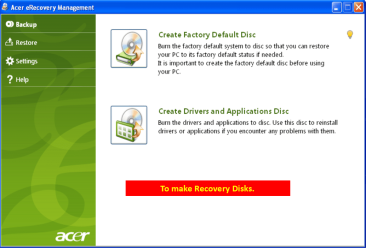
You are correct.

Windows is not an Acer product. You have to install Windows first, then worry about any Acer specific drivers. Even that doesn't mean much since Acer uses other manufacturers hadware (Intel, Realtek, AMD, Broadcom, etc)

I answered your inquiry regarding where to get Acer drivers here: Need help locating Acer Drivers. This is my last time trying to get it across to you.

Install Windows, install network driver, let Windows install other drivers, find :warn: devices in Device Manager, find drivers on Acer (or OEM site)


My only aversion to the clean install of Windows 7 tutorial you all keep referencing is that there didn't appear to be a single download available for Acer computers.
 
Last edited:

My Computer My Computer

Computer type
Laptop
Computer Manufacturer/Model Number
HP Pavilion dv6-6c10us
OS
x64 (6.3.9600) Win8.1 Pro & soon dual boot x64 (6.1.7601) Win7_SP1 HomePrem
CPU
AMD A6-3420M APU with Radeon(tm) HD Graphics
Motherboard
Hewlett-Packard 1805
Memory
6.00 GB
Graphics Card(s)
AMD Radeon(TM) HD 6520G
Sound Card
(1) AMD High Definition Audio Device (2) IDT High Definiti
Monitor(s) Displays
HP W2072a 20" LCD (1600 x 900) @ 60 Hz
Screen Resolution
1366 x 768 x 32 bits (4294967296 colors) @ 60 Hz
Hard Drives
ST640LM0 00 HM641JI SATA Disk Device
Keyboard
Logitech k520 wireless KB
Mouse
Logitech m320 wireless mouse (bundled with KB)
Internet Speed
15/5 | 54 MB Wireless 'n'
Antivirus
Realtime: Defender or Avast | On-demand: Malwarebytes, ESET
Browser
IE 11 on Win8, IE 10 on win 7
Other Info
Media: [Gimp, Audacity, VLC] || Comm: [WEmail 2012, Skype] || Productivity: [OpenOffice,| Textpad] || Utils: [Sysinternals, cCleaner, Speccy, Defraggler]
My only aversion to the clean install of Windows 7 tutorial you all keep referencing is that there didn't appear to be a single download available for Acer computers.
What do you expect. There are about 20 major PC manufacturers. Do you expect Greg to link the download sites for all of them - and maybe even foe each of the gesillion models they produce. Then also maintain the links because they may change and new models come out every day.

We really like to help but this is not a kindergarden where you are led by the hand for every step of the way. A minimal personal imitiative is assumed. Else you can go to the Acer support and pay them $99 per call. Maybe they make you feel more comfortable.
 

My Computer My Computer

Computer Manufacturer/Model Number
HP, Dell, Gateway, Toshiba - 4 laptops and 2 desktops
OS
Vista, Windows7, Mint Mate, Zorin, Windows 8
CPU
from 1.6GHz Duo to i7
Monitor(s) Displays
2x HP w2207
Hard Drives
5x HDD, 7x SSD, 12x Externals
Keyboard
with trackball - no mices
Mouse
Trackball mice
Internet Speed
DSL 6000
Well, I managed to get my computer updated and then I lost my internet connection again. *scratching my head*
 

My Computer My Computer

Computer type
PC/Desktop
Computer Manufacturer/Model Number
Acer Aspire m3202
OS
Windows 7 Home Premium 64 bit
Antivirus
not at the moment - just reinstalled
Well, I managed to get my computer updated and then I lost my internet connection again. *scratching my head*

Try to reset it like you did in post #51.
 

My Computer My Computer

Computer type
Laptop
Computer Manufacturer/Model Number
Lenovo Z710 #59400485
OS
Windows 8.1.1 64bit
CPU
i7-4700MQ
Memory
8.0GB PC3-12800 DDR3L SDRAM 1600 MHz
Graphics Card(s)
Intel® HD Graphics 4600
Sound Card
on-board
Monitor(s) Displays
17.3"
Screen Resolution
1920x1080
Hard Drives
1TB 5400 RPM;(OS,programs)


Hitachi, 1Tb external,(B'up)
PSU
4 Cell 41 Watt Hour Lithium-Ion
Case
Lenovo
Cooling
Air in, Air out.
Keyboard
Logitech - Y-UY95 - Illuminated
Mouse
M$ - Arc Touch
Internet Speed
59 Mb down / 25 Mb up
Antivirus
Defender
Browser
Firefox (newest)
Other Info
MBAM Pro, SAS Pro, Revo Pro.

Ext. HP 2311 Monitor
I think you're missing an important step. Which might be why you're having difficulty

Step 7 of the OEM reinstall
7. Gather your program installers. For those lacking disks, you may find them on the program's Support Downloads webpage. Favorite pre-installed apps may be found on the Downloads webpage for your model computer or manufacturer-provided Apps Disk. Others may be found by googling. Some pre-installed apps may not be available for clean reinstall - HP owners see additional note at bottom.
● Many of the favorite apps needed and desired for reinstall are available in the terrific app Ninite - Install or Update Multiple Apps at Once.

Just in case, save in advance your Wireless or Ethernet LAN (wired) driver on flash stick, CD or in your backup so you can install it to get online quickly - these can be found on the Support Downloads webpage for your model PC.
Which is why you keep focusing on Acer and which is why you don't have internet.

How to get you up and running again?
1. You'll need another computer to download your Wireless NIC driver.

There are two available drivers listed for the Acer Aspire m3202 desktop
I don't know which device is in your machine, though

If you know what wireless device is in the box, then download that one

Not sure, try one, then the other.

Download, install, reboot - it's hardware.

Pro-Nets
Wireless LAN Driver
1676.5.0702.2009
16.5 MB
2009/10/07
Download

liteon
Wireless LAN Driver
8.0.0.171
13.7 MB
2009/10/07
Download

Edit: Just in case I missed an important piece of information and you connect to the internet wired, here's the LAN driver (there's only one listed)

Marvell
LAN Driver
11.10.6.3
1.4 MB
2009/10/01
Download
 

My Computer My Computer

Computer type
Laptop
Computer Manufacturer/Model Number
HP Pavilion dv6-6c10us
OS
x64 (6.3.9600) Win8.1 Pro & soon dual boot x64 (6.1.7601) Win7_SP1 HomePrem
CPU
AMD A6-3420M APU with Radeon(tm) HD Graphics
Motherboard
Hewlett-Packard 1805
Memory
6.00 GB
Graphics Card(s)
AMD Radeon(TM) HD 6520G
Sound Card
(1) AMD High Definition Audio Device (2) IDT High Definiti
Monitor(s) Displays
HP W2072a 20" LCD (1600 x 900) @ 60 Hz
Screen Resolution
1366 x 768 x 32 bits (4294967296 colors) @ 60 Hz
Hard Drives
ST640LM0 00 HM641JI SATA Disk Device
Keyboard
Logitech k520 wireless KB
Mouse
Logitech m320 wireless mouse (bundled with KB)
Internet Speed
15/5 | 54 MB Wireless 'n'
Antivirus
Realtime: Defender or Avast | On-demand: Malwarebytes, ESET
Browser
IE 11 on Win8, IE 10 on win 7
Other Info
Media: [Gimp, Audacity, VLC] || Comm: [WEmail 2012, Skype] || Productivity: [OpenOffice,| Textpad] || Utils: [Sysinternals, cCleaner, Speccy, Defraggler]
Computiac, I tried shutting everything down again and but unfortunately that didn't help.

Slartybart, what is meant by "program installers" ??? Is that another term used for drivers? I will try google.

I don't mean to get on anyone's bad side here. All I can tell you is it takes time to take initiative when you don't know what you're doing. I've been working on this pc for three days straight now. I have just never attempted any of this up till now. Up till now the only experience I have had with Windows software is inserting a Windows 7 upgrade disc and following the prompts. As I said, I am a noob. I was ready to start over and try the tutorial step by step like you all are suggesting but then a friend told me I may be jumping the gun in starting over so I just want to be sure before I go through all of that again.
 

My Computer My Computer

Computer type
PC/Desktop
Computer Manufacturer/Model Number
Acer Aspire m3202
OS
Windows 7 Home Premium 64 bit
Antivirus
not at the moment - just reinstalled
I am trying the two nic drivers now. I'll report back when I'm done.
 

My Computer My Computer

Computer type
PC/Desktop
Computer Manufacturer/Model Number
Acer Aspire m3202
OS
Windows 7 Home Premium 64 bit
Antivirus
not at the moment - just reinstalled
Back
Top