
Solved Reformat gone bad - please help

Oh okay, I see now. Where the status is it says whether or not it has been started. So, if it hasn't been started I should click on it and attempt to start it. Am I following you?
 

My Computer My Computer

Computer type
PC/Desktop
Computer Manufacturer/Model Number
Acer Aspire m3202
OS
Windows 7 Home Premium 64 bit
Antivirus
not at the moment - just reinstalled
Here's an example of my snip from my Windows 8 Pro, yours should be similar, under Status Tab, the Services that I have mentioned should be Running or Started, if NOT please double click and choose Start.
If there's anything else that's unclear to you please let us know so that we can expedite the resolution of your issue.
 

Attachments

  • Services.PNG
    Services.PNG
    10.8 KB · Views: 1

My Computer My Computer

Computer Manufacturer/Model Number
Lenovo Desktop/Samsung Laptop
OS
Win7 & Win8 64bit
CPU
Intel i5
Internet Speed
Charter-20 Mbps
Antivirus
Avast
Browser
FF, IE9 and Chrome
Okay, yes. All of the services you mentioned have been started. So now should I move on to the static IP address?
 

My Computer My Computer

Computer type
PC/Desktop
Computer Manufacturer/Model Number
Acer Aspire m3202
OS
Windows 7 Home Premium 64 bit
Antivirus
not at the moment - just reinstalled

My Computer My Computer

Computer Manufacturer/Model Number
Lenovo Desktop/Samsung Laptop
OS
Win7 & Win8 64bit
CPU
Intel i5
Internet Speed
Charter-20 Mbps
Antivirus
Avast
Browser
FF, IE9 and Chrome
//Edit: Is there any ipconfig/all output posted here somewhere? I can't find it.//

I'm sorry, what info do u need regarding ipconfig? I'm not sure I know what you are asking (terminology).]

Checking the guide now.
 

My Computer My Computer

Computer type
PC/Desktop
Computer Manufacturer/Model Number
Acer Aspire m3202
OS
Windows 7 Home Premium 64 bit
Antivirus
not at the moment - just reinstalled

My Computer My Computer

Computer Manufacturer/Model Number
Lenovo Desktop/Samsung Laptop
OS
Win7 & Win8 64bit
CPU
Intel i5
Internet Speed
Charter-20 Mbps
Antivirus
Avast
Browser
FF, IE9 and Chrome

My Computer My Computer

Computer type
PC/Desktop
Computer Manufacturer/Model Number
Acer Aspire m3202
OS
Windows 7 Home Premium 64 bit
Antivirus
not at the moment - just reinstalled
You will need to get a USB flash drive to transfer the .txt file ipconfig/all output from your Windows 7 computer so that we can review the ipconfig/all output, this is very important.

Again, follow the directions here to obtain the output from your Windows 7 computer.
http://www.sevenforums.com/network-...sting-your-networking-thread.html#post2490995

Edit: Make sure that your Windows 7 computer is plugged in to the router when you run the ipconfig/all command.
 

My Computer My Computer

Computer Manufacturer/Model Number
Lenovo Desktop/Samsung Laptop
OS
Win7 & Win8 64bit
CPU
Intel i5
Internet Speed
Charter-20 Mbps
Antivirus
Avast
Browser
FF, IE9 and Chrome
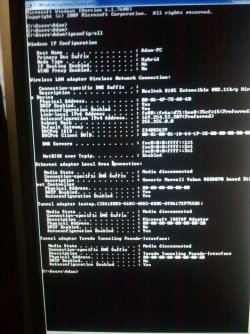
Bear with me. I'm not sure if I did this right, but I will refer back to the link which explains your preferred method of sharing pictures if it doesn't.

ipconfigurationpic1.jpg
 

My Computer My Computer

Computer type
PC/Desktop
Computer Manufacturer/Model Number
Acer Aspire m3202
OS
Windows 7 Home Premium 64 bit
Antivirus
not at the moment - just reinstalled
No, sorry. The Windows 7 pc was not plugged into the router with ethernet when I snapped the picture. Let me try again.

You will need to get a USB flash drive to transfer the .txt file ipconfig/all output from your Windows 7 computer so that we can review the ipconfig/all output, this is very important.

Again, follow the directions here to obtain the output from your Windows 7 computer.
http://www.sevenforums.com/network-...sting-your-networking-thread.html#post2490995

Edit: Make sure that your Windows 7 computer is plugged in to the router when you run the ipconfig/all command.
 

My Computer My Computer

Computer type
PC/Desktop
Computer Manufacturer/Model Number
Acer Aspire m3202
OS
Windows 7 Home Premium 64 bit
Antivirus
not at the moment - just reinstalled
Would u prefer that I attempt to make a text file rather than posting a screenshot?
 

My Computer My Computer

Computer type
PC/Desktop
Computer Manufacturer/Model Number
Acer Aspire m3202
OS
Windows 7 Home Premium 64 bit
Antivirus
not at the moment - just reinstalled

My Computer My Computer

Computer Manufacturer/Model Number
Lenovo Desktop/Samsung Laptop
OS
Win7 & Win8 64bit
CPU
Intel i5
Internet Speed
Charter-20 Mbps
Antivirus
Avast
Browser
FF, IE9 and Chrome

My Computer My Computer

Computer type
PC/Desktop
Computer Manufacturer/Model Number
Acer Aspire m3202
OS
Windows 7 Home Premium 64 bit
Antivirus
not at the moment - just reinstalled
Good job arayfo1..... Still no sign of connections.....hang in there....
Next task for you, please run these commands:

Click on Start> All Programs> Accessories and right click on Command Prompt, select "Run as Administrator" to open a command prompt, then type these commands in this order:

netsh int ipv4 reset reset.log then tap the enter key after
netsh int ipv6 reset reset.log then tap the enter key after
netsh winsock reset catalog then tap the enter key after

Restart the computer after.
 

My Computer My Computer

Computer Manufacturer/Model Number
Lenovo Desktop/Samsung Laptop
OS
Win7 & Win8 64bit
CPU
Intel i5
Internet Speed
Charter-20 Mbps
Antivirus
Avast
Browser
FF, IE9 and Chrome
You can copy and paste each of those commands in the CMD box to assure accuracy. They must be exact.
Thanks Greg, I was going to suggest that, but he's using a Windows 8 computer to post here, his Windows 7 computer doesn't have any connectivity at all.
 

My Computer My Computer

Computer Manufacturer/Model Number
Lenovo Desktop/Samsung Laptop
OS
Win7 & Win8 64bit
CPU
Intel i5
Internet Speed
Charter-20 Mbps
Antivirus
Avast
Browser
FF, IE9 and Chrome
Done.

Whenever I tried the second command it said: There's no user specified settings to be removed.

Good job arayfo1..... Still no sign of connections.....hang in there....
Next task for you, please run these commands:

Click on Start> All Programs> Accessories and right click on Command Prompt, select "Run as Administrator" to open a command prompt, then type these commands in this order:

netsh int ipv4 reset reset.log then tap the enter key after
netsh int ipv6 reset reset.log then tap the enter key after
netsh winsock reset catalog then tap the enter key after

Restart the computer after.
 

My Computer My Computer

Computer type
PC/Desktop
Computer Manufacturer/Model Number
Acer Aspire m3202
OS
Windows 7 Home Premium 64 bit
Antivirus
not at the moment - just reinstalled
It's okay for the second command.....Did you restart the computer after?

Can you please connect your computer directly to your router and see if you can access the internet?

Forgot to ask, what Security or Anti Virus programs do you have installed in your computer?
 

My Computer My Computer

Computer Manufacturer/Model Number
Lenovo Desktop/Samsung Laptop
OS
Win7 & Win8 64bit
CPU
Intel i5
Internet Speed
Charter-20 Mbps
Antivirus
Avast
Browser
FF, IE9 and Chrome
Yes, I restarted the pc.

I connected the pc via ethernet and there was no connection. Also, I've noticed the light on the router which usually lights up green is flashing green and yellow. Aren't ethernet cables usually universal/compatible with different types of devices?

My Windows 7 pc has Windows firewall only.

Windows 8 pc has Windows Defender/Malwarebytes/Super-anti-spyware/Advanced System Care/Probably something from HP as well.

Nevermind about the green and yellow light. It looks the same now that I've reconnected Windows 8 machine.

It's okay for the second command.....Did you restart the computer after?

Can you please connect your computer directly to your router and see if you can access the internet?

Forgot to ask, what Security or Anti Virus programs do you have installed in your computer?
 

My Computer My Computer

Computer type
PC/Desktop
Computer Manufacturer/Model Number
Acer Aspire m3202
OS
Windows 7 Home Premium 64 bit
Antivirus
not at the moment - just reinstalled
Is it possible for you to connect this laptop to another Wi-Fi networks? Do you a neighbor that you can bother and try to go there or perhaps connect using their broadband connection?
 

My Computer My Computer

Computer Manufacturer/Model Number
Lenovo Desktop/Samsung Laptop
OS
Win7 & Win8 64bit
CPU
Intel i5
Internet Speed
Charter-20 Mbps
Antivirus
Avast
Browser
FF, IE9 and Chrome
It's a desktop so I don't think I could try to connect it at a public wifi hotspot, but I could try to connect to my sister's personal hotspot the next time I see her. The problem is she lives an hour away.

Is it possible for you to connect this laptop to another Wi-Fi networks? Do you a neighbor that you can bother and try to go there or perhaps connect using their broadband connection?
 

My Computer My Computer

Computer type
PC/Desktop
Computer Manufacturer/Model Number
Acer Aspire m3202
OS
Windows 7 Home Premium 64 bit
Antivirus
not at the moment - just reinstalled
Back
Top