Registry cleaners

gsx1000r02

New member
Local time
12:02 AM
Messages
1
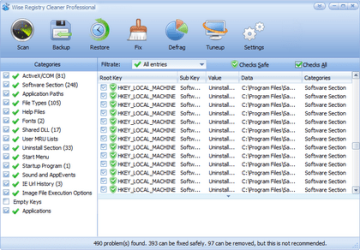
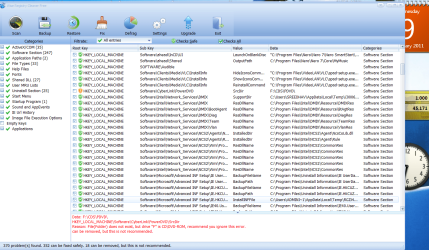
Ok so I'm still learning win7. anyways, back with vista there was a program called wise registry cleaner 4, and what i liked about this prog was the fact that in its description of each registry entry it showed the location of the entry, as in e:\whatever\whatever as in the location that is labeled data in the image below. I found entries in the registry that were attached to my external hard drive that i want to delete, however i cannot remember where they were. i wanted to clean up the registry and cannot find a registry cleaner or viewer that will show me entries by their location. i hope someone here can help me find something that will work.

thanx in advance.
 

Attachments

  • win reg cleaner.png
    win reg cleaner.png
    44 KB · Views: 76

My Computer

OS
win7 x64 ulti
This may not be what you want to hear, but its true. For both Vista and Windows Seven you should not use registry cleaners; they can cause more harm than good. In fact, they are not even needed. The one exception is ccleaner. It may not meet the requirements that you described, but it is a very benign cleaner, that should not cause problems. It is also used to clean up temp files and other crap that can and should be removed.
 

My Computer

Computer type
PC/Desktop
Computer Manufacturer/Model Number
Dell XPS 420
OS
Windows 10, Home Clean Install
CPU
Intel Core2 processsor Q8200(2.33Ghz 1333FSB) Quad Core Tech
Motherboard
Dell
Memory
6 gb
Graphics Card(s)
ATI Radeon 256MB HD3650
Sound Card
Intergrated 7.1 Channel Audio
Monitor(s) Displays
Dell SP2009W 20"
Hard Drives
640 GB Serial ATA Hard drive
Cooling
Fan
Keyboard
Dell USB Keyboard
Mouse
Dell Premium Optical USB
Internet Speed
DSL 2.85
If you want to post a different problem every day on this forum, use any cleaner you like. But if you want to keep your system running, throw all cleaners in the bin.
 

My Computer

Computer Manufacturer/Model Number
HP, Dell, Gateway, Toshiba - 4 laptops and 2 desktops
OS
Vista, Windows7, Mint Mate, Zorin, Windows 8
CPU
from 1.6GHz Duo to i7
Monitor(s) Displays
2x HP w2207
Hard Drives
5x HDD, 7x SSD, 12x Externals
Keyboard
with trackball - no mices
Mouse
Trackball mice
Internet Speed
DSL 6000
Dear gsx1000r02,
Warm welcome to the forum! Please resist the tiniest temptation to even touch the registry(with even the longest barge pole), because you are sure to remove a critical key another day if not today! This is sure to lead to a BSOD and a system crash! Do you take regular backups of your drives?

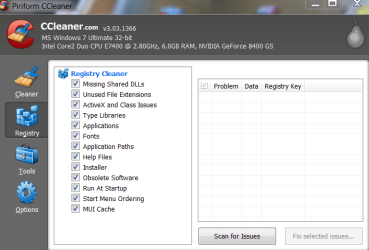
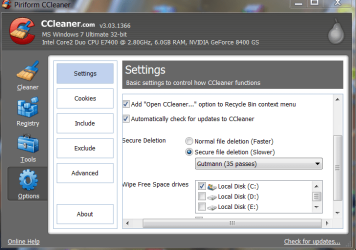
Even in Ccleaner, i am happy just to cleanup temp.files, but using the Gutmann 35 pass method.

As you know"if it ain't broke, leave it as it is"! They are not Registry cleaners but registry killers!:(

regards,
Sreedhav:cool:
 

Attachments

  • Piriform CCleaner_2011-02-07_09-00-04.png
    Piriform CCleaner_2011-02-07_09-00-04.png
    27 KB · Views: 39
  • Piriform CCleaner_2011-02-07_09-01-07-B.png
    Piriform CCleaner_2011-02-07_09-01-07-B.png
    32.5 KB · Views: 35
  • Piriform CCleaner_2011-02-07_09-03-20-C.png
    Piriform CCleaner_2011-02-07_09-03-20-C.png
    33.5 KB · Views: 50

My Computer

Computer Manufacturer/Model Number
Sony Vaio C series VPCCB35FN laptop
OS
MS Windows 7 Home Premium 64-bit SP1
CPU
IntelCore [email protected]; Sandy Bridge 32nm Tech.
Motherboard
Sony Vaio Version:C609NJYJ
Memory
4096Mb RAM; Single ChannelDDR3@665MHz; DRAM Freq:662MHz
Graphics Card(s)
AMD Radeon HD 6630M; GPU:Whistler;BIOS Core&mem Clock:123.36
Sound Card
REALTEK High Definition Audio Device; INTEL Display Card
Monitor(s) Displays
Generic PnP Intel HD;Resolution:1920*1040 Pixels; BPP:32bits
Screen Resolution
Current Resolution:1920*1080 Pixels; Monitor Frequency:60Hz
Hard Drives
Internal HD:TOSHIBA MK5061GSY; Real Size:488 GB;NTFS; 3 Partitions; SATA; HEADS:16

External HDD: WD Elements 1023 PORTABLE; Estimated Size: 1TB; NTFS; 3 Partitions
Cooling
Lateral Exhaust with a Cooling Pad Placed Beneath.
Keyboard
Logitech Bluetooth+ Generic Integrated K-B
Mouse
Logitech Bluetooth
Internet Speed
2MBPS
Other Info
1)Trend Micro Titanium Maximum Security Suite Version:3
2)SAS-PRO

3)MBAM--PRO


4)WATERFOX+IE9 +WOT+LINKEXTEND+ DRWEBCUREIT LINK CHECKER

5)SPYWAREBLASTER

6) WINPATROL PLUS

7) SANDBOXIE and
8) A BIT OF COMMON SENSE.
Easier just to use System Restore
 

My Computer

Computer type
PC/Desktop
Computer Manufacturer/Model Number
Dell XPS 420
OS
Windows 10, Home Clean Install
CPU
Intel Core2 processsor Q8200(2.33Ghz 1333FSB) Quad Core Tech
Motherboard
Dell
Memory
6 gb
Graphics Card(s)
ATI Radeon 256MB HD3650
Sound Card
Intergrated 7.1 Channel Audio
Monitor(s) Displays
Dell SP2009W 20"
Hard Drives
640 GB Serial ATA Hard drive
Cooling
Fan
Keyboard
Dell USB Keyboard
Mouse
Dell Premium Optical USB
Internet Speed
DSL 2.85

My Computers

System One System Two

  • Computer type
    PC/Desktop
    OS
    7 X64
    CPU
    i5 8400
    Motherboard
    gigabyte b365m ds3h
    Memory
    2x8gb 3200mhz
    Hard Drives
    various
    PSU
    pure power 11 400w cm
    Case
    Coolermaster
    Cooling
    cryorig m9i
  • Computer type
    PC/Desktop
    OS
    7x64
    CPU
    g5400
    Motherboard
    ga b365m ds3h
    Memory
    8gb ddr4 2400
    PSU
    xfx pro 450w
If you know what you are doing
This is the key - - if you know what you are doing, you can do a lot of things. But when it comes to the registry, I think most "average" users have no clue.
 

My Computer

Computer Manufacturer/Model Number
HP, Dell, Gateway, Toshiba - 4 laptops and 2 desktops
OS
Vista, Windows7, Mint Mate, Zorin, Windows 8
CPU
from 1.6GHz Duo to i7
Monitor(s) Displays
2x HP w2207
Hard Drives
5x HDD, 7x SSD, 12x Externals
Keyboard
with trackball - no mices
Mouse
Trackball mice
Internet Speed
DSL 6000
Yup, i agree with whs here... registry cleaners are not for the average "click next, next, next, finish" type of users, they require a certain amount of knowledge and common sense (backing up registry before making any changes)

So i'd stay away from registry cleaners if i don't know what i'm doing :)
 

My Computer

Computer type
PC/Desktop
OS
Windows
  • Like
Reactions: JMH
i wanted to clean up the registry and cannot find a registry cleaner or viewer that will show me entries by their location. i hope someone here can help me find something that will work.

thanx in advance.

You would be well advised to NOT use a registry cleaner.

*Modifying registry keys incorrectly can cause Windows instability, or make Windows unbootable.
*No registry cleaner is completely safe and the potential is ever present to cause more problems than they claim to fix.
THEREFORE
*If you do not have knowledge of the registry, then you would probably be better off leaving it alone, and definitely not placing blind trust in a program to do the job for you.


Should you go ahead & use a registry cleaner make sure you have
1.a current System Restore point created.
2.a recent Back up - preferably to an external HD.
 

My Computer

Computer Manufacturer/Model Number
LAPTOP. HP Pavilion dv7-4010TX .
OS
Win 7 Ultimate 64-bit. SP1.
CPU
Intel i7 -720QM.[1.6GHz Turbo Boost 2.8GHz. 6MB Cache.]
Memory
8 DDR 3 RAM. 1066MHZ
Graphics Card(s)
ATI 1024 MB. DDR3. Radeon HD5650
Monitor(s) Displays
17.3" High Definition Brightview LCD. LED Backlit.
Screen Resolution
1600 x 900.
Hard Drives
640GB
Case
Laptop / notebook.
Mouse
Logitech Anywhere mouse. MX.
Internet Speed
ADSL [ but too slow ]
Have installed CCleaner on hundreds of installs representing thousands of uses without a single issue. It's Disk and Registry cleaner are safe as they don't touch files which are still in use.

Unfortunately the Registry Cleaner sales scams with no genius behind them have tarred the whole lot. But CCleaner remains perhaps the most respected single app in the tech world.
 
Dear gregrocker,
QUOTE " But CCleaner remains perhaps the most respected single app in the tech world. " UNQUOTE.

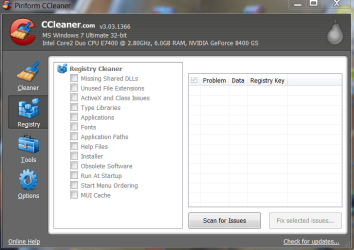
A point well made and valid! Kudos! If one looks at the "registry cleaning" functions in Ccleaner, the last one is "MUI Cache" (snap below). So, i went Googling and found three pertinent points!
1)MS coined the MUI to mean" Multilingual User Interface" and it stopped there.

2) A Wilderssecurity post mentioned that MUI cache is a log of all the programs you have used from boot to shutdown and is virtually a spyware cookie's paradise!

3) A very detailed and tech-savvy explanation was given in : Scot's Newsletter Forums > MUI
by "inbfedsp" and his/her post starts off like this" I'm not sure what MUICache stands for but I know for sure that Windows uses HKEY_CURRENT_USER\Software\Microsoft\Windows\ShellNoRoam\MUICache to cache location of icons and their string descriptions for various internal windows uses." and you may read the rest of the post in the link above.

There is no unanimity on what MUI stands for and whether to casually clear it or not is up for debate! This is not a theoretical expose', but it is (as said above) there in Ccleaner's registry cleanup functions! If you are pleased with my research, kindly tip me!
regards,
Sreedhav.
 

Attachments

  • MUI cache in ccleaner.png
    MUI cache in ccleaner.png
    35 KB · Views: 58

My Computer

Computer Manufacturer/Model Number
Sony Vaio C series VPCCB35FN laptop
OS
MS Windows 7 Home Premium 64-bit SP1
CPU
IntelCore [email protected]; Sandy Bridge 32nm Tech.
Motherboard
Sony Vaio Version:C609NJYJ
Memory
4096Mb RAM; Single ChannelDDR3@665MHz; DRAM Freq:662MHz
Graphics Card(s)
AMD Radeon HD 6630M; GPU:Whistler;BIOS Core&mem Clock:123.36
Sound Card
REALTEK High Definition Audio Device; INTEL Display Card
Monitor(s) Displays
Generic PnP Intel HD;Resolution:1920*1040 Pixels; BPP:32bits
Screen Resolution
Current Resolution:1920*1080 Pixels; Monitor Frequency:60Hz
Hard Drives
Internal HD:TOSHIBA MK5061GSY; Real Size:488 GB;NTFS; 3 Partitions; SATA; HEADS:16

External HDD: WD Elements 1023 PORTABLE; Estimated Size: 1TB; NTFS; 3 Partitions
Cooling
Lateral Exhaust with a Cooling Pad Placed Beneath.
Keyboard
Logitech Bluetooth+ Generic Integrated K-B
Mouse
Logitech Bluetooth
Internet Speed
2MBPS
Other Info
1)Trend Micro Titanium Maximum Security Suite Version:3
2)SAS-PRO

3)MBAM--PRO


4)WATERFOX+IE9 +WOT+LINKEXTEND+ DRWEBCUREIT LINK CHECKER

5)SPYWAREBLASTER

6) WINPATROL PLUS

7) SANDBOXIE and
8) A BIT OF COMMON SENSE.
If you know what you are doing
This is the key - - if you know what you are doing, you can do a lot of things. But when it comes to the registry, I think most "average" users have no clue.
I think gsx1000r02's original post indicates a pretty fair knowledge level. (At the least. I don't mean to damn with faint praise. :) )

Using a registry tool to remove obsolete references to a removable drive doesn't sound like a bad idea to me. The fact that he's asking before diving in willy-nilly tells me he would be prudent in its use.


...Unfortunately the Registry Cleaner sales scams with no genius behind them have tarred the whole lot. But CCleaner remains perhaps the most respected single app in the tech world.
Agreed. :)

I think the main reason the Greek Chorus inevitably shows up in threads on this subject is due to the vast number of ripoffs and downright dangerous registry cleaner programs out there. But if someone asked about an email client we wouldn't all automatically reply that "95% of all email is spam - stay away from it", would we? ;)
 

My Computer

Computer Manufacturer/Model Number
Self
OS
Main - Windows 7 Pro SP1 64-Bit; 2nd - Windows Server 2008 R2
CPU
Main - Core i7 2600K; 2nd - Core i7 920
Motherboard
Main - Asus P8Z68-V Pro/Gen3; 2nd - Gigabyte GA-EX58-UDR3
Memory
Main - 16GB Corsair Vengeance; 2nd - 12GB Corsair Vengeance
Graphics Card(s)
Main - XFX Radeon 6870 1GB; 2nd - XFX Radeon 4870 1GB
Sound Card
Both: Onboard Realtek Azalia
Monitor(s) Displays
Main - Hann 25" + I-INC 25" + Acer 23"; 2nd - Upgrading Soon
Screen Resolution
Main - 1920x1080 (All Three Monitors); 2nd - Upgrading Soon
Hard Drives
Main - (1) Crucial M4 128GB (Boot)
Main - (1) Seagate 2TB 64MB Cache (Data)
Main - (1) Seagate 2TB 64MB Cache (Data Backup)
2nd - (1) Intel X25-M SSD 80GB (Boot)
2nd - (3) Seagate 1TB 32MB Cache (Data Backup)
2nd - (1) Seagate 320GB (Because)
PSU
Main - OCZ 600W Modular; 2nd - OCZ 600W
Case
Main - Thermaltake Element G; 2nd - NZXT something or other
Cooling
Main - Corsair H80; 2nd - Prolimatech Megahalems
Keyboard
Main - Razer Reclusa; 2nd - Old MS Keyboard
Mouse
Main - Logitech MX Revolution; 2nd - Old MS Mouse
Internet Speed
20Mbps Time-Warner Cable
Hmmm, I've used CleanMyPC registry cleaner on Xp, vista, and 7 and I've always seen overall system performance go up. The only time it went terribly wrong was when I used the vista version on 64 bit 7....completely killed it. :(

Honestly, from my years of experience, registry cleaners DO help. For example, with Kaspersky Internet Security 2010 being a pretty major software package installed on your machine, when you uninstall it it commits jihad on the registry. Boot time goes from a solid 30 seconds to over a minute. Windows Explorer can act like vista, you open more than two windows and it freaks out. With a decent registry cleaner, it can take errors out and also defrag it. That's actually the most important there, defragmentation of the registry. Make sure the program you use has defragmentation capabilities.

And also, with use of 7 and registry cleaning and defragging, I can tell you for sure that the most you'll ever do it is probably one or two times every two weeks. Unless if you constantly install and uninstall major software that is. The NT 6.1 kernel is much more stable than 6.0. Yep.
 

My Computer

Computer Manufacturer/Model Number
ASUS
OS
Windows 7 Ultimate x64
CPU
AMD Athlon 240 II @ 2.8-4.004 ghz
Motherboard
M4A78LT-M LE
Memory
SuperTalent 4gb DDR3
Graphics Card(s)
ATI Radeon 3000HD
Screen Resolution
1440*900
Case
Re-modded Dell Dimension 4550
Cooling
Vantec 92mm Tornado x2
Other Info
It looks pretty.
Confessions from the congregation -

Found a Registry software program on a different Win7 forum that was "highly recommended as a Microsoft Gold certified program". Broke from my usual position of ignoring everyone elses recommedations (i.e., REALLY desperate to get my machine working again!!) and bought it for $30. Followed their istructions to the T for install, scan, clean up and defrag. Results??? Completely screwed up my machine (even worse then when I started).

Turns out I ended up shutting it down, recovering my system to prior to using the registry software, and finally finding people here who know what they are talking about when they say "just leave it alone"!!

Do yourself a favor - step away from the registry on Win 7 - just leave it alone.

Thanks again to gregrocker for his help with that!

My two cents...

slojo99
 
Last edited:

My Computer

Computer Manufacturer/Model Number
emachine ET-1831-01
OS
Windows 7 home premium 64
CPU
Intel Celeron 1.6
Memory
3 gb
Graphics Card(s)
ATI x1650 PCIE
Sound Card
integrated
PSU
Corsair 600
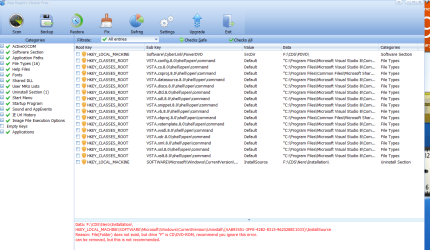
To answer the OP's question - doesn't wise run on 7 ? - I think it does.

If you know what you are doing - you should be able to identify the entries with that.

WiseCleaner - Wise Registry Cleaner Free

Dear SIW2,
You have made the point very well! I have never seen any reg.cleaner giving reasons as to why a particular reg. entry should not be removed! Very glad you gave us the link to check it out for ourselves! THERE IS NO HARM IN ADMITTING THAT I HAVE NOT GOT IT RIGHT (pardons for the bold type)! A rep. is on your way into your already fat bank balance!;) . Kindly view the snaps below:
 

Attachments

  • Wise reg.cleaner.png
    Wise reg.cleaner.png
    73.2 KB · Views: 122
  • Wise reg.cleaner-1.png
    Wise reg.cleaner-1.png
    23.2 KB · Views: 48
  • Wise reg.cleaner-2.png
    Wise reg.cleaner-2.png
    42.4 KB · Views: 55

My Computer

Computer Manufacturer/Model Number
Sony Vaio C series VPCCB35FN laptop
OS
MS Windows 7 Home Premium 64-bit SP1
CPU
IntelCore [email protected]; Sandy Bridge 32nm Tech.
Motherboard
Sony Vaio Version:C609NJYJ
Memory
4096Mb RAM; Single ChannelDDR3@665MHz; DRAM Freq:662MHz
Graphics Card(s)
AMD Radeon HD 6630M; GPU:Whistler;BIOS Core&mem Clock:123.36
Sound Card
REALTEK High Definition Audio Device; INTEL Display Card
Monitor(s) Displays
Generic PnP Intel HD;Resolution:1920*1040 Pixels; BPP:32bits
Screen Resolution
Current Resolution:1920*1080 Pixels; Monitor Frequency:60Hz
Hard Drives
Internal HD:TOSHIBA MK5061GSY; Real Size:488 GB;NTFS; 3 Partitions; SATA; HEADS:16

External HDD: WD Elements 1023 PORTABLE; Estimated Size: 1TB; NTFS; 3 Partitions
Cooling
Lateral Exhaust with a Cooling Pad Placed Beneath.
Keyboard
Logitech Bluetooth+ Generic Integrated K-B
Mouse
Logitech Bluetooth
Internet Speed
2MBPS
Other Info
1)Trend Micro Titanium Maximum Security Suite Version:3
2)SAS-PRO

3)MBAM--PRO


4)WATERFOX+IE9 +WOT+LINKEXTEND+ DRWEBCUREIT LINK CHECKER

5)SPYWAREBLASTER

6) WINPATROL PLUS

7) SANDBOXIE and
8) A BIT OF COMMON SENSE.
After going 64-bit a few days ago I have no reg cleaner installed and wont be installing any ... on the good advice of established members here at Windows Severn Forums, and my system is running very smooth :)
 

My Computer

Computer Manufacturer/Model Number
Home Built
OS
Windows 7 Professional 64-bit SP1
CPU
Intel E8400
Motherboard
MSI P35 Neo
Memory
4GB Crucial Ballistix
Graphics Card(s)
ATI ASUS Radeon HD 4830
Sound Card
Realtek ALC888 on Board
Monitor(s) Displays
Asus 22-inch VH226H Widescreen
Screen Resolution
1920 x 1080
Hard Drives
Two Western Digital 500GB
PSU
Hiper HPU-4M 530W
Case
Thermaltake Tsunami Dream Black
Cooling
Air/Fans
Keyboard
Saitek Eclipse
Mouse
Razer
Internet Speed
Sky Broadband
Other Info
USB Hub/Card Reader - 2 Pen Drives, 1 Phone Dock
Wow, that is pretty interesting that a majority of people seem to have had bad experiences with registry cleaners or recommend against them. Wait...I just remembered. In my days with Xp, I believe I tested out about.....four or five different programs. I ended up using CleanMyPC ever since and like I said, used it on Xp, vista, and 7, no issues other than that one time using an older version of it on 64 bit of 7. That was my fault because I didn't bother checking for product updates for. I had that older version on 32 bit of 7 and it identified it as vista and it worked great.

Sometimes when a registry program is Microsoft Gold Certified, I'd question that since that could just be a marketing ploy.

I vote for cleaners since I sure as hell am not going to spend time reinstalling Windows every year or so and having to suffer through a non-Windows 7 type of experience.
 

My Computer

Computer Manufacturer/Model Number
ASUS
OS
Windows 7 Ultimate x64
CPU
AMD Athlon 240 II @ 2.8-4.004 ghz
Motherboard
M4A78LT-M LE
Memory
SuperTalent 4gb DDR3
Graphics Card(s)
ATI Radeon 3000HD
Screen Resolution
1440*900
Case
Re-modded Dell Dimension 4550
Cooling
Vantec 92mm Tornado x2
Other Info
It looks pretty.
Many years ago, I used a registry cleaner on XP..nuked my system completely.
Since then, I've avoided registry cleaners like the plague, and I have seen no benefit from it when my friends use it on their systems.

Ccleaner is a great disk cleaning utility, but I still wouldn't use its registry cleaning functions. YMMV ofcourse.
 

My Computer

OS
XP Pro SP3, Windows 7 Pro x64
CPU
i2500
Motherboard
Asus P8P67
Memory
8GB 1333 MHz
Graphics Card(s)
GTX260
Sound Card
Asus Xonar DG
Monitor(s) Displays
Dell 2407WFP-HC
Screen Resolution
1920x1200
Hard Drives
Several; total 4TB
PSU
Silverstone Zeus 750W
Case
Gigabyte Full Tower
Cooling
Stock
Keyboard
Logitech G15
Mouse
Razer Deathadder
Internet Speed
10Mbps
If you need to "clean" your registry, you might just as well back everything up and do a re-install from a formatted disk.
 

My Computer

Computer Manufacturer/Model Number
Dell XPS 8300
OS
Win7 x64
CPU
Intel(R) Core(TM) i7-2600 CPU @ 3.40GHz
Memory
16GB Dual-Channel
Graphics Card(s)
NVIDIA GeForce GTS 450
Monitor(s) Displays
Viewsonic VX2753mh-LED 27" HDMI
Screen Resolution
1920x1080
Comodo System Cleaner is good.

People say registry cleaners aren't exactly needed for W7, but I still use one regardless to clean up temporary files, certain privacy files, and standard disc cleanup with it because it works better than CCleaner and the windows disc cleanup.

I think Comodo System Cleaner works better than the CCleaner, mostly because have WAY more options, disk cleaner, privacy, registry, file shredder, and etc. Really the only time I use the registry cleaner is to clean up uninstall locations.

Comodo System Cleaner also features a feature called Safe Delete, which prevents it from deleting vital files or registry keys. But if that fails it automatically makes restore points just in case.
 

My Computer

Computer Manufacturer/Model Number
Custom
OS
Windows 7 Professional 64 bit
CPU
AMD Phenom X4 925 @ 2.8ghz
Motherboard
Gigabyte GA-MA785GT-UD3H AM3
Memory
4GB DDR3 1600mhz A-DATA gaming series
Graphics Card(s)
Dual HIS Radeon HD 5770
Sound Card
Asus Xonar D1
Monitor(s) Displays
Samsung Syncmaster EX2220
Screen Resolution
1920x1080
Hard Drives
Dual Hitatchi 500GB Sata
PSU
Thermaltake Toughpower Grand 1200w A+ certified Gold.
Case
Thermaltake V3 Black
Cooling
Watercooler with Radiator on CPU, with 4 120mm case fans.
Keyboard
Thermaltake Challenger Pro
Mouse
Death Adder
Internet Speed
10mbps/1mbps
Back
Top