Registry Windows

Underthaker

New member
Local time
8:39 PM
Messages
9
Hello everyone, I would like to know in Batch File Script, if it is possible to find registry keys in the following location that I leave here below:

HKLM \ SOFTWARE \ Microsoft \ Windows NT \ CurrentVersion \ EditionID

To tell me which edition of Windows is installed.
Thanks to anyone who can give me the copy Batch script, thank you.
 

My Computer

Computer type
Laptop
Computer Manufacturer/Model Number
Asus
OS
Windows 10 Pro x64

My Computer

Computer type
PC/Desktop
OS
Windows 7 x64, Vista x64, 8.1 smartphone
CPU
Intel E8400 65W 64-bit
Motherboard
Gigabyte EP45-UD3LR
Memory
DDR2 2 x 2GB, 1GB x 2
Graphics Card(s)
XFX Radeon HD5750
Sound Card
AMD High Definition Audio; Realtek High Definition Audio
Monitor(s) Displays
iiyama prolite X2377HDS
Screen Resolution
1920 x 1080
Hard Drives
500GB 7200 rpm Seagate ST3500413AS 16MB, 500GB 5400 rpm Toshiba MQ02ABF050H 32MB, 200GB 7200 rpm Seagate ST3200820AS 8MB, 2TB 7200 rpm Western Digital WD20EZRX 64MB
PSU
Enermax Liberty Modular
Case
Antec P193 Midi Tower
Keyboard
Mionix ZIBAL 60
Mouse
Razer USB 2.0 Diamondback Mouse or Huion Graphics Tablet
Browser
Internet Explorer, Lunascape, Firefox, Opera, Avast Safezone
Code:
@echo off

For /f "tokens=3*" %%G in ('REG QUERY "HKLM\SOFTWARE\Microsoft\Windows NT\CurrentVersion" /v "EditionID" ^|Find "REG_"') do Call Set _THISEDITION=%%G%%H

Echo %_THISEDITION%

pause
 

My Computers

System One System Two

  • Computer type
    PC/Desktop
    OS
    7 X64
    CPU
    i5 8400
    Motherboard
    gigabyte b365m ds3h
    Memory
    2x8gb 3200mhz
    Hard Drives
    various
    PSU
    pure power 11 400w cm
    Case
    Coolermaster
    Cooling
    cryorig m9i
  • Computer type
    PC/Desktop
    OS
    7x64
    CPU
    g5400
    Motherboard
    ga b365m ds3h
    Memory
    8gb ddr4 2400
    PSU
    xfx pro 450w
Thank you for your help. But I would like to get the Batch command in which if the edition is X perform an action on specifies. Using the command if it exists? I do not know if I understand.

That is, if it is the Pro edition, it executes the A action.
If the Home edition is running the B action.
If the Enterprise edition is running the C action.

It was something I wanted in a Script batch file.
 

My Computer

Computer type
Laptop
Computer Manufacturer/Model Number
Asus
OS
Windows 10 Pro x64
It is the same as I posted above:
echo off

For /f "tokens=3*" %%G in ('REG QUERY "HKLM\SOFTWARE\Microsoft\Windows NT\CurrentVersion" /v "EditionID" ^|Find "REG_"') do Call Set THISEDITION=%%G%%H

IF %THISEDITION% EQU Professional (
some command here to execute the A action
) ELSE (
some other command to execute action B
)

rem or you could do this

IF %THISEDITION% EQU Enterprise (
some command here to execute the C action
)

pause
rem or you can use not equal to NEQ

IF %THISEDITION% NEQ Enterprise (
echo Sorry this is not Entereprise, cannot do whatever
echo Press any to key to exit
pause >nul
exit
)

rem or if it not enterprise, go to some other part of the batch

IF %THISEDITION% NEQ Enterprise GOTO :SOMEOTHERBIT
 

My Computers

System One System Two

  • Computer type
    PC/Desktop
    OS
    7 X64
    CPU
    i5 8400
    Motherboard
    gigabyte b365m ds3h
    Memory
    2x8gb 3200mhz
    Hard Drives
    various
    PSU
    pure power 11 400w cm
    Case
    Coolermaster
    Cooling
    cryorig m9i
  • Computer type
    PC/Desktop
    OS
    7x64
    CPU
    g5400
    Motherboard
    ga b365m ds3h
    Memory
    8gb ddr4 2400
    PSU
    xfx pro 450w
It is the same as I posted above:
echo off

For /f "tokens=3*" %%G in ('REG QUERY "HKLM\SOFTWARE\Microsoft\Windows NT\CurrentVersion" /v "EditionID" ^|Find "REG_"') do Call Set THISEDITION=%%G%%H

IF %THISEDITION% EQU Professional (
some command here to execute the A action
) ELSE (
some other command to execute action B
)

IF %THISEDITION% EQU Enterprise (
some command here to execute the C action
)

pause

Thanks mate, that's what I was looking for. A good act
 

My Computer

Computer type
Laptop
Computer Manufacturer/Model Number
Asus
OS
Windows 10 Pro x64
What you posted will perform
some command here to execute the A action ...if it is Professional
or
some command here to execute the B action ...if it is not Professional
then it would also perform
some command here to execute the C action ...if it is Enterprise

Those were just examples of different ways to use IF and EQU and NEQ


To keep it simple

Code:
@echo off

For /f "tokens=3*" %%G in ('REG QUERY "HKLM\SOFTWARE\Microsoft\Windows NT\CurrentVersion" /v "EditionID" ^|Find "REG_"') do Call Set THISEDITION=%%G%%H

IF %THISEDITION% EQU Professional (
some command here to execute the A action
) 

IF %THISEDITION% EQU Ultimate (
some command here to execute the B action
) 


IF %THISEDITION% EQU Enterprise (
some command here to execute the C action
and if you want another command here to perform E action
and if you want another command here to perform F action
)
 

My Computers

System One System Two

  • Computer type
    PC/Desktop
    OS
    7 X64
    CPU
    i5 8400
    Motherboard
    gigabyte b365m ds3h
    Memory
    2x8gb 3200mhz
    Hard Drives
    various
    PSU
    pure power 11 400w cm
    Case
    Coolermaster
    Cooling
    cryorig m9i
  • Computer type
    PC/Desktop
    OS
    7x64
    CPU
    g5400
    Motherboard
    ga b365m ds3h
    Memory
    8gb ddr4 2400
    PSU
    xfx pro 450w
And what will be the batch script to detect in the (CurrentBuildNumber) registry?
 

My Computer

Computer type
Laptop
Computer Manufacturer/Model Number
Asus
OS
Windows 10 Pro x64
Try and work it out, now you have had an example.
 

My Computers

System One System Two

  • Computer type
    PC/Desktop
    OS
    7 X64
    CPU
    i5 8400
    Motherboard
    gigabyte b365m ds3h
    Memory
    2x8gb 3200mhz
    Hard Drives
    various
    PSU
    pure power 11 400w cm
    Case
    Coolermaster
    Cooling
    cryorig m9i
  • Computer type
    PC/Desktop
    OS
    7x64
    CPU
    g5400
    Motherboard
    ga b365m ds3h
    Memory
    8gb ddr4 2400
    PSU
    xfx pro 450w
Try and work it out, now you have had an example.

Yes, but what do I put in "IF% THISEDITION%", "IF% CurrentBuildNumber%"?
 

My Computer

Computer type
Laptop
Computer Manufacturer/Model Number
Asus
OS
Windows 10 Pro x64
You can set just about any any word you like as a variable.

Code:
@echo off

set mybottom=great

echo %MYBOTTOM%

pause


Code:
@echo off

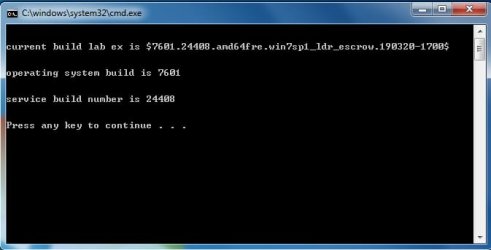
for /f "skip=2 tokens=2,*" %%A in ('reg query "HKLM\SOFTWARE\Microsoft\Windows NT\CurrentVersion" /v BuildLabEX') do (set funnyface=%%B)
echo  current build lab ex is $%funnyface%$
echo.& echo.

for /f "tokens=1-2 delims=." %%i in ("%funnyface%") do (
  set myfirsttoe=%%i
  set mysecondtoe=%%j
 )
echo.& echo.
echo operating system build is %myfirsttoe%
echo.& echo.
echo service build number is %mysecondtoe%
echo.& echo.
pause
IF %mysecondtoe% EQU 24408 (
 some command here to do A
  )

pause

Produces this:

buillabex.jpg

Obviously it sensible to use a word for the variable that is relevant e.g. rather than myfirsttoe and mysecondtoe, I would use osbld and svcbld as the variable names.
 
Last edited:

My Computers

System One System Two

  • Computer type
    PC/Desktop
    OS
    7 X64
    CPU
    i5 8400
    Motherboard
    gigabyte b365m ds3h
    Memory
    2x8gb 3200mhz
    Hard Drives
    various
    PSU
    pure power 11 400w cm
    Case
    Coolermaster
    Cooling
    cryorig m9i
  • Computer type
    PC/Desktop
    OS
    7x64
    CPU
    g5400
    Motherboard
    ga b365m ds3h
    Memory
    8gb ddr4 2400
    PSU
    xfx pro 450w
And what will be the batch script to detect in the (CurrentBuildNumber) registry?
The one line commands

wmic os get Caption
wmic os get Version
wmic os get Buildnumber
wmic os get Caption, Version, Buildnumber

may be useful for what you are doing
 

My Computer

Computer type
PC/Desktop
Computer Manufacturer/Model Number
diy
OS
Win7 pro x64
CPU
stock i7 7700k
Motherboard
Gigabyte Z270N-WIFI mini-ITX
Memory
Corsair Vengeance LPX 16GB (2x8GB) DDR4 @ 3200MHz
Graphics Card(s)
integrated Intel HD 630
Sound Card
onboard Realtek ALC1220
Monitor(s) Displays
two vertically mounted samsung 55" 4k un55mu8000
Screen Resolution
1920x1280
Hard Drives
256GB Samsung EVO 960 M.2 pci-e NVMe SSD
PSU
SilverStone Nightjar ST45NF 450Watt Fanless
Case
No case. Motherboard is mounted directly onto power supply
Cooling
Evercool low profile 815EP with Panaflow 12L fan at 7v
Keyboard
Ortek MCK-86 mini
Mouse
Belkin 5-button USB
Internet Speed
spectrum 400mbps
Thank you all for your help. Thankful for recognition.
 

My Computer

Computer type
Laptop
Computer Manufacturer/Model Number
Asus
OS
Windows 10 Pro x64
Back
Top