Reinstall Win 7, many missing mystery drivers

robertpri

New member
Local time
5:27 AM
Messages
46
This is related to another thread of mine, but the situatioin has changed so radically that a new thread made sense.

With the help of MS Tech Support on the phone [got right through!] he explained how to get rid of all my annoying partitiions. So, both drives were wiped out and made into single primary partitions.

I then installed Vista but had problems with a few of the drivers. A couple of them failed, but they were like 'touchpad' and such. Nothing that I saw as critical.

The minute Vista was complete, I custom installed Win 7 and it went well, execpt that it did say it could not find some drivers--of course, it did NOT say WHICH drivers! It just says, driver missing, click to browse or install.

I have no idea which one, or where it is.

So, rebooted to Win 7 and a few issues:

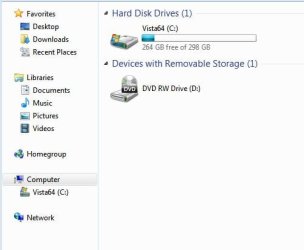
1: it knows the second hard drive is present and working, but it does not show in My Computer or Explorer. That is my biggest issue.

2: I have been installing second monitors on many machines for years, but this time, Win 7 can't seem to find my large moniitor. It worked before with Vista and it worked before with the first insall of Win 7.

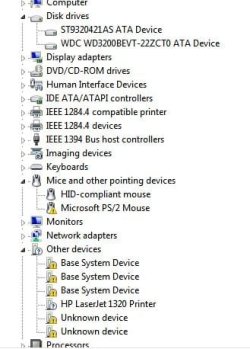
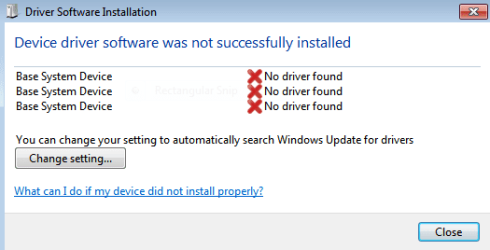
It says missing drivers in the screen shots, but are these Vista drivers it wants? Or Win 7 drivers?
 

Attachments
  • 1.PNG
    1.PNG
    7 KB · Views: 6
  • 5.JPG
    5.JPG
    24 KB · Views: 10
  • 6.JPG
    6.JPG
    33.6 KB · Views: 19
  • 7.JPG
    7.JPG
    52.8 KB · Views: 34

My Computer My Computer

Computer Manufacturer/Model Number
Asus G50 and Toshiba L505
OS
Win 7 - 64 Pro
CPU
2.28
Motherboard
?- asus laptop
Memory
4 gb
Graphics Card(s)
? laptop
Sound Card
? laptop
Monitor(s) Displays
dual display, laptop and 24" Samsung
Hard Drives
two 250gb drives in laptop and one 250 Esata
PSU
laptop
Case
laptop
Cooling
laptop
Do you have a card reader? Those device IDs appear to point missing card reader drivers. Is your USB ports working? Looks like maybe a chipset driver.
 

My Computer My Computer

Computer Manufacturer/Model Number
Toshiba L355D-7901
OS
Windows 7 X64
CPU
AMD Turion™ X2 Dual-Core Mobile Processor RM-72
Motherboard
AMD M780G chipset
Memory
4GB PC6400 DDR2 SDRAM
Graphics Card(s)
ATI Radeon™ 3100 Graphics
Sound Card
Realtek High Definition Audio
Monitor(s) Displays
17.0” diagonal widescreen TruBrite® TFT LCD
Screen Resolution
1440x900
Hard Drives
250GB (5400 RPM) Serial ATA
Mouse
Microsoft Bluetooth Notebook Mouse 5000
Thanks. i went to the Asus site but the error does not tell me much--missing device driver. During the install, it was the same problem: missing device driver, without telling me which device. Annoying.

All USB ports appear to be working, but I have 4 and did not try them all. Wiil do.

The error: base system device: PCI/VEN etc should tell me something, but it does not relate to anything I can find on the Asus site.

I browsed everywhere in windows.old [vista] but Win 7 did not like any of them.

Looks like another call to Asus.
 

My Computer My Computer

Computer Manufacturer/Model Number
Asus G50 and Toshiba L505
OS
Win 7 - 64 Pro
CPU
2.28
Motherboard
?- asus laptop
Memory
4 gb
Graphics Card(s)
? laptop
Sound Card
? laptop
Monitor(s) Displays
dual display, laptop and 24" Samsung
Hard Drives
two 250gb drives in laptop and one 250 Esata
PSU
laptop
Case
laptop
Cooling
laptop
I have solved most problems except for two 'base system device' errors. "Missing drivers" is the Win 7 msg. Asus tech support on the phone has improved considerably over the years, but once they understood that I was installing Windows 7 instead of Vista that came with their laptop--Tech support said they could not do anything for upgrading my Asus laptop.

In a way, I don't blame them, but calls to MS Tech support have confirmed Win7 is an upgrade and is "looking for installed Vista drivers by Asus". So, catch 22.

Asus won't help, but I have cleared most driver errors. Down to only two now.
 

My Computer My Computer

Computer Manufacturer/Model Number
Asus G50 and Toshiba L505
OS
Win 7 - 64 Pro
CPU
2.28
Motherboard
?- asus laptop
Memory
4 gb
Graphics Card(s)
? laptop
Sound Card
? laptop
Monitor(s) Displays
dual display, laptop and 24" Samsung
Hard Drives
two 250gb drives in laptop and one 250 Esata
PSU
laptop
Case
laptop
Cooling
laptop
The base system device is aR5C833 card reader They only have Vista drivers. Can be installed in compatibility mode http://www.sevenforums.com/tutorials/316-compatibility-mode.html Driver 32 bit ASUSTeK Computer Inc.-Support- 64 bit here ASUSTeK Computer Inc.-Support- Also you list your laptop as the Asus G50 but Asus only has the G50G and G50V G50VT(best buy) and G50VT the drivers listed are for the G50G If your is one of the others go to the last link and maje the afjustment in your series.Fabe
 

My Computer My Computer

Computer Manufacturer/Model Number
Self Built
OS
Windows 7 ultimate 64 bit / XP Home sp3
CPU
intel Core 2 Duo E8400 3.0ghz
Motherboard
Asus P5ND bios 1401
Memory
8 gigs 1066 OCZ Fata1ty
Graphics Card(s)
EVGA GTX 580 Call of Duty Black Ops Edition
Sound Card
Creative Soundblaster Audigy 2zs
Monitor(s) Displays
Asus 24in LCD's 2MS X2
Screen Resolution
1920x1080p @60Hz
Hard Drives
WD Caviar 500 Black/ WD Caviar 200 Blue
PSU
OCZ 700W GameXtreme
Case
NZXT Apollo
Cooling
Corsair H50 CPU/120mm x3 /60mm x2 /Corsair Dominator Ram
Keyboard
Logitech Bluetooth Wireless MX5000
Mouse
Logitech Bluetooth Wireless MX1000
Internet Speed
Download 19.83 Upload 0.97
Other Info
Logitech Z2300 Speakers/ Bose Noise Cancelling Headphones/Avermedia PCI-e Hybrid TV Bravo/Epson NX415 all in one/ 4 Port Powered USB Hub/ LG 10x Bluray Burner /TSST Corp DVDRW External
Thanks. The missing base drivers are all related to video, as I learned by checking the existing video drivers. I have downloaded the latest Nvidia drivers, but want to make backups before installing them. True, the missing drivers are Vista related [according to Asus Tech support] but for some reason, Win 7 wants them installed.

But once you upgrade to Win 7, the Vista driver CD that came with the Asus G50 no longer works. So, I'll try the Nvidia drivers after pumping up some courage. I hate the thought of crashing out.
 

My Computer My Computer

Computer Manufacturer/Model Number
Asus G50 and Toshiba L505
OS
Win 7 - 64 Pro
CPU
2.28
Motherboard
?- asus laptop
Memory
4 gb
Graphics Card(s)
? laptop
Sound Card
? laptop
Monitor(s) Displays
dual display, laptop and 24" Samsung
Hard Drives
two 250gb drives in laptop and one 250 Esata
PSU
laptop
Case
laptop
Cooling
laptop
Back
Top