Jtaylor100
New member
- Local time
- 7:50 PM
- Messages
- 7
Hi all,
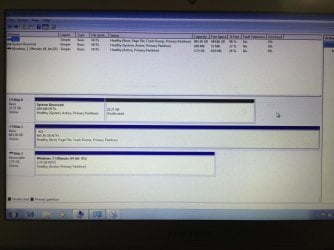
I recently reinstalled Windows 7 after a virus, but I think during the re-install I must have messed with the partitions. Now it installs fine but when I switch the laptop off and reboot it doesn't recognize or run Windows, unless I plug the usb back in and install from there. Once installed it runs fine, but as soon as you shutdown it won't restart.
I have tried cleaning disk and clearing partitions and the only thing I can think it is, is that it always wants to put the system reserved space and therefore the boot drive on disk 1, I can't seem to change this even after trying. Does this sound like the issue or am I clutching at straws?
Thanks for any help
I recently reinstalled Windows 7 after a virus, but I think during the re-install I must have messed with the partitions. Now it installs fine but when I switch the laptop off and reboot it doesn't recognize or run Windows, unless I plug the usb back in and install from there. Once installed it runs fine, but as soon as you shutdown it won't restart.
I have tried cleaning disk and clearing partitions and the only thing I can think it is, is that it always wants to put the system reserved space and therefore the boot drive on disk 1, I can't seem to change this even after trying. Does this sound like the issue or am I clutching at straws?
Thanks for any help
My Computer
At a glance
Windows 7 ultimate x64
- Computer type
- Laptop
- Computer Manufacturer/Model Number
- Samsung series 5 ultra
- OS
- Windows 7 ultimate x64