Reinstalled Windows, need help finding the right drivers

Axelzzlz

New member
Local time
2:23 AM
Messages
5
Hi,

I was having some freezing/BSOD problem with a certain very important program and I ended up reinstalling windows. I did so from a USB flashdisk but after windows was installed a lot of drivers seem to be missing. The laptop is a custom build and I don't have the cd with all the drivers since the disk is still at home, which is across the Atlantic Ocean so getting that isn't an option either.

The most important driver that seems to be missing as far as I can tell at the moment is the network adapter driver. Device Manager isn't recognizing the following devices:
- Ethernet Controller
- Network Controller
- PCI Device
- SM Bus Controller
- USB Controller

Windows Update isn't finding any drivers for those devices and I can't download them manually either since I don't know what I need to be looking for.

Any help is greatly appreciated since I've already been 2 days out of commission with the previous BSOD problem before I reinstalled windows. Let me know if you need me to supply any other information.

Thank You.

Axel


I saw in another thread it was asked to upload a dxdiag file so I attached that.
 

Attachments

My Computer My Computer

Computer type
Laptop
Computer Manufacturer/Model Number
custom build
OS
Windows 7 Home Premium 64bit
CPU
Intel i7-3630QM
Memory
16GB
Antivirus
Panda
Browser
Chrome
Your Ethernet controller is from Realtek. Go to the Realtek support site and download the Communication Network->NIC controller Gigabit driver suitable for your OS to a flash drive. Then install from flash
 

My Computer My Computer

Computer type
PC/Desktop
Computer Manufacturer/Model Number
Dell Optiplex 360 and Optiplex 755
OS
Desk 1: Win 7 Pro x32; Desk 2: Windows 10 x64
Hard Drives
500GB Crucial SSD in both Desktops
Other Info
Buffalo 6TB NAS, Raid 1
Thank you. I've installed the driver and it's now recognizing the Ethernet Controller. I'm still unable to create a wireless internet connection however, it only allows connection through an Ethernet cable but I don't have one. I suppose it has to do with the other 4 devices that it doesn't recognize, where do I find the drivers for those?

Cheers,

Axel
 

My Computer My Computer

Computer type
Laptop
Computer Manufacturer/Model Number
custom build
OS
Windows 7 Home Premium 64bit
CPU
Intel i7-3630QM
Memory
16GB
Antivirus
Panda
Browser
Chrome
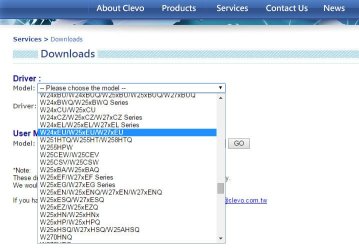
Ideally, now that you're Internet connected, you should get the rest from the motherboard vendor. So you would go to Clevo Support Downloads. Double check for yourself, but looks like the selection I highlighted below is for your model. Download ALL drivers.

Look through the driver list.
I'd install the Chipset and Intel Management Engine next.
Looks like you need USB 3.0 drivers for that machine too?
Also card reader also your wireless
Have a look through their driver list
 

Attachments

  • Clevo.jpg
    Clevo.jpg
    48.4 KB · Views: 0

My Computer My Computer

Computer type
PC/Desktop
Computer Manufacturer/Model Number
Dell Optiplex 360 and Optiplex 755
OS
Desk 1: Win 7 Pro x32; Desk 2: Windows 10 x64
Hard Drives
500GB Crucial SSD in both Desktops
Other Info
Buffalo 6TB NAS, Raid 1
Thank you. Almost there. Only the Network Controller is still unrecognized and wireless isn't working. There are multiple wireless drivers listed and I just picked a random Realtek Windows 7 version hoping they would all work but that's not the case. Which one do I need to download?
 

My Computer My Computer

Computer type
Laptop
Computer Manufacturer/Model Number
custom build
OS
Windows 7 Home Premium 64bit
CPU
Intel i7-3630QM
Memory
16GB
Antivirus
Panda
Browser
Chrome
Hey, hey. Glad to hear we're almost there.

Your wireless is an Intel chip. So i they should have an Intel wireless driver there too. Give it a try
 

My Computer My Computer

Computer type
PC/Desktop
Computer Manufacturer/Model Number
Dell Optiplex 360 and Optiplex 755
OS
Desk 1: Win 7 Pro x32; Desk 2: Windows 10 x64
Hard Drives
500GB Crucial SSD in both Desktops
Other Info
Buffalo 6TB NAS, Raid 1
Perfect, everything is working now. Thank you very much for the quick replies!
 

My Computer My Computer

Computer type
Laptop
Computer Manufacturer/Model Number
custom build
OS
Windows 7 Home Premium 64bit
CPU
Intel i7-3630QM
Memory
16GB
Antivirus
Panda
Browser
Chrome
You're most welcome. Glad to hear the good news and to be able to help :)

Here's a tip for the future: use DoubleDriver to backup your drivers before a reinstall (or time to time - just in case of a crash)

I just recently posted some info about drivers and using DoubleDriver. Have a look at it HERE
 

My Computer My Computer

Computer type
PC/Desktop
Computer Manufacturer/Model Number
Dell Optiplex 360 and Optiplex 755
OS
Desk 1: Win 7 Pro x32; Desk 2: Windows 10 x64
Hard Drives
500GB Crucial SSD in both Desktops
Other Info
Buffalo 6TB NAS, Raid 1
Back
Top