Reinstalling something you uninstalled in device manager?

heatman323

New member
Member
Local time
7:18 PM
Messages
47
So I was looking some stuff up on how to solve the Code 43 on the NVIDIA gpu(with the caution sign) where you get "You are not currently using a display attached to an NVIDIA GPU" and read that if you uninstalled it from device manager then clicked "Scan for hardware changes" on the topmost with your PC name it should reinstall it again and in most cases fix it, it didn't tho in my case and I would like to know how you can install it again? Was it a driver that I just uninstalled? If so do I just download the driver again?
 

My Computer My Computer

Computer Manufacturer/Model Number
Lenovo Ideapad Y580
OS
Microsoft Windows 7 Home Premium 64-bit SP1
CPU
Intel Core i7 @ 2.30GHz 55 °C Ivy Bridge 22nm Technology
Motherboard
LENOVO Product Name (U3E1) 56 °C
Memory
Type DDR3 Size 8192 MBytes Channels # Dual DRAM Frequency 79
Graphics Card(s)
Generic PnP Monitor (1366x768@60Hz) NVIDIA GeForce GTX 660M
Sound Card
Realtek High Definition Audio
Screen Resolution
1366 x 768
Hard Drives
932GB Seagate ST1000LM024 HN-M101MBB (SATA)
Internet Speed
7 mbps
Hi there ... Have you tried Downloading the Driver from the Lenovo website ... Do you also have an Intel GPU too.. It could be that your Nvidia card has died ...
 

My Computer My Computer

Computer Manufacturer/Model Number
W530-3630QM1
OS
windows 7 home 64bit
CPU
INTEL-CORE I7
Memory
16GB
Hard Drives
750GB
Browser
Chrome
Nope, I didn't know what it is in device manager that I uninstalled if it was just the driver or the GPU as a whole, not really familiar on how GPU and its components work. And yes I have an Intel GPU too and I definitely hope my NVIDIA GPU is not dead
 

My Computer My Computer

Computer Manufacturer/Model Number
Lenovo Ideapad Y580
OS
Microsoft Windows 7 Home Premium 64-bit SP1
CPU
Intel Core i7 @ 2.30GHz 55 °C Ivy Bridge 22nm Technology
Motherboard
LENOVO Product Name (U3E1) 56 °C
Memory
Type DDR3 Size 8192 MBytes Channels # Dual DRAM Frequency 79
Graphics Card(s)
Generic PnP Monitor (1366x768@60Hz) NVIDIA GeForce GTX 660M
Sound Card
Realtek High Definition Audio
Screen Resolution
1366 x 768
Hard Drives
932GB Seagate ST1000LM024 HN-M101MBB (SATA)
Internet Speed
7 mbps
Downloaded it again and it lost the caution sign in the device manager, got to run Final Fantasy XIV but it crashed less than 15 seconds into logging in. Is it possible that its the game that affects the GPU? I haven't tried it yet on other games. If other games also result in crashes does this mean that my GPU is dead? Does that mean playing games on my laptop will be impossible as replacing the GPU on a laptop cant be done because as I've heard, GPU's on laptops are soldered.
 

My Computer My Computer

Computer Manufacturer/Model Number
Lenovo Ideapad Y580
OS
Microsoft Windows 7 Home Premium 64-bit SP1
CPU
Intel Core i7 @ 2.30GHz 55 °C Ivy Bridge 22nm Technology
Motherboard
LENOVO Product Name (U3E1) 56 °C
Memory
Type DDR3 Size 8192 MBytes Channels # Dual DRAM Frequency 79
Graphics Card(s)
Generic PnP Monitor (1366x768@60Hz) NVIDIA GeForce GTX 660M
Sound Card
Realtek High Definition Audio
Screen Resolution
1366 x 768
Hard Drives
932GB Seagate ST1000LM024 HN-M101MBB (SATA)
Internet Speed
7 mbps
Hi there .. I would try it with other Games and see how it goes .. That is the problem with Laptops IMO they where never really made for Gaming ...
 

My Computer My Computer

Computer Manufacturer/Model Number
W530-3630QM1
OS
windows 7 home 64bit
CPU
INTEL-CORE I7
Memory
16GB
Hard Drives
750GB
Browser
Chrome
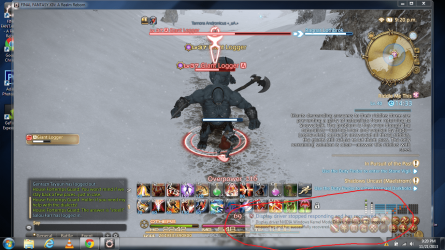
Okay tried the new GeForce r331 game ready driver for laptops and it seems to have fixed it PARTIALLY. What happened was compared to the former driver that crashed upon logging into the game less than a few seconds in, it now would keep working BUT I would get this every few seconds. Its like a mini crash every 30 seconds.
Its a bit better compared to the previous driver where I got pink squares and where the laptop refused to function altogether. Oh and not sure but this was my first try on windowed on the r331 driver, should I try windowed on my previous driver?
 

Attachments

  • pic.png
    pic.png
    598 KB · Views: 1

My Computer My Computer

Computer Manufacturer/Model Number
Lenovo Ideapad Y580
OS
Microsoft Windows 7 Home Premium 64-bit SP1
CPU
Intel Core i7 @ 2.30GHz 55 °C Ivy Bridge 22nm Technology
Motherboard
LENOVO Product Name (U3E1) 56 °C
Memory
Type DDR3 Size 8192 MBytes Channels # Dual DRAM Frequency 79
Graphics Card(s)
Generic PnP Monitor (1366x768@60Hz) NVIDIA GeForce GTX 660M
Sound Card
Realtek High Definition Audio
Screen Resolution
1366 x 768
Hard Drives
932GB Seagate ST1000LM024 HN-M101MBB (SATA)
Internet Speed
7 mbps
Hi there ... I do not think it is a Driver problem .. Try that Version and see how it goes fingers crossed
 

My Computer My Computer

Computer Manufacturer/Model Number
W530-3630QM1
OS
windows 7 home 64bit
CPU
INTEL-CORE I7
Memory
16GB
Hard Drives
750GB
Browser
Chrome
Back
Top