AlwaysNTroule
New member
- Local time
- 5:50 PM
- Messages
- 17
Reinstalling Win 7-"Setup was unable to create a new system..."
Conclusion/Summary
Goal: Do clean reinstall of Windows 7
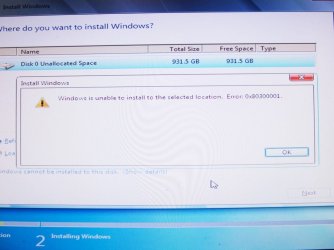
Problem: While trying to install from OEM CD to my Hard drive I got this message:
1. Deleted all partitions into one section (Disk 0)
2. I did Shift+F10 to pull up the command window
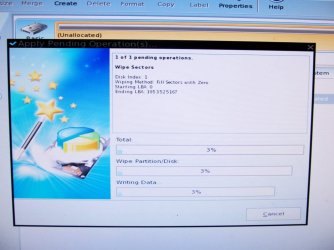
3. Ran the following commands to clean disk 0: DISKPART <Enter> list disk <Enter> select disk 0 <Enter> clean all [Took overnight to run, just the command "clean" would probably been sufficient] exit <Enter> exit <Enter>
4. Created an active partition of 100gb through commands as seen in this tutorial: How to Optimize an SSD / HDD When You're Ready to Reinstall the Operating System
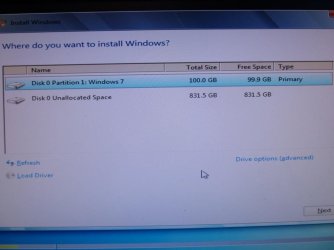
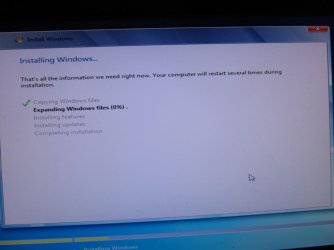
5. After creating the new active partition (disk 1) I was able to do a reinstall of Windows!
Note: I later extended disk 1 to include dik 0's 900GB.
Thanks for your help everyone; I hope this may be helpful for others!
-Andrew
Original message:
I am trying to do a reinstall of Windows 7 Home Premium from an OEM Reinstall disc. I deleted all partitions, so now all I have is partition 0 (931.5GB free). [Screenshot 1] However, when I try to click next I get a message saying:
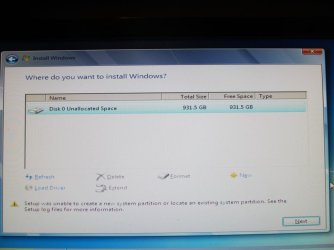
"Setup was unable to create a new system partition or locate an existing partition. See the Setup log files for more information."
Disk Part Fix
I came here to this (awesome) forum and tried doing the Shift+F10 disk part fix. I did the clean all command, but 12 hours later there was no success message and I read the average speed was 320GB/hour.
Clean/Clean All
I also read that some people had run the clean all command for 16+ hours, and it turned out they only need to do the clean command. So I tried the clean command, and performed it quickly, but I'm still getting the, "Setup was unable..." message.
More Info
Let me know if you need more info from me. I'm not overly tech savvy, but I'm willing to try anything at this point.
Here are some additional screenshots from diskpart showing no partition or volume:
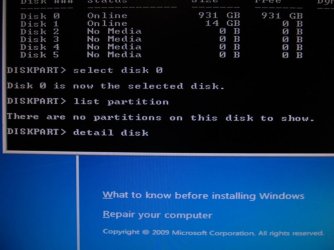
"There are no partitions on this disk to show."
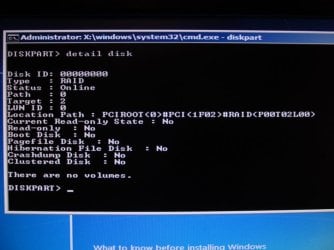
DISKPART> detail disk
Would highly appreciate your help!
Andrew
Conclusion/Summary
Goal: Do clean reinstall of Windows 7
Problem: While trying to install from OEM CD to my Hard drive I got this message:
"Setup was unable to create a new system partition or locate an existing partition. See the Setup log files for more information."
Here's what I did (thanks to everyone's help) that eventually worked:
1. Deleted all partitions into one section (Disk 0)
2. I did Shift+F10 to pull up the command window
3. Ran the following commands to clean disk 0: DISKPART <Enter> list disk <Enter> select disk 0 <Enter> clean all [Took overnight to run, just the command "clean" would probably been sufficient] exit <Enter> exit <Enter>
4. Created an active partition of 100gb through commands as seen in this tutorial: How to Optimize an SSD / HDD When You're Ready to Reinstall the Operating System
5. After creating the new active partition (disk 1) I was able to do a reinstall of Windows!
Note: I later extended disk 1 to include dik 0's 900GB.
Thanks for your help everyone; I hope this may be helpful for others!
-Andrew
Original message:
I am trying to do a reinstall of Windows 7 Home Premium from an OEM Reinstall disc. I deleted all partitions, so now all I have is partition 0 (931.5GB free). [Screenshot 1] However, when I try to click next I get a message saying:
"Setup was unable to create a new system partition or locate an existing partition. See the Setup log files for more information."
Disk Part Fix
I came here to this (awesome) forum and tried doing the Shift+F10 disk part fix. I did the clean all command, but 12 hours later there was no success message and I read the average speed was 320GB/hour.
Clean/Clean All
I also read that some people had run the clean all command for 16+ hours, and it turned out they only need to do the clean command. So I tried the clean command, and performed it quickly, but I'm still getting the, "Setup was unable..." message.
More Info
Let me know if you need more info from me. I'm not overly tech savvy, but I'm willing to try anything at this point.
Here are some additional screenshots from diskpart showing no partition or volume:
"There are no partitions on this disk to show."
DISKPART> detail disk
Would highly appreciate your help!
Andrew
Last edited:
My Computer
- Computer type
- PC/Desktop
- Computer Manufacturer/Model Number
- Dell XPS 8100
- OS
- Windows 7 Home Premium 64-Bit
- CPU
- Intel Core i7 CPU [email protected]
- Memory
- 12.0 GB
- Graphics Card(s)
- ATI Radeon
- Antivirus
- Avira Free
- Browser
- Mozilla Firefox