Solved Reinstalling Win 7

msalton1

New member
Member
VIP
Local time
12:06 PM
Messages
325
I've reinstalled win7 pro sp1 to a new SSD. I've downloaded the convenience rollup from MS.


I assume my next step is to install the convenience rollup.


  1. Any advice on how to proceed so as to have the smoothest, trouble free update to current day?
  2. What can I expect in terms of updating issues beyond that? Does the rollup bypass the update hang issues?
  3. Also, is there a current list of updates to avoid (or uninstall after the fact)?
  4. I did the pro sp1 install a few weeks ago. I'm doing this as time permits, so I may need to rearm the activation timer. Does this present any problems?


Thanks for any help.
 

My Computer

Computer type
PC/Desktop
Computer Manufacturer/Model Number
custom
OS
windows 7 Pro 64 Bit
CPU
i5 4670K
Motherboard
Asus Max Hero 1150 socket
Memory
16GB DDR3@933mhz
Graphics Card(s)
Radeon R9 390 8192mb
Monitor(s) Displays
Dell U2415 x3
Screen Resolution
1920 (5760) x 1200 x3
Hard Drives
System: Kingston 128GB SSD

Installing to Samsung 860 EVO 500GB
WD Black 2 TB & 1 TB
PSU
Corsair CX750M
Cooling
Hyper 312
Internet Speed
50mbps
Hi msalton1,

I've reinstalled win7 pro sp1 to a new SSD. I've downloaded the convenience rollup from MS.

I assume my next step is to install the convenience rollup.
  1. Any advice on how to proceed so as to have the smoothest, trouble free update to current day?
  2. What can I expect in terms of updating issues beyond that? Does the rollup bypass the update hang issues?
  3. Also, is there a current list of updates to avoid (or uninstall after the fact)?
  4. I did the pro sp1 install a few weeks ago. I'm doing this as time permits, so I may need to rearm the activation timer. Does this present any problems?

Going down the convenience rollup [KB3125574] route in order to get the OS upto date is not the best way to approach this. This is because there are pre-requisite updates, servicing stack updates, and some updates have been superseded.

For the best and smoothest method to do this on the LIVE OS use DISM++ [Deployment Image Servicing & Management]. Please follow my instructions below!

NOTE: The light blue text below are links to the relevant websites and programs, just click them!

DISM++ - Basic Overview

DISM++ is a FREE implementation tool that has the ability to perform Windows Updates [WU]. Some of the advantages [but not all] are:

[1] The GUI is very easy to understand and use.
[2] It is much faster than M$’s WU because it uses a different engine.
[3] It downloads the latest WU DB from the M$ servers, scans your OS, and then lists the updates available.
[4] It doesn’t install superseded updates like M$ does.
[5] It gives you the option of what you want to install.
[6] The pre-ticked updates are what is recommended and are similar to the WU critical and recommended updates. The un-ticked updates are similar to the WU optional updates.
[7] It warns you if an update:
  • Includes telemetry.
  • Has known issues with certain hardware.
  • Needs exclusive access.
  • Is suspect.
  • Your OS doesn't need it.
  • Has any other known issues.
[8] It doesn’t require re-booting between updates.[9] It can be used to either update an install.wim image OFFLINE, or to update the LIVE OS.

DISM++ - Run Windows Updates On The LIVE OS

DISM++ Direct download [zip] => DISM++.
DISM++ Website [you will need to translate the page] => DISM++ |New Windows Utility.

Here is the quick procedure guide:

[1] Download the latest version of DISM++ [see the DISM++ Direct download [zip] link above].
[2] Extract the files using something like 7-Zip here => 7-Zip.
[3] Turn Sleep mode OFF in Power Options [you can turn it back on after you have finished].
[4] Double-click Dism++x86 or Dism++x64 and then click Run.
[5] Click Updates in the left-hand pane and then click Scan [bottom right].
[6] Once the scan has completed, click Install Updates [blue button to the right of Scan].
[7] If any warning pop-ups appear [see item [7] in the Basic Overview above], click Cancel and it will skip that one. There could be several of these appear so click Cancel to all of them.
[8] It is advisable to run the DISM++ WU a couple of times. To do this, just re-boot and Scan again [from number [4] above].
[9] Run M$ WU to see if there are any other updates available.

That's it!

Create A System Image

Once you have your OS updated and running the way you like it, create a system image. This way, if things go wrong in the future, you will be able to restore your OS back to the exact same state that it is now in a very short time. This is because you will NOT have to install ALL the updates again, not to mention the amount of time needed to download and install them, and the numerous restarts required. There are two imaging programs which are very popular among members here, the first is AOMEI Backupper Standard [FREE], and the second is Macrium Reflect [FREE].

I hope this helps!

 

My Computer

Computer type
Laptop
Computer Manufacturer/Model Number
Fujitsu LIFEBOOK
OS
Win 7 HP SP1 64-bit Vista HB SP2 32-bit Linux Mint 18.3
CPU
Intel(R) Pentium(R) CPU P6200 @ 2.13GHz
Motherboard
FUJITSU FJNBB06
Memory
4.00 GB
Graphics Card(s)
Intel(R) Graphics Media Accelerator HD
Sound Card
[1] Realtek High Definition Audio [2] Intel(R) Display Audio
Screen Resolution
1366 x 768 x 32 bits (4294967296 colors) @ 59 Hz
Hard Drives
TOSHIBA MK5076GSX
Antivirus
AVG FREE
Wow! Well that makes it pretty painless. Can't ask for more than that. Thanks!
 

My Computer

Computer type
PC/Desktop
Computer Manufacturer/Model Number
custom
OS
windows 7 Pro 64 Bit
CPU
i5 4670K
Motherboard
Asus Max Hero 1150 socket
Memory
16GB DDR3@933mhz
Graphics Card(s)
Radeon R9 390 8192mb
Monitor(s) Displays
Dell U2415 x3
Screen Resolution
1920 (5760) x 1200 x3
Hard Drives
System: Kingston 128GB SSD

Installing to Samsung 860 EVO 500GB
WD Black 2 TB & 1 TB
PSU
Corsair CX750M
Cooling
Hyper 312
Internet Speed
50mbps

My Computer

Computer type
Laptop
Computer Manufacturer/Model Number
Fujitsu LIFEBOOK
OS
Win 7 HP SP1 64-bit Vista HB SP2 32-bit Linux Mint 18.3
CPU
Intel(R) Pentium(R) CPU P6200 @ 2.13GHz
Motherboard
FUJITSU FJNBB06
Memory
4.00 GB
Graphics Card(s)
Intel(R) Graphics Media Accelerator HD
Sound Card
[1] Realtek High Definition Audio [2] Intel(R) Display Audio
Screen Resolution
1366 x 768 x 32 bits (4294967296 colors) @ 59 Hz
Hard Drives
TOSHIBA MK5076GSX
Antivirus
AVG FREE
Another question...it make take some time before I can finish this up.


I haven't entered the Product Key or activated. Will this prevent me from updating to current?
 

My Computer

Computer type
PC/Desktop
Computer Manufacturer/Model Number
custom
OS
windows 7 Pro 64 Bit
CPU
i5 4670K
Motherboard
Asus Max Hero 1150 socket
Memory
16GB DDR3@933mhz
Graphics Card(s)
Radeon R9 390 8192mb
Monitor(s) Displays
Dell U2415 x3
Screen Resolution
1920 (5760) x 1200 x3
Hard Drives
System: Kingston 128GB SSD

Installing to Samsung 860 EVO 500GB
WD Black 2 TB & 1 TB
PSU
Corsair CX750M
Cooling
Hyper 312
Internet Speed
50mbps
Hi msalton1,

Another question...it make take some time before I can finish this up.
I haven't entered the Product Key or activated. Will this prevent me from updating to current?

No.

What I would do is get the OS up and running with all the updates etc first. Then when you are happy with it you can activate [you have 30 days I think in which to activate]. Finally, I would make a system image.

I hope this helps!
 

My Computer

Computer type
Laptop
Computer Manufacturer/Model Number
Fujitsu LIFEBOOK
OS
Win 7 HP SP1 64-bit Vista HB SP2 32-bit Linux Mint 18.3
CPU
Intel(R) Pentium(R) CPU P6200 @ 2.13GHz
Motherboard
FUJITSU FJNBB06
Memory
4.00 GB
Graphics Card(s)
Intel(R) Graphics Media Accelerator HD
Sound Card
[1] Realtek High Definition Audio [2] Intel(R) Display Audio
Screen Resolution
1366 x 768 x 32 bits (4294967296 colors) @ 59 Hz
Hard Drives
TOSHIBA MK5076GSX
Antivirus
AVG FREE

My Computer

Computer type
PC/Desktop
Computer Manufacturer/Model Number
Skylake Special #666
OS
Windows 10 Pro x64
CPU
Intel Core i7 6700K
Motherboard
Asus Sabertooth Z170 Mark 1
Memory
GSkill TridentZ RGB 16GB 3600 16-16-16-36
Graphics Card(s)
EVGA GTX 980 Ti SC x2
Sound Card
Realtek High Definition
Monitor(s) Displays
AOC G2460PG
Screen Resolution
1920 x 1080 144Hz
Hard Drives
Samsung 860 Pro 256GB, Seagate Barracuda 4TB x2
PSU
EVGA 1000 P2, EVGA White Custom Braided Cables
Case
Corsair Vengeance C70 Gunmetal Black
Cooling
Corsair H100i v2, Corsair ML120 x2, Thermal Grizzly Kryonaut
Keyboard
Logitech G910 Orion Spectrum
Mouse
Logitech G700s
Internet Speed
Verizon Fios Quantum Gateway 75/75
Antivirus
Windows Defender, Malwarebytes Free 3.8.3
Browser
Chrome
Other Info
Corsair SP120 x4, LG Blu-ray Drive, Durabrand HT-395 100 Watt Dolby Digital Amp, Corsair H2100 Wireless 7.1 Headset
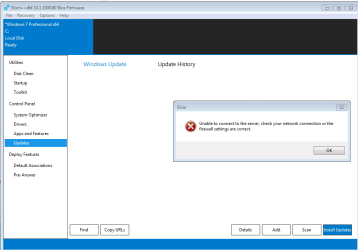
So I had time to get back to the new install this evening. I downloaded and ran DisM++ x64, but when clicking on scan, I keep getting the below error, yet I can browse online with no issues and even re-downloaded the Dism++ file from the link. Maybe the update servers are down?


No Servers.PNG
 

My Computer

Computer type
PC/Desktop
Computer Manufacturer/Model Number
custom
OS
windows 7 Pro 64 Bit
CPU
i5 4670K
Motherboard
Asus Max Hero 1150 socket
Memory
16GB DDR3@933mhz
Graphics Card(s)
Radeon R9 390 8192mb
Monitor(s) Displays
Dell U2415 x3
Screen Resolution
1920 (5760) x 1200 x3
Hard Drives
System: Kingston 128GB SSD

Installing to Samsung 860 EVO 500GB
WD Black 2 TB & 1 TB
PSU
Corsair CX750M
Cooling
Hyper 312
Internet Speed
50mbps
Hi msalton1,

Update System Specifications

Please update your system specifications in your UserCP => Edit System Spec setup. It will help us to help you!

This SevenForums tutorial [Published by Brink and written by CyberZeus] makes this task very easy and quick to do. Click here => System Info - See Your System Specs.

Thanks.
 

My Computer

Computer type
Laptop
Computer Manufacturer/Model Number
Fujitsu LIFEBOOK
OS
Win 7 HP SP1 64-bit Vista HB SP2 32-bit Linux Mint 18.3
CPU
Intel(R) Pentium(R) CPU P6200 @ 2.13GHz
Motherboard
FUJITSU FJNBB06
Memory
4.00 GB
Graphics Card(s)
Intel(R) Graphics Media Accelerator HD
Sound Card
[1] Realtek High Definition Audio [2] Intel(R) Display Audio
Screen Resolution
1366 x 768 x 32 bits (4294967296 colors) @ 59 Hz
Hard Drives
TOSHIBA MK5076GSX
Antivirus
AVG FREE
Hi msalton1,

I downloaded and ran DisM++ x64, but when clicking on scan, I keep getting the below error, yet I can browse online with no issues and even re-downloaded the Dism++ file from the link. Maybe the update servers are down?

That is very strange. I just downloaded it and run it on my x64 test system without any problems!

Is there anyone else here who would like to try downloading and running it from the link below and letting us know if it is OK please?

DISM++ Direct download [zip] => DISM++.

Thanks in advance.
 

My Computer

Computer type
Laptop
Computer Manufacturer/Model Number
Fujitsu LIFEBOOK
OS
Win 7 HP SP1 64-bit Vista HB SP2 32-bit Linux Mint 18.3
CPU
Intel(R) Pentium(R) CPU P6200 @ 2.13GHz
Motherboard
FUJITSU FJNBB06
Memory
4.00 GB
Graphics Card(s)
Intel(R) Graphics Media Accelerator HD
Sound Card
[1] Realtek High Definition Audio [2] Intel(R) Display Audio
Screen Resolution
1366 x 768 x 32 bits (4294967296 colors) @ 59 Hz
Hard Drives
TOSHIBA MK5076GSX
Antivirus
AVG FREE
I tried again this morning - the scan completed, it connected to servers, the bar on upper left of Dism++ showed "Installing", status bar (at bottom) progress indicator showed it progressively installing x of 113 updates (I left the default checked) all the way to 113, got the "success" message. However, next to each checked allegedly 'updated' file, the status shows "Download Failed".


I've tried restarting the system after Dism++ "finished. I also checked the option for Dism++ to restart when finished.


The only windows updates shown in WU history are the 3 that show after the SP1 install.


Any ideas? Or maybe I should install the Convenience Rollup and let it go from there?
 

My Computer

Computer type
PC/Desktop
Computer Manufacturer/Model Number
custom
OS
windows 7 Pro 64 Bit
CPU
i5 4670K
Motherboard
Asus Max Hero 1150 socket
Memory
16GB DDR3@933mhz
Graphics Card(s)
Radeon R9 390 8192mb
Monitor(s) Displays
Dell U2415 x3
Screen Resolution
1920 (5760) x 1200 x3
Hard Drives
System: Kingston 128GB SSD

Installing to Samsung 860 EVO 500GB
WD Black 2 TB & 1 TB
PSU
Corsair CX750M
Cooling
Hyper 312
Internet Speed
50mbps
Hi msalton1,

I tried again this morning - the scan completed, it connected to servers, the bar on upper left of Dism++ showed "Installing", status bar (at bottom) progress indicator showed it progressively installing x of 113 updates (I left the default checked) all the way to 113, got the "success" message. However, next to each checked allegedly 'updated' file, the status shows "Download Failed".

I've tried restarting the system after Dism++ "finished". I also checked the option for Dism++ to restart when finished.

The only windows updates shown in WU history are the 3 that show after the SP1 install.

Any ideas? Or maybe I should install the Convenience Rollup and let it go from there?

[3] Turn Sleep mode OFF in Power Options [you can turn it back on after you have finished].

[1] Did you do the above?
[2] Did you have any other HDD's or USB's attached when you run DISM++?
[3] Did you run DISM++ a second and third time?
[If so, did the updates that showed as being successfully installed on the first run appear again in the second scan?]

I hope this helps!
 

My Computer

Computer type
Laptop
Computer Manufacturer/Model Number
Fujitsu LIFEBOOK
OS
Win 7 HP SP1 64-bit Vista HB SP2 32-bit Linux Mint 18.3
CPU
Intel(R) Pentium(R) CPU P6200 @ 2.13GHz
Motherboard
FUJITSU FJNBB06
Memory
4.00 GB
Graphics Card(s)
Intel(R) Graphics Media Accelerator HD
Sound Card
[1] Realtek High Definition Audio [2] Intel(R) Display Audio
Screen Resolution
1366 x 768 x 32 bits (4294967296 colors) @ 59 Hz
Hard Drives
TOSHIBA MK5076GSX
Antivirus
AVG FREE
Hi msalton1,


[1] Did you do the above?
[2] Did you have any other HDD's or USB's attached when you run DISM++?
[3] Did you run DISM++ a second and third time?
[If so, did the updates that showed as being successfully installed on the first run appear again in the second scan?]

I hope this helps!


1. Yes, power options set to High Perf. The download failure occure withing 2 or 3 mins anyway, so power options don't come into play.


2. Yes. All HDs and CD drives disconnected.


3. Yes. And restarted the machine after 2 of the attempts.


4. Yes, the updates that showed as successful appeared in the update list again.


Also, I checked control panel/W Updates history and installed update after Dism++ ran. No new updates showed as installed. Baffling.


Just ran it again. The scan takes seconds. The "installing updates" phase takes just over a minute before the downloads are designated as "failed" (yet the success dialog appears).


I'm installing to a separate drive (disconnecting the existing drives and connecting the new SSD as necessary), keeping my production machine in use. So this isn't an emergency. If I have to, I'll run W/U overnight for a few nights.


Assuming so, after installing the Convenience Rollup, will I have to worry about the notorious 'update hangs'?
 
Last edited:

My Computer

Computer type
PC/Desktop
Computer Manufacturer/Model Number
custom
OS
windows 7 Pro 64 Bit
CPU
i5 4670K
Motherboard
Asus Max Hero 1150 socket
Memory
16GB DDR3@933mhz
Graphics Card(s)
Radeon R9 390 8192mb
Monitor(s) Displays
Dell U2415 x3
Screen Resolution
1920 (5760) x 1200 x3
Hard Drives
System: Kingston 128GB SSD

Installing to Samsung 860 EVO 500GB
WD Black 2 TB & 1 TB
PSU
Corsair CX750M
Cooling
Hyper 312
Internet Speed
50mbps
I don't understand what is going on here. Are you trying to Update a Clean Install of Windows 7 that was done with a Retail Disk, or from a Recovery Partition? If it is a Recovery Partition and already has SP1 then you don't need anything in most cases. If a Retail Disk then yes, you will need the Servicing Stack and the Rollup, but that's all.
 

My Computer

Computer type
Laptop
Computer Manufacturer/Model Number
HP Pavilion dv7-6c23cl
OS
Windows 7 Home Premium 64bit
CPU
AMD A8-3520M
Motherboard
Hewlett-Packard 180B (Socket FS1)
Memory
6.00GB DDR3 @ 674MHz (9-9-9-24)
Graphics Card(s)
512MB ATI AMD Radeon HD 6620G
Sound Card
IDT High Definition Audio CODEC
Monitor(s) Displays
Generic PnP Monitor
Screen Resolution
(1600x900@60Hz)
Hard Drives
Samsung 850 EVO 250GB SSD
Mouse
Logitec M525
Internet Speed
30-75Mbps
Antivirus
Avast Free, Unfortunately
Browser
Google Chrome, Firefox, IE
I don't understand what is going on here. Are you trying to Update a Clean Install of Windows 7 that was done with a Retail Disk, or from a Recovery Partition? If it is a Recovery Partition and already has SP1 then you don't need anything in most cases. If a Retail Disk then yes, you will need the Servicing Stack and the Rollup, but that's all.


A new install to a clean SSD using an official MS Win 7 Pro x64 SP1 ISO. It will be activated with a retail Product key.
 

My Computer

Computer type
PC/Desktop
Computer Manufacturer/Model Number
custom
OS
windows 7 Pro 64 Bit
CPU
i5 4670K
Motherboard
Asus Max Hero 1150 socket
Memory
16GB DDR3@933mhz
Graphics Card(s)
Radeon R9 390 8192mb
Monitor(s) Displays
Dell U2415 x3
Screen Resolution
1920 (5760) x 1200 x3
Hard Drives
System: Kingston 128GB SSD

Installing to Samsung 860 EVO 500GB
WD Black 2 TB & 1 TB
PSU
Corsair CX750M
Cooling
Hyper 312
Internet Speed
50mbps
Hi Nasty7,

I don't understand what is going on here. Are you trying to Update a Clean Install of Windows 7 that was done with a Retail Disk, or from a Recovery Partition? If it is a Recovery Partition and already has SP1 then you don't need anything in most cases. If a Retail Disk then yes, you will need the Servicing Stack and the Rollup, but that's all.

Whether it is a restore back to factory settings from a recovery partition or from a DVD/USB, you will still need the critical updates [and possibly some Important system updates] and .NET Framework updates. DISM++ never usually has a problem with this and is a much easier and quicker way to update the OS rather that going down the WU route!
 

My Computer

Computer type
Laptop
Computer Manufacturer/Model Number
Fujitsu LIFEBOOK
OS
Win 7 HP SP1 64-bit Vista HB SP2 32-bit Linux Mint 18.3
CPU
Intel(R) Pentium(R) CPU P6200 @ 2.13GHz
Motherboard
FUJITSU FJNBB06
Memory
4.00 GB
Graphics Card(s)
Intel(R) Graphics Media Accelerator HD
Sound Card
[1] Realtek High Definition Audio [2] Intel(R) Display Audio
Screen Resolution
1366 x 768 x 32 bits (4294967296 colors) @ 59 Hz
Hard Drives
TOSHIBA MK5076GSX
Antivirus
AVG FREE
Paul Black: Gotcha, I always use the Service Stack and Roll-Up and never any issues on dozens of machines. I don't know why it would be quicker as all the Updates still need downloading and installing, but I'll take your word for it. I'll have to try it one day, but using sysprep now, only takes 7min. I did just re-read your post and Bookmarked it Paul, thanks.
 

My Computer

Computer type
Laptop
Computer Manufacturer/Model Number
HP Pavilion dv7-6c23cl
OS
Windows 7 Home Premium 64bit
CPU
AMD A8-3520M
Motherboard
Hewlett-Packard 180B (Socket FS1)
Memory
6.00GB DDR3 @ 674MHz (9-9-9-24)
Graphics Card(s)
512MB ATI AMD Radeon HD 6620G
Sound Card
IDT High Definition Audio CODEC
Monitor(s) Displays
Generic PnP Monitor
Screen Resolution
(1600x900@60Hz)
Hard Drives
Samsung 850 EVO 250GB SSD
Mouse
Logitec M525
Internet Speed
30-75Mbps
Antivirus
Avast Free, Unfortunately
Browser
Google Chrome, Firefox, IE
Hi Nasty7,

I always use the Service Stack and Roll-Up and never any issues on dozens of machines. I don't know why it would be quicker as all the Updates still need downloading and installing, but I'll take your word for it. I'll have to try it one day, but using sysprep now, only takes 7min. I did just re-read your post and Bookmarked it Paul, thanks.

I also used to use the:

[1] - KB3020369 - Servicing Stack Update - April 2015.
[2] - KB3125574 - Convenience Rollup Package - May 2016.
[3] - KB3172605 - Functional Update Rollup [THIS ONE IS IMPORTANT] - July 2016.
[4] - KB3179573 - Functional Update Rollup - August 2016.

...etc, and then running WU. The problem with doing it that way [I found] is the amount of time needed to download and install all the updates, not to mention the numerous restarts required.

I then found a muck quicker and easier way to achieve this was to use DISM++!

DISM++ is a FREE implementation tool that has the ability to perform Windows Updates [WU]. Some of the advantages [but not all] are:

[1] The GUI is very easy to understand and use.
[2] It is much faster than M$’s WU because it uses a different engine.
[3] It downloads the latest WU DB from the M$ servers, scans your OS, and then lists the updates available.
[4] It doesn’t install superseded updates like M$ does.
[5] It gives you the option of what you want to install.
[6] The pre-ticked updates are what is recommended and are similar to the WU critical and recommended updates. The un-ticked updates are similar to the WU optional updates.

[7] It warns you if an update:
  • Includes telemetry.
  • Has known issues with certain hardware.
  • Needs exclusive access.
  • Is suspect.
  • Your OS doesn't need it.
  • Has any other known issues.
[8] It doesn’t require re-booting between updates.
[9] It can be used to either update an install.wim image OFFLINE, or to update the LIVE OS.
 

My Computer

Computer type
Laptop
Computer Manufacturer/Model Number
Fujitsu LIFEBOOK
OS
Win 7 HP SP1 64-bit Vista HB SP2 32-bit Linux Mint 18.3
CPU
Intel(R) Pentium(R) CPU P6200 @ 2.13GHz
Motherboard
FUJITSU FJNBB06
Memory
4.00 GB
Graphics Card(s)
Intel(R) Graphics Media Accelerator HD
Sound Card
[1] Realtek High Definition Audio [2] Intel(R) Display Audio
Screen Resolution
1366 x 768 x 32 bits (4294967296 colors) @ 59 Hz
Hard Drives
TOSHIBA MK5076GSX
Antivirus
AVG FREE
Just tried again. The odd thing is that afterwards, I plugged my existing system drive (and other devices) back in and booted, then decided to try Dism++ on the same machine with my daily hardware configuration. Only had a few updates, but Dism++ connected, downloaded and installed.


Just a thought for the problem (new install) SSD...should I leave the Dism++ default updates checked? Should I start with an older update that might be causing an issue if not installed first?
 

My Computer

Computer type
PC/Desktop
Computer Manufacturer/Model Number
custom
OS
windows 7 Pro 64 Bit
CPU
i5 4670K
Motherboard
Asus Max Hero 1150 socket
Memory
16GB DDR3@933mhz
Graphics Card(s)
Radeon R9 390 8192mb
Monitor(s) Displays
Dell U2415 x3
Screen Resolution
1920 (5760) x 1200 x3
Hard Drives
System: Kingston 128GB SSD

Installing to Samsung 860 EVO 500GB
WD Black 2 TB & 1 TB
PSU
Corsair CX750M
Cooling
Hyper 312
Internet Speed
50mbps
And, if Dism++ isn't going to do the job, I guess I'll have to do it that 'old fashioned way'.


Paul, does your post #18 contain all the steps I'll need to get current? Is there a guide with a certain order, etc? Is there a list of updates I'll need to uninstall after (i.e., the 'phone-home' updates)? I'd like to do this the right way to avoid any issues down the line.


Any info will be appreciated. Thanks!


PS - if anyone can tell me the problem with Dism++ here, much appreciated!
 

My Computer

Computer type
PC/Desktop
Computer Manufacturer/Model Number
custom
OS
windows 7 Pro 64 Bit
CPU
i5 4670K
Motherboard
Asus Max Hero 1150 socket
Memory
16GB DDR3@933mhz
Graphics Card(s)
Radeon R9 390 8192mb
Monitor(s) Displays
Dell U2415 x3
Screen Resolution
1920 (5760) x 1200 x3
Hard Drives
System: Kingston 128GB SSD

Installing to Samsung 860 EVO 500GB
WD Black 2 TB & 1 TB
PSU
Corsair CX750M
Cooling
Hyper 312
Internet Speed
50mbps
Back
Top