Relevantknowledge

Damarwulan

New member
Local time
6:31 PM
Messages
16
In system tray shown application running, it call "relevantknowlegde", what is that...?, Is kind of spyware?, how I can stop/unistalling it, because every connect to the internet the relevantknowledge show and it makes my connection heavy/slow...
Please, some body help me.....
thank
 

My Computer

OS
windows 7 ultimate
CPU
Compaq Presario
It is spyware which has connected itself to the internet, which is why it is in your system tray. You are right to restrict closely what you allow to start up with your computer and connect to the internet - see the entire list by running msconfig and editing the startup tab to only what absolutely needs to startup with the pc.

To handle this infection, I suggest you download Avast free home anti-virus and accept its offer during install to run a boot scan. At restart it will enter safe mode and do the deepest possible AV scan.

Immediately afterward, reboot and tap F8 at startup to enter Safe Mode with Networking. Download Spybot S&D, install, update and run in Safe Mode. This should clean up the infection, and any others.

If it gets any worse rather than better, consider a clean install booting from Win7 DVD and formatting the drive.
 
Thank for reply.
but before I read your reply, I found in programs and feature, relevantknowledge, I click uninstall.
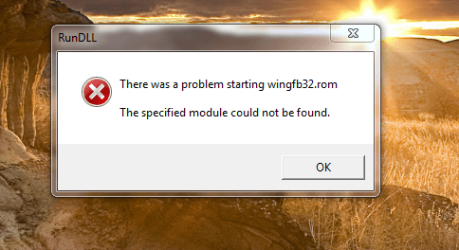
opsss..., after restart fount eror message :
How I can fix that....?
 

Attachments

  • start up.PNG
    start up.PNG
    51.5 KB · Views: 223

My Computer

OS
windows 7 ultimate
CPU
Compaq Presario
Thank for reply.
but before I read your reply, I found in programs and feature, relevantknowledge, I click uninstall.
opsss..., after restart fount eror message :
How I can fix that....?
wow...google pulled nothing on that file name (with or without the .rom extension...)

...but I got some info on that name "RelevantKnowledge"

RelevantKnowledge -> The homepage of the spyware:p
I believe this will work in a command prompt -> %WinDir%\rlvknlg.exe -bootremove -uninst:RelevantKnowledge
 

My Computer

Computer Manufacturer/Model Number
Compal JFT02 (Custom Build Laptop)
OS
Windows 7 Home Premium x64 - Mac OS X 10.6.4 x64
CPU
Intel Core 2 Duo T9300 2.5 GHz
Motherboard
JFT02
Memory
4GB Kingston DDR2-800
Graphics Card(s)
NVIDIA Geforce 8600M GT (512MB Model)
Sound Card
Realtek HD Audio
Monitor(s) Displays
WUXGA Standard Laptop Display
Screen Resolution
1680*1050
Hard Drives
Toshiba 320GB 5400RPM Laptop HD
PSU
Standard Laptop Power Supply
Case
Standard Laptop Case
Cooling
Standard Laptop Cooling
Keyboard
Standard Laptop 105 Key-Keyboard
Mouse
Synaptics Touchpad
Internet Speed
Verizion Online DSL 3360/864 kbs (dl/up)
Thank for reply.
but before I read your reply, I found in programs and feature, relevantknowledge, I click uninstall.
opsss..., after restart fount eror message :
How I can fix that....?
wow...google pulled nothing on that file name (with or without the .rom extension...)

...but I got some info on that name "RelevantKnowledge"

RelevantKnowledge -> The homepage of the spyware:p
I believe this will work in a command prompt -> %WinDir%\rlvknlg.exe -bootremove -uninst:RelevantKnowledge

Sorry, how to use that command, step by step please...
 

My Computer

OS
windows 7 ultimate
CPU
Compaq Presario
type CMD is start search box, right click result CMD above and Run As Administrator, copy and paste after blinking cursor:

%WinDir%\rlvknlg.exe -bootremove -uninst:RelevantKnowledge

Follow steps given in my first post to edit msconfig, boot scan with Avast and run Spybot in Safe Mode.

If Avast or Spybot don't root it out of registry and Programs then we can do a manual search afterward.
 
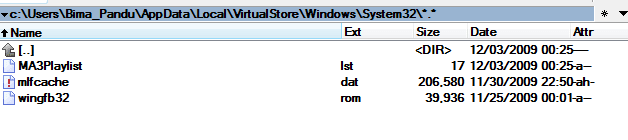
Another way I tried search the file on my local disk, then I Copying the file to C:\windows\system32\, the error message doesn't show anymore even I restart or shutdown many time, but I still don't know why this error message show after uninstalling "relevantknowledge"?, is this the part file of nero 9? (has .rom), or winamp player?
thank
 

Attachments

  • solve error.PNG
    solve error.PNG
    4.5 KB · Views: 300

My Computer

OS
windows 7 ultimate
CPU
Compaq Presario
Download Malwarebytes' Anti-Malware to your desktop
|MG| Malwarebytes Anti-Malware 1.42 Download
* Double-click mbam-setup.exe and follow the prompts to install the program.
* At the end, be sure a checkmark is placed next to Update Malwarebytes' Anti-Malware and Launch Malwarebytes' Anti-Malware, then click Finish.
* If an update is found, it will download and install the latest version.
* Once the program has loaded, select Perform full scan, then click Scan.
* When the scan is complete, click OK, then Show Results to view the results.
* Be sure that everything is checked, and click Remove Selected.
* When completed, a log will open in Notepad. Please save it to a convenient location. Copy and Paste that log into your next reply.

I would like to take a look at it :)
 

My Computer

Computer type
PC/Desktop
Computer Manufacturer/Model Number
Bruce ... somewhere in his 40's
OS
Windows 7 Ultimate 32bit SP1
CPU
Intel(R) Core(TM)2 Quad CPU @ 2.40GHz, 2400 MHz
Motherboard
INTEL/D975XBX2
Memory
4 GB
Graphics Card(s)
ATI Radeon HD 2600 Pro
Monitor(s) Displays
Samsung SyncMaster 914v
Screen Resolution
1280 x 1024
Hard Drives
2/500GB each ... ST3500630AS ATA Device.
One is not connected
PSU
Rocketfish 700 W
Case
G.Skill Gigabyte Chassis
Keyboard
Standard PS/2 Keyboard
Mouse
Microsoft PS/2 Mouse
Internet Speed
DSL
Antivirus
Avira Internet Security
Browser
IE 11
Other Info
ATI HDMI Audio
Back
Top