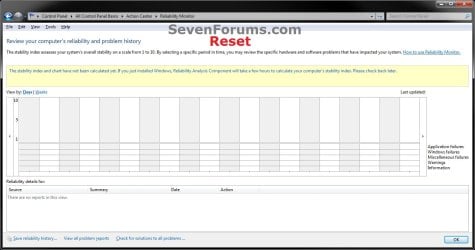
Reliability Monitor - Reset

How to Reset Reliability Monitor in Windows 7 and Windows 8


   Information
If you have fixed the errors or just want to clear the reported data in Reliabilty Monitor, then this will show you how to reset the Reliability Monitor back to a clean default state in Windows 7 and Windows 8.

You must be logged in as an administrator to be able to do this tutorial.

   Note
Reliability Monitor is an advanced tool that measures hardware and software problems and other changes to your computer. It collects 24 hours of data before it displays any results and calculates the stability index that ranges from 1 (the least stable) to 10 (the most stable). You can use the index to help evaluate the reliability of your computer by reviewing the reported application failures, Windows failures, Miscellaneous failures, Warnings, and Information. Any change you make to your computer or problem that occurs on your computer affects the stability index.

   Warning
If you reset the Reliability Monitor, then any previously displayed data will no longer be available unless you have backed it up in step 3 below to restore.

This does not work in Windows 8.1 Update.


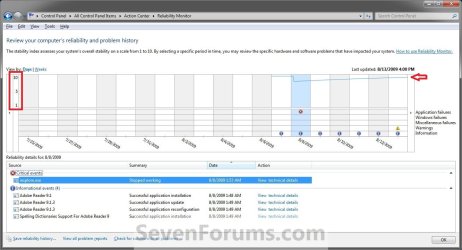
EXAMPLE: Reliability Monitor
NOTE: You can tell your Index score (scales from 1 to 10, 10 is the best score) by looking at how the chart line ends in the upper right corner boxed in red below compared to the scale of 10 to 1 on the left upper corner boxed in red below.
Before.jpg

Windows7-Reset.jpg

Here's How:

1. Click/tap on the Download button below to download the file below, and save it to your desktop.
NOTE: Special thanks to Zardoc for providing the part in the BAT file to clear the Event Viewer logs.
Reset_Reliability_Monitor.bat


Download


2. Unblock the .bat file.

3. Right click or press and hold on the downloaded .bat file and click/tap on Run as administrator.

4. If prompted, click/tap on Yes (UAC).

5. You will now see a command prompt open, run the commands to reset Reliability Monitor, then close.

6. If this is for Windows 8 and 8.1, then you must repeat steps 3-5 to run the .bat file a second time for this to work.

7. When finished, restart the computer to fully apply.


   Note
It may take Reliability Monitor a few to 24 hours to display results again after being reset.


That's it,
Shawn


Attachments

Last edited:
About that batch file.

Under Windows 8 Pro.

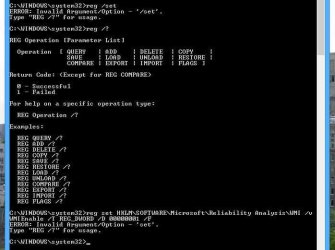
I thought you might like to see this. The reg set command does not work. Apparently, there is no 'set' option for reg.exe in Windows 8. You have to create a .reg file and use IMPORT.... (at least I think that's the way you do it, not sure)

Secondly, The batch file cleared the logs and deleted the Reliability Monitor's database alright, but now two days later my reliability monitor seems to be broke. It's not collecting any data at all. Maybe it will in a few days.

Lastly, I'm not sure if this is related but in the task scheduler I see RACTask is running, and running, and running.... I think something is broke. I'm not sure what at this time.
 

Attachments

  • reg set.jpg
    reg set.jpg
    38.8 KB · Views: 721

My Computer My Computer

At a glance

Windows 7 Home Premium x64, Windows 8 Pro x32Core2 Quad Q66004GBGigabyte GeForce 650 TI OC
OS
Windows 7 Home Premium x64, Windows 8 Pro x32
CPU
Core2 Quad Q6600
Motherboard
DP35DP
Memory
4GB
Graphics Card(s)
Gigabyte GeForce 650 TI OC
Sound Card
Built in
Monitor(s) Displays
HP2511x, Acer 19 in.
Screen Resolution
1920 x 1080
Hard Drives
2, WD Caviar Blue 500GB
Seagate External USB 3.0 2TB
Cooling
air
Keyboard
Logitech G510
Mouse
Razer Death Adder
Internet Speed
tested at 20 Mbps download / 4 Mbps upload.
Under Windows 8 Pro.

I thought you might like to see this. The reg set command does not work. Apparently, there is no 'set' option for reg.exe in Windows 8. You have to create a .reg file and use IMPORT.... (at least I think that's the way you do it, not sure)

Secondly, The batch file cleared the logs and deleted the Reliability Monitor's database alright, but now two days later my reliability monitor seems to be broke. It's not collecting any data at all. Maybe it will in a few days.

Lastly, I'm not sure if this is related but in the task scheduler I see RACTask is running, and running, and running.... I think something is broke. I'm not sure what at this time.
reg set doesn't work in win7 as well!

It must be:
Code:
reg add "HKLM\SOFTWARE\Microsoft\Reliability Analysis\WMI" /v WMIEnable /T REG_DWORD /D 00000001 /F
 

My Computer My Computer

At a glance

Microsoft Windows 7 Home Premium 64-bits 7601...Intel(R) Core(TM) i3 CPU M 370 @ 2.40GHz4,00 GBATI Mobility Radeon HD 5400 Series
Computer type
Laptop
Computer Manufacturer/Model Number
ACER ASPIRE 5742G
OS
Microsoft Windows 7 Home Premium 64-bits 7601 Multiprocessor Free Service Pack 1
CPU
Intel(R) Core(TM) i3 CPU M 370 @ 2.40GHz
Motherboard
Acer Aspire 5742G
Memory
4,00 GB
Graphics Card(s)
ATI Mobility Radeon HD 5400 Series
Sound Card
(1) AMD High Definition Audio Device (2) Realtek High Defi
Screen Resolution
1366 x 768 x 32 bits (4294967296 colors) @ 60 Hz
Hard Drives
WDC WD5000BEVT-22ZAT0
Hello 8OHCO, and welcome to Seven Forums.

Thank you for bringing this to my attention.

The BAT file has been updated to correct the set/add issue. Please try it again to see how it works for you now. :)

The WMIEnable DWORD in the registry is set to 1 by default. The BAT is just making sure that it's still set that way.
 

My Computer My Computer

At a glance

64-bit Windows 11 Pro for WorkstationsIntel i7-8700K OC'd to 5 GHz64 GB (4x16GB) G.SKILL TridentZ RGB DDR4 3600...ASUS ROG-STRIX-GTX1080TI-O11G-GAMING
Computer type
PC/Desktop
Computer Manufacturer/Model Number
Self built custom
OS
64-bit Windows 11 Pro for Workstations
CPU
Intel i7-8700K OC'd to 5 GHz
Motherboard
ASUS ROG Maximus XI Formula Z390
Memory
64 GB (4x16GB) G.SKILL TridentZ RGB DDR4 3600 MHz
Graphics Card(s)
ASUS ROG-STRIX-GTX1080TI-O11G-GAMING
Sound Card
Integrated
Monitor(s) Displays
2 x Samsung Odyssey G7 27"
Screen Resolution
2560x1440
Hard Drives
1TB Samsung 990 PRO M.2,
4TB Samsung 990 PRO PRO M.2,
TerraMaster F8 SSD Plus NAS
PSU
Seasonic Prime Titanium 850W
Case
Thermaltake Core P3
Cooling
Corsair Hydro H115i
Keyboard
Logitech wireless K800
Mouse
Logitech MX Master 4
Internet Speed
2 Gb/s Download and 100 Mb/s Upload
Antivirus
Malwarebyte Anti-Malware Premium
Browser
Google Chrome
Other Info
Logitech Z625 speaker system,
Logitech BRIO 4K Pro webcam,
HP Color LaserJet Pro MFP M477fdn,
APC SMART-UPS RT 1000 XL - SURT1000XLI,
Galaxy S23 Plus phone
I found the registry entry using regedit and verified it was there and set to 1. So I understood that part. I'm assuming that at some point there was a version of reg.exe that DID have a set option. Is that the case? Anyway, that's all beside the point.

My reliability monitor stopped displaying anything after running the batch file. Two days went by and still nothing showing up in there at all. No rating, no Info icons, no warnings - nothing. Apparently it doesn't like having its database deleted from %ProgramData%\Microsoft\RAC\... or something.

I have an Acronis full disk backup from 1/20/13. I'm thinking it might be best to simply restore it and move on.

This reliability rating is not some badge of honor and I don't really think it's worth resetting. It doesn't matter if the indexed was trashed to 1 after some installation went awry. Who cares, right? Thank you just the same, but I think I'll skip worrying about the reliability index in the future. I would rather have it intact and functioning than have it show a 10 that is in essence a falsehood, or worse yet, have it broken and showing no rating at all.

This is a clever, cool little batch file and I thank you for that, and I thank you for taking the time to reply.

If you ever find a way to delete some specific events from the Reliability Monitor's history let me know.

Best wishes. Beginning disk restoration now...
 

My Computer My Computer

At a glance

Windows 7 Home Premium x64, Windows 8 Pro x32Core2 Quad Q66004GBGigabyte GeForce 650 TI OC
OS
Windows 7 Home Premium x64, Windows 8 Pro x32
CPU
Core2 Quad Q6600
Motherboard
DP35DP
Memory
4GB
Graphics Card(s)
Gigabyte GeForce 650 TI OC
Sound Card
Built in
Monitor(s) Displays
HP2511x, Acer 19 in.
Screen Resolution
1920 x 1080
Hard Drives
2, WD Caviar Blue 500GB
Seagate External USB 3.0 2TB
Cooling
air
Keyboard
Logitech G510
Mouse
Razer Death Adder
Internet Speed
tested at 20 Mbps download / 4 Mbps upload.
8OHCO,

Since this is for your Windows 8, did you run the .bat file twice, then restarted the computer?

In Windows 8, it will not work properly unless ran twice in a row first.
 

My Computer My Computer

At a glance

64-bit Windows 11 Pro for WorkstationsIntel i7-8700K OC'd to 5 GHz64 GB (4x16GB) G.SKILL TridentZ RGB DDR4 3600...ASUS ROG-STRIX-GTX1080TI-O11G-GAMING
Computer type
PC/Desktop
Computer Manufacturer/Model Number
Self built custom
OS
64-bit Windows 11 Pro for Workstations
CPU
Intel i7-8700K OC'd to 5 GHz
Motherboard
ASUS ROG Maximus XI Formula Z390
Memory
64 GB (4x16GB) G.SKILL TridentZ RGB DDR4 3600 MHz
Graphics Card(s)
ASUS ROG-STRIX-GTX1080TI-O11G-GAMING
Sound Card
Integrated
Monitor(s) Displays
2 x Samsung Odyssey G7 27"
Screen Resolution
2560x1440
Hard Drives
1TB Samsung 990 PRO M.2,
4TB Samsung 990 PRO PRO M.2,
TerraMaster F8 SSD Plus NAS
PSU
Seasonic Prime Titanium 850W
Case
Thermaltake Core P3
Cooling
Corsair Hydro H115i
Keyboard
Logitech wireless K800
Mouse
Logitech MX Master 4
Internet Speed
2 Gb/s Download and 100 Mb/s Upload
Antivirus
Malwarebyte Anti-Malware Premium
Browser
Google Chrome
Other Info
Logitech Z625 speaker system,
Logitech BRIO 4K Pro webcam,
HP Color LaserJet Pro MFP M477fdn,
APC SMART-UPS RT 1000 XL - SURT1000XLI,
Galaxy S23 Plus phone
8OHCO,

Since this is for your Windows 8, did you run the .bat file twice, then restarted the computer?

In Windows 8, it will not work properly unless ran twice in a row first.


Yes, I did run it twice and reset the computer. It seemed to work great, but after a couple days I noticed that it wasn't logging anything at all.

I might be game to try it again tomorrow, but this time I'll do a full system backup right before I start. I just did my disk image restoration with Acronis True Image and all is well. I have a few individual files to restore from my online backup service before I get into trying the batch file again.

I was reading a forum somewhere else that said you don't need to clear the logs as the batch file does. That it worked to simply delete the RAC database in %ProgramData%... I was wondering if perhaps one could delete specific events from the Application log somehow. Then delete the RAC database. Then just let the system fly as usual. Would this be a method of purging specific events from the Reliability History? I'm not sure how to delete a specific event from a windows log. One either clears the entire log or changes nothing when using Event Viewer.
 

My Computer My Computer

At a glance

Windows 7 Home Premium x64, Windows 8 Pro x32Core2 Quad Q66004GBGigabyte GeForce 650 TI OC
OS
Windows 7 Home Premium x64, Windows 8 Pro x32
CPU
Core2 Quad Q6600
Motherboard
DP35DP
Memory
4GB
Graphics Card(s)
Gigabyte GeForce 650 TI OC
Sound Card
Built in
Monitor(s) Displays
HP2511x, Acer 19 in.
Screen Resolution
1920 x 1080
Hard Drives
2, WD Caviar Blue 500GB
Seagate External USB 3.0 2TB
Cooling
air
Keyboard
Logitech G510
Mouse
Razer Death Adder
Internet Speed
tested at 20 Mbps download / 4 Mbps upload.
Without clearing the event logs as well, we found that sometimes the events will just show up again in Reliability Monitor within a few days.

I'm not aware of any way to delete specific events in a log in Event Viewer.

Please let me know how it went.
 

My Computer My Computer

At a glance

64-bit Windows 11 Pro for WorkstationsIntel i7-8700K OC'd to 5 GHz64 GB (4x16GB) G.SKILL TridentZ RGB DDR4 3600...ASUS ROG-STRIX-GTX1080TI-O11G-GAMING
Computer type
PC/Desktop
Computer Manufacturer/Model Number
Self built custom
OS
64-bit Windows 11 Pro for Workstations
CPU
Intel i7-8700K OC'd to 5 GHz
Motherboard
ASUS ROG Maximus XI Formula Z390
Memory
64 GB (4x16GB) G.SKILL TridentZ RGB DDR4 3600 MHz
Graphics Card(s)
ASUS ROG-STRIX-GTX1080TI-O11G-GAMING
Sound Card
Integrated
Monitor(s) Displays
2 x Samsung Odyssey G7 27"
Screen Resolution
2560x1440
Hard Drives
1TB Samsung 990 PRO M.2,
4TB Samsung 990 PRO PRO M.2,
TerraMaster F8 SSD Plus NAS
PSU
Seasonic Prime Titanium 850W
Case
Thermaltake Core P3
Cooling
Corsair Hydro H115i
Keyboard
Logitech wireless K800
Mouse
Logitech MX Master 4
Internet Speed
2 Gb/s Download and 100 Mb/s Upload
Antivirus
Malwarebyte Anti-Malware Premium
Browser
Google Chrome
Other Info
Logitech Z625 speaker system,
Logitech BRIO 4K Pro webcam,
HP Color LaserJet Pro MFP M477fdn,
APC SMART-UPS RT 1000 XL - SURT1000XLI,
Galaxy S23 Plus phone
Ok, here's the deal. When you use the batch file it can take a very long time to rebuild the database and if there's no data for several months it could take so long that you might think it's broke, but it's not.

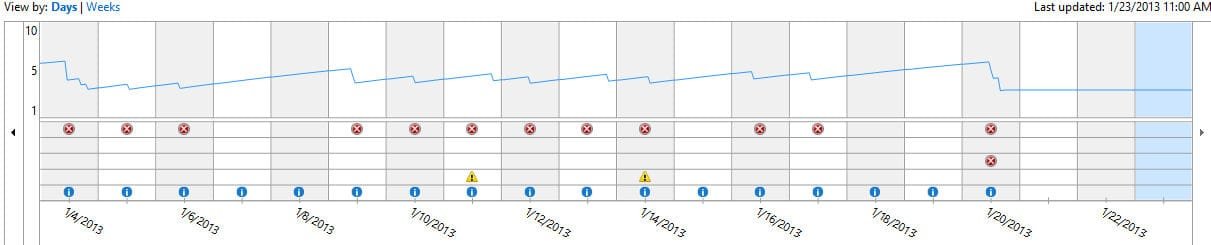
Today I restored my entire hard drive from a backup made on January 20th -- 11 days ago. It's taken 6 hours for the graph to even begin to show data for the time period of the 3 days following the backup.

The first graph below is set to show days. The second one shows weeks. Notice in the first graph that it only shows up to 1/23/2013. It took the system 6 hours to build the data for 3 days. So imagine how long it will take for the system to rebuild 6 weeks of data.

This all might sound convoluted. The bottom line is wait at least a week before you expect to see your graph rebuild itself in some cases. I just didn't wait long enough. I figured 48 hours was long enough. Nope! Not even close!

The batch file works fine. Just be aware that your graph might take forever and one day to rebuild itself. Nothing is broken.
 

Attachments

  • graph1.jpg
    graph1.jpg
    31.4 KB · Views: 237
  • graph2.jpg
    graph2.jpg
    24.2 KB · Views: 229

My Computer My Computer

At a glance

Windows 7 Home Premium x64, Windows 8 Pro x32Core2 Quad Q66004GBGigabyte GeForce 650 TI OC
OS
Windows 7 Home Premium x64, Windows 8 Pro x32
CPU
Core2 Quad Q6600
Motherboard
DP35DP
Memory
4GB
Graphics Card(s)
Gigabyte GeForce 650 TI OC
Sound Card
Built in
Monitor(s) Displays
HP2511x, Acer 19 in.
Screen Resolution
1920 x 1080
Hard Drives
2, WD Caviar Blue 500GB
Seagate External USB 3.0 2TB
Cooling
air
Keyboard
Logitech G510
Mouse
Razer Death Adder
Internet Speed
tested at 20 Mbps download / 4 Mbps upload.
Thank you for posting back and confirming 8OHCO. :)
 

My Computer My Computer

At a glance

64-bit Windows 11 Pro for WorkstationsIntel i7-8700K OC'd to 5 GHz64 GB (4x16GB) G.SKILL TridentZ RGB DDR4 3600...ASUS ROG-STRIX-GTX1080TI-O11G-GAMING
Computer type
PC/Desktop
Computer Manufacturer/Model Number
Self built custom
OS
64-bit Windows 11 Pro for Workstations
CPU
Intel i7-8700K OC'd to 5 GHz
Motherboard
ASUS ROG Maximus XI Formula Z390
Memory
64 GB (4x16GB) G.SKILL TridentZ RGB DDR4 3600 MHz
Graphics Card(s)
ASUS ROG-STRIX-GTX1080TI-O11G-GAMING
Sound Card
Integrated
Monitor(s) Displays
2 x Samsung Odyssey G7 27"
Screen Resolution
2560x1440
Hard Drives
1TB Samsung 990 PRO M.2,
4TB Samsung 990 PRO PRO M.2,
TerraMaster F8 SSD Plus NAS
PSU
Seasonic Prime Titanium 850W
Case
Thermaltake Core P3
Cooling
Corsair Hydro H115i
Keyboard
Logitech wireless K800
Mouse
Logitech MX Master 4
Internet Speed
2 Gb/s Download and 100 Mb/s Upload
Antivirus
Malwarebyte Anti-Malware Premium
Browser
Google Chrome
Other Info
Logitech Z625 speaker system,
Logitech BRIO 4K Pro webcam,
HP Color LaserJet Pro MFP M477fdn,
APC SMART-UPS RT 1000 XL - SURT1000XLI,
Galaxy S23 Plus phone
Sweet bat file :)
 

My Computer My Computer

At a glance

Win-7-Pro64bit 7-H-Prem-64biti7-5930K 2nd i9-9940x both water blocked VRM'...Trident-z 3200C14 2nd Trident-z 3600C16EVGA 1080ti ftw3 2nd Titan Xp both water blocked
Computer type
PC/Desktop
Computer Manufacturer/Model Number
Custom assembled by me :}
OS
Win-7-Pro64bit 7-H-Prem-64bit
CPU
i7-5930K 2nd i9-9940x both water blocked VRM's too
Motherboard
ASUS SABERTOOTH X99 2nd ASUS x299 Apex
Memory
Trident-z 3200C14 2nd Trident-z 3600C16
Graphics Card(s)
EVGA 1080ti ftw3 2nd Titan Xp both water blocked
Sound Card
Built-in Realtek
Monitor(s) Displays
1-AOC G2460PG 24"G-Sync 144Hz/ 2nd 1-ASUS VG248QE 24" 144Hz
Screen Resolution
1920 x 1080 144Hz
Hard Drives
2-Samsung M.2 Evo & Evo Plus
2-Samsung 850 EVO 500GB SSD's/ 3-2.5 W.D. Black 1tb-&3-1tb/3-3.5 WD Black 1tb hdd's
PSU
EVGA SuperNOVA 1000-P2 2nd 1200-P2
Case
2-Corsair Obsidian Series 450D Black ATX Mid Tower
Cooling
Custom water loops
Keyboard
Logitech G710+/ 2nd Logitech G910
Mouse
2-RedDragon M901 Perdition 16400 dpi Gaming mouse = wired
Internet Speed
Comcast Ping 19ms 89.31mbps download speed 6.12mbps upload
Antivirus
Malwarebytes Pro/ Superantispyware Pro
Browser
FireFox & Pale moon
Other Info
2nd ASUS X299 Apex/Intel i9-9940x with Custom water loop/7H-Prem-x64/Corsair 450D case/Ram Trident-z 3600C16 4x8gb / Samsung970Evo plus 500gb SSD/Dual ssd EZ swap evo/PSU EVGA SuperNova 1200w-P2 80+Platinum/GPU Titan Xp /8-ML-140 on push-pull on 2-280GTX rads
Problem with chronology reliability

Hello,
About two months ago, after resetting "ReliabilityHistory" with "Reliability monitor-reset" was born a problem with "ReliabilityHistory" is always resets, even if I install updates, if I delete from "Event Viewer" the events in "System" ....
Thank you.

View image: http://1drv.ms/1ogOY3u
I also followed the instructions in: Problem with chronology reliability - Microsoft Community, but the problem persists ....

Windows 8.1 Pro 32 bit :(
 

My Computer My Computer

At a glance

Windows 7 64 Bit Ultimate
Computer type
PC/Desktop
OS
Windows 7 64 Bit Ultimate
Hello alpha45, and welcome to Seven Forums. :)

alpha45 said:
Hi, thank you for the reply,
I have deleted the folders Outbound, PublishedData, StateData and Temp, but the result after a day has not changed and will not reset and the Reliability monitor, Rac folder is empty!.
What can be wrong to file .Bat in: reset Reliability Monitor- http://www.sevenforums.com/tutorials/20779-reliability-monitor-reset.html
is correct: HKLM\SOFTWARE\Microsoft\Reliability Analysis\WMI WMIEnable DWORD =1?
Thank you

Quoted from your post at MS Answers, you really don't want to delete the folders themselves, but just their contents.

Did you already run SFC and DISM if needed?

SFC /SCANNOW Command - Run in Windows 8
 

My Computer My Computer

At a glance

64-bit Windows 11 Pro for WorkstationsIntel i7-8700K OC'd to 5 GHz64 GB (4x16GB) G.SKILL TridentZ RGB DDR4 3600...ASUS ROG-STRIX-GTX1080TI-O11G-GAMING
Computer type
PC/Desktop
Computer Manufacturer/Model Number
Self built custom
OS
64-bit Windows 11 Pro for Workstations
CPU
Intel i7-8700K OC'd to 5 GHz
Motherboard
ASUS ROG Maximus XI Formula Z390
Memory
64 GB (4x16GB) G.SKILL TridentZ RGB DDR4 3600 MHz
Graphics Card(s)
ASUS ROG-STRIX-GTX1080TI-O11G-GAMING
Sound Card
Integrated
Monitor(s) Displays
2 x Samsung Odyssey G7 27"
Screen Resolution
2560x1440
Hard Drives
1TB Samsung 990 PRO M.2,
4TB Samsung 990 PRO PRO M.2,
TerraMaster F8 SSD Plus NAS
PSU
Seasonic Prime Titanium 850W
Case
Thermaltake Core P3
Cooling
Corsair Hydro H115i
Keyboard
Logitech wireless K800
Mouse
Logitech MX Master 4
Internet Speed
2 Gb/s Download and 100 Mb/s Upload
Antivirus
Malwarebyte Anti-Malware Premium
Browser
Google Chrome
Other Info
Logitech Z625 speaker system,
Logitech BRIO 4K Pro webcam,
HP Color LaserJet Pro MFP M477fdn,
APC SMART-UPS RT 1000 XL - SURT1000XLI,
Galaxy S23 Plus phone
HI,
I said that I deleted the folders Outbound, PublishedData, StateData and Temp, but the problem persists, see picture.
I also run SFC and DISM, but without any error.
TY
 

My Computer My Computer

At a glance

Windows 7 64 Bit Ultimate
Computer type
PC/Desktop
OS
Windows 7 64 Bit Ultimate
Did you run the .bat file in the tutorial here twice since this is for Windows 8.1?
 

My Computer My Computer

At a glance

64-bit Windows 11 Pro for WorkstationsIntel i7-8700K OC'd to 5 GHz64 GB (4x16GB) G.SKILL TridentZ RGB DDR4 3600...ASUS ROG-STRIX-GTX1080TI-O11G-GAMING
Computer type
PC/Desktop
Computer Manufacturer/Model Number
Self built custom
OS
64-bit Windows 11 Pro for Workstations
CPU
Intel i7-8700K OC'd to 5 GHz
Motherboard
ASUS ROG Maximus XI Formula Z390
Memory
64 GB (4x16GB) G.SKILL TridentZ RGB DDR4 3600 MHz
Graphics Card(s)
ASUS ROG-STRIX-GTX1080TI-O11G-GAMING
Sound Card
Integrated
Monitor(s) Displays
2 x Samsung Odyssey G7 27"
Screen Resolution
2560x1440
Hard Drives
1TB Samsung 990 PRO M.2,
4TB Samsung 990 PRO PRO M.2,
TerraMaster F8 SSD Plus NAS
PSU
Seasonic Prime Titanium 850W
Case
Thermaltake Core P3
Cooling
Corsair Hydro H115i
Keyboard
Logitech wireless K800
Mouse
Logitech MX Master 4
Internet Speed
2 Gb/s Download and 100 Mb/s Upload
Antivirus
Malwarebyte Anti-Malware Premium
Browser
Google Chrome
Other Info
Logitech Z625 speaker system,
Logitech BRIO 4K Pro webcam,
HP Color LaserJet Pro MFP M477fdn,
APC SMART-UPS RT 1000 XL - SURT1000XLI,
Galaxy S23 Plus phone
Yes...
Hi
 

My Computer My Computer

At a glance

Windows 7 64 Bit Ultimate
Computer type
PC/Desktop
OS
Windows 7 64 Bit Ultimate
Since this was two months ago, I doubt that you would have a restore point to use. If not, then you may need to refresh Windows 8.1 to be able sort this since SFC and DISM didn't help. :(
 

My Computer My Computer

At a glance

64-bit Windows 11 Pro for WorkstationsIntel i7-8700K OC'd to 5 GHz64 GB (4x16GB) G.SKILL TridentZ RGB DDR4 3600...ASUS ROG-STRIX-GTX1080TI-O11G-GAMING
Computer type
PC/Desktop
Computer Manufacturer/Model Number
Self built custom
OS
64-bit Windows 11 Pro for Workstations
CPU
Intel i7-8700K OC'd to 5 GHz
Motherboard
ASUS ROG Maximus XI Formula Z390
Memory
64 GB (4x16GB) G.SKILL TridentZ RGB DDR4 3600 MHz
Graphics Card(s)
ASUS ROG-STRIX-GTX1080TI-O11G-GAMING
Sound Card
Integrated
Monitor(s) Displays
2 x Samsung Odyssey G7 27"
Screen Resolution
2560x1440
Hard Drives
1TB Samsung 990 PRO M.2,
4TB Samsung 990 PRO PRO M.2,
TerraMaster F8 SSD Plus NAS
PSU
Seasonic Prime Titanium 850W
Case
Thermaltake Core P3
Cooling
Corsair Hydro H115i
Keyboard
Logitech wireless K800
Mouse
Logitech MX Master 4
Internet Speed
2 Gb/s Download and 100 Mb/s Upload
Antivirus
Malwarebyte Anti-Malware Premium
Browser
Google Chrome
Other Info
Logitech Z625 speaker system,
Logitech BRIO 4K Pro webcam,
HP Color LaserJet Pro MFP M477fdn,
APC SMART-UPS RT 1000 XL - SURT1000XLI,
Galaxy S23 Plus phone
I'm sorry, but I have no restore points so old! :(
Hi
 

My Computer My Computer

At a glance

Windows 7 64 Bit Ultimate
Computer type
PC/Desktop
OS
Windows 7 64 Bit Ultimate
I'm not sure what else will help other than a refresh. :(
 

My Computer My Computer

At a glance

64-bit Windows 11 Pro for WorkstationsIntel i7-8700K OC'd to 5 GHz64 GB (4x16GB) G.SKILL TridentZ RGB DDR4 3600...ASUS ROG-STRIX-GTX1080TI-O11G-GAMING
Computer type
PC/Desktop
Computer Manufacturer/Model Number
Self built custom
OS
64-bit Windows 11 Pro for Workstations
CPU
Intel i7-8700K OC'd to 5 GHz
Motherboard
ASUS ROG Maximus XI Formula Z390
Memory
64 GB (4x16GB) G.SKILL TridentZ RGB DDR4 3600 MHz
Graphics Card(s)
ASUS ROG-STRIX-GTX1080TI-O11G-GAMING
Sound Card
Integrated
Monitor(s) Displays
2 x Samsung Odyssey G7 27"
Screen Resolution
2560x1440
Hard Drives
1TB Samsung 990 PRO M.2,
4TB Samsung 990 PRO PRO M.2,
TerraMaster F8 SSD Plus NAS
PSU
Seasonic Prime Titanium 850W
Case
Thermaltake Core P3
Cooling
Corsair Hydro H115i
Keyboard
Logitech wireless K800
Mouse
Logitech MX Master 4
Internet Speed
2 Gb/s Download and 100 Mb/s Upload
Antivirus
Malwarebyte Anti-Malware Premium
Browser
Google Chrome
Other Info
Logitech Z625 speaker system,
Logitech BRIO 4K Pro webcam,
HP Color LaserJet Pro MFP M477fdn,
APC SMART-UPS RT 1000 XL - SURT1000XLI,
Galaxy S23 Plus phone
The only help I can give is that before using the Reset Reliability Monitor I did not have this problem ....
I do not understand why deleting the log in event viewer "System" will reset also the events in ReliabilityHistory.
The folders that are formed in C\windows\winsxs\temp\PendingRenames\ not affect?
Hi
 

My Computer My Computer

At a glance

Windows 7 64 Bit Ultimate
Computer type
PC/Desktop
OS
Windows 7 64 Bit Ultimate
If the logs don't get deleted, they may eventually get picked back up by Reliability Monitor.

It appears that your Reliability Monitor was improperly reset before trying the .bat file here. If not reset properly, it could cause Reliability Monitor to no longer work. Usually refreshing Windows is the only way to sort this what that happens.
 

My Computer My Computer

At a glance

64-bit Windows 11 Pro for WorkstationsIntel i7-8700K OC'd to 5 GHz64 GB (4x16GB) G.SKILL TridentZ RGB DDR4 3600...ASUS ROG-STRIX-GTX1080TI-O11G-GAMING
Computer type
PC/Desktop
Computer Manufacturer/Model Number
Self built custom
OS
64-bit Windows 11 Pro for Workstations
CPU
Intel i7-8700K OC'd to 5 GHz
Motherboard
ASUS ROG Maximus XI Formula Z390
Memory
64 GB (4x16GB) G.SKILL TridentZ RGB DDR4 3600 MHz
Graphics Card(s)
ASUS ROG-STRIX-GTX1080TI-O11G-GAMING
Sound Card
Integrated
Monitor(s) Displays
2 x Samsung Odyssey G7 27"
Screen Resolution
2560x1440
Hard Drives
1TB Samsung 990 PRO M.2,
4TB Samsung 990 PRO PRO M.2,
TerraMaster F8 SSD Plus NAS
PSU
Seasonic Prime Titanium 850W
Case
Thermaltake Core P3
Cooling
Corsair Hydro H115i
Keyboard
Logitech wireless K800
Mouse
Logitech MX Master 4
Internet Speed
2 Gb/s Download and 100 Mb/s Upload
Antivirus
Malwarebyte Anti-Malware Premium
Browser
Google Chrome
Other Info
Logitech Z625 speaker system,
Logitech BRIO 4K Pro webcam,
HP Color LaserJet Pro MFP M477fdn,
APC SMART-UPS RT 1000 XL - SURT1000XLI,
Galaxy S23 Plus phone
Back
Top