Remote Desktop Connection - Access Limited to one PC

ply5013

New member
Local time
4:24 PM
Messages
6
I was using XP on my laptop on a docking station. My office upgraded me to a 7 pc so I could use the laptop to remote connect to while traveling. The new pc uses the IP that the laptop used to use. I connect perfectly from the laptop to the desktop with Remote Desktop Connection, but when I try to log in from other machines (I've tried Vista and a linux machine), I can't log in.

The log in screen shows up, but it tells me I have the wrong username and/or password when I use any machine other than my laptop.

Any ideas?

Thanks.
 

My Computer My Computer

At a glance

Windows 7
OS
Windows 7
Welcome!

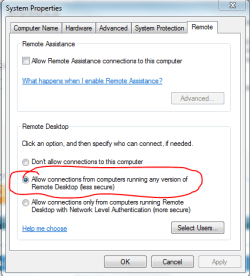
Make sure that on your host (the desktop), connecting from any version of Windows is allowed.
Capture.PNG

Hope this helps,
~JK
 

My Computer My Computer

At a glance

Windows 7 Professional x64Intel i7 2600K OC'd @ 4620 MHz16GB GSkill Sniper 2133 Mhz (4x4GB)EVGA GeForce GTX 480 SuperClocked+
Computer Manufacturer/Model Number
Custom
OS
Windows 7 Professional x64
CPU
Intel i7 2600K OC'd @ 4620 MHz
Motherboard
Asus P8Z68-V Pro
Memory
16GB GSkill Sniper 2133 Mhz (4x4GB)
Graphics Card(s)
EVGA GeForce GTX 480 SuperClocked+
Sound Card
Realtek High Definition Audio
Monitor(s) Displays
2x Acer S273HLbmii 27"
Screen Resolution
2 x 1920x1080
Hard Drives
64GB Crucial M4 SSD

Storage: Hitachi 1TB 5400RPM, Samsung 1.5TB 5400RPM
PSU
Corsair HW Series 750w (modular)
Case
Cooler Master HAF 932 Advanced Blue Edition
Cooling
CM Hyper 212+ CPU cooler, 3x 230mm + 1x 140mm case fans
Keyboard
Logitech MK320 (wireless)
Mouse
Logitech MK320 (wireless)
Internet Speed
30 Mb/s : 2 Mb/s

My Computer My Computer

At a glance

Windows 7 Professional x64Intel i7 2600K OC'd @ 4620 MHz16GB GSkill Sniper 2133 Mhz (4x4GB)EVGA GeForce GTX 480 SuperClocked+
Computer Manufacturer/Model Number
Custom
OS
Windows 7 Professional x64
CPU
Intel i7 2600K OC'd @ 4620 MHz
Motherboard
Asus P8Z68-V Pro
Memory
16GB GSkill Sniper 2133 Mhz (4x4GB)
Graphics Card(s)
EVGA GeForce GTX 480 SuperClocked+
Sound Card
Realtek High Definition Audio
Monitor(s) Displays
2x Acer S273HLbmii 27"
Screen Resolution
2 x 1920x1080
Hard Drives
64GB Crucial M4 SSD

Storage: Hitachi 1TB 5400RPM, Samsung 1.5TB 5400RPM
PSU
Corsair HW Series 750w (modular)
Case
Cooler Master HAF 932 Advanced Blue Edition
Cooling
CM Hyper 212+ CPU cooler, 3x 230mm + 1x 140mm case fans
Keyboard
Logitech MK320 (wireless)
Mouse
Logitech MK320 (wireless)
Internet Speed
30 Mb/s : 2 Mb/s
Thanks, but no luck. All those options have been tried. I'll keep looking...
 

My Computer My Computer

At a glance

Windows 7
OS
Windows 7
but when I try to log in from other machines (I've tried Vista and a linux machine), I can't log in.

The log in screen shows up, but it tells me I have the wrong username and/or password when I use any machine other than my laptop.

Any ideas?

Thanks.

I'm not sure what you mean by this. So you RDP to the PC, and you tried to physically log onto another machine ???
 

My Computer My Computer

At a glance

Windows 7 Ultimate 64BitGenuineIntel Intel(R) Core(TM) DuoCore T2400 ...2.00 GBMobile Intel(R) 945 Express Chipset
Computer Manufacturer/Model Number
Lenovo ThinkPad T60
OS
Windows 7 Ultimate 64Bit
CPU
GenuineIntel Intel(R) Core(TM) DuoCore T2400 @ 1.83GHz
Motherboard
Intel(R) 82801G (ICH7 Family)
Memory
2.00 GB
Graphics Card(s)
Mobile Intel(R) 945 Express Chipset
Sound Card
SoundMAX Integrated Digital HD Audio
Monitor(s) Displays
ThinkPad Display
Screen Resolution
1400x1050
Hard Drives
100Gb SATA
Keyboard
Standard Keyboard
Mouse
HID-compliant Mouse
Internet Speed
Cable Broadband - 54Mbps
Other Info
Intel(R) PRO/1000 PL Network Connection
11a/b/g Wireless LAN Mini PCI Express Adapter
but when I try to log in from other machines (I've tried Vista and a linux machine), I can't log in.

The log in screen shows up, but it tells me I have the wrong username and/or password when I use any machine other than my laptop.

Any ideas?

Thanks.

I'm not sure what you mean by this. So you RDP to the PC, and you tried to physically log onto another machine ???

I'll try to clarify. I try to remote connect, and it connects to the PC with 7 and shows the log in screen with my username. When I type in my password, I get the message that the username or password is incorrect.
 

My Computer My Computer

At a glance

Windows 7
OS
Windows 7
I found this somewhere and it seems to relate to your sign in problem.

Quoted from another site with important info highlighted in bold....You can only log into the Guest account remotely.
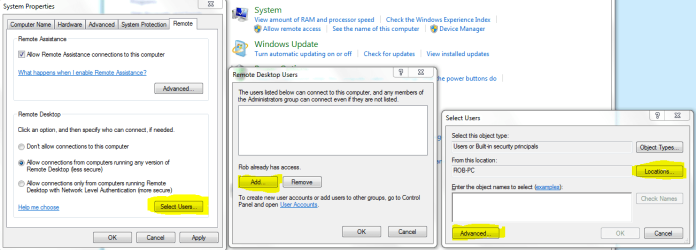
You will need too setup the access list for the remote users. You need to add your user name to the remote users list. This can be done by going too start - control panel - large icons, system and security,-security-allow remote access - remote tab- select users-add user. Once you add the remote user name it should work.
 
Last edited:

My Computer My Computer

At a glance

Windows 7 Ult, Windows 8.1 Pro,Q9650-4.275GHz, E8600 4.5GHz, E6750-3.8GHzG.Skill PC2 9600 1200Mhz 5 5 5 15 2TGTX480
Computer type
PC/Desktop
Computer Manufacturer/Model Number
Home built
OS
Windows 7 Ult, Windows 8.1 Pro,
CPU
Q9650-4.275GHz, E8600 4.5GHz, E6750-3.8GHz
Motherboard
Evga 780i FTW
Memory
G.Skill PC2 9600 1200Mhz 5 5 5 15 2T
Graphics Card(s)
GTX480
Sound Card
Asus Xonar D2
Monitor(s) Displays
HannsG
Screen Resolution
1680X1050
Hard Drives
GSkill Phoenix Pro 120GB SSD
PSU
ThermalTake Toughpower 1000Watt modular
Case
ThermalTake XaserV
Cooling
Xigmatek S1283
Keyboard
Logitech G15
Mouse
Logitech G9
Internet Speed
T1
I found this somewhere and it seems to relate to your sign in problem.

You can only log into the Guest account remotely.
You will need too setup the access list for the remote users. You need to add your user name to the remote users list. This can be done by going too start - control panel - large icons, system and security,-security-allow remote access - remote tab- select users-add user. Once you add the remote user name it should work.

Thanks. I've set up the Guest account, but I won't be able to try it out until I get home tonight.

Will logging in as "guest" still allow me to have access to everything I would normally see (Outlook and pst files mostly).
 

My Computer My Computer

At a glance

Windows 7
OS
Windows 7
I found this somewhere and it seems to relate to your sign in problem.

You can only log into the Guest account remotely.
You will need too setup the access list for the remote users. You need to add your user name to the remote users list. This can be done by going too start - control panel - large icons, system and security,-security-allow remote access - remote tab- select users-add user. Once you add the remote user name it should work.

Thanks. I've set up the Guest account, but I won't be able to try it out until I get home tonight.

Will logging in as "guest" still allow me to have access to everything I would normally see (Outlook and pst files mostly).

I'm not sure about access permissions using the Guest account with RDC but you should be able to access everything by adding the user name to the RDC accounts list.

That quote was from another site and I'm not too sure about using the Guest account " I did not actually say that..... it was simply quoted from another site" The horse is dead so please stop beating it guys. :)

I believe the rest of the info is absolutely correct, the requirement to add the Usernames to the RDC list is mandatory.

Adding the User names to the list is just another security layer and is required so I highlighted the important settings that need attention.

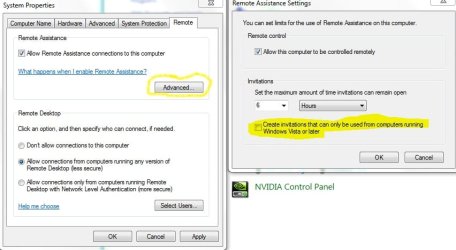
Hopefully adding the user name to the RDC list should allow you to access the machine, you may also need to create invitations and adjust the time limit if needed.

Follow the yellow highlight in the pictures to get the settings correct.
 

Attachments

  • RDC adding user names.PNG
    RDC adding user names.PNG
    36.6 KB · Views: 356
  • RDC create invitations.jpg
    RDC create invitations.jpg
    50.5 KB · Views: 341
Last edited:

My Computer My Computer

At a glance

Windows 7 Ult, Windows 8.1 Pro,Q9650-4.275GHz, E8600 4.5GHz, E6750-3.8GHzG.Skill PC2 9600 1200Mhz 5 5 5 15 2TGTX480
Computer type
PC/Desktop
Computer Manufacturer/Model Number
Home built
OS
Windows 7 Ult, Windows 8.1 Pro,
CPU
Q9650-4.275GHz, E8600 4.5GHz, E6750-3.8GHz
Motherboard
Evga 780i FTW
Memory
G.Skill PC2 9600 1200Mhz 5 5 5 15 2T
Graphics Card(s)
GTX480
Sound Card
Asus Xonar D2
Monitor(s) Displays
HannsG
Screen Resolution
1680X1050
Hard Drives
GSkill Phoenix Pro 120GB SSD
PSU
ThermalTake Toughpower 1000Watt modular
Case
ThermalTake XaserV
Cooling
Xigmatek S1283
Keyboard
Logitech G15
Mouse
Logitech G9
Internet Speed
T1
The guest account cannot be logged into remotely.
 

My Computer My Computer

At a glance

Windows 7 Professional x64Intel i7 2600K OC'd @ 4620 MHz16GB GSkill Sniper 2133 Mhz (4x4GB)EVGA GeForce GTX 480 SuperClocked+
Computer Manufacturer/Model Number
Custom
OS
Windows 7 Professional x64
CPU
Intel i7 2600K OC'd @ 4620 MHz
Motherboard
Asus P8Z68-V Pro
Memory
16GB GSkill Sniper 2133 Mhz (4x4GB)
Graphics Card(s)
EVGA GeForce GTX 480 SuperClocked+
Sound Card
Realtek High Definition Audio
Monitor(s) Displays
2x Acer S273HLbmii 27"
Screen Resolution
2 x 1920x1080
Hard Drives
64GB Crucial M4 SSD

Storage: Hitachi 1TB 5400RPM, Samsung 1.5TB 5400RPM
PSU
Corsair HW Series 750w (modular)
Case
Cooler Master HAF 932 Advanced Blue Edition
Cooling
CM Hyper 212+ CPU cooler, 3x 230mm + 1x 140mm case fans
Keyboard
Logitech MK320 (wireless)
Mouse
Logitech MK320 (wireless)
Internet Speed
30 Mb/s : 2 Mb/s
is your normal machine in a domain environment? Or do you "normally" log in locally when at the office? Your group policy and or AD settings could very well be blocking access to all machines except one... I also notice that you have the IP of the old machine. this too could cause these problems.
 

My Computer My Computer

At a glance

7 Pro
OS
7 Pro
Take a look here, maybe that will work.
 

My Computer My Computer

At a glance

Windows 7 Professional x64Intel i7 2600K OC'd @ 4620 MHz16GB GSkill Sniper 2133 Mhz (4x4GB)EVGA GeForce GTX 480 SuperClocked+
Computer Manufacturer/Model Number
Custom
OS
Windows 7 Professional x64
CPU
Intel i7 2600K OC'd @ 4620 MHz
Motherboard
Asus P8Z68-V Pro
Memory
16GB GSkill Sniper 2133 Mhz (4x4GB)
Graphics Card(s)
EVGA GeForce GTX 480 SuperClocked+
Sound Card
Realtek High Definition Audio
Monitor(s) Displays
2x Acer S273HLbmii 27"
Screen Resolution
2 x 1920x1080
Hard Drives
64GB Crucial M4 SSD

Storage: Hitachi 1TB 5400RPM, Samsung 1.5TB 5400RPM
PSU
Corsair HW Series 750w (modular)
Case
Cooler Master HAF 932 Advanced Blue Edition
Cooling
CM Hyper 212+ CPU cooler, 3x 230mm + 1x 140mm case fans
Keyboard
Logitech MK320 (wireless)
Mouse
Logitech MK320 (wireless)
Internet Speed
30 Mb/s : 2 Mb/s
I have not come across a situation where i need to log on using Guest accounts. As far as i know Guest account should never be used.

You would log on using the account that you would normally log on physically to the machine, pending whether you have allow this account full access or not on the remote machine you are trying to RDP to.
 

My Computer My Computer

At a glance

Windows 7 Ultimate 64BitGenuineIntel Intel(R) Core(TM) DuoCore T2400 ...2.00 GBMobile Intel(R) 945 Express Chipset
Computer Manufacturer/Model Number
Lenovo ThinkPad T60
OS
Windows 7 Ultimate 64Bit
CPU
GenuineIntel Intel(R) Core(TM) DuoCore T2400 @ 1.83GHz
Motherboard
Intel(R) 82801G (ICH7 Family)
Memory
2.00 GB
Graphics Card(s)
Mobile Intel(R) 945 Express Chipset
Sound Card
SoundMAX Integrated Digital HD Audio
Monitor(s) Displays
ThinkPad Display
Screen Resolution
1400x1050
Hard Drives
100Gb SATA
Keyboard
Standard Keyboard
Mouse
HID-compliant Mouse
Internet Speed
Cable Broadband - 54Mbps
Other Info
Intel(R) PRO/1000 PL Network Connection
11a/b/g Wireless LAN Mini PCI Express Adapter
I figured it out!

When my office manager gave me the PC, the login screen name was "office" and no password was required. Setting up my login info (username and password) was the only way to get my laptop to remote connect. Following advice on this thread, I tried to add my username to the list of users, but it would't let me. I did notice that it said "Office has access." HMMMM - so I tried logging in with username of "office" and my password and it worked!

Not sure why my username didn't over write the previous, but at least I know how to access my pc from anywhere now. I can work on that during my spare time.

Thanks to everyone for all the help and suggestions.
 

My Computer My Computer

At a glance

Windows 7
OS
Windows 7
Great, I was just about out of ideas. I'm glad you figured it out.
 

My Computer My Computer

At a glance

Windows 7 Professional x64Intel i7 2600K OC'd @ 4620 MHz16GB GSkill Sniper 2133 Mhz (4x4GB)EVGA GeForce GTX 480 SuperClocked+
Computer Manufacturer/Model Number
Custom
OS
Windows 7 Professional x64
CPU
Intel i7 2600K OC'd @ 4620 MHz
Motherboard
Asus P8Z68-V Pro
Memory
16GB GSkill Sniper 2133 Mhz (4x4GB)
Graphics Card(s)
EVGA GeForce GTX 480 SuperClocked+
Sound Card
Realtek High Definition Audio
Monitor(s) Displays
2x Acer S273HLbmii 27"
Screen Resolution
2 x 1920x1080
Hard Drives
64GB Crucial M4 SSD

Storage: Hitachi 1TB 5400RPM, Samsung 1.5TB 5400RPM
PSU
Corsair HW Series 750w (modular)
Case
Cooler Master HAF 932 Advanced Blue Edition
Cooling
CM Hyper 212+ CPU cooler, 3x 230mm + 1x 140mm case fans
Keyboard
Logitech MK320 (wireless)
Mouse
Logitech MK320 (wireless)
Internet Speed
30 Mb/s : 2 Mb/s
Back
Top