Solved Remote desktop is not working

vlatro

New member
Local time
9:20 AM
Messages
14
Dear all,

My remote desktop isn't working.

I have 1 PC
and 1 laptop
Both windows 7 x64 ultimate
Both in the same Homegroup. Sharing of files is working perfectly.

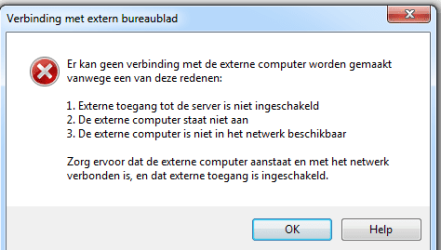
The problem is that i can't connect (attachments)

I've tried everything that Microsoft support says:
Troubleshoot Remote Desktop problems

Nothing seems to work.
The problem exists in both ways: laptop can't connect to PC, PC can't connect to laptop.

Anyone?
 

Attachments
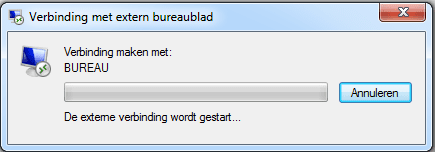
  • Naamloos.png
    Naamloos.png
    16.1 KB · Views: 30
  • Naamloos2.png
    Naamloos2.png
    21.6 KB · Views: 31

My Computer

OS
Windows 7 Ultimate x64
I assume by saying your remote desktop is not working means you cannot remotely control another PC on your network as you used to be able to do, or has this never worked ? By having systems in a workgroup and sharing files with each other is not the same as being able to take control of another system's desktop - you have to set this up and is not the default condition of windows.
 

My Computer

Computer Manufacturer/Model Number
HP Desktop Slimline
OS
Windows 7 Home Premium 64-bit
CPU
Athlon
Memory
3GB
Graphics Card(s)
Integrated
Monitor(s) Displays
HP 20" LCD
Hard Drives
500GB
Internet Speed
Slow
It used to work perfect. After re-installing windows it doesn't anymore. My windows settings are fine. External connections are allowed on both devices.
 

My Computer

OS
Windows 7 Ultimate x64
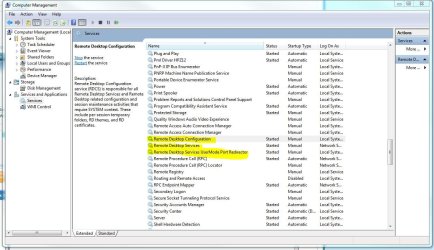
Have you checked to ensure the remote desktop service is started on both PCs?
 

Attachments

  • services.JPG
    services.JPG
    173.5 KB · Views: 27

My Computer

Computer Manufacturer/Model Number
Lenovo ThinkCenter, Custom Built PC, Acer Aspire V3-771G-9809
OS
Windows 7 enterprise 64 bit, Windows 7 Pro 64 bit ,Windows 8 64bit
CPU
Core i5-2400, Athlon 64 X2 6400+ ,Core i7-3632QM
Motherboard
ASUS M4A79 Deluxe
Memory
4GB, 4gb g.skill ddr2, 8gb
Graphics Card(s)
Radeon HD 4550 sgb, Radeon HD 4870, NVIDIA Geforce GT 650m
Monitor(s) Displays
dual samsung 22" monitors
Hard Drives
500GB, Western Digital WD Blue WD6400AAKS 640GB 7200 RPM 16MB Cache SATA 3.0Gb/s, 1TB
Case
Antec Twelve Hundred V3 Black Steel ATX Full Tower
Cooling
ASUS Silent Square Pro
Mouse
Razar Death adder
Internet Speed
20 mbps
Have you tried connecting via IP address instead of computer name? Are you sure that both computers are a member of the same workgroup (read: not homegroup)
 

My Computer

Computer Manufacturer/Model Number
Custom Build
OS
Windows 7 Ultimate x64, BackTrack Linux 5 R2, Windows XP
CPU
Intel Core i7 920 OC to 3.6GHz
Motherboard
ASUS P6T Deluxe V2
Memory
Corsair 6GB DDR3
Graphics Card(s)
ATI Radeon 4890
Monitor(s) Displays
ASUS 23"
Screen Resolution
1920x1080
Hard Drives
150GB Velociraptor
640GB
PSU
Corsair 850w
Case
CoolerMaster HAF932
Cooling
CoolerMaster V8
Internet Speed
30Mbps
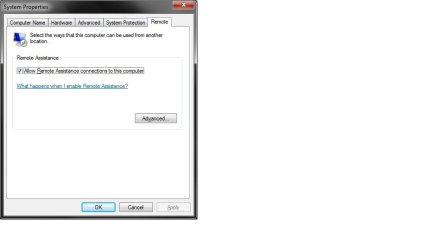
Make sure Remote Desktop is enabled on the destination PC.

click start - Right click "computer" - Properties - Advanced system settings - Then click on the Remote tab - Make sure the box is ticked.

Remoter.jpg
 

My Computer

Computer Manufacturer/Model Number
Cooler Master
OS
Windows 7 Home Premium 64 Bit
CPU
Core I7 1155 3.4GHZ
Memory
8GB DDR 1600
Hard Drives
64 GB SSD - OS
1TB - DATA
PSU
340 Watt Corsair
Case
Cooler Master
Cooling
Cooler Master
Make sure Remote Desktop is enabled on the destination PC.

click start - Right click "computer" - Properties - Advanced system settings - Then click on the Remote tab - Make sure the box is ticked.

View attachment 251996

Enabled on both devices, as already said before.
 

My Computer

OS
Windows 7 Ultimate x64
Have you tried connecting via IP address instead of computer name?

That does the trick in 1 direction.
Connecting from the PC to the LAPTOP via IP address.
IP works, computer name doesn't.

UPDATE: works in both directions now. I renewed the IP addresses.
So now I still have to find out why IP works and computer name doesn't...


Workgroup is the same
 
Last edited:

My Computer

OS
Windows 7 Ultimate x64
Have you tried connecting via IP address instead of computer name?

That does the trick in 1 direction.
Connecting from the PC to the LAPTOP via IP address.
IP works, computer name doesn't.

UPDATE: works in both directions now. I renew the IP addresses.
SO now I still have to find out why IP works and computer name doesn't...


Workgroup is the same

DNS it propbebly can't resolve computer name.
 

My Computer

Computer Manufacturer/Model Number
Cooler Master
OS
Windows 7 Home Premium 64 Bit
CPU
Core I7 1155 3.4GHZ
Memory
8GB DDR 1600
Hard Drives
64 GB SSD - OS
1TB - DATA
PSU
340 Watt Corsair
Case
Cooler Master
Cooling
Cooler Master
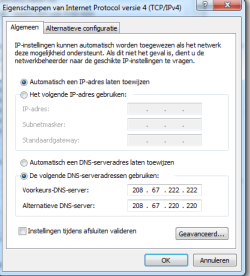
I am using opendns. Might that be the problem?
 

My Computer

OS
Windows 7 Ultimate x64
Ensure netbios over TCPIP is enabled on both machines and restart computers.
 

My Computer

Computer Manufacturer/Model Number
HP Compaq 6715B
OS
Windows 7 Ultimate x64
CPU
AMD turion 64x2 TL-64 2.2Ghz
Motherboard
HC030
Memory
Sodimm DDR2 4GB
Graphics Card(s)
ATI Radeon 1250 128MB IGP
Hard Drives
Fujitsu Siemens 500GB sata 3.0 Gb/s
Are both computers in the same subnet ie. 192.168.1.1 subnet?
 

My Computer

Computer Manufacturer/Model Number
HP Compaq 6715B
OS
Windows 7 Ultimate x64
CPU
AMD turion 64x2 TL-64 2.2Ghz
Motherboard
HC030
Memory
Sodimm DDR2 4GB
Graphics Card(s)
ATI Radeon 1250 128MB IGP
Hard Drives
Fujitsu Siemens 500GB sata 3.0 Gb/s
Ensure both computers have the same workgroup name i.e workgroup.

Ensure your firewalls on both computers have Homegroup support enabled or similar.

Also that communications are allowed between computers in trusted zone check firewall documentation for how to's
 

My Computer

Computer Manufacturer/Model Number
HP Compaq 6715B
OS
Windows 7 Ultimate x64
CPU
AMD turion 64x2 TL-64 2.2Ghz
Motherboard
HC030
Memory
Sodimm DDR2 4GB
Graphics Card(s)
ATI Radeon 1250 128MB IGP
Hard Drives
Fujitsu Siemens 500GB sata 3.0 Gb/s
Ensure both computers have the same workgroup name i.e workgroup.

Ensure your firewalls on both computers have Homegroup support enabled or similar.

Also that communications are allowed between computers in trusted zone check firewall documentation for how to's

Already done that, no results
 

My Computer

OS
Windows 7 Ultimate x64
Are both computers in the same subnet ie. 192.168.1.1 subnet?

Both 255.255.240.0

How many systems are you working with in your network? That is a lot of host address space.

As for your DNS, try doing an ipconfig /flushdns from the command prompt on both affected machines.
 

My Computer

Computer Manufacturer/Model Number
Custom Build
OS
Windows 7 Ultimate x64, BackTrack Linux 5 R2, Windows XP
CPU
Intel Core i7 920 OC to 3.6GHz
Motherboard
ASUS P6T Deluxe V2
Memory
Corsair 6GB DDR3
Graphics Card(s)
ATI Radeon 4890
Monitor(s) Displays
ASUS 23"
Screen Resolution
1920x1080
Hard Drives
150GB Velociraptor
640GB
PSU
Corsair 850w
Case
CoolerMaster HAF932
Cooling
CoolerMaster V8
Internet Speed
30Mbps
Off the hostname issue, The PC that you can not connect to at all have you verified that the firewall ports are open.
 

My Computer

OS
Windows 7 Ultimate x64
How many systems are you working with in your network? That is a lot of host address space.
.
1 laptop, 1 pc

As for your DNS, try doing an ipconfig /flushdns from the command prompt on both affected machines.

I don't think that will help, as said i'm using opendns, so it won't change with a flush. will it?

Off the hostname issue, The PC that you can not connect to at all have you verified that the firewall ports are open.

Firewall is disabled
 

Attachments

  • Naamloos.png
    Naamloos.png
    39.9 KB · Views: 9

My Computer

OS
Windows 7 Ultimate x64
Back
Top