Remote Desktop Issues - it shouldn't be this difficult

ixodid

New member
Member
Local time
3:40 PM
Messages
54
I have at my primary residence a desktop PC with Win7 Pro and in System Properties > Remote tab, under Remote Desktop, I have chosen "Allow connections..."

When I use my laptop PC at my second home, I cannot connect. I get the error message "Remote Desktop can't connect to the remote computer for one of these reasons:
1) Remote access to the server is not enabled
2) The remote computer is turned off
3) The remote computer is not available on the network
Make sure the remote computer is turned on and connected to the network, and that remote access is enabled."

(The laptop has my desktop PC's correct IP address entered in the Computer field in the RDC window)

If the error message is correct, the remote computer (which I thought was actually the HOST computer) is not connected to the network. If that is actually the problem, how do I make it connected to the network?
 

My Computer

Computer Manufacturer/Model Number
HP p6350z
OS
Windows 7 Professional x64
Memory
8 GB
Monitor(s) Displays
2 x Dell 2007WFPb
I have at my primary residence a desktop PC with Win7 Pro and in System Properties > Remote tab, under Remote Desktop, I have chosen "Allow connections..."

When I use my laptop PC at my second home, I cannot connect. I get the error message "Remote Desktop can't connect to the remote computer for one of these reasons:
1) Remote access to the server is not enabled
2) The remote computer is turned off
3) The remote computer is not available on the network
Make sure the remote computer is turned on and connected to the network, and that remote access is enabled."

(The laptop has my desktop PC's correct IP address entered in the Computer field in the RDC window)

If the error message is correct, the remote computer (which I thought was actually the HOST computer) is not connected to the network. If that is actually the problem, how do I make it connected to the network?


I too found RDT difficult and inconsistent to use. I found an alternative (free) called Team View
 

My Computer

Computer Manufacturer/Model Number
HP Pavillion dv-7 1005 Tx
OS
Win 8 Release candidate 8400
CPU
[email protected]
Memory
4 gigs
Graphics Card(s)
Nvidia 9600M
Sound Card
HD built-in
Monitor(s) Displays
17" Wxga
Screen Resolution
1440x900
Cooling
none
Internet Speed
45Mb down 5Mb up
Do you have a router or a firewall which is blocking inbound on port 3389? Or, is it possible that your ISP is blocking access on that port?
 

My Computer

Computer Manufacturer/Model Number
Self-Built in July 2009
OS
Windows 7 Ultimate x64
CPU
Intel Q9550 2.83Ghz OC'd to 3.40Ghz
Motherboard
Gigabyte GA-EP45-UD3R rev. 1.1, F12 BIOS
Memory
8GB G.Skill PI DDR2-800, 4-4-4-12 timings
Graphics Card(s)
EVGA 1280MB Nvidia GeForce GTX570
Sound Card
Realtek ALC899A 8 channel onboard audio
Monitor(s) Displays
23" Acer x233H
Screen Resolution
1920x1080
Hard Drives
Intel X25-M 80GB Gen 2 SSD
Western Digital 1TB Caviar Black, 32MB cache. WD1001FALS
PSU
Corsair 620HX modular
Case
Antec P182
Cooling
stock
Keyboard
ABS M1 Mechanical
Mouse
Logitech G9 Laser Mouse
Internet Speed
15/2 cable modem
Other Info
Windows and Linux enthusiast. Logitech G35 Headset.

My Computer

Computer type
PC/Desktop
Computer Manufacturer/Model Number
Home built
OS
Windows 7 Ult, Windows 8.1 Pro,
CPU
Q9650-4.275GHz, E8600 4.5GHz, E6750-3.8GHz
Motherboard
Evga 780i FTW
Memory
G.Skill PC2 9600 1200Mhz 5 5 5 15 2T
Graphics Card(s)
GTX480
Sound Card
Asus Xonar D2
Monitor(s) Displays
HannsG
Screen Resolution
1680X1050
Hard Drives
GSkill Phoenix Pro 120GB SSD
PSU
ThermalTake Toughpower 1000Watt modular
Case
ThermalTake XaserV
Cooling
Xigmatek S1283
Keyboard
Logitech G15
Mouse
Logitech G9
Internet Speed
T1
I found an alternative (free) called Team View
Thanks, I will consider that but I want to try to get RDC to work first.

Do you have a router or a firewall which is blocking inbound on port 3389?
I have Trend Micro Internet Security firewall on - how can I determine if it is blocking port 3389?

Or, is it possible that your ISP is blocking access on that port?
Did not know this was a possibility. Is there a way I can tell?

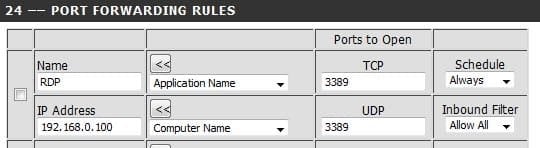
Your router may have a setting to enable RDC through the firewall. I believe you might need to use port foward 3389.
This screen shot is how my router settings already were. Are those setting correct?
 

Attachments

  • 3389.jpg
    3389.jpg
    13.6 KB · Views: 264

My Computer

Computer Manufacturer/Model Number
HP p6350z
OS
Windows 7 Professional x64
Memory
8 GB
Monitor(s) Displays
2 x Dell 2007WFPb
Back
Top