Remote Desktop Woes (Connection Issues)

If you have ccleaner installed, you can open it then go to tools-startup

If not see here:


1. Open the Start Menu, type msconfig in the search box, and press Enter.

2. If prompted by UAC, then click on Yes.

3.) Click the startup tab

Take a snapshot of the list. Or use the snipping tool.
 

My Computer My Computer

At a glance

Windows 10 ProAMD Ryzen 5 2400G Processor with Radeon RX Ve...G.SKILL Ripjaws V Series 16GB (2 x 8GB) 288-P...2047MB NVIDIA GeForce GTX 1060 6GB (EVGA)
Computer type
PC/Desktop
Computer Manufacturer/Model Number
Custom Built
OS
Windows 10 Pro
CPU
AMD Ryzen 5 2400G Processor with Radeon RX Vega 11 Graphics
Motherboard
ASRock X470 Master SLI/AC AM4 AMD Promontory X470 SATA 6Gb/s
Memory
G.SKILL Ripjaws V Series 16GB (2 x 8GB) 288-Pin DDR4 SDRAM D
Graphics Card(s)
2047MB NVIDIA GeForce GTX 1060 6GB (EVGA)
Sound Card
Motherboard Built in
Monitor(s) Displays
Acer R240HY bidx 23.8-Inch IPS HDMI DVI VGA (1920 x 1080) Wi
Screen Resolution
1920 x 1080
Hard Drives
1TB Sandisk SSD PLUS (Main drive)
500 GB Seagate 7200 RPM (Games)
500 GB Western Digital 7200 RPM (Virtual Machines)
PSU
CORSAIR TX Series TX650M 650W 80+ Gold Modular Power Supply
Case
CORSAIR CARBIDE SPEC-02 Mid-Tower Gaming Case, Red LED Fan
Cooling
220mm, two 120mm, and four 60mm fans
Keyboard
Wired Dell keyboard
Mouse
Wireless Logitech mouse
Internet Speed
250mb down, 30mb up
Antivirus
Panda Cloud Antivirus
Browser
Chrome-ish x64
Other Info
Your awesome for reading this.
If you have ccleaner installed, you can open it then go to tools-startup

If not see here:


1. Open the Start Menu, type msconfig in the search box, and press Enter.

2. If prompted by UAC, then click on Yes.

3.) Click the startup tab

Take a snapshot of the list. Or use the snipping tool.

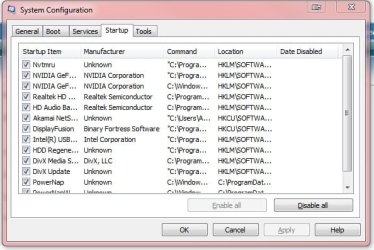
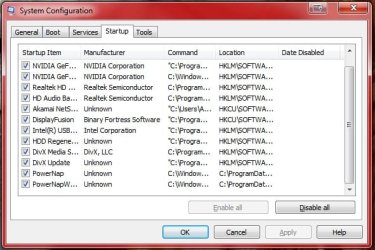
Here they are, attached. Thanks for all your help!
 

Attachments

  • Startup.jpg
    Startup.jpg
    45.9 KB · Views: 12
  • Startup2.jpg
    Startup2.jpg
    46.4 KB · Views: 12

My Computer My Computer

At a glance

Windows 7 Home Premium 64bit
Computer type
PC/Desktop
Computer Manufacturer/Model Number
Asus
OS
Windows 7 Home Premium 64bit
Hmmm, I see nothing that would cause this. What is powernap? Do you know what that is? I was unable to find any information on it.

I also do not see any antivirus software! Do you have any? Malwarebytes is not an antivirus program.

On the other pc that works, when you open the rdp file, look through each tab and look at the settings set. Make sure they are identical to what is on the pc you're having trouble with.
 

My Computer My Computer

At a glance

Windows 10 ProAMD Ryzen 5 2400G Processor with Radeon RX Ve...G.SKILL Ripjaws V Series 16GB (2 x 8GB) 288-P...2047MB NVIDIA GeForce GTX 1060 6GB (EVGA)
Computer type
PC/Desktop
Computer Manufacturer/Model Number
Custom Built
OS
Windows 10 Pro
CPU
AMD Ryzen 5 2400G Processor with Radeon RX Vega 11 Graphics
Motherboard
ASRock X470 Master SLI/AC AM4 AMD Promontory X470 SATA 6Gb/s
Memory
G.SKILL Ripjaws V Series 16GB (2 x 8GB) 288-Pin DDR4 SDRAM D
Graphics Card(s)
2047MB NVIDIA GeForce GTX 1060 6GB (EVGA)
Sound Card
Motherboard Built in
Monitor(s) Displays
Acer R240HY bidx 23.8-Inch IPS HDMI DVI VGA (1920 x 1080) Wi
Screen Resolution
1920 x 1080
Hard Drives
1TB Sandisk SSD PLUS (Main drive)
500 GB Seagate 7200 RPM (Games)
500 GB Western Digital 7200 RPM (Virtual Machines)
PSU
CORSAIR TX Series TX650M 650W 80+ Gold Modular Power Supply
Case
CORSAIR CARBIDE SPEC-02 Mid-Tower Gaming Case, Red LED Fan
Cooling
220mm, two 120mm, and four 60mm fans
Keyboard
Wired Dell keyboard
Mouse
Wireless Logitech mouse
Internet Speed
250mb down, 30mb up
Antivirus
Panda Cloud Antivirus
Browser
Chrome-ish x64
Other Info
Your awesome for reading this.
Hmmm, I see nothing that would cause this. What is powernap? Do you know what that is? I was unable to find any information on it.

I also do not see any antivirus software! Do you have any? Malwarebytes is not an antivirus program.

On the other pc that works, when you open the rdp file, look through each tab and look at the settings set. Make sure they are identical to what is on the pc you're having trouble with.

I did try what you suggested as far as mirroring settings, and I even tried sending a copy of the one that works to my work PC. Still the same issue; it sits on "initializing connection" before eventually giving me the error message.

Powernap is part of Display Fusion; a program I use to manage my dual monitors. Aside from Malwarebytes, I do not have any other program.
 

My Computer My Computer

At a glance

Windows 7 Home Premium 64bit
Computer type
PC/Desktop
Computer Manufacturer/Model Number
Asus
OS
Windows 7 Home Premium 64bit
That is not good. All your pcs should have an antivirus. If you want a free and lightweight program, I recommend panda cloud free. Its in my signature below this post. You should have an antivirus. Malwarebytes is a compliment to it, not a replacement! I would also run a scan once you get it installed.

Thanks for the info. Unfortunately I am running out of ideas...

Is the one that cannot connect a desktop or laptop?

Do you have any other issues with the pc? Browsing the web and everything else fine?

Do you have any connection software (vpn, filters, host file edits,) or any software that involves connecting to the internet that is different from the other pcs?

I would ask you to upload it here, but since its a matter of security that would not be wise.
 

My Computer My Computer

At a glance

Windows 10 ProAMD Ryzen 5 2400G Processor with Radeon RX Ve...G.SKILL Ripjaws V Series 16GB (2 x 8GB) 288-P...2047MB NVIDIA GeForce GTX 1060 6GB (EVGA)
Computer type
PC/Desktop
Computer Manufacturer/Model Number
Custom Built
OS
Windows 10 Pro
CPU
AMD Ryzen 5 2400G Processor with Radeon RX Vega 11 Graphics
Motherboard
ASRock X470 Master SLI/AC AM4 AMD Promontory X470 SATA 6Gb/s
Memory
G.SKILL Ripjaws V Series 16GB (2 x 8GB) 288-Pin DDR4 SDRAM D
Graphics Card(s)
2047MB NVIDIA GeForce GTX 1060 6GB (EVGA)
Sound Card
Motherboard Built in
Monitor(s) Displays
Acer R240HY bidx 23.8-Inch IPS HDMI DVI VGA (1920 x 1080) Wi
Screen Resolution
1920 x 1080
Hard Drives
1TB Sandisk SSD PLUS (Main drive)
500 GB Seagate 7200 RPM (Games)
500 GB Western Digital 7200 RPM (Virtual Machines)
PSU
CORSAIR TX Series TX650M 650W 80+ Gold Modular Power Supply
Case
CORSAIR CARBIDE SPEC-02 Mid-Tower Gaming Case, Red LED Fan
Cooling
220mm, two 120mm, and four 60mm fans
Keyboard
Wired Dell keyboard
Mouse
Wireless Logitech mouse
Internet Speed
250mb down, 30mb up
Antivirus
Panda Cloud Antivirus
Browser
Chrome-ish x64
Other Info
Your awesome for reading this.
That is not good. All your pcs should have an antivirus. If you want a free and lightweight program, I recommend panda cloud free. Its in my signature below this post. You should have an antivirus. Malwarebytes is a compliment to it, not a replacement! I would also run a scan once you get it installed.

Thanks for the info. Unfortunately I am running out of ideas...

Is the one that cannot connect a desktop or laptop?

Do you have any other issues with the pc? Browsing the web and everything else fine?

Do you have any connection software (vpn, filters, host file edits,) or any software that involves connecting to the internet that is different from the other pcs?

I would ask you to upload it here, but since its a matter of security that would not be wise.

You and me both. It just makes no sense that my desktop could connect remotely up until a week ago (when my workplace migrated to the new system) but now it can't -- Whereas my laptops can.

AFAIK I do not have any connection software like VPNs, just the remote desktop software. Everything else is fine on the desktop; I still browse and game like normal.
 

My Computer My Computer

At a glance

Windows 7 Home Premium 64bit
Computer type
PC/Desktop
Computer Manufacturer/Model Number
Asus
OS
Windows 7 Home Premium 64bit
Unfortunately,

I am out of ideas and will have to leave the thread. We have posted this in our section where we ask for more help, hopefully another member can assist.

But please make sure to install panda or some other free AV. Stay safe out there.
 

My Computer My Computer

At a glance

Windows 10 ProAMD Ryzen 5 2400G Processor with Radeon RX Ve...G.SKILL Ripjaws V Series 16GB (2 x 8GB) 288-P...2047MB NVIDIA GeForce GTX 1060 6GB (EVGA)
Computer type
PC/Desktop
Computer Manufacturer/Model Number
Custom Built
OS
Windows 10 Pro
CPU
AMD Ryzen 5 2400G Processor with Radeon RX Vega 11 Graphics
Motherboard
ASRock X470 Master SLI/AC AM4 AMD Promontory X470 SATA 6Gb/s
Memory
G.SKILL Ripjaws V Series 16GB (2 x 8GB) 288-Pin DDR4 SDRAM D
Graphics Card(s)
2047MB NVIDIA GeForce GTX 1060 6GB (EVGA)
Sound Card
Motherboard Built in
Monitor(s) Displays
Acer R240HY bidx 23.8-Inch IPS HDMI DVI VGA (1920 x 1080) Wi
Screen Resolution
1920 x 1080
Hard Drives
1TB Sandisk SSD PLUS (Main drive)
500 GB Seagate 7200 RPM (Games)
500 GB Western Digital 7200 RPM (Virtual Machines)
PSU
CORSAIR TX Series TX650M 650W 80+ Gold Modular Power Supply
Case
CORSAIR CARBIDE SPEC-02 Mid-Tower Gaming Case, Red LED Fan
Cooling
220mm, two 120mm, and four 60mm fans
Keyboard
Wired Dell keyboard
Mouse
Wireless Logitech mouse
Internet Speed
250mb down, 30mb up
Antivirus
Panda Cloud Antivirus
Browser
Chrome-ish x64
Other Info
Your awesome for reading this.
Unfortunately,

I am out of ideas and will have to leave the thread. We have posted this in our section where we ask for more help, hopefully another member can assist.

But please make sure to install panda or some other free AV. Stay safe out there.

Thanks for trying, man. I know I wasn't much help with my vague info.
 

My Computer My Computer

At a glance

Windows 7 Home Premium 64bit
Computer type
PC/Desktop
Computer Manufacturer/Model Number
Asus
OS
Windows 7 Home Premium 64bit
I have a small suggestion after you get your anti virus installed and your system scanned.

Once again go into msconfig/Start up and uncheck everything except your security and the the programs you need for RDT.
Then go into Services in the lower left corner select Hide all Microsoft Services. Uncheck everything except your security and things needed for RDT.
Reboot and give it a try.

*** Make a list of everything you had checked in Start and Services before changing them.
That way you can put them back the way they were.***

What this is doing is stopping the unchecked items from starting at boot. They will still work when you or a program request them to work.

Example:
If you have Office installed but it doesn't start at boot.
You can still use it just by ticking on Office or it's Icon.
It will start as it normally would. When your done you just close it and it stops running in the background when your not using it.

If RDT starts working as it should you will know that it is one of those programs you unchecked in msconfig. You can then add them a few at a time to find out which program is causing the problem.

Also compare your setting in Malwarebytes with the proper working computer settings in Malwarebytes.

https://www.malwarebytes.org/support/guides/mbam/AdvancedSettings.html
 

My Computer My Computer

At a glance

Windows 10 Pro. 64/ version 1709 Windows 7 Pr...Intel i7-6800K @ 4.3Corsair Platinum 16 gig @2400EVGA GTX 1070 OC
Computer type
PC/Desktop
Computer Manufacturer/Model Number
Home made Desktop
OS
Windows 10 Pro. 64/ version 1709 Windows 7 Pro/64
CPU
Intel i7-6800K @ 4.3
Motherboard
ASUS X-99 Deluxe II
Memory
Corsair Platinum 16 gig @2400
Graphics Card(s)
EVGA GTX 1070 OC
Monitor(s) Displays
Asus 27" LED LCD/VE278Q
Screen Resolution
1920-1080 or 1280-720 HDMI
Hard Drives
INTEL SSD 730-240 Gb Sata 3.0/
PSU
EVGA Platium 1200W
Case
Phanteks Luxe Tempered Glass 8 fans/ one radiator
Cooling
XSPC/ Water Cooled CPU
Keyboard
Das 4 Professional
Mouse
Logitech M705/MX Anywhere 2-S
Internet Speed
100 mbits
Antivirus
Microsoft Security Essentials/ Malwarebytes Premium 3.0/ SAS
Browser
I.E. 11 default/Firefox/ ISP Time Warner Cable/Spectrum
Other Info
LG BluRay Burner/
Sound system-KLipsch-THX/
Icy Dock ssd Hot Swap bays.
Look I am really a bit of a simpleton when it comes to this stuff but I am wondering maybe you have a driver problem with your LAN / WLAN etc etc have you updated them all?

For any malware I would run these

http://www.superantispyware.com/

http://www.malwarebytes.org/products/malwarebytes_free/

http://www.bleepingcomputer.com/download/adwcleaner/

download from bleeping computer – delete any rubbishthese find.

Emsisoft Free Emergency Kit: portable malware scanner | Free removal of Viruses,Bots, Spyware, Keyloggers and Trojans I only use the Emergancy Kit and Commnnad line scans

this
http://support.kaspersky.com/4162
There are more heavy duty ones but I usually find these enough.

There is also the bleeding obvious

http://www.sevenforums.com/tutorials/1538-sfc-scannow-command-system-file-checker.html

http://www.sevenforums.com/tutorials/433-disk-check.html < use the /f option in Option 2 ifnecessary


My Computer My Computer

At a glance

Desk1 7 Home Prem / Desk2 10 Pro / Main lap A...Desk1 i5 3750K / Laptop i7 GTX 860M / Desk2 i...Desk1 8GB (1866) / Desk2 16GB (1333) / Laptop...Desk 1& 2NVidia GTX 650 & Laptops on board Intel
Computer type
PC/Desktop
Computer Manufacturer/Model Number
Own build (new) Desk1 / Asus ROG Win 7 / Desk2 1st build
OS
Desk1 7 Home Prem / Desk2 10 Pro / Main lap Asus ROG 10 Pro 2 laptop Toshiba 7 Pro Asus P2520 7 & 10
CPU
Desk1 i5 3750K / Laptop i7 GTX 860M / Desk2 i5 2500
Motherboard
Desk1 Asus P877-V / Desk2 Gigabyte H67 UD3H / Laptop ?
Memory
Desk1 8GB (1866) / Desk2 16GB (1333) / Laptop 8Gb DDR3
Graphics Card(s)
Desk 1& 2NVidia GTX 650 & Laptops on board Intel
Sound Card
Desk 1 & 2 -XONAR DG Realtek High Def audio Laptop
Monitor(s) Displays
Desk 1 Benq HD 2450 / Desk2 Philips 24" / Laptop 17.5"
Screen Resolution
1920x1080 D1 & D2 & Laptop 1
Hard Drives
Desk1 Samsung 120GB 830 SSD
Asus ROG 256GB 850 Pro SSD
Desk2 Samsung 840 256 SSD
Toshiba 120GB EVO
PSU
Desk 1 Corsair HX 1050/ Laptop ? / Desk 2 Corsair HX 650
Case
Desk 1 Cooler HAF XM ? Toshiba laptop / Desk2 Coolermaster
Cooling
Fans on all Desk1 -2 Desk2 - all Coolermasters 5 Laptop ?
Keyboard
Desk 1 MS Sidewinder X6 Desk 2 MS Sidewinder X 4
Mouse
Desk 1&2 - Gigabyte MS 900 gamer - laptop - Logitec wireless
Internet Speed
ADSL2+
Other Info
One other Desktop (tester) and spare Toshba laptop both with SSD's
Running Kaspersky 2016 ISS on all machines config'd identically
Logitec audio stereo systems on each machine (x3)
Canon MG5250MFC
Router/modem TP-Link running WPA2SK
Okay, well... None of the above worked, but I did some monkeying around on my own. I figured since the old file worked and the new one doesn't, I'd download the old file and see what happened when I tried to connect. Naturally it didn't connect, but it at least got past the "initiating connection" part.

So after a bit of head scratching, I just decided to edit the old file with the new info and... Voila. NO idea why that worked, but it did. Considering the new file works on two of my laptops, I'm still thoroughly confused but I'll take it.

Thanks for all your help and suggestions!
 

My Computer My Computer

At a glance

Windows 7 Home Premium 64bit
Computer type
PC/Desktop
Computer Manufacturer/Model Number
Asus
OS
Windows 7 Home Premium 64bit
Back
Top