
Solved Remount hard drive?

AOTA

New member
Local time
6:35 PM
Messages
15
Location
A hole in the bottom of the sea
I recently tried to convert one of my hard drives from a FAT32 to a NTFS drive. during this process, CONVERT said it needed to unmount the drive, and i said yes. however, the process never finished because it said it was to fragmented. when i went to defragment it, it said the file path specified (e: ) was invalid... how do i get this drive remounted without having to completely reformat it?
thanks.

EDIT: still dont know what happened. ended up have to use a file recovery program to get most of my files back. still would like to know what i did wrong/how to fix it.
 
Last edited:

My Computer

Computer Manufacturer/Model Number
Compaq and custom
OS
Windows 7 Home Premium 32bit, Windows 7 Ultimate 32bit
EDIT: still dont know what happened. ended up have to use a file recovery program to get most of my files back. still would like to know what i did wrong/how to fix it.

Did u ever get this problem fix? Does it still show up as unmounted? Sorry i am asking this because the post is like two months old or so....
 

My Computer

Computer Manufacturer/Model Number
HP Pavilion a1719n - Product number:RQ403AA Serial number:CNH7021zq1
OS
Windows 7 Ultimate 32bit
CPU
Intel Pentium 4 631 processor with HT Technology
Motherboard
Asus P5LP-LE (Leonite) HP motherboard name: Leonite-GL8E
Memory
3 Gb total (2x1GB and 2x512MB)
Graphics Card(s)
Integrated graphics using Intel GMA 950
Sound Card
Realtek ALC 888 chipset
Monitor(s) Displays
Envision lcd monitor
Screen Resolution
1440 x 900 landscape
Hard Drives
350Gb Western Digital HD, 250GB Seagate barracuda HD
Keyboard
Hp OEM keyboard Model #: 5137
Other Info
Socket type: 775

Chipset: Northbridge: Intel 945G Southbridge: ICH7DH
i used a hard drive recovery software to re-format it so that it would show up. never found out an easy way to fix it.
 

My Computer

Computer Manufacturer/Model Number
Compaq and custom
OS
Windows 7 Home Premium 32bit, Windows 7 Ultimate 32bit
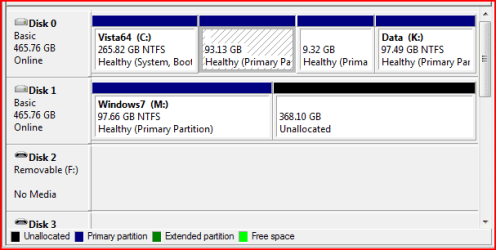
maybe the problem was that when you deleted the drive you didn't relocate the drive partion back. for example DISK MANAGEMENT has the avility to shrink volumes and resise partions maybe you forgot to put the unllocated partion as a drive.
Disk Management_2.png

see that image where it says DISK 1 on the left side?
Drive M: is split into two but the unllocated part is not currently needed maybe thats how your drive showed up thats why it didnt show on "My computer"
 

My Computer

Computer Manufacturer/Model Number
HP Pavilion a1719n - Product number:RQ403AA Serial number:CNH7021zq1
OS
Windows 7 Ultimate 32bit
CPU
Intel Pentium 4 631 processor with HT Technology
Motherboard
Asus P5LP-LE (Leonite) HP motherboard name: Leonite-GL8E
Memory
3 Gb total (2x1GB and 2x512MB)
Graphics Card(s)
Integrated graphics using Intel GMA 950
Sound Card
Realtek ALC 888 chipset
Monitor(s) Displays
Envision lcd monitor
Screen Resolution
1440 x 900 landscape
Hard Drives
350Gb Western Digital HD, 250GB Seagate barracuda HD
Keyboard
Hp OEM keyboard Model #: 5137
Other Info
Socket type: 775

Chipset: Northbridge: Intel 945G Southbridge: ICH7DH
the thing is, it did show up in my computer, but it would not let me format it, open it or edit it in any way... although that does sound like it might have been part of th problem.
 

My Computer

Computer Manufacturer/Model Number
Compaq and custom
OS
Windows 7 Home Premium 32bit, Windows 7 Ultimate 32bit
You probably had to assign a different drive letter to format it.
 

My Computer

Computer Manufacturer/Model Number
HP Pavilion a1719n - Product number:RQ403AA Serial number:CNH7021zq1
OS
Windows 7 Ultimate 32bit
CPU
Intel Pentium 4 631 processor with HT Technology
Motherboard
Asus P5LP-LE (Leonite) HP motherboard name: Leonite-GL8E
Memory
3 Gb total (2x1GB and 2x512MB)
Graphics Card(s)
Integrated graphics using Intel GMA 950
Sound Card
Realtek ALC 888 chipset
Monitor(s) Displays
Envision lcd monitor
Screen Resolution
1440 x 900 landscape
Hard Drives
350Gb Western Digital HD, 250GB Seagate barracuda HD
Keyboard
Hp OEM keyboard Model #: 5137
Other Info
Socket type: 775

Chipset: Northbridge: Intel 945G Southbridge: ICH7DH
Ether way its all fixed now. was able to recover all my files and get the drive working again. no problems since.
 

My Computer

Computer Manufacturer/Model Number
Compaq and custom
OS
Windows 7 Home Premium 32bit, Windows 7 Ultimate 32bit
Good thing you got it fixed.
 

My Computer

Computer Manufacturer/Model Number
HP Pavilion a1719n - Product number:RQ403AA Serial number:CNH7021zq1
OS
Windows 7 Ultimate 32bit
CPU
Intel Pentium 4 631 processor with HT Technology
Motherboard
Asus P5LP-LE (Leonite) HP motherboard name: Leonite-GL8E
Memory
3 Gb total (2x1GB and 2x512MB)
Graphics Card(s)
Integrated graphics using Intel GMA 950
Sound Card
Realtek ALC 888 chipset
Monitor(s) Displays
Envision lcd monitor
Screen Resolution
1440 x 900 landscape
Hard Drives
350Gb Western Digital HD, 250GB Seagate barracuda HD
Keyboard
Hp OEM keyboard Model #: 5137
Other Info
Socket type: 775

Chipset: Northbridge: Intel 945G Southbridge: ICH7DH
Back
Top