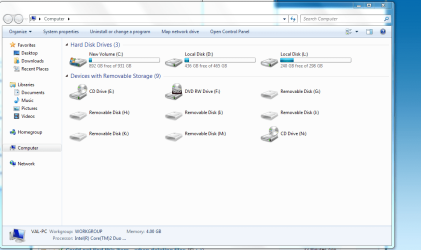
Hi i can't explain about where all these came from but i would like to get rid of them if i could. I right click on them but theres no delete option. Can someone tell my how i can remove these if possible. My OS is Windows 7 U.
Attachments
Capture21.PNG
45.4 KB
· Views: 308
My Computer
OS
Windows 7 U/64
CPU
AMD Phenom II X6 1090T Black Edition Thuban 3.2GHz
If you mean the removable disks, then do you have a media card reader installed on your computer? These will usually show up like this with a drive letter per card slot of the media card reader.
If this is the case, then you could check the Hide empty drives in the Computer folder box in Folder Options like in the tutorial below to have these drives hidden until you actually insert a media card into one of the slots.


 Hi i can't explain about where all these came from but i would like to get rid of them if i could. I right click on them but theres no delete option. Can someone tell my how i can remove these if possible. My OS is Windows 7 U.