

- Local time
- 12:29 PM
- Messages
- 568
The OCZ Vertex 3 SSD is a leftover from an upgrade and I was curious to test this StarTech internal/external enclosure:
Newegg.com - StarTech.com Removable 2.5" SATA Hard Drive Enclosure and Backup System for 3.5/5.25" Bay
The enclosure reminds me of the removable hard drive, with the exception of once this drive ejected, it can also connect via USB 3.0 and/or 2.0 to any PC. The enclosure supports SATA revision I/II/III, perfect for the Vertex 3.
Let's start with the enclosure performance, when the drive is plugged in to the bay that is connected to the host via SATA III:
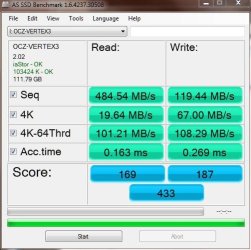
That's about 5-10% less that the Vertex III can do, when connected directly to the host. Not too bad and could be a good backup media...
The USB 3.0 performance on the other hand was sort of disappointing:
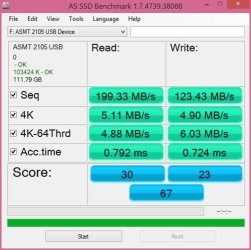
While it is certainly faster than an HDD in an external enclosure, but not by much. It seems that the USB interface still have ways to go to catch up with the SSD.
It's an interesting solution from StarTech and probably not their fault that the USB interface is slow...
Newegg.com - StarTech.com Removable 2.5" SATA Hard Drive Enclosure and Backup System for 3.5/5.25" Bay
The enclosure reminds me of the removable hard drive, with the exception of once this drive ejected, it can also connect via USB 3.0 and/or 2.0 to any PC. The enclosure supports SATA revision I/II/III, perfect for the Vertex 3.
Let's start with the enclosure performance, when the drive is plugged in to the bay that is connected to the host via SATA III:
That's about 5-10% less that the Vertex III can do, when connected directly to the host. Not too bad and could be a good backup media...
The USB 3.0 performance on the other hand was sort of disappointing:
While it is certainly faster than an HDD in an external enclosure, but not by much. It seems that the USB interface still have ways to go to catch up with the SSD.
It's an interesting solution from StarTech and probably not their fault that the USB interface is slow...
My Computer
- Computer type
- PC/Desktop
- Computer Manufacturer/Model Number
- Custom built at Home
- OS
- Windows 7 64-bit, Windows 8.1 64-bit, OSX El Capitan, Windows 10 (VMware)
- CPU
- Intel i5-3350P 3.1 GHz
- Motherboard
- Gigabyte GA-Z77X-UP5 TH
- Memory
- 16 GBs GSkill Sniper
- Graphics Card(s)
- Radeon HD 7850
- Sound Card
- VIA HD Audio
- Monitor(s) Displays
- Dell U2410 24"
- Screen Resolution
- 1920x1200
- Hard Drives
- 1 x Intel 520 240 GBs
1 x Seagate 1TBs SATA 2.0,
1 x Seagate 1TBs eSATA 2.0
- PSU
- Thermaltake 850W
- Case
- Antec P183
- Cooling
- Noctua NH-D14 Heatsink 2 x 120mm fans, 4 x 120mm case fans
- Keyboard
- Dell Multimedia keyboard
- Mouse
- Logitech Trackball
- Internet Speed
- 28.5 Mb/s


