Removable Storage

cindysgold

New member
Local time
10:34 AM
Messages
12
How do I delete Usb devices from my computer ? I have unistalled them from Device Manager. But, when I restart the computer they come back. I have several and get confussed on which is which.

Thanks : )
 

My Computer

OS
windows 7
Are they physically disconnected when you boot?
 

My Computer

OS
Windows 7 Ultimate x64
The usb's are not connected to the computer when I restart.
 

My Computer

OS
windows 7
Where are you seeing the entries for them when they cause confusion? I mean, is it showing the disconnected drives in Windows Explorer, file save dialogs, safely remove hardware dialog?

Oh, and welcome to the forum! Sometimes I don't know where my manners are!
 

My Computer

OS
Windows 7 Ultimate x64
I click on computer and under Devices with removable storage there are 5 listed. I go into Device Maneger and unistall them. When I restart my computer they come back.
I would like to delete them. I don't use these flash drives anymore.
 

My Computer

OS
windows 7
Were these little USB flash drives or the larger USB hard drives?

And where in device manager did you uninstall?
 

My Computer

OS
Windows 7 Ultimate x64
Are these flash drives or do you've a memory card reader installed? I had similar problem phantom drives appeared but they were for the card reader.
Are those devices empty as viewed from explorer? If answer to both questions is yes, you can go to Tools>Folder options>view and check 'Hide empty drives and folders' or something like that.
If you'd instead like to disable those, go to device manager, right click the devices and select Disable, not uninstall.
 

My Computer

Computer Manufacturer/Model Number
HCL
OS
Winbdows 7 ultimate x64 | Ubuntu 12.04 x64 LTS
CPU
Core 2 Duo e7400 @ 2.90GHz
Motherboard
Gigabyte G31M-ES2L
Memory
3GB DDR2
Graphics Card(s)
Asus Nvidia GTX 560Ti 1GB
Sound Card
On-board
Monitor(s) Displays
HCL eZeeBee 18.5" LCD
Screen Resolution
1366x768 @ 60Hz
Hard Drives
Western Digital 320GB
PSU
Corsair CX500 V2 500W
Cooling
Stock
Keyboard
Stock
Mouse
Stock
Internet Speed
15-25kBps D/L | 10kBps U/L | Hey Don't laugh
Thank You ! There gone from Devices and removable storage.
 

My Computer

OS
windows 7
Glad we could help. :)
 

My Computer

Computer Manufacturer/Model Number
HCL
OS
Winbdows 7 ultimate x64 | Ubuntu 12.04 x64 LTS
CPU
Core 2 Duo e7400 @ 2.90GHz
Motherboard
Gigabyte G31M-ES2L
Memory
3GB DDR2
Graphics Card(s)
Asus Nvidia GTX 560Ti 1GB
Sound Card
On-board
Monitor(s) Displays
HCL eZeeBee 18.5" LCD
Screen Resolution
1366x768 @ 60Hz
Hard Drives
Western Digital 320GB
PSU
Corsair CX500 V2 500W
Cooling
Stock
Keyboard
Stock
Mouse
Stock
Internet Speed
15-25kBps D/L | 10kBps U/L | Hey Don't laugh
All that does is stop the drives from being visible. They can't be flash drives if they keep coming back, unless they are still connected to the computer.

My guess is, you have a card reader or a printer with a card reader, and those drives are showing up in Explorer. The better solution is to rename them to new letters, to move them "out of the way", so to speak.
 

My Computer

OS
Windows 7 Ultimate x64 SP1
CPU
Intel Core i7-2600
Motherboard
Gigabyte GA-P67A-UD3P-B3
Memory
12 GB Patriot Extreme DDR3-1333
Graphics Card(s)
Nvidia GTX 470
Monitor(s) Displays
Dell UltraSharp 2209WA
Hard Drives
OCZ Agility3 240 GB, WD5001AALS, WD7501AALS
PSU
OCZ ModStream 700W
Case
CoolerMaster HAF 912 Advanced
Cooling
CoolerMaster Hyper 212 Plus
If I rename them then I'm still stuck with them there, right..
 

My Computer

OS
windows 7
It isn't an issue to have them visible in Explorer. If you rename them...there's no confusion. My card reader uses M, N, O, and P. I have several other drive letters in use, plus several network drives connected, and there's no confusion.
 

My Computer

OS
Windows 7 Ultimate x64 SP1
CPU
Intel Core i7-2600
Motherboard
Gigabyte GA-P67A-UD3P-B3
Memory
12 GB Patriot Extreme DDR3-1333
Graphics Card(s)
Nvidia GTX 470
Monitor(s) Displays
Dell UltraSharp 2209WA
Hard Drives
OCZ Agility3 240 GB, WD5001AALS, WD7501AALS
PSU
OCZ ModStream 700W
Case
CoolerMaster HAF 912 Advanced
Cooling
CoolerMaster Hyper 212 Plus
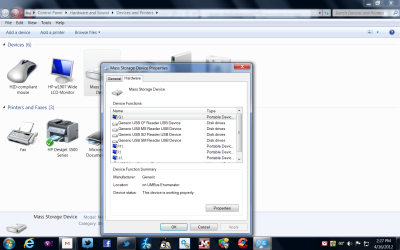
can you look and see if they are showing in devices and printers,
if so is it possible to remove them there then they wont show in " computer"
i had this issue with an old phone and it showed in computer as a removable storage item, removing it from devices and printers sorted it out.
 

My Computer

Computer Manufacturer/Model Number
Hewlett packard/p6512uk
OS
Microsoft Windows 7 Home Premium 64-bit 7600
CPU
IIx4 amd athelon 635 processor
Motherboard
FOXCONN 2AA9
Memory
2x2gb
Graphics Card(s)
ati radeon HD 5450
Sound Card
(1) Realtek High Definition Audio (2) AMD High Definition
Monitor(s) Displays
samsung lcd tv 32"
Screen Resolution
1360x 768
Hard Drives
(1) WDC WD10 01FAES-60Z2A0 SATA Disk Device (2) Maxtor OneTouch USB Device (3) ST310003 33AS USB Device (4) WD My Book 1111 USB Device
PSU
?
Cooling
air!
Keyboard
wireless hp
Mouse
wireless Hp,optical
Internet Speed
1.10mb/s
Antivirus
MSE
Browser
Firefox
You can use any free letter you want. For example, C, couldn't be used, obviously. My three hard drives are C, D, and E. My optical drive is F. Then I have a huge gap separating the rest. As I said, M, N, O, and P, are my card reader, and S, U, and Z are network drives. Drives that allow it, like hard drives, get names, like my C drive is SYSTEM, D is STORAGE, and E is MEDIA. The network drives are recognizable by path. There's very little to memorize, and it sounds like you are over-thinking or over-complicating your setup.
 

My Computer

OS
Windows 7 Ultimate x64 SP1
CPU
Intel Core i7-2600
Motherboard
Gigabyte GA-P67A-UD3P-B3
Memory
12 GB Patriot Extreme DDR3-1333
Graphics Card(s)
Nvidia GTX 470
Monitor(s) Displays
Dell UltraSharp 2209WA
Hard Drives
OCZ Agility3 240 GB, WD5001AALS, WD7501AALS
PSU
OCZ ModStream 700W
Case
CoolerMaster HAF 912 Advanced
Cooling
CoolerMaster Hyper 212 Plus
That's definitely a card-reader. If you go into Disk Management, you'll be able to right click on any drive and change it's letter (except C).
 

My Computer

OS
Windows 7 Ultimate x64 SP1
CPU
Intel Core i7-2600
Motherboard
Gigabyte GA-P67A-UD3P-B3
Memory
12 GB Patriot Extreme DDR3-1333
Graphics Card(s)
Nvidia GTX 470
Monitor(s) Displays
Dell UltraSharp 2209WA
Hard Drives
OCZ Agility3 240 GB, WD5001AALS, WD7501AALS
PSU
OCZ ModStream 700W
Case
CoolerMaster HAF 912 Advanced
Cooling
CoolerMaster Hyper 212 Plus
To help avoid confusion and keep the Explorer window uncluttered while viewing the "Computer" folder, while in Explorer, do:

Alt-T -> Folder options -> in View tab, select "Hide empty drives in the Computer folder", click OK.

That way they won't appear unless you insert a card into the reader. After you eject the card the icon/listing for it will disappear.
 

My Computer

OS
Windows 7 Ultimate x64
When I click Alt-T I don't have a folder option.
 

My Computer

OS
windows 7
Back
Top