
You are using an out of date browser. It may not display this or other websites correctly.
You should upgrade or use an alternative browser.
You should upgrade or use an alternative browser.
Solved Removal of virus has blocked internet. PLEASE PLEASE HELP
- Thread starter ChronicX
- Start date

ChronicX,
What applies to one case (Florida Rene) may not apply to another. It appears you have tried all sorts of fixes...
Let's give the following a whirl:
:info: Please open Notepad (Start > All Programs > Accessories > Notepad)
Copy the entire contents of the code box below (Do not copy the word 'code') to Notepad.
Save it to the Desktop, and name it: fixlist.txt
NOTICE: This script is written specifically for this computer!!!
Running this on another computer may cause damage to the Operating System.
Now, please runFRST64, and press the Fix button, just once, and wait.
If for some reason the tool needs a restart, please let the system restart normally. After that let the tool complete its run.
When done, the tool creates a report on the Desktop called: Fixlog.txt
:ar: Please post the Fixlog.txt in your reply.
:info: Next, please use the portable version of the Windows Repair (All In One)
It allows you to use the program from a portable device such as a USB flash drive.
Download > Windows Repair (All In One) Download
Save to a USB flash/pen drive.
Using the USB drive, place it on the Desktop of the affected computer.
Right-click the tweaking.com program icon on the Desktop, and select: Run as Administrator
Click Next at the Setup, and follow the prompts.
Make sure to temporarily disable your AntiVirus program before the repairs are done.
At the program's console...
Go to Step 5 Backup, and under Registry Backup, select: Backup
Under System Restore click on: Create
Next, go to Repairs tab and click: Open Repairs
In the next prompt, press: Unselect all
Next, select the following entries: 1, 2, 3, 5, 7, 10, 13, 14, 15, 26, and, 27
On the right side, check: Restart/Shutdown system when finished
Press: Start Repairs
When the program finishes, please restart the computer.
:ar: Please post Windows the Repair log in your reply.
It is located in the following folder:
64-bit systems - C:\Program Files (x86)\Tweaking.com\Windows Repair (All in One)\Logs
:ar: Also, please run the Farbar Service Scanner once again, and post the new reports in your reply.
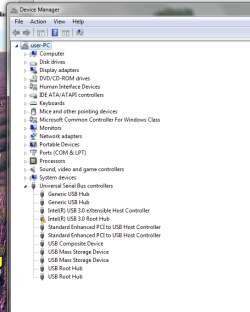
:info: Last, please access Device Manager:
Click on: Start > Control Panel > System
Click on: Device Manager
Are there any red or yellow "?" "!" marks by any devices?
What applies to one case (Florida Rene) may not apply to another. It appears you have tried all sorts of fixes...
Let's give the following a whirl:
:info: Please open Notepad (Start > All Programs > Accessories > Notepad)
Copy the entire contents of the code box below (Do not copy the word 'code') to Notepad.
Save it to the Desktop, and name it: fixlist.txt
Code:
start
ShellIconOverlayIdentifiers: [00avast] -> {472083B0-C522-11CF-8763-00608CC02F24} =>  No File
HKLM\SOFTWARE\Policies\Microsoft\Internet Explorer: Policy restriction
HKU\S-1-5-21-4213399731-3783266677-3300108212-1000\SOFTWARE\Policies\Microsoft\Internet Explorer: Policy restriction
SearchScopes: HKU\S-1-5-19 -> DefaultScope {0633EE93-D776-472f-A0FF-E1416B8B2E3A} URL =
SearchScopes: HKU\S-1-5-20 -> DefaultScope {0633EE93-D776-472f-A0FF-E1416B8B2E3A} URL =
SearchScopes: HKU\S-1-5-21-4213399731-3783266677-3300108212-1000 -> {BF720CA6-A9D6-440D-B1D3-6DC8EFC6B639} URL =
SearchScopes: HKU\S-1-5-21-4213399731-3783266677-3300108212-1000 -> {D7FD4AA9-8AA0-42A2-A283-1E84ADF3FB09} URL =
Toolbar: HKU\S-1-5-21-4213399731-3783266677-3300108212-1000 -> No Name - {21FA44EF-376D-4D53-9B0F-8A89D3229068} -  No File
endRunning this on another computer may cause damage to the Operating System.
Now, please runFRST64, and press the Fix button, just once, and wait.
If for some reason the tool needs a restart, please let the system restart normally. After that let the tool complete its run.
When done, the tool creates a report on the Desktop called: Fixlog.txt
:ar: Please post the Fixlog.txt in your reply.
:info: Next, please use the portable version of the Windows Repair (All In One)
It allows you to use the program from a portable device such as a USB flash drive.
Download > Windows Repair (All In One) Download
Save to a USB flash/pen drive.
Using the USB drive, place it on the Desktop of the affected computer.
Right-click the tweaking.com program icon on the Desktop, and select: Run as Administrator
Click Next at the Setup, and follow the prompts.
Make sure to temporarily disable your AntiVirus program before the repairs are done.
At the program's console...
Go to Step 5 Backup, and under Registry Backup, select: Backup
Under System Restore click on: Create
Next, go to Repairs tab and click: Open Repairs
In the next prompt, press: Unselect all
Next, select the following entries: 1, 2, 3, 5, 7, 10, 13, 14, 15, 26, and, 27
On the right side, check: Restart/Shutdown system when finished
Press: Start Repairs
When the program finishes, please restart the computer.
:ar: Please post Windows the Repair log in your reply.
It is located in the following folder:
64-bit systems - C:\Program Files (x86)\Tweaking.com\Windows Repair (All in One)\Logs
:ar: Also, please run the Farbar Service Scanner once again, and post the new reports in your reply.
:info: Last, please access Device Manager:
Click on: Start > Control Panel > System
Click on: Device Manager
Are there any red or yellow "?" "!" marks by any devices?
Last edited:
My Computer
At a glance
Windows 7 Home Premium
- Computer type
- PC/Desktop
- Computer Manufacturer/Model Number
- An ol' eMachines
- OS
- Windows 7 Home Premium
- Internet Speed
- Fine for me...I'm retired!

- Local time
- 11:40 AM
- Messages
- 8,608
Is this you, or someone you know? --> Administrator Guest Mcx1-USER-PC
My Computer
At a glance
Windows 7 Ultimate 32bit SP1Intel(R) Core(TM)2 Quad CPU @ 2.40GHz, 2400 MHz4 GBATI Radeon HD 2600 Pro
- Computer type
- PC/Desktop
- Computer Manufacturer/Model Number
- Bruce ... somewhere in his 40's
- OS
- Windows 7 Ultimate 32bit SP1
- CPU
- Intel(R) Core(TM)2 Quad CPU @ 2.40GHz, 2400 MHz
- Motherboard
- INTEL/D975XBX2
- Memory
- 4 GB
- Graphics Card(s)
- ATI Radeon HD 2600 Pro
- Monitor(s) Displays
- Samsung SyncMaster 914v
- Screen Resolution
- 1280 x 1024
- Hard Drives
- 2/500GB each ... ST3500630AS ATA Device.
One is not connected
- PSU
- Rocketfish 700 W
- Case
- G.Skill Gigabyte Chassis
- Keyboard
- Standard PS/2 Keyboard
- Mouse
- Microsoft PS/2 Mouse
- Internet Speed
- DSL
- Antivirus
- Avira Internet Security
- Browser
- IE 11
- Other Info
- ATI HDMI Audio
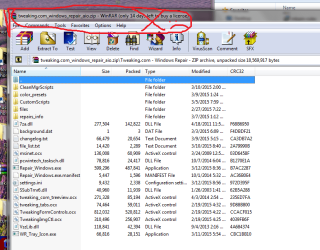
Cottonball - Thank you for helping me! Attached is the Fixlog you requested. I downloaded the portable Windows Repair as you instructed but it came down in .zip format; unzipped there is no tweaking.com application icon? Do I have to Install it via the Repair_Windows executable?
Jacee - that is the name of my computer actually.
Jacee - that is the name of my computer actually.
Attachments
My Computer
At a glance
Windows 7 Home Premium 64
- Computer type
- PC/Desktop
- OS
- Windows 7 Home Premium 64
- Antivirus
- Avast Internet Security
- Browser
- Chrome
ChronicX,
Try to connect to see what happens.
If no-go, use the Repair_Windows application located in the folder where Windows Repair portable was extracted.
Try to connect to see what happens.
If no-go, use the Repair_Windows application located in the folder where Windows Repair portable was extracted.
My Computer
At a glance
Windows 7 Home Premium
- Computer type
- PC/Desktop
- Computer Manufacturer/Model Number
- An ol' eMachines
- OS
- Windows 7 Home Premium
- Internet Speed
- Fine for me...I'm retired!
My Computer
At a glance
Windows 7 Home Premium 64
- Computer type
- PC/Desktop
- OS
- Windows 7 Home Premium 64
- Antivirus
- Avast Internet Security
- Browser
- Chrome
Repair_Windows.exe should do it.
My Computer
At a glance
Windows 7 Home Premium
- Computer type
- PC/Desktop
- Computer Manufacturer/Model Number
- An ol' eMachines
- OS
- Windows 7 Home Premium
- Internet Speed
- Fine for me...I'm retired!

My Computer
At a glance
Windows 7 Home Premium 64
- Computer type
- PC/Desktop
- OS
- Windows 7 Home Premium 64
- Antivirus
- Avast Internet Security
- Browser
- Chrome
My Computer
At a glance
Windows 7 Home Premium 64
- Computer type
- PC/Desktop
- OS
- Windows 7 Home Premium 64
- Antivirus
- Avast Internet Security
- Browser
- Chrome
ChronicX,
This may sound rather trivial, but, let's do a power deplete.
Press the Power button to turn on the computer.
Start Windows normally.
Next, please shut down your Firewall.
Now, try to connect.
If still down, once again, please run: MiniToolBox
Save it to a USB flash drive, and move it to the Desktop of the computer with problems.
Check the following boxes:
:ar: Please post the Result.txt that appears on the Desktop, in your reply.
This may sound rather trivial, but, let's do a power deplete.
- Shutdown the computer.
- Disconnect all external connected peripheral devices.
- Unplug the power cord, and, if applicable, remove the battery.
- Press and hold down the Power button for about 15 seconds to drain any residual electrical charge from the capacitors that protect the memory. Do this twice.
Press the Power button to turn on the computer.
Start Windows normally.
Next, please shut down your Firewall.
Now, try to connect.
If still down, once again, please run: MiniToolBox
Save it to a USB flash drive, and move it to the Desktop of the computer with problems.
Check the following boxes:
- Report IE Proxy Settings
- Report FF Proxy Settings
- List content of Hosts
- List IP configuration
- List Winsock Entries
- List Devices > Only Problems
- List Restore Points
:ar: Please post the Result.txt that appears on the Desktop, in your reply.
Last edited:
My Computer
At a glance
Windows 7 Home Premium
- Computer type
- PC/Desktop
- Computer Manufacturer/Model Number
- An ol' eMachines
- OS
- Windows 7 Home Premium
- Internet Speed
- Fine for me...I'm retired!
Also, back to Post #13, where you ran SystemLook, it showed:
Searching for "*plsapp*"
C:\System Volume Information\SystemRestore\FRStaging\Windows\System32\plsapp64.dll ------- 439296 bytes [21:33 27/05/2015] [21:33 27/05/2015] 33948FF6D642994C5831809F3234F30A
C:\Users\user\AppData\Roaming\Microsoft\Windows\Recent\plsapp64.lnk --a---- 752 bytes [05:19 19/06/2015] [16:56 19/06/2015] 4C06075E3BD38AD4EF24391F91E63E0D
The above are Sendori's PureLeads.
Is a System Restore Point available for 27/05/2015?
Searching for "*plsapp*"
C:\System Volume Information\SystemRestore\FRStaging\Windows\System32\plsapp64.dll ------- 439296 bytes [21:33 27/05/2015] [21:33 27/05/2015] 33948FF6D642994C5831809F3234F30A
C:\Users\user\AppData\Roaming\Microsoft\Windows\Recent\plsapp64.lnk --a---- 752 bytes [05:19 19/06/2015] [16:56 19/06/2015] 4C06075E3BD38AD4EF24391F91E63E0D
The above are Sendori's PureLeads.
Is a System Restore Point available for 27/05/2015?
My Computer
At a glance
Windows 7 Home Premium
- Computer type
- PC/Desktop
- Computer Manufacturer/Model Number
- An ol' eMachines
- OS
- Windows 7 Home Premium
- Internet Speed
- Fine for me...I'm retired!
I will do that now. Thanks! Also, while I really REALLY don't want to, I have a Windows 8 upgrade disk arriving soon. If I upgrade and do a clean install, do you think the issue would be resolved? Again, I would rather avoid that option as I have hundreds of gigs in games movies and other stuff that would all have to be redownloaded and that would literally take a million years. in any case, I will do what you ask and get back to you in a little bit. thanks again.
My Computer
At a glance
Windows 7 Home Premium 64
- Computer type
- PC/Desktop
- OS
- Windows 7 Home Premium 64
- Antivirus
- Avast Internet Security
- Browser
- Chrome
good morning. I ran the MRT scan as you requested. it came back clean with no threats or issues. I cannot upload the report or log right now. those two files you referenced, should i locate them and delete them? as for the restore points I don't have many previous 26 18 2015 I have tried a lot of them but they just don't take. the system will reboot and it says it was unable to complete the action or something to that effect. thanks again for your diligence and help.
My Computer
At a glance
Windows 7 Home Premium 64
- Computer type
- PC/Desktop
- OS
- Windows 7 Home Premium 64
- Antivirus
- Avast Internet Security
- Browser
- Chrome
- Local time
- 11:40 AM
- Messages
- 8,608
Did you try restoring by running as Administrator?
My Computer
At a glance
Windows 7 Ultimate 32bit SP1Intel(R) Core(TM)2 Quad CPU @ 2.40GHz, 2400 MHz4 GBATI Radeon HD 2600 Pro
- Computer type
- PC/Desktop
- Computer Manufacturer/Model Number
- Bruce ... somewhere in his 40's
- OS
- Windows 7 Ultimate 32bit SP1
- CPU
- Intel(R) Core(TM)2 Quad CPU @ 2.40GHz, 2400 MHz
- Motherboard
- INTEL/D975XBX2
- Memory
- 4 GB
- Graphics Card(s)
- ATI Radeon HD 2600 Pro
- Monitor(s) Displays
- Samsung SyncMaster 914v
- Screen Resolution
- 1280 x 1024
- Hard Drives
- 2/500GB each ... ST3500630AS ATA Device.
One is not connected
- PSU
- Rocketfish 700 W
- Case
- G.Skill Gigabyte Chassis
- Keyboard
- Standard PS/2 Keyboard
- Mouse
- Microsoft PS/2 Mouse
- Internet Speed
- DSL
- Antivirus
- Avira Internet Security
- Browser
- IE 11
- Other Info
- ATI HDMI Audio
ChronicX,
Please get to the Command Prompt (Start > All Programs > Accessories)
Right-click the Command Prompt, and select: Run as Administrator
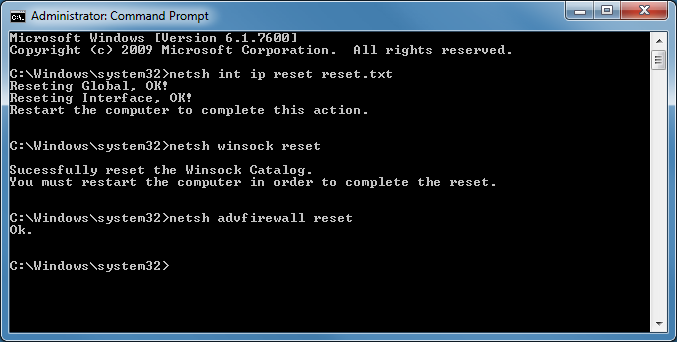
At the Command Prompt, copy/paste the following commands (use the mouse), and press Enter after each:
netsh int ip reset reset.txt
netsh winsock reset
netsh advfirewall reset
shutdown -r -t 1
After the computer restarts, try your Internet connection.
If still no-go,
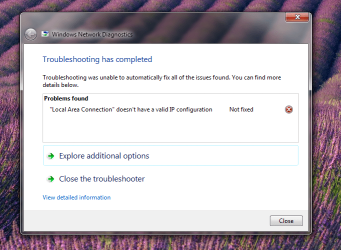
That may shed some light on this connection issue.
Also, will you use SystemLook, and search for these again:
:filefind
*plsapp*
:regfind
PureLeads
Let's see if they are still there.
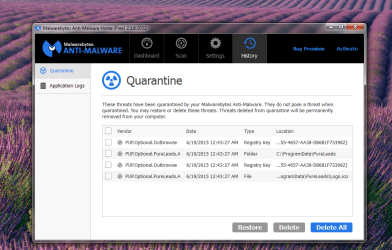
Last, can you post the report of Malwarebytes Anti-Malware?
These entries...
PUP.Optional.Winsock.Hijack, C:\Windows\System32\plsapp64.dll, Delete-on-Reboot, [c13df37c840689ad186ace855da8a957],
PUP.Optional.Winsock.Hijack, C:\Windows\SysWOW64\plsapp.dll, Delete-on-Reboot, [986671fee8a23ff7a5de4a0974919070]
...when removed, will render the Internet unusable.
Please get to the Command Prompt (Start > All Programs > Accessories)
Right-click the Command Prompt, and select: Run as Administrator
At the Command Prompt, copy/paste the following commands (use the mouse), and press Enter after each:
netsh int ip reset reset.txt
netsh winsock reset
netsh advfirewall reset
shutdown -r -t 1
After the computer restarts, try your Internet connection.
If still no-go,
MRT? What was requested is the Mini Tool Box report.I ran the MRT scan as you requested...
That may shed some light on this connection issue.
Also, will you use SystemLook, and search for these again:
:filefind
*plsapp*
:regfind
PureLeads
Let's see if they are still there.
Last, can you post the report of Malwarebytes Anti-Malware?
These entries...
PUP.Optional.Winsock.Hijack, C:\Windows\System32\plsapp64.dll, Delete-on-Reboot, [c13df37c840689ad186ace855da8a957],
PUP.Optional.Winsock.Hijack, C:\Windows\SysWOW64\plsapp.dll, Delete-on-Reboot, [986671fee8a23ff7a5de4a0974919070]
...when removed, will render the Internet unusable.
Last edited:
My Computer
At a glance
Windows 7 Home Premium
- Computer type
- PC/Desktop
- Computer Manufacturer/Model Number
- An ol' eMachines
- OS
- Windows 7 Home Premium
- Internet Speed
- Fine for me...I'm retired!
Sorry. I thought it was malicious removal tool by Microsoft. I will run those tests that you just mentioned in just a moment. I will post the results in as soon as I can. Thank you again.
My Computer
At a glance
Windows 7 Home Premium 64
- Computer type
- PC/Desktop
- OS
- Windows 7 Home Premium 64
- Antivirus
- Avast Internet Security
- Browser
- Chrome
Take your time.
When you run the Command Prompt as Administrator, make sure the prompt shows:
C:\Windows\System32
This is what it should look like:
When you run the Command Prompt as Administrator, make sure the prompt shows:
C:\Windows\System32
This is what it should look like:
My Computer
At a glance
Windows 7 Home Premium
- Computer type
- PC/Desktop
- Computer Manufacturer/Model Number
- An ol' eMachines
- OS
- Windows 7 Home Premium
- Internet Speed
- Fine for me...I'm retired!
Here are the updated reports. Ran the CMD directives as you asked. Curiously, the third directive "netsh winsock reset" failed as it stated it couldn't locate the file (?).
Attachments
My Computer
At a glance
Windows 7 Home Premium 64
- Computer type
- PC/Desktop
- OS
- Windows 7 Home Premium 64
- Antivirus
- Avast Internet Security
- Browser
- Chrome
Jacee, the only account on this computer that I know of is "user" (me). And any attempt I made at restoring failed.
My Computer
At a glance
Windows 7 Home Premium 64
- Computer type
- PC/Desktop
- OS
- Windows 7 Home Premium 64
- Antivirus
- Avast Internet Security
- Browser
- Chrome
ChronicX,
My white hairs have increased dealing with PureLeads and its aftermath!!
Please open Notepad and paste the following text to it:
In Notepad, click File > Save as...
Save the file to the Desktop
File name: PLfix.reg
Make sure the Save as Type field says: All Files
Next, please go to the Desktop and double-click on PLfix.reg
Click Yes to merge it in the Registry.
Now, go to Control Panel > Folder Options
Select the View Tab.
-Under the Hidden files and folders heading select: Show hidden files, folders and drives
-Uncheck: Hide protected operating system files (recommended)
-Uncheck: Hide file extensions for known file types
Click Yes to confirm.
Click: OK
Using Windows Explorer (right-click Start)
Remove the following folder:
C:\Program Files (x86)\PureLeads
Then, reverse the changes to the folders, files, and protected operating system files that you checked/unchecked.
Last, open the Command Prompt again, Run as Administrator, and copy/paste the following commands (use the mouse), and press Enter after each:
netsh int ip reset reset.txt
netsh winsock reset
netsh advfirewall reset
shutdown -r -t 1
After the computer restarts, try your Internet connection.
My white hairs have increased dealing with PureLeads and its aftermath!!
Please open Notepad and paste the following text to it:
Code:
REGEDIT4

[-HKEY_CURRENT_USER\Software\PureLeads]
[HKEY_LOCAL_MACHINE\SOFTWARE\Dyn\Installed]
"PureLeads"=-
[-HKEY_LOCAL_MACHINE\SOFTWARE\PureLeads]
[-HKEY_USERS\S-1-5-21-4213399731-3783266677-3300108212-1000\Software\PureLeads]
In Notepad, click File > Save as...
Save the file to the Desktop
File name: PLfix.reg
Make sure the Save as Type field says: All Files
Next, please go to the Desktop and double-click on PLfix.reg
Click Yes to merge it in the Registry.
Now, go to Control Panel > Folder Options
Select the View Tab.
-Under the Hidden files and folders heading select: Show hidden files, folders and drives
-Uncheck: Hide protected operating system files (recommended)
-Uncheck: Hide file extensions for known file types
Click Yes to confirm.
Click: OK
Using Windows Explorer (right-click Start)
Remove the following folder:
C:\Program Files (x86)\PureLeads
Then, reverse the changes to the folders, files, and protected operating system files that you checked/unchecked.
Last, open the Command Prompt again, Run as Administrator, and copy/paste the following commands (use the mouse), and press Enter after each:
netsh int ip reset reset.txt
netsh winsock reset
netsh advfirewall reset
shutdown -r -t 1
After the computer restarts, try your Internet connection.
My Computer
At a glance
Windows 7 Home Premium
- Computer type
- PC/Desktop
- Computer Manufacturer/Model Number
- An ol' eMachines
- OS
- Windows 7 Home Premium
- Internet Speed
- Fine for me...I'm retired!
Similar threads
- Replies
- 4
- Views
- 4K
- Replies
- 7
- Views
- 2K
- Replies
- 4
- Views
- 2K