Solved Removal of virus has blocked internet. PLEASE PLEASE HELP

I know what you mean about the white hairs. This has caused me a greeeeeeat deal of stress. I very much appreciate your effort and swift response. That being said, I am doing the things you want me to do but it should be mentioned that there is no Pure Leads folder at that path. I did a search of the C:\ drive and there were no instances of that folder? Is that possible or did I goof something up?
 

My Computer My Computer

At a glance

Windows 7 Home Premium 64
Computer type
PC/Desktop
OS
Windows 7 Home Premium 64
Antivirus
Avast Internet Security
Browser
Chrome
The winsock reset failed to find the specified file. Fixes applied, connection still unidentified network, no access.

This basically all started when I installed GTA V. It was apparently SUPER sensitive to this plsapp.dll and would constantly crash. I did diagnostics and had identified and quarantined the dll's in question. I'm thinking MAB may have deleted them after a certain amount of time? I dunno why I am saying that, maybe a little back story might give us a break through. :/ I am usually pretty good at protecting myself but this Pure Leads thing took me by surprise. I had no idea it could cause this much damage.
 

My Computer My Computer

At a glance

Windows 7 Home Premium 64
Computer type
PC/Desktop
OS
Windows 7 Home Premium 64
Antivirus
Avast Internet Security
Browser
Chrome
Run SystemLook again with the same entries as before.
Let's see what that shows.

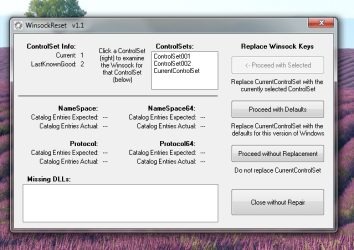
Also, Download WinsockReset 1.2

Unzip, and run the WinsockReset application.
 

My Computer My Computer

At a glance

Windows 7 Home Premium
Computer type
PC/Desktop
Computer Manufacturer/Model Number
An ol' eMachines
OS
Windows 7 Home Premium
Internet Speed
Fine for me...I'm retired!
You may have a 'proxy' setting that needs to be disabled ....

Disable the proxy settings in Internet Explorer:

1) Under “Tools” in the browser tool bar select “Internet Options”.
2) In the “Internet Options” window that pops up, click the “Connections” tab at the top.
3) Click “LAN Settings” near the bottom of the “Connections” section.
4) If the “Proxy server” checkbox is marked with a check, click it to deselect/uncheck it.
5) Click “Ok” to close the “Local Area Network (LAN) Settings” window.
6) Click “Ok” to close the “Internet Options” window.
Reboot

Make sure "Proxy server" is still disabled under your LAN Settings.
Test whether internet connectivity is restored.
 

My Computer My Computer

At a glance

Windows 7 Ultimate 32bit SP1Intel(R) Core(TM)2 Quad CPU @ 2.40GHz, 2400 MHz4 GBATI Radeon HD 2600 Pro
Computer type
PC/Desktop
Computer Manufacturer/Model Number
Bruce ... somewhere in his 40's
OS
Windows 7 Ultimate 32bit SP1
CPU
Intel(R) Core(TM)2 Quad CPU @ 2.40GHz, 2400 MHz
Motherboard
INTEL/D975XBX2
Memory
4 GB
Graphics Card(s)
ATI Radeon HD 2600 Pro
Monitor(s) Displays
Samsung SyncMaster 914v
Screen Resolution
1280 x 1024
Hard Drives
2/500GB each ... ST3500630AS ATA Device.
One is not connected
PSU
Rocketfish 700 W
Case
G.Skill Gigabyte Chassis
Keyboard
Standard PS/2 Keyboard
Mouse
Microsoft PS/2 Mouse
Internet Speed
DSL
Antivirus
Avira Internet Security
Browser
IE 11
Other Info
ATI HDMI Audio
Here are the updated reports. Also attached is the screenshot of WinsockReset, I don't want to be presumptuous so which option should I choose? Jacee, the proxy server option was not checked.
 

Attachments

  • SLNEW.txt
    SLNEW.txt
    2.3 KB · Views: 3
  • WR.png
    WR.png
    47.7 KB · Views: 21

My Computer My Computer

At a glance

Windows 7 Home Premium 64
Computer type
PC/Desktop
OS
Windows 7 Home Premium 64
Antivirus
Avast Internet Security
Browser
Chrome
SystemLook is still reporting PureLeads entries, and the MiniToolBox report is showing several Restore Points!!!

As long as PureLeads is around, don't see the point of fixing the Winsock entries.

It is late in Illinois, and I need to get some Zzzzs.

Also need to scratch my head several times, and see what route to take.


In the meantime please run the SFC /SCANNOW Command in Windows 7 to Scan and Repair System Files.
Tutorial by Brink: http://www.sevenforums.com/tutorials/1538-sfc-scannow-command-system-file-checker.html
 

My Computer My Computer

At a glance

Windows 7 Home Premium
Computer type
PC/Desktop
Computer Manufacturer/Model Number
An ol' eMachines
OS
Windows 7 Home Premium
Internet Speed
Fine for me...I'm retired!
Actually! After the Winsock Reset, the internet connectivity was restored!! YAAAAAY! I will gush more in a moment but first, I activated ESET as my primary AV. I had a paid subscription to Avast but clearly, this virus went right by it. What you suggest I use as a proper protection versus these types of things. I do want to make sure I am free and clear before I mark it solved but omg...thank you thank you thank you thank you! You are amazing! Get some rest and I will gush some more later. THANK YOU!
 

My Computer My Computer

At a glance

Windows 7 Home Premium 64
Computer type
PC/Desktop
OS
Windows 7 Home Premium 64
Antivirus
Avast Internet Security
Browser
Chrome
Could not sleep, too many Winsocks in my head!

After the Winsock Reset, the internet connectivity was restored
Which one?

There is still System Restore in question.
The sfc /scannow may help that issue.
 

My Computer My Computer

At a glance

Windows 7 Home Premium
Computer type
PC/Desktop
Computer Manufacturer/Model Number
An ol' eMachines
OS
Windows 7 Home Premium
Internet Speed
Fine for me...I'm retired!
WinsockReset 1.2... just ran a new MAM. Here's the report.
 

Attachments

My Computer My Computer

At a glance

Windows 7 Home Premium 64
Computer type
PC/Desktop
OS
Windows 7 Home Premium 64
Antivirus
Avast Internet Security
Browser
Chrome
It's interesting that it brought those two files up as suspicious as those are the ones if deleted kills the internet... I think.
 

My Computer My Computer

At a glance

Windows 7 Home Premium 64
Computer type
PC/Desktop
OS
Windows 7 Home Premium 64
Antivirus
Avast Internet Security
Browser
Chrome
You are correct!! Those may be the entries that, if MBAM removes them, you will not have an Internet connection.
Hold tight on those!! Need to find out more info.


Boot in Safe Mode and see if you create a restore point:
  1. When the computer is powered on or restarted, tap the F8 key in 1 second intervals.
  2. After your computer displays hardware information and runs a memory test, the Advanced Boot Options menu appears.
  3. Use the arrow keys to select Safe Mode,and press: ENTER
 

My Computer My Computer

At a glance

Windows 7 Home Premium
Computer type
PC/Desktop
Computer Manufacturer/Model Number
An ol' eMachines
OS
Windows 7 Home Premium
Internet Speed
Fine for me...I'm retired!
Doubt that I will get the folks from MBAM at this hour.

Also, I do need to get some sleep.

Will get back with you tomorrow and see if we can figure out what to do with those blankity-blank entries.

You have been great through all this.
My old brain is not what it used to be.

Thanks for your patience.
 

My Computer My Computer

At a glance

Windows 7 Home Premium
Computer type
PC/Desktop
Computer Manufacturer/Model Number
An ol' eMachines
OS
Windows 7 Home Premium
Internet Speed
Fine for me...I'm retired!
I created some restore points although I have not tested them out yet. Overnight I will be running full scans with ESET and Malwarebytes Anti-Rootkit. :) Thank you again. I cannot tell you how thankful I am. I am hopeful we can smoke out those other Pure Leads instances. Thanks again!
 

My Computer My Computer

At a glance

Windows 7 Home Premium 64
Computer type
PC/Desktop
OS
Windows 7 Home Premium 64
Antivirus
Avast Internet Security
Browser
Chrome
And oh yes... I made backups of the plsapp/plsapp64... renamed them and squirreled them away just in case.
 

My Computer My Computer

At a glance

Windows 7 Home Premium 64
Computer type
PC/Desktop
OS
Windows 7 Home Premium 64
Antivirus
Avast Internet Security
Browser
Chrome
Updated AdwCleaner report.
 

Attachments

My Computer My Computer

At a glance

Windows 7 Home Premium 64
Computer type
PC/Desktop
OS
Windows 7 Home Premium 64
Antivirus
Avast Internet Security
Browser
Chrome
Will you also download a new copy of the Farbar Recovery Scan Tool:
Farbar Recovery Scan Tool Download

Check: Addition.txt

Remove the old copy. This program gets updated often. New version: 21-06-2015

Please post the two reports.

Thanks.
 

My Computer My Computer

At a glance

Windows 7 Home Premium
Computer type
PC/Desktop
Computer Manufacturer/Model Number
An ol' eMachines
OS
Windows 7 Home Premium
Internet Speed
Fine for me...I'm retired!
Here are the latest reports. Malwarebytes Anti-Root Kit came up clean.
 

Attachments

My Computer My Computer

At a glance

Windows 7 Home Premium 64
Computer type
PC/Desktop
OS
Windows 7 Home Premium 64
Antivirus
Avast Internet Security
Browser
Chrome
ChronicX,

Checking a few things out to get rid of the nuisance without losing the Internet connection.

Also need to go out for a while. Will be back later.

Thanks for your patience.
 

My Computer My Computer

At a glance

Windows 7 Home Premium
Computer type
PC/Desktop
Computer Manufacturer/Model Number
An ol' eMachines
OS
Windows 7 Home Premium
Internet Speed
Fine for me...I'm retired!
Thanks, Cottonball, I am updating a lot of the tools and rescanning fairly often. Nothing has come up and the scans as of yet. Thanks again for your help. :)
 

My Computer My Computer

At a glance

Windows 7 Home Premium 64
Computer type
PC/Desktop
OS
Windows 7 Home Premium 64
Antivirus
Avast Internet Security
Browser
Chrome
ChronicX,

Let's roll once again...

We are going to take a chance, since the entries found by MBAM are a Layered Service Provider .dll that uses Winsock APIs to attempt to insert itself into the TCP/IP protocol stack. However, we need to get rid of the .dll.

If, after running MBAM you have no Internet connection, the program that follows processes the netsh winsock reset catalog command. It resets the winsock catalog to the standard Windows configuration, which means that all Layered Service Providers (LSPs) that were added, are skipped. So if you were using third-party LSPs, the associated programs may have to be re-installed or repaired.

So, here we go...

Run Malwarebytes Anti-Malware
Make sure you update the program.

Run the Threat Scan.

When the scan completes, you are presented with a screen showing what Malwarebytes Anti-Malware has detected.
Click on the Quarantine All button, and then click on the Apply Actions button.

Malwarebytes Anti-Malware quarantines all the files or entries that it found.

When removing the files from Quarantine, Malwarebytes Anti-Malware requires a reboot.
When it displays a message stating that it needs to reboot the computer, please allow it to do so.
A prompt appears after the first reboot stating MalwareBytes Anti-Malware needs to reboot the computer a second time. Please do so.

:ar: Please post the MBAM report in your reply.

[The log is automatically saved by MBAM and is also viewed by clicking:
History tab > Application Logs.]


:ar: Test the Internet.


In case of Internet failure, please use the tool: Zoek

First, temporarily disable your AV program.
Info on how to disable your security applications > How To Temporarily Disable Your Anti-virus, Firewall And Anti-malware Programs - Security Mini-Guides

Zoek Download > http://download.bleepingcomputer.com/smeenk/zoek.exe
When the download appears, save to the Desktop.
On the Desktop, right-click the Zoek.exe file and select: Run as Administrator (Give it a few seconds to appear.)

Next, copy/paste the entire script inside the code box below to the input field of Zoek:

Code:
createsrpoint;
netsh winsock reset catalog;b
ipconfig /flushdns;b
emptyfolderscheck;delete
emptyclsid;
emptyalltemp;
autoclean;

Now...
Close any open Browsers.
Click the Run script button, and wait. It takes a few minutes to run all the script.

When the tool finishes, the zoek-results.log is opened in Notepad.
The log is also found on the systemdrive, normally C:\
If a reboot is needed log is opened after the reboot.

:ar: Please attach the zoek-results.log in your reply.

 

My Computer My Computer

At a glance

Windows 7 Home Premium
Computer type
PC/Desktop
Computer Manufacturer/Model Number
An ol' eMachines
OS
Windows 7 Home Premium
Internet Speed
Fine for me...I'm retired!
Back
Top