Remove Built-in Programs in Windows 7

werty12345

New member
Member
Local time
12:28 AM
Messages
46
I would like to know how can I remove some of the built-in programs in Windows 7 like Address Book, Notepad, Calculator, etc permanently.

Nzyme
 

My Computer

OS
Windows 7 Ultimate (32bit)
I don't think you can ever delete those applications. Its system default applications.
Why would you ever want to delete those things?
Take Care
 

My Computer

Computer Manufacturer/Model Number
Compaq Presario
OS
Windows 7 Ultimate Service Pack 1
CPU
Intel(R) Core(TM)2 Duo CPU T6400 @ 2.00GHz
Memory
3GB
Graphics Card(s)
NVIDIA GeForce G 103M
Screen Resolution
1366 x 768 @ 60Hz - Aspect Ratio 16:9
I would like to know how can I remove some of the built-in programs in Windows 7 like Address Book, Notepad, Calculator, etc permanently.

Nzyme


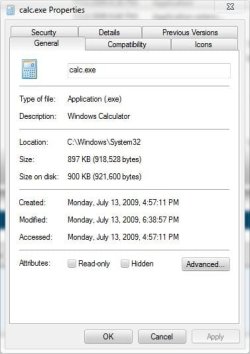
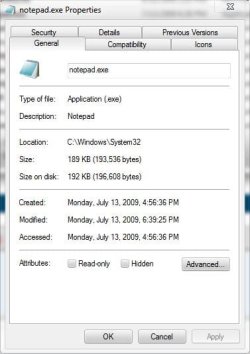
Not sure why you want to get rid of them, notepad and calculator are 1 Mb.

Why bother, just don't use them. They don't take up space and they aren't resource hogs.
 

Attachments

  • calc.JPG
    calc.JPG
    42.3 KB · Views: 26
  • notepad.JPG
    notepad.JPG
    42.5 KB · Views: 23

My Computer

Computer type
PC/Desktop
Computer Manufacturer/Model Number
Self Built
OS
Win 10 Pro x64
CPU
Intel I5-2500K @3.3GHz
Motherboard
Asrock P67 Extreme4
Memory
16GB G.Skill Ripjaws X (4x4GB)
Graphics Card(s)
EVGA GeForce 750 Ti SC 2GB
Sound Card
ASUS Xonar DG 5.1 Channels 24-bit 96KHz PCI Interface Sound
Monitor(s) Displays
auria eq2367
Screen Resolution
1920 x 1080
Hard Drives
250GB Samsung 850 EVO SSD
1TB WD Blue
1TB Hitachi
PSU
SeaSonic X 650W 80 Plus Gold
Case
Corsair Obsidian 750D
Cooling
Corsair H60, Three 140mm case fans
Keyboard
Logitech Wireless Keyboard K520
Mouse
Logitech Wireless Mouse M310
Internet Speed
Wave Broadband ~ 100 dn 5 up
Antivirus
Windows Defender, Malwarebytes Premium
Browser
Edge, IE11, Chrome
Other Info
Laptop specs: HP g7-1365dx /
CPU: AMD A6-3420M APU with Radeon(tm) HD Graphics /
RAM: Crucial 8Gb (2x4Gb) /
SSD: Crucial M4-CT128M4SSD2 ATA Device/ FW 000F /
GFX: AMD Radeon HD 6520G /
OS: Windows 10 Pro x64
Is there a particular reason why you want to remove them?

Their resource use is very low and Notepad in particular can be very useful for compiling batch files. As for Calculator, I'm always using it - especially when my wife has overspent on her housekeeping budget! :p
 

My Computer

Computer Manufacturer/Model Number
HP Pavilion Elite 495UK
OS
Windows 7 Ultimate SP1 64-Bit
CPU
Intel Core i7 870 @ 2.93GHz
Motherboard
MSI 2A9C (CPU1)
Memory
8Gb Dual-Channel DDR3 @ 664MHz
Graphics Card(s)
nVidia GeForce GTX 460 1024MB dedicated RAM
Sound Card
Realtek HD Audio
Monitor(s) Displays
HP2310i
Screen Resolution
1920 x 1080
Hard Drives
1x1954GB Hitachi HDS22020ALA 330 (RAID), 1x1954GB Hitachi External for backup and storage
PSU
460W
Case
HP Elite
Cooling
Air cooled
Keyboard
Logitech K750 solar-powered keyboard
Mouse
Logitech Wireless M180 mouse
Internet Speed
2Mb
Other Info
Pure Avanti Flow Internet Radio with iPod Dock, 64Gb iPod, HP USB Speakers, Sony MDR-V500 Headphones, Sony Vaio F-Series Laptop
Ok, I was just curious if this was possible but would like to remove the "heavier" programs like speech recognition, backup, aero etc...
 

My Computer

OS
Windows 7 Ultimate (32bit)
I have no idea if this will work but go to C:\Windows\System32 and take ownership http://www.sevenforums.com/tutorials/1911-take-ownership-shortcut.html and give your self permission http://www.sevenforums.com/tutorials/122666-permissions-allow-deny-users-groups.html of calc.exe and are renaming it to calc.bak.exe and see if that works. You may need to go to C:\ProgramData\Microsoft\Windows\Start Menu\Programs\Accessories and or C:\Users\YOUR USER NAME\AppData\Roaming\Microsoft\Windows\Start Menu\Programs\Accessories to remove the shortcut. If you do not see them use this tutorial to unhide them. http://www.sevenforums.com/tutorials/394-hidden-files-folders-show-hide.html
Afterwords restart your computer to see if it's disabled I have read there is a possibility that Windows will automatically enable it again. If it does work you will have to find the other .exe and do the same thing.
Jerry
 

My Computer

Computer type
Laptop
Computer Manufacturer/Model Number
Sager NP9170
OS
Win 7 Pro x64 / Win 10 Pro
CPU
Intel(R) Core(TM) i7-3630QM CPU @ 2.40GHz
Motherboard
CLEVO P170EM
Memory
12 GB
Graphics Card(s)
(1) Intel(R) HD Graphics 4000 (2) NVIDIA GeForce GTX 675M
Sound Card
(1) Realtek High Definition Audio (2) Intel(R) Display Aud
Monitor(s) Displays
17.3
Screen Resolution
1920x1080
Hard Drives
(1) Samsung 860 EVO 500GB(OS) (1) Samsung 860 EVO 500GB(Data)
Keyboard
Backlite
Antivirus
MSE, Malwarebytes Pro
Browser
Firefox
Other Info
DESKTOP: Custom-built.
OS: Win 10 Pro x64.
CASE: Rosewill R5.
CPU: Intel I5 4670K CPU @ 3.40GHz.
CPU COOLER: Cool Master Hyper 212 EVO.
MOTHERBOARD: Asus Z87-A.
MEMORY: Kingston HyperX 2x4 GB.
GPU: Nvidia Geforce 650 TI.
PSU: Corsair TX750.
DRIVES: (1) Samsung 840 120 GB SSD (2) Western Digital blue 500 GB 7200 RPM.
Ok, I was just curious if this was possible but would like to remove the "heavier" programs like speech recognition, backup, aero etc...

They can't be removed just disabled.
 

My Computer

Computer Manufacturer/Model Number
Hopalong/ Godzilla
OS
Windows7 Pro 64bit SP-1; Windows XP Pro 32bit
CPU
Intel Core i7-870 Lynnfield 2.93GHz LGA 1156 95W Quad-Core
Motherboard
ASUS P7P55D-E PRO
Memory
8GB@1400MHz Crucial Ballistix DDR3-1600 4x2GB
Graphics Card(s)
ASUS ENGTX460 DirectCU/2DI/1GD5 1GB 256-bit GDDR5
Sound Card
VIA Onboard
Monitor(s) Displays
Asus VS248H-P 24"; Samsung SyncMaster 941BW 19"ws
Screen Resolution
1920x1080; 1440x900
Hard Drives
Samsung 830 120GB SSD
Intel 320 120GB SSD
Western Digital Caviar Black WD7501AALS 750GB 7200 RPM SATA 3.0Gb/s
Western Digital Caviar Black WD6401AALS 640GB 7200 RPM SATA 3.0Gb/s
PSU
COOLER MASTER Silent Pro RS850-AMBAJ3-US 850W Modular
Case
COOLER MASTER HAF 932 RC-932-KKN5-GP Black
Cooling
Scythe "Mugen-2 Rev.B" (2 ScytheKaze-Jyuni PWM fans)
Keyboard
Logitech K-320
Mouse
Kensington
Antivirus
Avast Inernet Suite
Browser
IE 9 ; Chrome
You can turn off features like:

  • Games - Internet Games
  • Internet Explorer 9
  • Internet Information Services - FTP Server
  • Internet Information Services Hostable Web Core
  • Media Features
  • Microsoft .NET Framework 3.51
  • Services for NFS (Network File System)
  • Subsystem for UNIX-based Applications
  • TIFF Filter
  • Windows Gadget Platform
  • Windows Search
  • XPS Services
  • XPS Viewer
Few more...

Here is how:
http://www.sevenforums.com/tutorials/5023-windows-features-turn-off.html

That's the last thing you can do.
Take Care
 

My Computer

Computer Manufacturer/Model Number
Compaq Presario
OS
Windows 7 Ultimate Service Pack 1
CPU
Intel(R) Core(TM)2 Duo CPU T6400 @ 2.00GHz
Memory
3GB
Graphics Card(s)
NVIDIA GeForce G 103M
Screen Resolution
1366 x 768 @ 60Hz - Aspect Ratio 16:9
Back
Top