Solved Remove "Create Shortcut" from file and folder context menu?

Britton30

R.I.P. 7/09/2014
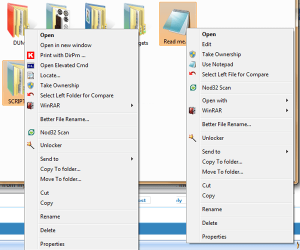
Hi Shawn, is there a way to remove "Create Shortcut" from the right-click context menu on a file/folder?
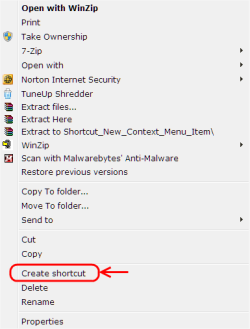
Untitled.png
 

My Computer

Computer type
PC/Desktop
Computer Manufacturer/Model Number
Home Built Desktop By DataTech
OS
Windows 7 Ultimate X64 SP1
CPU
Intel i5-2550K, Differing ~4.4-4.8GHz No built in GPU
Motherboard
ASUS P8Z68-V PRO/GEN3
Memory
16GB G.Skill Sniper 1866MHz @ 2133MHz 2x8GB
Graphics Card(s)
ASUS GTX650TIB-DC2OC-2GD5, (650TI Boost)
Sound Card
Onboard Realtek 5-1
Monitor(s) Displays
Samsung P2570HD
Screen Resolution
1920x1080
Hard Drives
Samsung 840 Pro 256GB SSD for OS, 500GB Seagate Constellation (Enterprise drive) for Data
PSU
Corsair HX650W
Case
Inwin Dragon Rider
Cooling
Hyper 212 EVO w/two Noctua fans, push-pull, @1300 RPM
Keyboard
E-Z Eyes, bright yellow keys with large characters
Mouse
steelseries SENSEI Laser Pro Gaming
Internet Speed
48-51Mbs Mbs down, 11 Mbs up Xfinity Cable
Antivirus
Norton Internet Security 2013
Browser
IE 10, Opera, Pale Moon if needed
Other Info
4 case fans, LG BluRay-RE, ASUS DVD-RW, Mr. Fusion power supply, 1.21 gigawatts.
Editing of the language file should work.
 

Attachments

  • shortcut.png
    shortcut.png
    40.8 KB · Views: 266

My Computer

Computer type
PC/Desktop
OS
Windows 8.1 ; Windows 7 x86 (Dec2008-Jan2013)
Other Info
"The scale icon at the top right of a post or tutorial is how you can give rep to the member."
Thanks Neutron16, how would I edit this? Sorry, I don't speak string, bat, vbs, or what ever that is.:o
 

My Computer

Computer type
PC/Desktop
Computer Manufacturer/Model Number
Home Built Desktop By DataTech
OS
Windows 7 Ultimate X64 SP1
CPU
Intel i5-2550K, Differing ~4.4-4.8GHz No built in GPU
Motherboard
ASUS P8Z68-V PRO/GEN3
Memory
16GB G.Skill Sniper 1866MHz @ 2133MHz 2x8GB
Graphics Card(s)
ASUS GTX650TIB-DC2OC-2GD5, (650TI Boost)
Sound Card
Onboard Realtek 5-1
Monitor(s) Displays
Samsung P2570HD
Screen Resolution
1920x1080
Hard Drives
Samsung 840 Pro 256GB SSD for OS, 500GB Seagate Constellation (Enterprise drive) for Data
PSU
Corsair HX650W
Case
Inwin Dragon Rider
Cooling
Hyper 212 EVO w/two Noctua fans, push-pull, @1300 RPM
Keyboard
E-Z Eyes, bright yellow keys with large characters
Mouse
steelseries SENSEI Laser Pro Gaming
Internet Speed
48-51Mbs Mbs down, 11 Mbs up Xfinity Cable
Antivirus
Norton Internet Security 2013
Browser
IE 10, Opera, Pale Moon if needed
Other Info
4 case fans, LG BluRay-RE, ASUS DVD-RW, Mr. Fusion power supply, 1.21 gigawatts.
Gary , you need Resource Hacker to do it , as Neutron16 suggested .

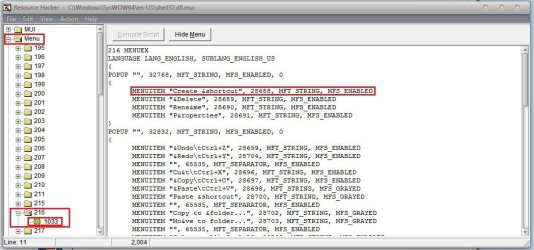
Go it C:\Windows\SysWOW64\en-US\shell32.dll.mui and open it with Resource Hacker . Now , at the left hand pane, the second item is "Menu" . Expand it , and the expand 216 under it . Click on 1033, and delete the string . Save the result on desktop as the same name .
Capture.JPG
Now, make a system restore point or a image backup (for if it troubles later ).

Now , use http://www.sevenforums.com/software/58071-windows-se7en-file-replacer-tool.html to replace it, and then restart your computer.
 

My Computer

Computer type
PC/Desktop
Computer Manufacturer/Model Number
Self Assembled
OS
Microsoft Windows 10 Pro Insider Preview 64-bit
CPU
Intel(R) Core(TM) i3-4130 CPU @ 3.40GHz
Motherboard
Gigabyte Technology Co., Ltd. B85M-D3H
Memory
Corsair Vengence 4GB x2 (8.00GB Dual-Channel DDR3 @ 798MHz)
Graphics Card(s)
2047MB GeForce GTS 450 (ZOTAC International)
Sound Card
Onboard (Realtek High Definition Audio)
Monitor(s) Displays
LG Flatron E2040T
Screen Resolution
1600x900
Hard Drives
Western Digital 1 TB
Seagate 500 GB
PSU
Corsair VS550
Case
Cooler Master K380
Cooling
Cooler Master Seidon 120V Plus
Keyboard
Logitech MK260r
Mouse
Logitech MK260r
Internet Speed
PMPL Broadband
Antivirus
Windows Defender + MBAM
Browser
Firefox
Other Info
Dell Studio 15" Laptop
Sorry about being dense, but what am I saving and replacing?:confused:
 

My Computer

Computer type
PC/Desktop
Computer Manufacturer/Model Number
Home Built Desktop By DataTech
OS
Windows 7 Ultimate X64 SP1
CPU
Intel i5-2550K, Differing ~4.4-4.8GHz No built in GPU
Motherboard
ASUS P8Z68-V PRO/GEN3
Memory
16GB G.Skill Sniper 1866MHz @ 2133MHz 2x8GB
Graphics Card(s)
ASUS GTX650TIB-DC2OC-2GD5, (650TI Boost)
Sound Card
Onboard Realtek 5-1
Monitor(s) Displays
Samsung P2570HD
Screen Resolution
1920x1080
Hard Drives
Samsung 840 Pro 256GB SSD for OS, 500GB Seagate Constellation (Enterprise drive) for Data
PSU
Corsair HX650W
Case
Inwin Dragon Rider
Cooling
Hyper 212 EVO w/two Noctua fans, push-pull, @1300 RPM
Keyboard
E-Z Eyes, bright yellow keys with large characters
Mouse
steelseries SENSEI Laser Pro Gaming
Internet Speed
48-51Mbs Mbs down, 11 Mbs up Xfinity Cable
Antivirus
Norton Internet Security 2013
Browser
IE 10, Opera, Pale Moon if needed
Other Info
4 case fans, LG BluRay-RE, ASUS DVD-RW, Mr. Fusion power supply, 1.21 gigawatts.
I meant that you can modify binary language mui file.

For US English x64 you are editing this MUI language file.
C:\Windows\SysWOW64\en-US\shell32.dll.mui

When you finished editing you need to save it elsewhere, because you can not simply overwrite that file by saving due to restriction in permissions (google "trustedInstaller" for more info). And that tool will help you to replace original file with modified one without playing with permissions yourself.

Also if stable version of ResHacker would not work, use beta version.

And when you modified that file, before saving it, do not forget to click "Compile Script" button on the toolbar (here is a picture of a different file just for illustration purposes).
 

My Computer

Computer type
PC/Desktop
OS
Windows 8.1 ; Windows 7 x86 (Dec2008-Jan2013)
Other Info
"The scale icon at the top right of a post or tutorial is how you can give rep to the member."
  • Like
Reactions: Arc
Sorry about being dense, but what am I saving and replacing?:confused:
Ok , you deleted the string that Neutron16 and me pointed out, then, as Neutron16 suggested, press the "Compile Script" button .

Now look at the menu bar .... the first one is File . Click on it, and select "Save as". Change the save location to Desktop, and name it shell32.dll.mui , and save .

This one (saved on the desktop) is the file that we call modded system file, and you are to replace the original system file with the modded one .
 

My Computer

Computer type
PC/Desktop
Computer Manufacturer/Model Number
Self Assembled
OS
Microsoft Windows 10 Pro Insider Preview 64-bit
CPU
Intel(R) Core(TM) i3-4130 CPU @ 3.40GHz
Motherboard
Gigabyte Technology Co., Ltd. B85M-D3H
Memory
Corsair Vengence 4GB x2 (8.00GB Dual-Channel DDR3 @ 798MHz)
Graphics Card(s)
2047MB GeForce GTS 450 (ZOTAC International)
Sound Card
Onboard (Realtek High Definition Audio)
Monitor(s) Displays
LG Flatron E2040T
Screen Resolution
1600x900
Hard Drives
Western Digital 1 TB
Seagate 500 GB
PSU
Corsair VS550
Case
Cooler Master K380
Cooling
Cooler Master Seidon 120V Plus
Keyboard
Logitech MK260r
Mouse
Logitech MK260r
Internet Speed
PMPL Broadband
Antivirus
Windows Defender + MBAM
Browser
Firefox
Other Info
Dell Studio 15" Laptop
OK, I've done as you said and created the modded file, replaced the original and the Create shortcut remains. I have use the stable and Beta Reshack software.
 

My Computer

Computer type
PC/Desktop
Computer Manufacturer/Model Number
Home Built Desktop By DataTech
OS
Windows 7 Ultimate X64 SP1
CPU
Intel i5-2550K, Differing ~4.4-4.8GHz No built in GPU
Motherboard
ASUS P8Z68-V PRO/GEN3
Memory
16GB G.Skill Sniper 1866MHz @ 2133MHz 2x8GB
Graphics Card(s)
ASUS GTX650TIB-DC2OC-2GD5, (650TI Boost)
Sound Card
Onboard Realtek 5-1
Monitor(s) Displays
Samsung P2570HD
Screen Resolution
1920x1080
Hard Drives
Samsung 840 Pro 256GB SSD for OS, 500GB Seagate Constellation (Enterprise drive) for Data
PSU
Corsair HX650W
Case
Inwin Dragon Rider
Cooling
Hyper 212 EVO w/two Noctua fans, push-pull, @1300 RPM
Keyboard
E-Z Eyes, bright yellow keys with large characters
Mouse
steelseries SENSEI Laser Pro Gaming
Internet Speed
48-51Mbs Mbs down, 11 Mbs up Xfinity Cable
Antivirus
Norton Internet Security 2013
Browser
IE 10, Opera, Pale Moon if needed
Other Info
4 case fans, LG BluRay-RE, ASUS DVD-RW, Mr. Fusion power supply, 1.21 gigawatts.
OK, I've done as you said and created the modded file, replaced the original and the Create shortcut remains. I have use the stable and Beta Reshack software.
That is common if your system is not fresh install. If you have updated to SP1 from RTM you should have at least two other copies of that file in the subfolders of the folder
C:\Windows\winsxs\
 

My Computer

Computer type
PC/Desktop
OS
Windows 8.1 ; Windows 7 x86 (Dec2008-Jan2013)
Other Info
"The scale icon at the top right of a post or tutorial is how you can give rep to the member."
Grrreat. there are 10,298 subfolders in there.:confused:
 

My Computer

Computer type
PC/Desktop
Computer Manufacturer/Model Number
Home Built Desktop By DataTech
OS
Windows 7 Ultimate X64 SP1
CPU
Intel i5-2550K, Differing ~4.4-4.8GHz No built in GPU
Motherboard
ASUS P8Z68-V PRO/GEN3
Memory
16GB G.Skill Sniper 1866MHz @ 2133MHz 2x8GB
Graphics Card(s)
ASUS GTX650TIB-DC2OC-2GD5, (650TI Boost)
Sound Card
Onboard Realtek 5-1
Monitor(s) Displays
Samsung P2570HD
Screen Resolution
1920x1080
Hard Drives
Samsung 840 Pro 256GB SSD for OS, 500GB Seagate Constellation (Enterprise drive) for Data
PSU
Corsair HX650W
Case
Inwin Dragon Rider
Cooling
Hyper 212 EVO w/two Noctua fans, push-pull, @1300 RPM
Keyboard
E-Z Eyes, bright yellow keys with large characters
Mouse
steelseries SENSEI Laser Pro Gaming
Internet Speed
48-51Mbs Mbs down, 11 Mbs up Xfinity Cable
Antivirus
Norton Internet Security 2013
Browser
IE 10, Opera, Pale Moon if needed
Other Info
4 case fans, LG BluRay-RE, ASUS DVD-RW, Mr. Fusion power supply, 1.21 gigawatts.

My Computer

Computer type
PC/Desktop
OS
Windows 10 Home x64
CPU
INTEL Core i5-750 Quad-Core 3.37GHz
Motherboard
ASUS P7P55D
Memory
HyperX Fury Black Series 8GB (2 x 4GB) 1866Mhz
Graphics Card(s)
EVGA GeForce GTX 750 Superclocked 1GB 128-Bit GDDR5
Monitor(s) Displays
LG 32MA68HY 32" IPS
Screen Resolution
1920 x 1080
Hard Drives
Samsung 840 Evo 120GB, SEAGATE 500GB Barracuda® 7200.12, SATA 3 Gb/s, 7200 RPM, 16MB cache
PSU
ANTEC TruePower New TP-550, 80 PLUS, 550W
Case
ANTEC Three Hundred Illusion
Cooling
COOLER MASTER Hyper 212 Plus, 4 x 120mm 1 x 140mm Noctua's
Internet Speed
85 + Mbps
Antivirus
Avast
Browser
Vivaldi

My Computer

Computer type
PC/Desktop
OS
Windows 8.1 ; Windows 7 x86 (Dec2008-Jan2013)
Other Info
"The scale icon at the top right of a post or tutorial is how you can give rep to the member."
Looks like I started a thread on this at about the same time of this one. Arc referred me to this one. Using Everything I found 6 mui files on my c drive.
1. C:\Windows\System32\en-US\shell32.dll.mui
2. C:\Windows\SysWOW64\en-US\shell32.dll.mui
3. C:\Windows\winsxs\x86_microsoft-windows-shell32.resources_31bf3856ad364e35_6.1.7600.16385_en-us_59801cbd3a2f3965\shell32.dll.mui
4. C:\Windows\winsxs\x86_microsoft-windows-shell32.resources_31bf3856ad364e35_6.1.7601.17514_en-us_5bb13085371dbcff\shell32.dll.mui
5. C:\Windows\winsxs\amd64_microsoft-windows-shell32.resources_31bf3856ad364e35_6.1.7600.16385_en-us_b59eb840f28caa9b\shell32.dll.mui
6. C:\Windows\winsxs\amd64_microsoft-windows-shell32.resources_31bf3856ad364e35_6.1.7601.17514_en-us_b7cfcc08ef7b2e35\shell32.dll.mui

Using beta ResHacker (the first download would not open two of the mui's) & Se7en File Replacer, I removed the "create shortcut" from all 6, rebooted and still have the same issue. Restored and changed all 6 manually as I kind of like to see what's happening as it happens. Still did not fix the issue so I can only assume that there is another file or more that has this locked in. This thing is really a bugger! Been playing with it for about two weeks now! Sooner or later, it will happen!
 

My Computer

Computer type
PC/Desktop
Computer Manufacturer/Model Number
Computer by ME
OS
Windows 7 Pro 64 bit & Windows Pro 64 bit
CPU
Intel i7-2600k 3.06 GHz
Motherboard
Gigabyte H67A-UD3H-B3
Memory
16 GB GSkill F3-10666CL7Q
Graphics Card(s)
EVGA GeForce GT 1030
Sound Card
onboard for now
Monitor(s) Displays
Dual AOC 2770VH1
Screen Resolution
1920x1080
Hard Drives
3 - Samsung 850 Pro Series 256 GB SSD
2 - Samsung 840 Pro Series 128 GB SSD
2 - Muskin Chronos Deluxe 120 GB SSD
PSU
Antec EarthWatts EA750
Case
Antec Sonata Elite
Cooling
120 mm Antec System Fan & 120 Antec rear exhaust fan
Keyboard
Keys U See
Mouse
Logitech Trackball T-BC21
Internet Speed
18 mbps down / 4 mbps up
Antivirus
MSE
Browser
Firefox
Other Info
Icy Dock 4 bay x 2.5 ssd to 5.25 exterior hot swap
4-LaCie Rugged USB3 Thunderbolt Series 120GB SSD
2-Mushkin Enhanced Ventura Pro 32GB USB 3.0 Flash Drive
3-Sandisk Extreme Pro 128gb Flash Drive
Netgear Nighthawk X6 AC 3200 R8000 - WZR-1 D1800H
US Robotics USr5610C modem
Open your "Run" window, or an elevated command prompt. Type in mcbuilder. When it finishes running (if you are using the run window the opened command prompt shuts itself). Do a reboot.

Create Shortcut should now be gone.

Be aware on 64bit systems you will have two shell32.dll.mui's.

One in C:\Windows\System32\en-US
Other in C:\Windows\SysWOW64\en-US

They're slightly different to each other so you'll need to modify both.

The Winsxs are default backups. Personally I don't touch them. (I'm not saying anyone who does is wrong, I just don't).
 

My Computer

OS
windows 7 ultimate
Mcbuilder did not resolve the issue.
 

My Computer

Computer type
PC/Desktop
Computer Manufacturer/Model Number
Computer by ME
OS
Windows 7 Pro 64 bit & Windows Pro 64 bit
CPU
Intel i7-2600k 3.06 GHz
Motherboard
Gigabyte H67A-UD3H-B3
Memory
16 GB GSkill F3-10666CL7Q
Graphics Card(s)
EVGA GeForce GT 1030
Sound Card
onboard for now
Monitor(s) Displays
Dual AOC 2770VH1
Screen Resolution
1920x1080
Hard Drives
3 - Samsung 850 Pro Series 256 GB SSD
2 - Samsung 840 Pro Series 128 GB SSD
2 - Muskin Chronos Deluxe 120 GB SSD
PSU
Antec EarthWatts EA750
Case
Antec Sonata Elite
Cooling
120 mm Antec System Fan & 120 Antec rear exhaust fan
Keyboard
Keys U See
Mouse
Logitech Trackball T-BC21
Internet Speed
18 mbps down / 4 mbps up
Antivirus
MSE
Browser
Firefox
Other Info
Icy Dock 4 bay x 2.5 ssd to 5.25 exterior hot swap
4-LaCie Rugged USB3 Thunderbolt Series 120GB SSD
2-Mushkin Enhanced Ventura Pro 32GB USB 3.0 Flash Drive
3-Sandisk Extreme Pro 128gb Flash Drive
Netgear Nighthawk X6 AC 3200 R8000 - WZR-1 D1800H
US Robotics USr5610C modem
Try the entries in Menu 210 of your shell32.dll.mui file(s). Mine Reads:

210 MENUEX
LANGUAGE LANG_ENGLISH, SUBLANG_ENGLISH_US
{
POPUP "", 0, MFT_STRING, MFS_ENABLED, 0
{
MENUITEM "Cu&t", 24, MFT_STRING, MFS_ENABLED
MENUITEM "&Copy", 25, MFT_STRING, MFS_ENABLED
MENUITEM "&Paste", 26, MFT_STRING, MFS_ENABLED
MENUITEM "", 65535, MFT_SEPARATOR, MFS_ENABLED
MENUITEM "Rena&me", 18, MFT_STRING, MFS_ENABLED
MENUITEM "", 65535, MFT_SEPARATOR, MFS_ENABLED
MENUITEM "Create &Shortcut", 16, MFT_STRING, MFS_ENABLED
MENUITEM "", 65535, MFT_SEPARATOR, MFS_ENABLED
MENUITEM "&Delete", 17, MFT_STRING, MFS_ENABLED
MENUITEM "", 65535, MFT_SEPARATOR, MFS_ENABLED
}


Which matches / is the right order reading down my context menu(s)
 

My Computer

OS
windows 7 ultimate
OK, to try it out. I changed the entries in Menu 210 of my shell32.dll.mui files in C:\Windows\System32\en-US and C:\Windows\SysWOW64\en-US from:

210 MENUEX
LANGUAGE LANG_ENGLISH, SUBLANG_ENGLISH_US
{
POPUP "", 0, MFT_STRING, MFS_ENABLED, 0
{
MENUITEM "Cu&t", 24, MFT_STRING, MFS_ENABLED
MENUITEM "&Copy", 25, MFT_STRING, MFS_ENABLED
MENUITEM "&Paste", 26, MFT_STRING, MFS_ENABLED
MENUITEM "", 65535, MFT_SEPARATOR, MFS_ENABLED
MENUITEM "Rena&me", 18, MFT_STRING, MFS_ENABLED
MENUITEM "", 65535, MFT_SEPARATOR, MFS_ENABLED
MENUITEM "Create &Shortcut", 16, MFT_STRING, MFS_ENABLED
MENUITEM "", 65535, MFT_SEPARATOR, MFS_ENABLED
MENUITEM "&Delete", 17, MFT_STRING, MFS_ENABLED
MENUITEM "", 65535, MFT_SEPARATOR, MFS_ENABLED
}


To:
210 MENUEX
LANGUAGE LANG_ENGLISH, SUBLANG_ENGLISH_US
{
POPUP "", 0, MFT_STRING, MFS_ENABLED, 0
{
MENUITEM "Cu&t", 24, MFT_STRING, MFS_ENABLED
MENUITEM "&Copy", 25, MFT_STRING, MFS_ENABLED
MENUITEM "&Paste", 26, MFT_STRING, MFS_ENABLED
MENUITEM "", 65535, MFT_SEPARATOR, MFS_ENABLED
MENUITEM "Rena&me", 18, MFT_STRING, MFS_ENABLED
MENUITEM "", 65535, MFT_SEPARATOR, MFS_ENABLED
MENUITEM "&Delete", 17, MFT_STRING, MFS_ENABLED
MENUITEM "", 65535, MFT_SEPARATOR, MFS_ENABLED
}


Swapped them out and rebooted. No difference. Ran mcbuilder and re-booted and create shortcut has gone from my folder and file context menus.
 

Attachments

  • No Shortcut.png
    No Shortcut.png
    121.3 KB · Views: 81
Last edited:

My Computer

OS
windows 7 ultimate
Great job :thumbsup:
I hope now anaron and Britton30 will be able to do it :p
 

My Computer

Computer type
PC/Desktop
Computer Manufacturer/Model Number
Self Assembled
OS
Microsoft Windows 10 Pro Insider Preview 64-bit
CPU
Intel(R) Core(TM) i3-4130 CPU @ 3.40GHz
Motherboard
Gigabyte Technology Co., Ltd. B85M-D3H
Memory
Corsair Vengence 4GB x2 (8.00GB Dual-Channel DDR3 @ 798MHz)
Graphics Card(s)
2047MB GeForce GTS 450 (ZOTAC International)
Sound Card
Onboard (Realtek High Definition Audio)
Monitor(s) Displays
LG Flatron E2040T
Screen Resolution
1600x900
Hard Drives
Western Digital 1 TB
Seagate 500 GB
PSU
Corsair VS550
Case
Cooler Master K380
Cooling
Cooler Master Seidon 120V Plus
Keyboard
Logitech MK260r
Mouse
Logitech MK260r
Internet Speed
PMPL Broadband
Antivirus
Windows Defender + MBAM
Browser
Firefox
Other Info
Dell Studio 15" Laptop
Finally back to the computer, restored and started over. Worked like a dream with the 210 menu! Amazing something so simple took so long for me to get there. Thanks guys! Not gotta get the "open using Resource Hacker" off some of my program icons. Always something to play with.
 

My Computer

Computer type
PC/Desktop
Computer Manufacturer/Model Number
Computer by ME
OS
Windows 7 Pro 64 bit & Windows Pro 64 bit
CPU
Intel i7-2600k 3.06 GHz
Motherboard
Gigabyte H67A-UD3H-B3
Memory
16 GB GSkill F3-10666CL7Q
Graphics Card(s)
EVGA GeForce GT 1030
Sound Card
onboard for now
Monitor(s) Displays
Dual AOC 2770VH1
Screen Resolution
1920x1080
Hard Drives
3 - Samsung 850 Pro Series 256 GB SSD
2 - Samsung 840 Pro Series 128 GB SSD
2 - Muskin Chronos Deluxe 120 GB SSD
PSU
Antec EarthWatts EA750
Case
Antec Sonata Elite
Cooling
120 mm Antec System Fan & 120 Antec rear exhaust fan
Keyboard
Keys U See
Mouse
Logitech Trackball T-BC21
Internet Speed
18 mbps down / 4 mbps up
Antivirus
MSE
Browser
Firefox
Other Info
Icy Dock 4 bay x 2.5 ssd to 5.25 exterior hot swap
4-LaCie Rugged USB3 Thunderbolt Series 120GB SSD
2-Mushkin Enhanced Ventura Pro 32GB USB 3.0 Flash Drive
3-Sandisk Extreme Pro 128gb Flash Drive
Netgear Nighthawk X6 AC 3200 R8000 - WZR-1 D1800H
US Robotics USr5610C modem
Back
Top