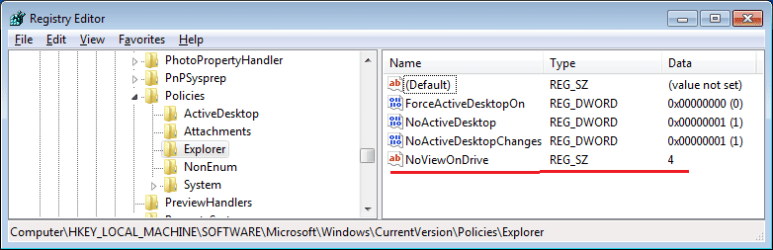
Shortcut > Context Menu > Properties > disable "Open File Location"
Hey Fellow Techies,
I'm having an issue with a security flaw in Server 2008 R2, it should be a similar kernal as 7 so I'm hoping we can come up with an answer.
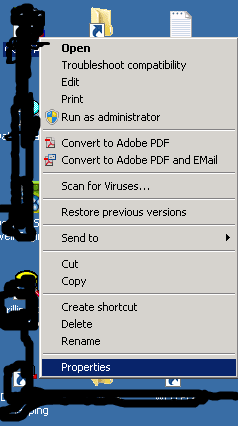
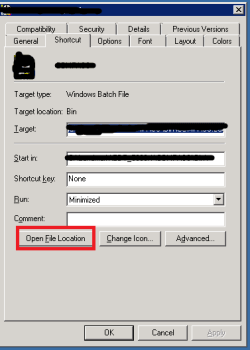
L.S.S. - When you right click on a shortcut and go to the properties box there is an option to "open file location" I want to either remove the button or disable it.
I have removed the "Open folder location" link from the context menu itself. I do not want to disable the properties tab completely due to users on occasion need file or shortcut information. This seems to be a big flaw in windows and the last way for users to easily access the C: drive, which I DO NOT want.
Thanks in advanced!!
Cameron C
I.T. Systems Admin
Hey Fellow Techies,
I'm having an issue with a security flaw in Server 2008 R2, it should be a similar kernal as 7 so I'm hoping we can come up with an answer.
L.S.S. - When you right click on a shortcut and go to the properties box there is an option to "open file location" I want to either remove the button or disable it.
I have removed the "Open folder location" link from the context menu itself. I do not want to disable the properties tab completely due to users on occasion need file or shortcut information. This seems to be a big flaw in windows and the last way for users to easily access the C: drive, which I DO NOT want.
Thanks in advanced!!
Cameron C
I.T. Systems Admin
Attachments
My Computer
- Computer type
- PC/Desktop
- Computer Manufacturer/Model Number
- HP Multiple desktops and laptops, proliant server
- OS
- Win 7 x64 Pro, XP x86 & x64, Windows server 2012, 2008 R2 Std.