Remove date from system tray

pandemic

New member
Local time
3:15 PM
Messages
2
I don't want to see the date under the clock in the system tray (lower right corner of the screen). Is it possible to remove or hide the date?
 

My Computer

Computer Manufacturer/Model Number
( : Homegrown :)
OS
Microsoft Windows 7 Enterprise x64
CPU
AMD Phenom II X4 940 Black Edition
Motherboard
GIGABYTE GA-M52L-S3P
Memory
Corsair Twin2X 8500C5 2048 MB (6 GB total)
Graphics Card(s)
GIGABYTE , ATI Radeon™ HD 4350, 512 MB
Sound Card
Trust 5.1-Surround USB 2.0 External Sound Card
Monitor(s) Displays
Samsung LE40A686 (LCD-TV)
Screen Resolution
1360 x 768
Hard Drives
Samsung Spinpoint F1 750 GB (system drive)
Samsung 1 TB (Storage)
PSU
SWEEX PSU ATX 650W BIG FAN
Case
no
Cooling
open cabinet
Keyboard
Logitech Wave Cordless
Mouse
Microsoft Wireless Laser Mouse 5000
Internet Speed
20000 kbps / 1000 kbps
Right click taskbar... Properties... check Use Small Icons.
 

My Computer

OS
Windows 7 Pro RTM
CPU
Intel Core i7-975E
Motherboard
Asus P6T Deluxe V2
Memory
12 GB Muskin Redline 998691 DDR3 1600
Graphics Card(s)
XFX GeForce 8800GTX XXX Edition
Sound Card
HT Omega Claro+
Monitor(s) Displays
Dell 1907FP
Screen Resolution
1280 x 1024
Hard Drives
Corsair P128 (CMFSSD-128GBG2D) SSD for OS and Programs
Seagate Barracuda 7200.10 HDD for user files
Seagate Barracuda 7200.9 HDD for games
PSU
Antec TruePower Quattro TPQ-1000
Cooling
Prolimatech Megahalem with dual 120 x 38mm Silenx fans
Hmm asfar as I know there isnt a way unless you use small icons, I'll keep searching though!

Thanks,
Kukag
 

My Computer

Computer Manufacturer/Model Number
Custom
OS
Windows 7
CPU
AMD Phenom II X4 940 3.0 Stock
Motherboard
Gigabyte GA-MA78GM-S2H
Memory
G.SKILL DDR2 800 PI Black 4GB+Corsair XMS2 Xtrm Gaming 2GB
Graphics Card(s)
ASUS EN8800GT TOP (Fact OC)
Monitor(s) Displays
Optiquest 20" Flatscreen
Screen Resolution
1680x1050
Hard Drives
Seagate 3.5' 7200RPM 750GB HDD
PSU
Antec NeoHE 550W
Cooling
Stock AMD Phenom HSF
Keyboard
Logitech G15
Internet Speed
Charter HighSpeed 10 Down / 5 Up
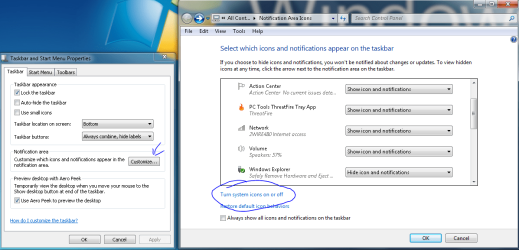
If you dint want the clock or date...

Right click taskbar > Properties
In the notification area (section) click the customize button
In the Notification dialog click on "Turn system icons on or off"
For the Clock+date click select Off in teh dropdown menu for Clock
Click OK
 

Attachments

  • Remove Date.PNG
    Remove Date.PNG
    51.7 KB · Views: 337
  • Remove Date2.PNG
    Remove Date2.PNG
    32.2 KB · Views: 307
Last edited:

My Computer

Computer Manufacturer/Model Number
Dell Dimension E520
OS
Windows 7 Ultimate (x86)
CPU
Intel 2.20 Dual Core
Memory
4 GB
Graphics Card(s)
nVidia 9400 GT (512 MB)
Sound Card
Sigmatel C Major HD
Monitor(s) Displays
22" Samsung 2232 bw
Screen Resolution
1680x1050
Mouse
Microsoft Arc
Other Info
Wacom Graphire 4 (6x8) Tablet
I want the clock, but no date. It would have been extra nice if i could remove the date and then use the freed up space to have a bigger clock.
 
Last edited:

My Computer

Computer Manufacturer/Model Number
( : Homegrown :)
OS
Microsoft Windows 7 Enterprise x64
CPU
AMD Phenom II X4 940 Black Edition
Motherboard
GIGABYTE GA-M52L-S3P
Memory
Corsair Twin2X 8500C5 2048 MB (6 GB total)
Graphics Card(s)
GIGABYTE , ATI Radeon™ HD 4350, 512 MB
Sound Card
Trust 5.1-Surround USB 2.0 External Sound Card
Monitor(s) Displays
Samsung LE40A686 (LCD-TV)
Screen Resolution
1360 x 768
Hard Drives
Samsung Spinpoint F1 750 GB (system drive)
Samsung 1 TB (Storage)
PSU
SWEEX PSU ATX 650W BIG FAN
Case
no
Cooling
open cabinet
Keyboard
Logitech Wave Cordless
Mouse
Microsoft Wireless Laser Mouse 5000
Internet Speed
20000 kbps / 1000 kbps
Back
Top