
You are using an out of date browser. It may not display this or other websites correctly.
You should upgrade or use an alternative browser.
You should upgrade or use an alternative browser.
Remove 'Include in Library' in context menu
- Thread starter mixfire
- Start date

- Local time
- 3:38 PM
- Messages
- 16,784

My Computers
System One System Two
-
- Computer type
- PC/Desktop
- OS
- 7 X64
- CPU
- i5 8400
- Motherboard
- gigabyte b365m ds3h
- Memory
- 2x8gb 3200mhz
- Hard Drives
- various
- PSU
- pure power 11 400w cm
- Case
- Coolermaster
- Cooling
- cryorig m9i
-
- Computer type
- PC/Desktop
- OS
- 7x64
- CPU
- g5400
- Motherboard
- ga b365m ds3h
- Memory
- 8gb ddr4 2400
- PSU
- xfx pro 450w
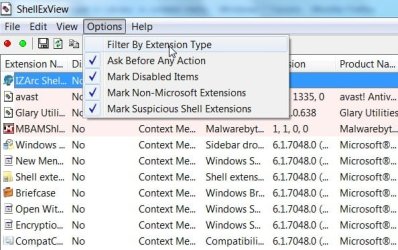
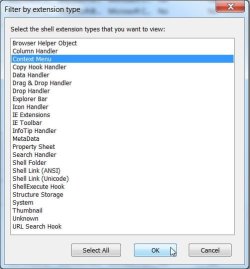
I've tried the same utility and I've disabled the include in library context entry from shellexview, but the entry is still there in explorer. Try it for yourself, temporarily disable it and right click on a folder, see if it's still there.
My Computer
- OS
- Windows 7
- Local time
- 3:38 PM
- Messages
- 16,784
Hi,
This will do it - unzip and dble click , or rt click and merge the REMOVE reg file. The ADD reg file is if you ever want it back.
View attachment REMOVELIBCONTMEN.zip
View attachment ADDLIBCONTMEN.zip

This will do it - unzip and dble click , or rt click and merge the REMOVE reg file. The ADD reg file is if you ever want it back.
View attachment REMOVELIBCONTMEN.zip
View attachment ADDLIBCONTMEN.zip
My Computers
System One System Two
-
- Computer type
- PC/Desktop
- OS
- 7 X64
- CPU
- i5 8400
- Motherboard
- gigabyte b365m ds3h
- Memory
- 2x8gb 3200mhz
- Hard Drives
- various
- PSU
- pure power 11 400w cm
- Case
- Coolermaster
- Cooling
- cryorig m9i
-
- Computer type
- PC/Desktop
- OS
- 7x64
- CPU
- g5400
- Motherboard
- ga b365m ds3h
- Memory
- 8gb ddr4 2400
- PSU
- xfx pro 450w
- Local time
- 3:38 PM
- Messages
- 16,784
I will make a couple of .reg files - 5 mins
My Computers
System One System Two
-
- Computer type
- PC/Desktop
- OS
- 7 X64
- CPU
- i5 8400
- Motherboard
- gigabyte b365m ds3h
- Memory
- 2x8gb 3200mhz
- Hard Drives
- various
- PSU
- pure power 11 400w cm
- Case
- Coolermaster
- Cooling
- cryorig m9i
-
- Computer type
- PC/Desktop
- OS
- 7x64
- CPU
- g5400
- Motherboard
- ga b365m ds3h
- Memory
- 8gb ddr4 2400
- PSU
- xfx pro 450w
- Local time
- 3:38 PM
- Messages
- 16,784
My Computers
System One System Two
-
- Computer type
- PC/Desktop
- OS
- 7 X64
- CPU
- i5 8400
- Motherboard
- gigabyte b365m ds3h
- Memory
- 2x8gb 3200mhz
- Hard Drives
- various
- PSU
- pure power 11 400w cm
- Case
- Coolermaster
- Cooling
- cryorig m9i
-
- Computer type
- PC/Desktop
- OS
- 7x64
- CPU
- g5400
- Motherboard
- ga b365m ds3h
- Memory
- 8gb ddr4 2400
- PSU
- xfx pro 450w
Great job SIW2. I got one more for you. I want to remove the windows media player context menus, the one that says 'Add to windows media player list' and so on. I found a website which lets you unregister the windows shell extensions, but there's no effect. I also found a site with some reg keys to remove, but I don't think it's for the version of media player that ships with windows 7. Have a reg file for these too?
My Computer
- OS
- Windows 7
- Local time
- 3:38 PM
- Messages
- 16,784
I will have a look
My Computers
System One System Two
-
- Computer type
- PC/Desktop
- OS
- 7 X64
- CPU
- i5 8400
- Motherboard
- gigabyte b365m ds3h
- Memory
- 2x8gb 3200mhz
- Hard Drives
- various
- PSU
- pure power 11 400w cm
- Case
- Coolermaster
- Cooling
- cryorig m9i
-
- Computer type
- PC/Desktop
- OS
- 7x64
- CPU
- g5400
- Motherboard
- ga b365m ds3h
- Memory
- 8gb ddr4 2400
- PSU
- xfx pro 450w
- Local time
- 3:38 PM
- Messages
- 16,784
The simplest way there is to use the Context Menu module in the free Glaryutilities
Glary Utilities
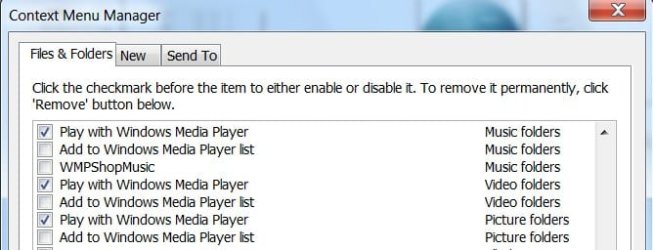
You will need to run Glary as Admin - even better, rt click the Integrator.exe file in Glary Utilities folder in Program files(x86).
Click Properties>Compatibility tab>Tick Run as Admin box
>Apply>OK.
Hope it helps
SIW2
Glary Utilities
You will need to run Glary as Admin - even better, rt click the Integrator.exe file in Glary Utilities folder in Program files(x86).
Click Properties>Compatibility tab>Tick Run as Admin box
>Apply>OK.
Hope it helps
SIW2
My Computers
System One System Two
-
- Computer type
- PC/Desktop
- OS
- 7 X64
- CPU
- i5 8400
- Motherboard
- gigabyte b365m ds3h
- Memory
- 2x8gb 3200mhz
- Hard Drives
- various
- PSU
- pure power 11 400w cm
- Case
- Coolermaster
- Cooling
- cryorig m9i
-
- Computer type
- PC/Desktop
- OS
- 7x64
- CPU
- g5400
- Motherboard
- ga b365m ds3h
- Memory
- 8gb ddr4 2400
- PSU
- xfx pro 450w
I tried that, but it still has no affect. I don't know why it's not working, perhaps windows media player is reregistering it everytime it launches? There were four entries for media player, I removed them all and no luck. Did you try it on your end? Same results?
My Computer
- OS
- Windows 7
- Local time
- 3:38 PM
- Messages
- 16,784
Hi ,
Works for me.
Did you tick Run as Admin under Properties>Compatibility on the Integrator.exe ?
Works for me.
Did you tick Run as Admin under Properties>Compatibility on the Integrator.exe ?
My Computers
System One System Two
-
- Computer type
- PC/Desktop
- OS
- 7 X64
- CPU
- i5 8400
- Motherboard
- gigabyte b365m ds3h
- Memory
- 2x8gb 3200mhz
- Hard Drives
- various
- PSU
- pure power 11 400w cm
- Case
- Coolermaster
- Cooling
- cryorig m9i
-
- Computer type
- PC/Desktop
- OS
- 7x64
- CPU
- g5400
- Motherboard
- ga b365m ds3h
- Memory
- 8gb ddr4 2400
- PSU
- xfx pro 450w
- Local time
- 3:38 PM
- Messages
- 16,784
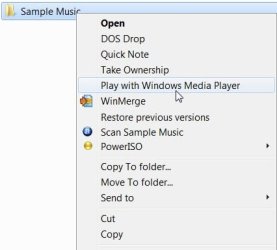
Don't know why it isn't working for you . I left Play with.. and removed the others
My Computers
System One System Two
-
- Computer type
- PC/Desktop
- OS
- 7 X64
- CPU
- i5 8400
- Motherboard
- gigabyte b365m ds3h
- Memory
- 2x8gb 3200mhz
- Hard Drives
- various
- PSU
- pure power 11 400w cm
- Case
- Coolermaster
- Cooling
- cryorig m9i
-
- Computer type
- PC/Desktop
- OS
- 7x64
- CPU
- g5400
- Motherboard
- ga b365m ds3h
- Memory
- 8gb ddr4 2400
- PSU
- xfx pro 450w
I do not know either. I've read every web page I can about it and nothing works. I can uncheck the entry but it never gets updated. I try logging off/on and restarting and the change is never reflected. I've also tried many other utilities and they don't work either! This is so frustrating! I just wanna remove this damn entry.
My Computer
- OS
- Windows 7
I've used this program Creative Element Power Tools to let you see the file types and their associated context menu entries. Each time I open .avi and remove the 'Add to Windows Media Player list' it gets immediately reentered when I refresh the program window. So even though I removed it with all the other context editing programs something is still putting it back instantly.
My Computer
- OS
- Windows 7
Similar threads
- Replies
- 4
- Views
- 28K

- Replies
- 0
- Views
- 43K
- Replies
- 35
- Views
- 33K
