Remove Picture

jhansen965

New member
Member
VIP
Local time
10:25 AM
Messages
117
Hello,
I know many people have posted this before but I have not found a clear answer. I would like to know if there is a way to remove both the frame and picture in the start menu. And, I do not want to use a third-party program. Pleassssse help!:D:D
 

My Computer

Computer Manufacturer/Model Number
HP
OS
Windows 7 profesional
Memory
4 Gigs
Monitor(s) Displays
Built in display
Hard Drives
1 280 gig
Case
N/A
Keyboard
Built in
Mouse
Built in
Internet Speed
100 mbps

My Computer

Computer type
PC/Desktop
Computer Manufacturer/Model Number
Self Built
OS
Win 10 Pro x64
CPU
Intel I5-2500K @3.3GHz
Motherboard
Asrock P67 Extreme4
Memory
16GB G.Skill Ripjaws X (4x4GB)
Graphics Card(s)
EVGA GeForce 750 Ti SC 2GB
Sound Card
ASUS Xonar DG 5.1 Channels 24-bit 96KHz PCI Interface Sound
Monitor(s) Displays
auria eq2367
Screen Resolution
1920 x 1080
Hard Drives
250GB Samsung 850 EVO SSD
1TB WD Blue
1TB Hitachi
PSU
SeaSonic X 650W 80 Plus Gold
Case
Corsair Obsidian 750D
Cooling
Corsair H60, Three 140mm case fans
Keyboard
Logitech Wireless Keyboard K520
Mouse
Logitech Wireless Mouse M310
Internet Speed
Wave Broadband ~ 100 dn 5 up
Antivirus
Windows Defender, Malwarebytes Premium
Browser
Edge, IE11, Chrome
Other Info
Laptop specs: HP g7-1365dx /
CPU: AMD A6-3420M APU with Radeon(tm) HD Graphics /
RAM: Crucial 8Gb (2x4Gb) /
SSD: Crucial M4-CT128M4SSD2 ATA Device/ FW 000F /
GFX: AMD Radeon HD 6520G /
OS: Windows 10 Pro x64
I imagine learning to remove the pic and frame manually will help someone learn a little more about how Windows works. I myself am curious how the start menu pic is stored/used/displayed/run.
 

My Computer

Computer Manufacturer/Model Number
Gateway GT5268E
OS
Windows 7 Professional 64bit SP1
CPU
Intel Core2 Duo E7500
Motherboard
OEM
Memory
4GB 800MHz
Graphics Card(s)
Nvidia Geforce 8600GTS
Sound Card
Onboard HD Audio with S/PDIF optical output
Monitor(s) Displays
Vizio M220VA (22" LCD TV)
Screen Resolution
1920*1080
Hard Drives
250GB SATA
1TB SATA
1TB USB
1TB USB
PSU
285 watts
Case
OEM
Cooling
OEM
Keyboard
OEM
Mouse
Logitech M-BZ96C
Internet Speed
Depends on amount of ISP throttling at any given moment.
Other Info
APC XS1300 (shows my computer's average power draw is 145-155w); same UPS for second PC, but average power draw is only around 65-80w.

Second PC: HP SR5110NX, Win7 Pro 64, AMD Athon 3800+, 4GB 533MHz RAM, Onboard graphics, 17" CRT display @1280*1024, 200w PSU, 250GB boot hdd, 640GB USB HDD.
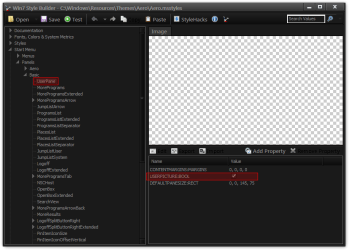
With Windows Style Builder Ave's Windows7 Style Builder
You can uncheck the USERPICTURE:BOOL at
Start Menu > Panels > Basic > UserPane
Win7 Style Builder - CWindowsResourcesThemesAeroAero.msstyles.png
Jerry

Edit: Look at this http://www.sevenforums.com/customization/29037-remove-user-picture-start-menu.html

Or
If you are using the default aero theme I have WSB & can change that for you.
If you are using a custom theme you will need to ask the theme maker. It's not cool to change someone else work.
&
You will need to do 1 of these 2 ways of Enabling custom themes for it to work.
http://www.sevenforums.com/tutorials/34579-enabling-custom-themes-windows-7-a.html
Or
http://www.sevenforums.com/tutorials/28377-theme-how-apply-custom-themes.html?filter
Jerry
 
Last edited:

My Computer

Computer type
Laptop
Computer Manufacturer/Model Number
Sager NP9170
OS
Win 7 Pro x64 / Win 10 Pro
CPU
Intel(R) Core(TM) i7-3630QM CPU @ 2.40GHz
Motherboard
CLEVO P170EM
Memory
12 GB
Graphics Card(s)
(1) Intel(R) HD Graphics 4000 (2) NVIDIA GeForce GTX 675M
Sound Card
(1) Realtek High Definition Audio (2) Intel(R) Display Aud
Monitor(s) Displays
17.3
Screen Resolution
1920x1080
Hard Drives
(1) Samsung 860 EVO 500GB(OS) (1) Samsung 860 EVO 500GB(Data)
Keyboard
Backlite
Antivirus
MSE, Malwarebytes Pro
Browser
Firefox
Other Info
DESKTOP: Custom-built.
OS: Win 10 Pro x64.
CASE: Rosewill R5.
CPU: Intel I5 4670K CPU @ 3.40GHz.
CPU COOLER: Cool Master Hyper 212 EVO.
MOTHERBOARD: Asus Z87-A.
MEMORY: Kingston HyperX 2x4 GB.
GPU: Nvidia Geforce 650 TI.
PSU: Corsair TX750.
DRIVES: (1) Samsung 840 120 GB SSD (2) Western Digital blue 500 GB 7200 RPM.
Thank you all I will try your suggestions.
 

My Computer

Computer Manufacturer/Model Number
HP
OS
Windows 7 profesional
Memory
4 Gigs
Monitor(s) Displays
Built in display
Hard Drives
1 280 gig
Case
N/A
Keyboard
Built in
Mouse
Built in
Internet Speed
100 mbps
Back
Top