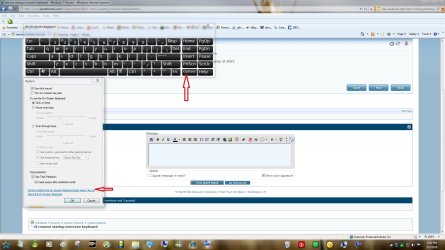
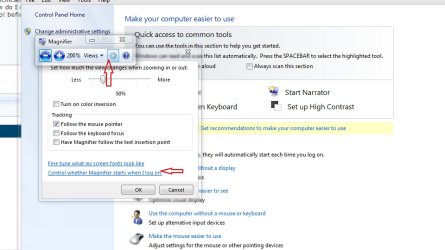
remove startup onscreen keyboard

meemoe

New member
Local time
11:35 PM
Messages
1
Hi, when i startup, too many pop ups appear all over the screen. How do I switch them off?!?!
I'm working on it.
Specifically, I working on removing the windows 7 magnifer and onscreen keyboard, which popup at start.
How do I switch them off?
Help! before my computer breaks due to too many startup pop ups!
 

My Computer

OS
windows 7

Attachments

  • osk.jpg
    osk.jpg
    393.7 KB · Views: 4,428
  • magnifier.jpg
    magnifier.jpg
    329.8 KB · Views: 2,807
Last edited by a moderator:

My Computer

Computer type
PC/Desktop
Computer Manufacturer/Model Number
Self Built
OS
Win 10 Pro x64
CPU
Intel I5-2500K @3.3GHz
Motherboard
Asrock P67 Extreme4
Memory
16GB G.Skill Ripjaws X (4x4GB)
Graphics Card(s)
EVGA GeForce 750 Ti SC 2GB
Sound Card
ASUS Xonar DG 5.1 Channels 24-bit 96KHz PCI Interface Sound
Monitor(s) Displays
auria eq2367
Screen Resolution
1920 x 1080
Hard Drives
250GB Samsung 850 EVO SSD
1TB WD Blue
1TB Hitachi
PSU
SeaSonic X 650W 80 Plus Gold
Case
Corsair Obsidian 750D
Cooling
Corsair H60, Three 140mm case fans
Keyboard
Logitech Wireless Keyboard K520
Mouse
Logitech Wireless Mouse M310
Internet Speed
Wave Broadband ~ 100 dn 5 up
Antivirus
Windows Defender, Malwarebytes Premium
Browser
Edge, IE11, Chrome
Other Info
Laptop specs: HP g7-1365dx /
CPU: AMD A6-3420M APU with Radeon(tm) HD Graphics /
RAM: Crucial 8Gb (2x4Gb) /
SSD: Crucial M4-CT128M4SSD2 ATA Device/ FW 000F /
GFX: AMD Radeon HD 6520G /
OS: Windows 10 Pro x64
That's in the Ease Of Access Center in your control panel. Search that in your control panle.

And your computer wont break =)

You would need a LOT of pop-ups to crash a modern processor...
 

My Computer

Computer Manufacturer/Model Number
Dell
OS
Windows 7 (x86)
CPU
Dual I7's, 2.66GhZ each
Motherboard
AMD
Memory
4 GB
Graphics Card(s)
NIVIDA GeForce 3600
Sound Card
Standard
Monitor(s) Displays
1980 x 1280 TruLife HD
Hard Drives
**UPGRADED**

1 TB HD (External converted)
Case
Standard back.
Cooling
Dual fans.
Disable ALL startup programs except your security program.
 

My Computer

Computer Manufacturer/Model Number
HP, Dell, Gateway, Toshiba - 4 laptops and 2 desktops
OS
Vista, Windows7, Mint Mate, Zorin, Windows 8
CPU
from 1.6GHz Duo to i7
Monitor(s) Displays
2x HP w2207
Hard Drives
5x HDD, 7x SSD, 12x Externals
Keyboard
with trackball - no mices
Mouse
Trackball mice
Internet Speed
DSL 6000
Similar Problem

My on screen keyboard is run on startup, and I don't want it to.

I have gone into the ease of access menu and made sure that the "Use On-Screen Keyboard" box is NOT checked.

I have run msconfig, nothing there runs osk.exe.

I have tried using the autoruns program that was suggest in the vista form, again nothing is found that runs osk.exe

I have confirmed that it is actually osk.exe running by going into the task manager when the On-Screen keyboard is running and found "osk.exe".

Any advise or suggestions would be helpful.

Thanks,
 

My Computer

OS
Windows 7 Ultimate 64 bit
Back
Top