
Solved Remove the "Focus Rectangle" from Icons

Gornot

Professional Slacker
Guru
Gold Member
VIP
Local time
2:07 AM
Messages
2,288
Location
Belgrade, Serbia
The Focus Rectangle has always been a part of Windows, ever since Windows 3.1. But in Windows 7 it seems it acts a bit differently, or the way it appears and disappears randomly is simply a bug; I won't make any certain statements. But here's the deal:
Whenever you change the desktop background or a theme in Windows 7, the Focus Rectangle becomes visible.
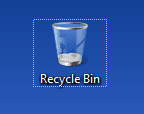
rectangle_focus.png

Now, I have found a few solutions or registry hacks to completely remove this (but only for XP), and as some people may actually use it, it's not recommended to completely remove it. So the answer is actually quite simple:
Restart the PC. On the next boot the Focus Rectangle will be gone and will not appear until you change the desktop background or the theme again.

no-rectangle.png

Perhaps a simple Log Off can do the trick as well, I haven't tested, but I think it should work as well.

Yet, if you really want to risk it and try to remove it, you can use the Universal Focus Rectangle Remover I found on the Neowin Forums. Use administrator priviledges when running whatever is in the ZIP file (I do not wish to test this).

Installation:
1. Unpack the downloaded archive
2. Use x86 setup for 32bit systems; for 64bit systems, you need to use both files included in the archive.
3. Log off or restart the PC.

This fix works for both Windows 7 and Vista!

EDITED to add new link, courtesy of Bongo :)
 
Last edited:

My Computer

Computer type
Laptop
Computer Manufacturer/Model Number
Custom
OS
Windows 7 Home Premium x64
CPU
Intel Core i5 2500K
Motherboard
MSI MS-7750
Memory
8GB DDR3
Graphics Card(s)
nVidia GeForce GTX650 Ti BOOST
Sound Card
Realtek
Monitor(s) Displays
21' Philips
Screen Resolution
Full HD
Hard Drives
1TB
PSU
500W
Just a quick note to say that logging off and back on works also.
 

My Computer

Computer Manufacturer/Model Number
Toshiba Satellite A135S4487
OS
Windows 7 Ultimate (32-bit)
CPU
Intel Mobile Core 2 Duo T5500 @ 1.66 GHz
Motherboard
Intel i945GM Chipset
Memory
2.0GB Dual Channel DDR2 @ 266 MHz 4-4-4-12
Graphics Card(s)
Mobile Intel 945 Express Chipset Family
Sound Card
Realtek High Definition Audio
Monitor(s) Displays
Generic PnP Monitor, Samsung 46" LCD
Screen Resolution
1280 x 800, 1920 x 1080
Hard Drives
100GB Hitachi ATA Device (IDE)
120GB Western Digital USB
250GB External USB
Keyboard
Microsoft Wireless Comfort Keyboard 5000
Mouse
Microsoft Wireless Mouse 5000
Internet Speed
DSL
Great. Thanks for that.
I tested the UFRR from the link and it works. The ugly rectangle is gone, but of course, the feature itself is still there.
Untitled.jpg
 

My Computer

Computer type
Laptop
Computer Manufacturer/Model Number
Custom
OS
Windows 7 Home Premium x64
CPU
Intel Core i5 2500K
Motherboard
MSI MS-7750
Memory
8GB DDR3
Graphics Card(s)
nVidia GeForce GTX650 Ti BOOST
Sound Card
Realtek
Monitor(s) Displays
21' Philips
Screen Resolution
Full HD
Hard Drives
1TB
PSU
500W
What about x64?
 

My Computer

Computer Manufacturer/Model Number
HP dv7t 1000 CTO
OS
Windows 7 Ultimate 7600 RTM - Windows Server 2008 R2 7600 RTM Dual Boot
CPU
Intel Core Duo
Memory
4 gigs
Graphics Card(s)
NVIDIA 9600 GT
Sound Card
IDT HD Audio
Monitor(s) Displays
Generic 1680x1050
Screen Resolution
1680x1050
Hard Drives
TOSHIBA MK2552GSX ATA Device 320 gigs
Mouse
Synaptics Port Device PS/2
I signed up just to say thank you. That really helped me a lot, those dots drove me insane!
 

My Computer

OS
Win7 Ultimate x86
Oh my, well thank you. You should stick around, though, as there is much more help offered here.

This little app supports x64 as well... I think.
 

My Computer

Computer type
Laptop
Computer Manufacturer/Model Number
Custom
OS
Windows 7 Home Premium x64
CPU
Intel Core i5 2500K
Motherboard
MSI MS-7750
Memory
8GB DDR3
Graphics Card(s)
nVidia GeForce GTX650 Ti BOOST
Sound Card
Realtek
Monitor(s) Displays
21' Philips
Screen Resolution
Full HD
Hard Drives
1TB
PSU
500W
With the installation of IE9b, this fix does not seem to work anymore, unfortunately. I will try and find another solution for IE9 users, and post back any feedback.

Edit: Let me restate that the focus rectangle won't work in IE, but reinstalling it should work for Windows itself.

Edit2: Yes, it does :P
 
Last edited:

My Computer

Computer type
Laptop
Computer Manufacturer/Model Number
Custom
OS
Windows 7 Home Premium x64
CPU
Intel Core i5 2500K
Motherboard
MSI MS-7750
Memory
8GB DDR3
Graphics Card(s)
nVidia GeForce GTX650 Ti BOOST
Sound Card
Realtek
Monitor(s) Displays
21' Philips
Screen Resolution
Full HD
Hard Drives
1TB
PSU
500W
The link is broken to the Universal Focus Rectangle Remover so I will post it here in a zip folder.
 

Attachments

My Computer

Computer type
Laptop
Computer Manufacturer/Model Number
Sager NP9170
OS
Win 7 Pro x64 / Win 10 Pro
CPU
Intel(R) Core(TM) i7-3630QM CPU @ 2.40GHz
Motherboard
CLEVO P170EM
Memory
12 GB
Graphics Card(s)
(1) Intel(R) HD Graphics 4000 (2) NVIDIA GeForce GTX 675M
Sound Card
(1) Realtek High Definition Audio (2) Intel(R) Display Aud
Monitor(s) Displays
17.3
Screen Resolution
1920x1080
Hard Drives
(1) Samsung 860 EVO 500GB(OS) (1) Samsung 860 EVO 500GB(Data)
Keyboard
Backlite
Antivirus
MSE, Malwarebytes Pro
Browser
Firefox
Other Info
DESKTOP: Custom-built.
OS: Win 10 Pro x64.
CASE: Rosewill R5.
CPU: Intel I5 4670K CPU @ 3.40GHz.
CPU COOLER: Cool Master Hyper 212 EVO.
MOTHERBOARD: Asus Z87-A.
MEMORY: Kingston HyperX 2x4 GB.
GPU: Nvidia Geforce 650 TI.
PSU: Corsair TX750.
DRIVES: (1) Samsung 840 120 GB SSD (2) Western Digital blue 500 GB 7200 RPM.
The link is broken to the Universal Focus Rectangle Remover so I will post it here in a zip folder.

Bongo - I just wanted to thank you for taking the time to realize the broken link, and being kind enough to post an alternative download method for those like myself. I have searched exhaustively all over the net and have come up with either broken links, or straight up b.s. links redirecting me somewhere else. Please keep it posted for others, for future reference. Thanks again...ROCK!!! ~johnny~ :party:
 

My Computer

Computer type
PC/Desktop
Computer Manufacturer/Model Number
ASUSTeK Computer Inc.
OS
Windows 7 Ultimate x64
CPU
AMD Phenom II X4 965 Black Edition
Motherboard
AMD M4N82 Deluxe
Memory
Nvidia DDR3 Dual 4096 MBytes
Graphics Card(s)
Nvidia GeForce GT430
Hard Drives
WD Caviar®Blue™ 500 GB
Antivirus
Norton 360
Browser
Microsoft IE 10
Universal Rectangle Remover...Why?

I am curious as to why this has recently become such a common issue with people all over the world. For example, I have had Windows 7 and been running it fine without ever running into the "Rectangle Box" Problem. Seriously, it has only been within the last several months, a year tops, that it has been an issue for me at least. Obviously it has something to do with Windows itself, and one possibility I was thinking may be from a recent Win Update. This of course being said admitting that I am no IT Tech. and could be way off base. But, it seems at least a logical question. In addition, I was thinking it may have something to do with the Win Cleaning Programs. For example, I use Ccleaner...possibly whatever it is cleaning could be ****ing with the registry too. Finally, I haven't pinned the exact cause as of yet, but what I have mentioned above are the only things that I can think of considering the only changes I have made personally, or new software I have used (Ccleaner) as mentioned above. Any thoughts on this topic as far as possible cause? If so, please respond because it has been seriously irritating the **** out of me to find out the cause. thanks in advance... ;)
 

My Computer

Computer type
PC/Desktop
Computer Manufacturer/Model Number
ASUSTeK Computer Inc.
OS
Windows 7 Ultimate x64
CPU
AMD Phenom II X4 965 Black Edition
Motherboard
AMD M4N82 Deluxe
Memory
Nvidia DDR3 Dual 4096 MBytes
Graphics Card(s)
Nvidia GeForce GT430
Hard Drives
WD Caviar®Blue™ 500 GB
Antivirus
Norton 360
Browser
Microsoft IE 10
The link is broken to the Universal Focus Rectangle Remover so I will post it here in a zip folder.

Bongo - I just wanted to thank you for taking the time to realize the broken link, and being kind enough to post an alternative download method for those like myself. I have searched exhaustively all over the net and have come up with either broken links, or straight up b.s. links redirecting me somewhere else. Please keep it posted for others, for future reference. Thanks again...ROCK!!! ~johnny~ :party:

I am curious as to why this has recently become such a common issue with people all over the world. For example, I have had Windows 7 and been running it fine without ever running into the "Rectangle Box" Problem. Seriously, it has only been within the last several months, a year tops, that it has been an issue for me at least. Obviously it has something to do with Windows itself, and one possibility I was thinking may be from a recent Win Update. This of course being said admitting that I am no IT Tech. and could be way off base. But, it seems at least a logical question. In addition, I was thinking it may have something to do with the Win Cleaning Programs. For example, I use Ccleaner...possibly whatever it is cleaning could be ****ing with the registry too. Finally, I haven't pinned the exact cause as of yet, but what I have mentioned above are the only things that I can think of considering the only changes I have made personally, or new software I have used (Ccleaner) as mentioned above. Any thoughts on this topic as far as possible cause? If so, please respond because it has been seriously irritating the **** out of me to find out the cause. thanks in advance... ;)

You're welcome

This issue has be around for a long time it's not new.

Jerry
 

My Computer

Computer type
Laptop
Computer Manufacturer/Model Number
Sager NP9170
OS
Win 7 Pro x64 / Win 10 Pro
CPU
Intel(R) Core(TM) i7-3630QM CPU @ 2.40GHz
Motherboard
CLEVO P170EM
Memory
12 GB
Graphics Card(s)
(1) Intel(R) HD Graphics 4000 (2) NVIDIA GeForce GTX 675M
Sound Card
(1) Realtek High Definition Audio (2) Intel(R) Display Aud
Monitor(s) Displays
17.3
Screen Resolution
1920x1080
Hard Drives
(1) Samsung 860 EVO 500GB(OS) (1) Samsung 860 EVO 500GB(Data)
Keyboard
Backlite
Antivirus
MSE, Malwarebytes Pro
Browser
Firefox
Other Info
DESKTOP: Custom-built.
OS: Win 10 Pro x64.
CASE: Rosewill R5.
CPU: Intel I5 4670K CPU @ 3.40GHz.
CPU COOLER: Cool Master Hyper 212 EVO.
MOTHERBOARD: Asus Z87-A.
MEMORY: Kingston HyperX 2x4 GB.
GPU: Nvidia Geforce 650 TI.
PSU: Corsair TX750.
DRIVES: (1) Samsung 840 120 GB SSD (2) Western Digital blue 500 GB 7200 RPM.
Greetings all. I decided to register because of how super easy and simple of a fix I found to this problem. No download needed, or logging on and off. Just go to your desktop and simply press alt+escape. That should remove the dotted outline caused by using keyboard navigation. I hope this helps anyone else out there searching for a fix to this problem. Cheers everyone!
 
Last edited:

My Computer

Computer type
PC/Desktop
OS
Windows 7 Home Premium 64 bit
The link is broken to the Universal Focus Rectangle Remover so I will post it here in a zip folder.

Thanks for posting this link, I have lost my backup of the archive in the meantime and like many others, just couldn't find it online :D
 

My Computer

Computer type
Laptop
Computer Manufacturer/Model Number
Custom
OS
Windows 7 Home Premium x64
CPU
Intel Core i5 2500K
Motherboard
MSI MS-7750
Memory
8GB DDR3
Graphics Card(s)
nVidia GeForce GTX650 Ti BOOST
Sound Card
Realtek
Monitor(s) Displays
21' Philips
Screen Resolution
Full HD
Hard Drives
1TB
PSU
500W
The link is broken to the Universal Focus Rectangle Remover so I will post it here in a zip folder.

Thanks for posting this link, I have lost my backup of the archive in the meantime and like many others, just couldn't find it online :D

You're welcome
 

My Computer

Computer type
Laptop
Computer Manufacturer/Model Number
Sager NP9170
OS
Win 7 Pro x64 / Win 10 Pro
CPU
Intel(R) Core(TM) i7-3630QM CPU @ 2.40GHz
Motherboard
CLEVO P170EM
Memory
12 GB
Graphics Card(s)
(1) Intel(R) HD Graphics 4000 (2) NVIDIA GeForce GTX 675M
Sound Card
(1) Realtek High Definition Audio (2) Intel(R) Display Aud
Monitor(s) Displays
17.3
Screen Resolution
1920x1080
Hard Drives
(1) Samsung 860 EVO 500GB(OS) (1) Samsung 860 EVO 500GB(Data)
Keyboard
Backlite
Antivirus
MSE, Malwarebytes Pro
Browser
Firefox
Other Info
DESKTOP: Custom-built.
OS: Win 10 Pro x64.
CASE: Rosewill R5.
CPU: Intel I5 4670K CPU @ 3.40GHz.
CPU COOLER: Cool Master Hyper 212 EVO.
MOTHERBOARD: Asus Z87-A.
MEMORY: Kingston HyperX 2x4 GB.
GPU: Nvidia Geforce 650 TI.
PSU: Corsair TX750.
DRIVES: (1) Samsung 840 120 GB SSD (2) Western Digital blue 500 GB 7200 RPM.
I know this is on old post but I have searched everywhere for a fix for this and all the solutions didn't work except for this! I have never had this issue except for the past month or two and it was VERY annoying. I could get it gone by restarting but would come back the second I used any keyboard buttons, using just the mouse on a fresh restart would make it go away. I don't know why using Windows 7 for years and now Windows 8 I have just ran into this issue but now I finally found a fix. Thank you so much!
 

My Computer

Computer type
PC/Desktop
OS
Windows 8 64-bit
Ditto on the old post. Just wanted to let folks know this does not work with Windows 8.1.
 

My Computer

Computer type
PC/Desktop
Computer Manufacturer/Model Number
Lenovo IdeaCenter 450
OS
Windows 10 Pro X64
CPU
Intel Quad Core i7-4770 @ 3.4Ghz
Memory
16.0GB PC3-12800 DDR3 SDRAM 1600 MHz
Graphics Card(s)
Intel Integrated HD Graphics
Sound Card
Realtek HD Audio
Monitor(s) Displays
HP 22" LCD
Screen Resolution
1680 x 1050
Hard Drives
250GB Samsung EVO SATA-3 SSD
2TB Seagate ST2000DM001 SATA-2
1.5TB Seagate ST3150041AS SATA
Keyboard
Dell USB
Mouse
Lenovo USB
Internet Speed
Cable via Road Runner 3MB Upload, 30MB Download
Antivirus
Windows Defender, MBAM Pro, MBAE
Browser
Seamonkey
Other Info
UEFI/GPT
PLDS DVD-RW DH16AERSH
I have 8.1 Pro X64 and it doesn't work for me.
 

My Computer

Computer type
PC/Desktop
Computer Manufacturer/Model Number
Lenovo IdeaCenter 450
OS
Windows 10 Pro X64
CPU
Intel Quad Core i7-4770 @ 3.4Ghz
Memory
16.0GB PC3-12800 DDR3 SDRAM 1600 MHz
Graphics Card(s)
Intel Integrated HD Graphics
Sound Card
Realtek HD Audio
Monitor(s) Displays
HP 22" LCD
Screen Resolution
1680 x 1050
Hard Drives
250GB Samsung EVO SATA-3 SSD
2TB Seagate ST2000DM001 SATA-2
1.5TB Seagate ST3150041AS SATA
Keyboard
Dell USB
Mouse
Lenovo USB
Internet Speed
Cable via Road Runner 3MB Upload, 30MB Download
Antivirus
Windows Defender, MBAM Pro, MBAE
Browser
Seamonkey
Other Info
UEFI/GPT
PLDS DVD-RW DH16AERSH
This no longer works .. something changed in the last few weeks. Even when I reapply the Remove Focus, or regsrv32 the DLL .. it does not work.
 

My Computer

Computer Manufacturer/Model Number
Asus V2-M3M8200 Barebones
OS
Windows 7 Professional x64
CPU
AMD Phenom II X4 925
Motherboard
V2-M3M8200 (basically a M3N78-VM)
Memory
4x1024mb Kingston HyperX DDR2-1066 KHX8500D2/1G
Graphics Card(s)
Asus GTS 450 OC
Sound Card
Creative Sound Blaster X-Fi Titanium PCIe
Monitor(s) Displays
Asus 24" LCD VH242H
Screen Resolution
1920x1080
Hard Drives
WDC WD5000AAKS
WDC WD5002ABYS
Seagate ST325062 USB-to-IDE
Fujitsu 160GB Pocket USB HDD
PSU
Antec Earthwatts EA-430D
Case
Asus V2-M3M8200
Cooling
120mm side fan & 80mm front & 92mm rear fan
Keyboard
Dell USB mini Multimedia
Mouse
Logitech MX518
Internet Speed
Comcast Xfinity
Other Info
Logitech Webcam Pro 9000
Accurian 40-1462 Speakers
little dot MKII Headphone Amp
So anybody found any new solution that will work on 8.1 with update 1?
 

My Computer

OS
Windows 7
Back
Top